

What Your Bluetooth Devices Reveal: A Technical Deep Dive
Bluetooth is a ubiquitous protocol powering everything from headphones and fitness trackers to smart home appliances. While its convenience is undeniable, recent research and high-profile incidents confirm that these wireless devices can inadvertently leak sensitive information—sometimes even when idle or in standby. This article dissects what data Bluetooth-enabled products reveal, how attackers exploit such leaks, and actionable strategies for developers and security engineers to detect, monitor, and harden Bluetooth infrastructure.

Before diving into technical details, it is important to note that these vulnerabilities are not abstract. In 2026, hundreds of millions of earbuds, headphones, and speakers were found vulnerable to attacks exploiting Google’s Fast Pair protocol, resulting in the potential for device hijacking and unauthorized audio access.
Bluetooth Data Exposure: What Gets Leaked and How
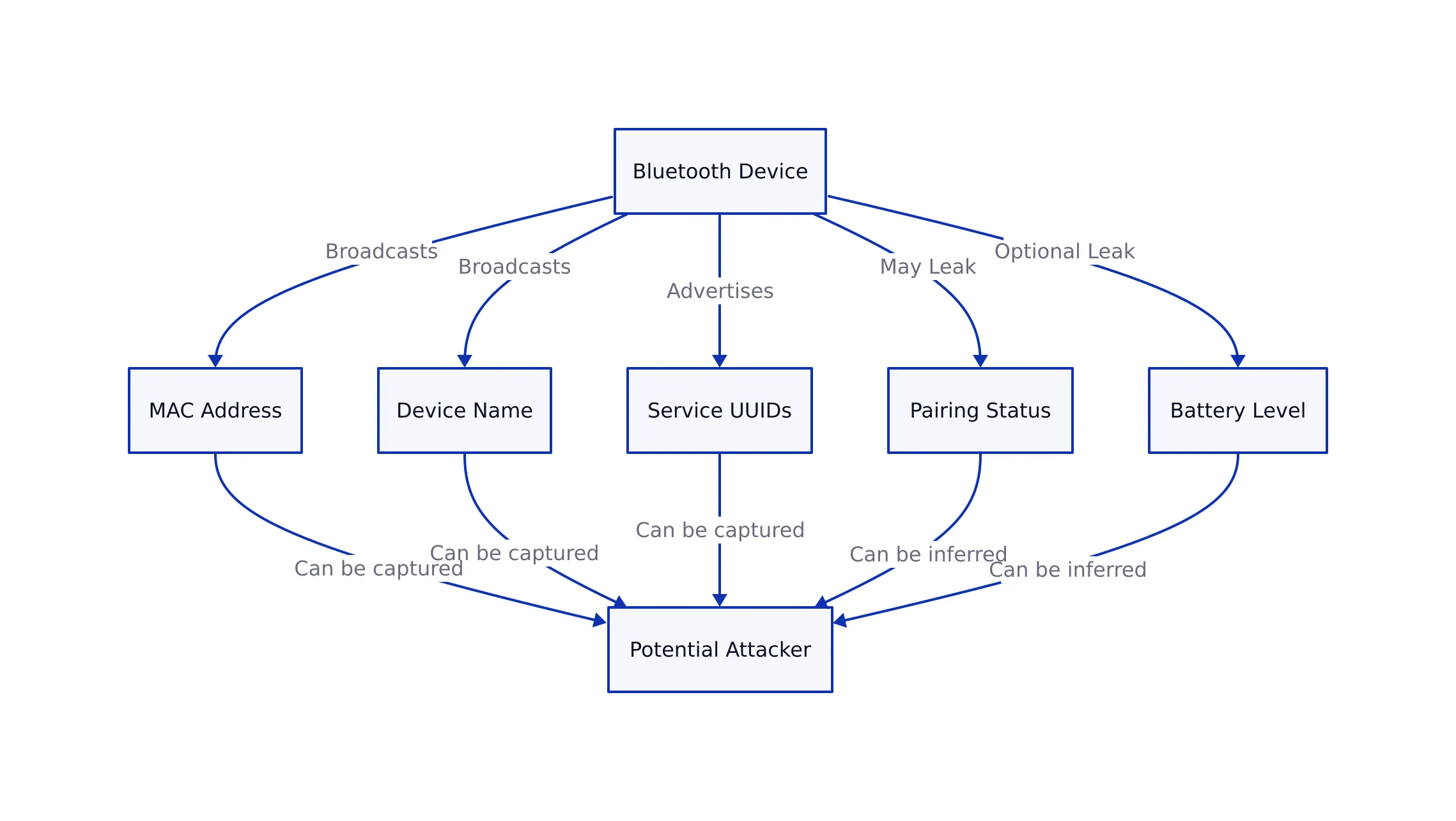
Wireless devices using the Bluetooth standard, by design, broadcast information to enable pairing and discoverability. However, even outside of active pairing windows, these products may leak data such as:
- Device name and type (e.g., “JBL Speaker” or “Samsung Smart Watch”)
- MAC address—a unique, persistent hardware identifier
- Supported services and profiles (e.g., audio, health, location)
- Signal strength (RSSI)—can be used to geolocate devices
- Firmware version and vendor info (sometimes exposed in advertising packets)
This information allows for not only targeted attacks, but also mass device fingerprinting and tracking. For instance, attackers can passively scan for MAC addresses in public spaces, correlating them with known device types and even tracking individual users over time.
 One cloud drive your whole global team can actually access. Sesame Disk by NiHao Cloud From $4/mo — unlimited on-demand storage, no VPN required, even in China.
Recent studies, such as the U.K. government-commissioned research on Bluetooth-enabled sex toys, found that attackers could hijack devices, extract sensitive data, and even control their behavior remotely.

Even seemingly benign gadgets can leak more than expected. For example, a well-known fitness watch brand was reported in 2025 to expose sensitive user data over Bluetooth, including health metrics and device identifiers, due to inadequate authentication and encryption.
Attack Vectors and Real-World Exploits
Wireless protocol attacks typically fall into several categories, as demonstrated by recent incidents:
- Eavesdropping and Sniffing: Attackers use tools to capture Bluetooth packets, revealing unencrypted data (such as audio streams or device info). The Fast Pair flaw affecting 17 Google audio devices allowed hackers to eavesdrop on connections.
- Device Hijacking: Vulnerabilities in protocols like WhisperPair enable attackers to forcibly pair and control devices, sometimes without user consent, as seen in recent earbud hijacks (source).
- Tracking and Profiling: Persistent MAC addresses and device broadcasts enable long-term tracking of users across different locations. This is especially problematic for fitness trackers and wearables.
- Malicious Firmware or Data Injection: Some products accept data or firmware updates over Bluetooth with inadequate authentication, opening the door to code injection or full device compromise.
Code Example: Passive Bluetooth Scanning on Linux
Security researchers and attackers alike use tools to scan for Bluetooth-enabled devices. The following hcitool and btmon command sequence (Linux) shows how an attacker or pen tester might enumerate devices in range:
 Tired of "file too large" and broken links when sending to the world and to China? Sesame Disk by NiHao Cloud Upload once, share anywhere — China, USA, Europe, APAC. Pay only for what you use.
# Enable Bluetooth interface
sudo hciconfig hci0 up
# Start scanning for Bluetooth devices
sudo hcitool -i hci0 scan
# Monitor Bluetooth packets in real time
sudo btmon
Note: Always use such tools in authorized, legal contexts, such as penetration testing with client consent. Consult the official documentation for advanced options.

Detection, Monitoring, and Hardening Strategies
Effective defense for wireless-enabled devices requires a blend of prevention, detection, and monitoring. Drawing from recent incidents and OWASP Mobile Security guidelines, recommended strategies include:
- Enforce Pairing Authentication: Require user approval and strong authentication (e.g., numeric comparison or passkey) for all pairing attempts.
- Rotate or Randomize MAC Addresses: Where possible, enable MAC address randomization to prevent long-term tracking. Some modern devices implement this by default, but many legacy products do not.
- Disable Discoverable Mode by Default: Devices should not be discoverable unless explicitly requested by the user.
- Encrypt All Sensitive Data in Transit: Leverage authenticated encryption for all Bluetooth communication. As we discussed in our guide to cryptography for developers, weak or missing encryption is a common failure mode.
- Monitor for Unexpected Pairing or Connection Attempts: Implement logging for all pairing requests and alert users to suspicious activity.
- Apply Firmware Updates Promptly: Many vulnerabilities (such as the Fast Pair flaw) are patched via firmware updates—delaying these increases risk.
- Conduct Regular Penetration Testing: Use tools and techniques outlined above to audit your wireless stack and device configuration.
For regulated environments or critical infrastructure, map these controls to frameworks such as NIST and OWASP, as we covered in our analysis of secure file sharing in regulated industries.
Comparison Table: Recent Bluetooth Vulnerabilities and Impact
| Vulnerability/Incident | Affected Devices/Protocols | Exposure/Impact | Source |
|---|---|---|---|
| Google Fast Pair Flaw (2026) | 17 Google audio devices, Fast Pair protocol | Eavesdropping, device hijacking | Yahoo Tech |
| WhisperPair Vulnerabilities | Bluetooth earbuds, audio products | Device takeover, audio interception | MSN Tech |
| Fitness Watch Data Leak (2025) | Well-known fitness watch brand | User data exposure, location tracking | Yahoo Cybersecurity |
| Bluetooth-Enabled Sex Toy Hijack | Various Bluetooth-enabled sex toys | Remote control, sensitive data leak | Yahoo News |
Actionable Security Checklist
- Audit all device broadcasts for excessive information (device name, vendor, version).
- Disable discoverable mode except when explicitly needed for pairing.
- Implement MAC address randomization where feasible.
- Encrypt all Bluetooth communications using strong, up-to-date algorithms.
- Promptly apply firmware and software updates from vendors.
- Monitor logs for repeated or suspicious pairing/connection attempts.
- Conduct penetration testing using tools like
hcitoolandbtmon. - Educate users on risks of using wireless technology in public and on untrusted networks.
Key Takeaways
Key Takeaways:
- Bluetooth devices routinely broadcast information that can be exploited for tracking, profiling, and direct attack.
- Recent vulnerabilities in protocols like Fast Pair and WhisperPair have exposed millions of devices to eavesdropping and hijacking.
- Effective hardening combines strong authentication, encryption, non-discoverability, and vigilant monitoring.
- Device manufacturers and developers must move beyond default settings to comply with modern security frameworks (OWASP, NIST).
- Regular auditing and updates are essential—delayed patching leaves devices open to known exploits.
For organizations deploying Bluetooth-enabled hardware, the lessons mirror those we surfaced in our firmware security coverage: every “smart” device is a potential leak and attack surface. The more connected, the more vigilant your monitoring and hardening must be.
For further reading on cryptographic best practices and secure protocol implementation, see our essential security guide for developers.