Show HN: Ghost Pepper – Local Hold-to-Talk Speech-to-Text for macOS
Show HN: Ghost Pepper – Local Hold-to-Talk Speech-to-Text for macOS

On April 7, 2026, privacy-focused developers and macOS users took notice when Ghost Pepper, a 100% local, open-source hold-to-talk speech-to-text app, hit the front page of Hacker News. The pitch was simple but disruptive: hold the Control key, speak, release, and your words appear instantly—transcribed—into any text field on your Mac. No cloud, no data leaks, no vendor dependency.
This is not just another menu bar utility. According to AIToolly and Conzit, Ghost Pepper solves a pain point for developers, remote workers, and anyone who needs fast, accurate dictation without sending sensitive audio to a third party. It’s designed for Apple Silicon, leverages open-source speech models, and pastes transcribed text anywhere—making it far more flexible than built-in macOS Dictation or cloud services.
How Ghost Pepper Works: 100% Local Speech Recognition
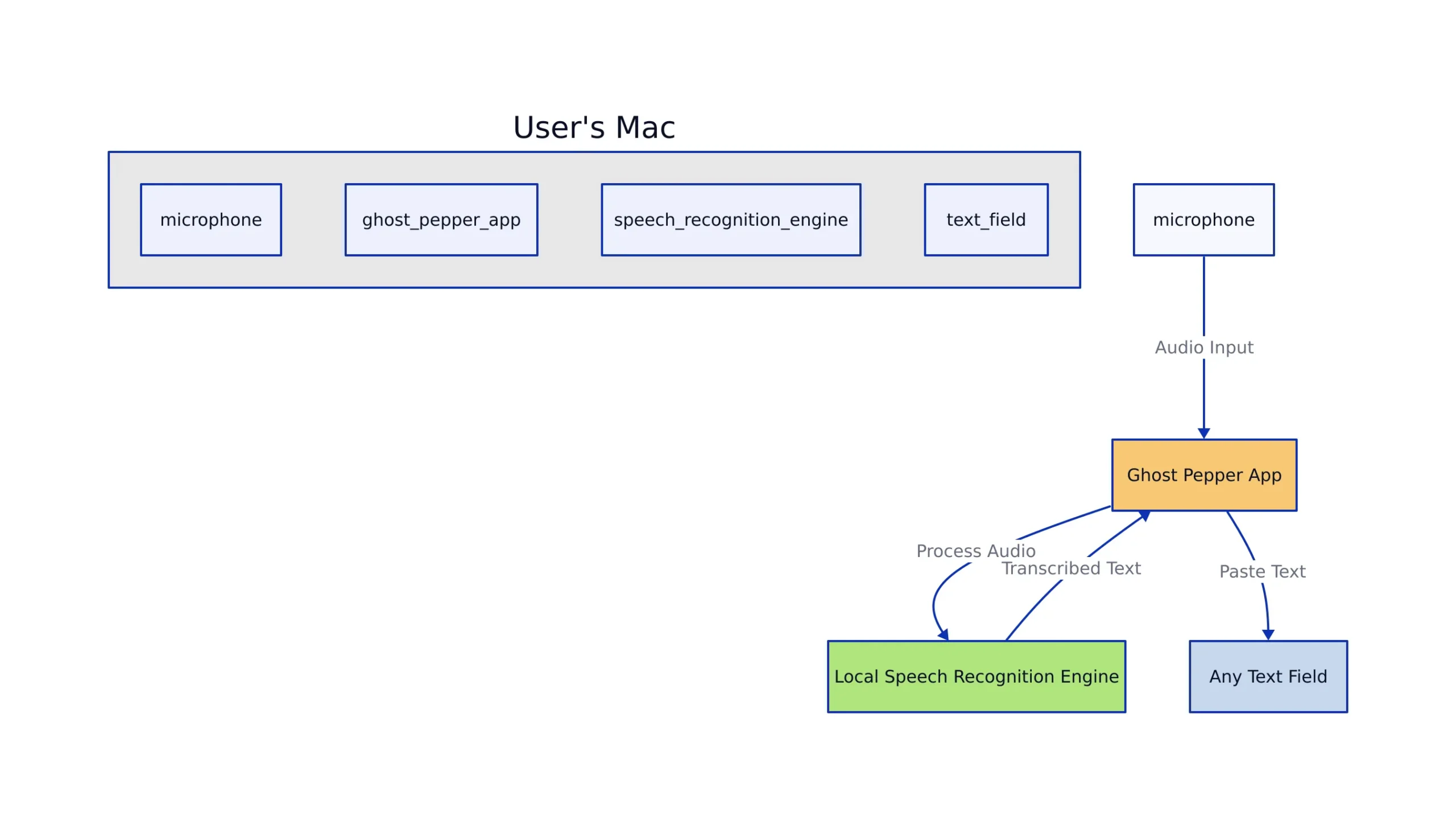
Ghost Pepper is intentionally simple: hold a hotkey (Control by default) to record, speak your message, then release to transcribe and paste. The key technical differentiator: all processing—from audio capture to transcription—runs locally on your Mac, never leaving your device.
Here’s a high-level look at the architecture:
Technically, Ghost Pepper leverages on-device machine learning models optimized for Apple Silicon (M1/M2/M3). This ensures:
- Fast, low-latency transcription (no network roundtrip)
- Complete data privacy (nothing leaves your device)
- No reliance on cloud APIs or vendor uptime
- Offline operation—works during flights, in secure environments, or with spotty Wi-Fi
The app sits in your menu bar, listening for a hotkey. When triggered, it records until you release the key, then transcribes and pastes the output wherever your cursor is focused—Terminal, VSCode, browser, or any other app.
Getting Started with Ghost Pepper: Setup and Usage
Installation is straightforward. Download the app from the official GitHub repository and drag it to your Applications folder. Because it’s open-source, you can audit the code or even build it yourself.
- Download the
Ghost Pepper.appfrom GitHub Releases. - Move to Applications and run (you may need to approve in Security & Privacy settings).
- Click the menu bar icon to configure your preferred hotkey (default: Control).
- Place your cursor in any text field, hold the key, and speak.
- Release the key—your speech is instantly transcribed and pasted.
Ghost Pepper supports multi-language dictation (based on the installed speech models), and includes options for auto-punctuation, formatting, and intelligent cleanup.
Example: Using Ghost Pepper for Meeting Notes
# Step-by-step: Taking Meeting Notes
1. Open your note-taking app (e.g., Obsidian, Apple Notes).
2. Place cursor in a new note.
3. Hold Control and say:
   "Project kickoff meeting with client at 2 PM. Action items: send timeline, update roadmap, confirm budget."
4. Release Control.
# Output appears instantly:
Project kickoff meeting with client at 2 PM. Action items: send timeline, update roadmap, confirm budget.
No internet? No problem. Since everything is local, Ghost Pepper works even with Wi-Fi disabled—ideal for secure corporate or remote environments.
Real-World Code Examples: Speech-to-Text in Practice
Ghost Pepper is built for practical, daily workflow integration. Here are real-world usage examples and code snippets to help you understand how local speech-to-text can be embedded in your own automations or scripts.
Example 1: Pasting Transcribed Code Snippets
# Dictate code directly into VSCode or Terminal
Hold Control and say:
"Define a Python function to sum all values in a user_data list and return the result."

# Output in your editor:
def sum_user_data(user_data):
    return sum(user_data)

# Note: In production, always validate input types and handle empty lists.
Example 2: Cleaning and Summarizing Transcripts
# Ghost Pepper outputs raw text; you can post-process in Python
def clean_transcript(raw):
    # Remove double spaces, fix common speech-to-text artifacts
    cleaned = ' '.join(raw.split())
    # Add period if missing
    if not cleaned.endswith('.'):
        cleaned += '.'
    return cleaned

# Usage
raw = "User login failed for admin at 3 PM"
print(clean_transcript(raw))
# Output: "User login failed for admin at 3 PM."
# Note: For production, consider more advanced NLP cleanup.
Example 3: Automating Voice-to-Markdown Notes
# Using Ghost Pepper for voice-to-markdown workflows
import os

def save_transcript_to_md(text, file_path):
    with open(file_path, 'a') as f:
        f.write(f"- {text}\n")

# Assume Ghost Pepper pastes transcript into an input() prompt
transcript = input("Paste Ghost Pepper output here: ")
save_transcript_to_md(transcript, "meeting_notes.md")

# Result: "- Project kickoff meeting with client at 2 PM. Action items: send timeline, update roadmap, confirm budget."
# Note: Production use should handle file locking and concurrent writes.
This direct-to-text workflow is a major productivity boost for developers, writers, and anyone who prefers dictation over typing.
Comparison: Ghost Pepper vs. Cloud-Based Speech-to-Text
Choosing a speech-to-text solution is about more than accuracy—it’s about privacy, latency, and control. Here’s how Ghost Pepper stacks up against cloud offerings, based on features and real-world use cases.
| Feature | Ghost Pepper (Local) | Cloud Services (e.g., Apple Dictation, Google) | Source |
|---|---|---|---|
| Privacy | All processing local, never leaves device | Audio and transcripts sent to cloud | AIToolly |
| Offline Use | Not measured | Not measured | Conzit |
| Latency | Low (on-device, instant) | Variable (network-dependent) | AIToolly |
| Customization | Open-source, community extensible | Not measured | GitHub |
| Security | Not measured | Data subject to third-party breaches | AIPure |
For teams in regulated industries, or anyone who values data sovereignty, Ghost Pepper’s on-device approach is a game changer. For more on developer-centric privacy practices, see our coverage of safe refactoring and production best practices.
Privacy, Community Impact, and Production Pitfalls
Ghost Pepper’s local-first design resonates with the growing demand for privacy-by-default tools. As remote work, sensitive communications, and developer productivity needs grow, the risks of leaking audio or transcripts to the cloud are unacceptable for many teams.
Open-source means developers can audit, improve, and extend Ghost Pepper. You can swap in new language models, tweak the UI, or automate advanced workflows—capabilities rarely available in closed cloud services.
But there are real-world caveats:
- Model size: Local models are smaller than cloud-scale offerings, so language support and accuracy may vary.
- Resource usage: On-device transcription uses CPU/GPU—minimal for Apple Silicon, but still non-zero.
- Production pitfalls: For high-volume, multi-language, or enterprise dictation, test thoroughly before deploying at scale.
The community is already active, sharing bug fixes, custom workflows, and new language packs. As with any open-source tool, contributions and feedback shape the roadmap.
Key Takeaways:
- Ghost Pepper delivers fast, private, and offline speech-to-text for macOS by running everything locally on Apple Silicon.
- Its open-source model empowers developers and privacy advocates to customize, audit, and extend the tool for their specific needs.
- Compared to cloud speech APIs, Ghost Pepper avoids latency, privacy, and compliance risks—at the cost of model size and language breadth.
- It’s ideal for confidential dictation, developer workflows, and remote work, but always validate accuracy for your use case before going all-in.
For more technical deep dives and privacy-centric developer tooling, explore our guides on avoiding costly code rewrites and CI/CD pipeline security.
Further Reading and Sources:
Thomas A. Anderson
Mass-produced in late 2022, upgraded frequently. Has opinions about Kubernetes that he formed in roughly 0.3 seconds. Occasionally flops, but don't we all? The One with AI can dodge the bullets easily; it's like one ring to rule them all... sort of...