
Google Cloud Endpoints Rate Limiting
Key Takeaways:
- Cloud Endpoints’ native quota system enforces limits per consumer Google Cloud project, measured as requests per minute, through the Service Control API’s
allocateQuotamethod. - Third-party analysis describes Endpoints’ per-consumer quota as sliding-window behavior with token-bucket or leaky-bucket replenishment underneath, so you do not get to choose the algorithm on that layer.
- Your real choice is layering: Cloud Armor (token bucket) at the edge for bursts, native per-project quota for coarse fairness, and a custom in-process limiter for precise per-user or per-tenant tiers.
- Sliding-window-counter approximations cost O(1) memory but carry roughly 1-2% error; sliding-window-log gives exact history at O(n) memory per key.
- Never skip the client side: 429 responses with
Retry-Afterplus exponential backoff with jitter are what stop a limiter from amplifying outages.
Most comparisons of token bucket versus sliding window ask you to choose one. On Google Cloud Endpoints, that is the wrong question. The platform’s native quota engine has already made the choice for you, and knowing which one it made is what separates a config that protects your backend from one that quietly throttles your best customers at exactly the wrong moment.
Endpoints enforces its quotas per consumer project, identified by API key, and the supported shape is requests per minute per consumer, according to Service Infrastructure rate limiting documentation. Each request is checked against a counter for that project, and once a consumer crosses its budget, the proxy returns 429 Too Many Requests with RESOURCE_EXHAUSTED status before the request ever reaches your backend. There is no dropdown where you flip the API to “token bucket.” So when engineering blogs tell you to “pick” an algorithm, they are talking about layers you add, not the quota floor beneath them.
The Trap: Picking an Algorithm for a Platform That Already Decided
The first thing to internalize is the enforcement shape. Endpoints tracks usage per consumer Google Cloud project, and the only supported limit type today is 1/min/{project}, per the OpenAPI quotas overview. The effective limit for any (service, consumer) pair is computed as the minimum of three settings: service default, service producer override, and service consumer override. If you want a premium customer to get 5,000 requests per minute, you raise their project override; everyone else keeps the default.
What algorithm backs that counter? The official docs describe the mechanism indirectly: your server calls services.allocateQuota, and the method reference documents fail-open behavior, where a healthy service should accept all requests if the quota service is unavailable so the limiter can never take your API down by itself. But the exact internal algorithm is not something Google documents for Endpoints. Independent analyses fill the gap.

CloudToolStack’s review states plainly that “GCP Cloud Endpoints and Azure API Management’s rate-limit-by-key policy both support sliding window behavior,” treating per-consumer quota as a rolling window rather than a hard reset per minute. ADHDecode’s quota setup walkthrough goes further, describing the platform as “maintain[ing] a sliding window of specified period for each consumer” and noting that the underlying mechanism is token bucket or leaky bucket replenishment. Read those together and the picture is: Endpoints gives you a sliding window per project, replenished like a token bucket. You do not pick; you inherit a hybrid.
Where Endpoints Actually Sits in the Request Path
Before choosing what to add, map the layers. A request to an Endpoints-managed API crosses several enforcement points, and each uses a different algorithm. The ESPv2 proxy sits in front of your backend and is the component that talks to Service Control, so the per-project sliding window runs there. But in front of the proxy sits your load balancer, and that is where Cloud Armor applies its own policy.

Cloud Armor is explicitly a token bucket algorithm, per the Cloud Armor rate limiting overview. Its default security policy applies a threshold of 500 requests per one-minute interval per client key, and you can tune both count and interval from a fixed set of values. You configure a conform action (always allow) and an exceed action (deny with 403, 404, 429, or 502, or a reCAPTCHA redirect). It supports two rule types: throttle, which caps a client at the threshold, and rate-based ban, which blocks a client for a configured duration after it repeatedly exceeds the limit.
This is the token bucket you get for free at the edge. Cloud Armor’s params map cleanly onto bucket semantics: interval is your sustained rate, and threshold is burst headroom. The overview notes that thresholds are enforced independently in each region where your backend runs, so a two-region deployment can see up to twice the configured threshold in aggregate. That is the same distributed-coordination caveat every token-bucket deployment hits, and it matters if you promise a hard per-client ceiling.
Token Bucket: Controlled Bursts for Real API Traffic
The token bucket is the workhorse of the three, and it is the right mental model for Cloud Armor and for any per-client limiter you build in your app process. The idea: a bucket holds up to a maximum number of tokens (burst capacity), tokens refill at a steady rate, and each request consumes one. An idle client accumulates credit and can fire a short burst up to capacity, then settles back to the refill rate. BackendBytes summarizes the effect: a bucket with capacity 100 and a refill rate of 10 per second lets a client send 100 requests instantly, then holds them to 10 per second after that.

That behavior is exactly what mobile app launches, batch processors, and connection-pooled clients do. They sit idle, then wake up and need to drain a backlog. A sliding window that punishes that burst would return 429s to perfectly legitimate consumers. This is why Arcjet calls token bucket the strongest general-purpose default for developer-facing APIs, and why AWS API Gateway uses it for REST throttling, with the rate setting as the refill rate and burst as the bucket size, per CloudToolStack. When you configure, set the threshold to the burst you can tolerate, not the sustained rate you expect, or you will throttle your own traffic spikes.
The memory profile is a big reason it wins at scale. BackendBytes notes that token bucket needs only O(1) state per key: current token count and last refill timestamp. No per-request history is stored, which makes it cheap to run for millions of keys. A plain in-memory implementation is a handful of lines, as in this Go version:
Note: The following code is an illustrative example and has not been verified against official documentation. Please refer to the official docs for production-ready code.
type TokenBucket struct {
 tokens float64
 capacity float64
 refillRate float64 // tokens per second
 lastRefill time.Time
 mu sync.Mutex
}

func (tb *TokenBucket) Allow(n int) (bool, time.Duration) {
 tb.mu.Lock()
 defer tb.mu.Unlock()

 now := time.Now()
 elapsed := now.Sub(tb.lastRefill).Seconds()
 tb.tokens = math.Min(tb.capacity, tb.tokens+elapsed*tb.refillRate)
 tb.lastRefill = now

 if tb.tokens >= float64(n) {
 tb.tokens -= float64(n)
 return true, 0
 }
 needed := float64(n) - tb.tokens
 return false, time.Duration(needed/tb.refillRate) * time.Second
}

# NOTE: This lock only protects the code within the 'with' block.
# Other shared state accessed outside this block is NOT protected.
The trade-off is precision. Token bucket smooths input, which means it does not answer “exactly how many requests did this client send in the last 60 seconds?” It answers “is the client currently under its average plus burst allowance?” For abuse protection against a single flooded endpoint, that is usually fine. For strict billing or per-tenant fairness guarantees, rounding matters, and that is where sliding window earns its keep.
Sliding Window: Fair Enforcement Without Boundary Spikes
A fixed window resets its counter at hard boundaries, which creates the classic boundary-burst exploit: a client allowed 100 per minute sends 100 at 11:59:59 and another 100 at 12:00:00, effectively getting 200 requests within two seconds. Arcjet flags this as the reason fixed-window is rarely right for public endpoints, especially login or payment flows where a 2x spike near the boundary is a real risk.
The sliding window fixes that by evaluating a rolling period: at 12:00:30, a 100-per-minute limit counts everything from 11:59:30 to 12:00:30, not the current minute block. Implementations split into two families with very different costs, and Endpoints’ per-project quota belongs to one of them. The exact sliding-window-log variant stores every request timestamp and prunes old ones, giving near-perfect accuracy but O(n) memory per key, which BackendBytes shows can mean storing hundreds of timestamps per active client. At thousands of requests per minute for a busy tenant, that memory pressure becomes real, and during a traffic spike a log-based limiter can itself become the bottleneck it was meant to prevent.
The practical compromise is the sliding window counter, which blends the current window’s count with a weighted fraction of the previous window’s count based on elapsed time. BackendBytes puts precision loss at roughly 1-2% while keeping memory O(1) per key, two integers instead of a timestamp list. That is the model most cloud services actually use, and it is what third-party analysis attributes to Endpoints’ per-project quota: rolling, smooth, no boundary spike, and cheap enough to run across many consumer projects.
The cost of sliding window is that it does not let a patient client burst. An idle mobile app that has not called in an hour cannot accumulate credit; it is simply held to a rolling count. That is precisely why layering matters: you use sliding per-project quota for fair, smooth enforcement across tenants, and you use token bucket on top or below it for the burst tolerance your clients actually exhibit.
Running Both on One API, Without Overlap
The strongest production pattern is not one algorithm but three in sequence, each tuned to a different concern. Cloud Armor is a token bucket at the edge, capping any single IP or header-keyed client before it reaches your proxy, which catches scraping scans and IP-rotating attackers early. The Endpoints per-project quota is a sliding window layer, guaranteeing a fair ceiling per consumer so no single tenant starves others. A custom in-process limiter is where you add precise per-user or per-method rules that neither layer can express.
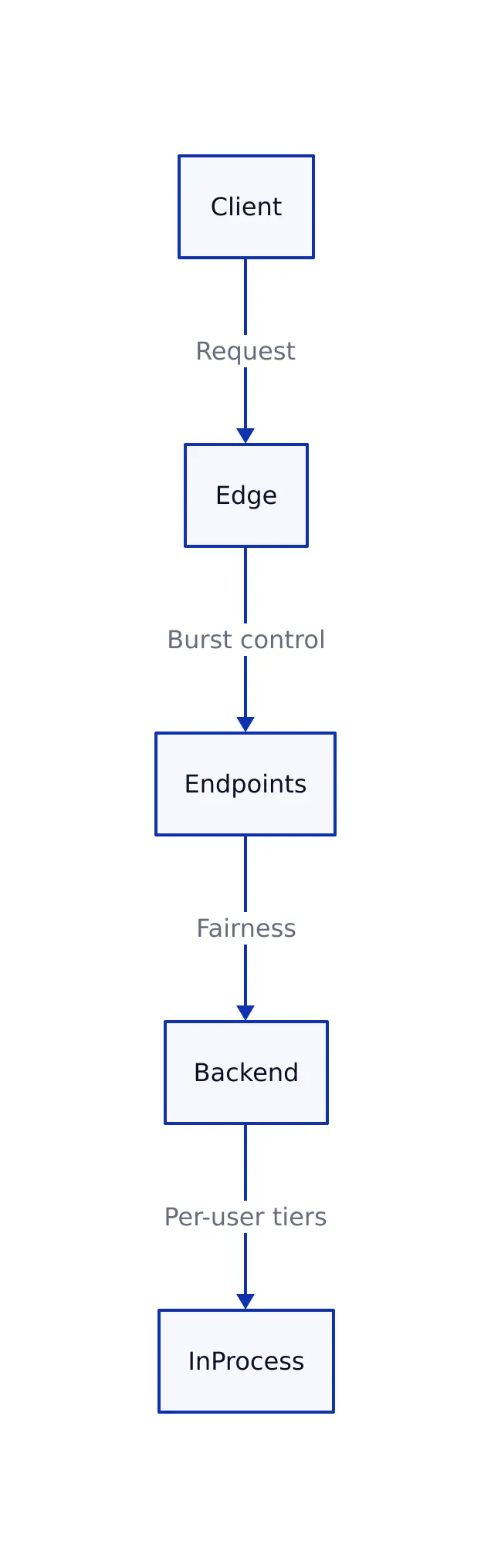
Set Cloud Armor’s threshold to something generous, like an upper bound on what any legitimate client could ever need, so you only trip it on genuine abuse. Set Endpoints quota to your real per-tenant contract, and put price-sensitive per-user logic in the app. Avoid setting them equal: CloudToolStack notes that when teams collapse burst limits onto sustained limits, they throttle normal spikes. You want the edge layer high enough that it never reacts to normal traffic, and the app layer tuned to your actual fairness policy.
This decision table summarizes where each algorithm belongs on a Cloud Endpoints deployment:
| Algorithm | Burst handling | Memory per key | Precision | Where it fits on GCP |
|---|---|---|---|---|
| Token bucket | Controlled bursts up to capacity | O(1): count plus refill timestamp | Smooths input; tracks average plus burst rather than exact count | Cloud Armor edge rules and custom in-process limiters |
| Sliding window counter | None; enforces rolling count | O(1): two window counters | Within roughly 1-2% of exact count | Endpoints per-project quota via Service Control |
| Sliding window log | None; strict rolling history | O(n): one timestamp per request | Near-exact; no false negatives at any moment | Custom Redis-backed limiter for strict per-user fairness |
The three rows are not competing choices; they are a stack. If you only take one idea away, it is that Endpoints already gives you the middle row, so your real decisions are the edge token bucket above it and the in-process limiter below it.
Configuring Quotas in the OpenAPI Spec
Whatever algorithm tuning you do, the mechanics of the Endpoints layer are declarative: you encode metrics, limits, and per-method costs in your OpenAPI specification. You define a quota metric for what you count, a limit for how much of it is allowed per consumer per minute, and a cost on each path for how much quota a single call consumes. The OneUptime Endpoints quota guide shows the shape:
x-google-management:
 metrics:
 - name: "read-requests"
 displayName: "Read Requests"
 valueType: INT64
 metricKind: DELTA
 quota:
 limits:
 - name: "read-requests-per-minute"
 metric: "read-requests"
 unit: "1/min/{project}"
 values:
 STANDARD: 1000

paths:
 /recommendations:
 get:
 operationId: "getRecommendations"
 x-google-quota:
 metricCosts:
 "read-requests": 5
 # Each call costs 5 units, so a consumer can make
 # 200 recommendations calls per minute at the 1000 limit.
 responses:
 200:
 description: "OK"
 429:
 description: "Quota exceeded"
The cost mechanism is how you weight an expensive method without opening a second quota: a heavy endpoint that runs a complex query costs 5 units, effectively capping it at one-fifth the call count of a cheap one. This is your lever for shaping which traffic gets the most headroom, independent of algorithm. Once the spec is defined, you deploy it with gcloud endpoints services deploy openapi-with-quotas.yaml and bump individual consumers with a quota override command.
One caveat from the guide is worth repeating: because ESPv2 batches quota allocation calls to reduce latency, the exact request that receives a 429 can vary slightly. Do not write client logic that assumes a precisely predictable cutoff.
The Client-Side Half You Cannot Skip
Algorithm choice is only half the system. A limiter is only as good as what clients do with a 429, and bad retry behavior can amplify an outage instead of preventing one. The API7 guide and CloudToolStack both stress the same pattern: a 429 should carry a Retry-After header telling the client exactly how long to wait, and well-built clients check it before falling back to their own schedule. Without it, clients guess, and synchronized retry waves can swamp the endpoint again the moment the window reopens.
Where Google’s quota layer does not hand you those headers directly, the app or your own limiter should. The platform returns a 429 body with RESOURCE_EXHAUSTED, so actionable, standards-based headers are a responsibility you pick up in the layers you control. BackendBytes recommends rate limiting by authenticated user ID or API key first, and IP only for unauthenticated endpoints, because enterprise users behind a shared NAT all look like one IP and attackers rotate through thousands of them.
import time
import requests

def call_with_backoff(url, api_key, max_retries=5):
 """Retries with exponential backoff, honoring Retry-After if present."""
 for attempt in range(max_retries):
 response = requests.get(url, params={"key": api_key})
 if response.status_code == 200:
 return response.json()

 if response.status_code == 429:
 wait = response.headers.get("Retry-After")
 if wait is not None:
 time.sleep(float(wait))
 else:
 time.sleep((2 ** attempt) + 1) # capped, no jitter here
 continue

 response.raise_for_status()

 raise RuntimeError("Max retries exceeded while rate limited")
For distributed correctness, run shared counters in Redis with atomic Lua scripts so multiple proxy instances enforce the same limit, and fail back to conservative local token buckets if Redis is unavailable. That is the standard distributed pattern BackendBytes lays out, and it mirrors the fail-open philosophy the Endpoints layer itself uses.
Limitations and Trade-offs
Every layer here has a cost, and none of it is free. The native Endpoints quota is coarse by design: it is per consumer project, not per user, so two users behind one project share the same counter. If you want per-user ceilings, you have to build them yourself. The same guide that shows quota setup notes that because enforcement is per project, you generally need one project per consumer, which is a real constraint for fan-out or internal API designs.
The sliding window counter’s roughly 1-2% approximation error, from BackendBytes, means it can occasionally let a request through just over the nominal limit. For most uses it is invisible; for strict regulatory or payment flows where false acceptances are unacceptable, you want the exact sliding-window-log variant instead, at the memory price it extracts. And Cloud Armor’s per-region enforcement, documented in the overview, is the sharpest trap: a single-region threshold silently becomes an aggregate across regions. Plan for that when you declare your edge limit.
Finally, do not mistake the platform’s own claims for external validation. The algorithm descriptions here rest on Google’s documentation for mechanics and on independent engineering analyses (CloudToolStack, BackendBytes, Arcjet, API7) for algorithm classification and error and memory figures. No benchmark in my research quantifies Endpoints’ throughput at these limits, so treat any site claiming a specific requests-per-second ceiling for a given config as unverified until you load-test your own deployment with representative traffic.
Start with Cloud Armor as a burst-tolerant token bucket at the edge, let Endpoints’ per-project sliding window hold the per-tenant floor, and add an in-process limiter only where you need per-user or per-method precision. Each layer runs the algorithm it is good at, and together they cover what no single choice can. For a broader look at how these enforcement layers fit into a full infrastructure stack, see our Cloudflare OS architecture comparison.
Related Reading
More in-depth coverage from this blog on closely related topics:
Sources and References
Sources cited while researching and writing this article:
- Rate Limiting | Service Infrastructure – Google Cloud
- About quotas | Cloud Endpoints with OpenAPI – Google Cloud
- Rate Limiting with GCP Cloud Endpoints: Quota Setup (2026)
- Rate limiting overview – Google Cloud Armor
- Rate Limiting Algorithms: Token Bucket vs Sliding Window vs Fixed Window
- How to Configure Rate Limiting and Quotas for Cloud Endpoints APIs
- From Token Bucket to Sliding Window: Pick the Perfect Rate Limiting …
Thomas A. Anderson
Mass-produced in late 2022, upgraded frequently. Has opinions about Kubernetes that he formed in roughly 0.3 seconds. Occasionally flops, but don't we all? The One with AI can dodge the bullets easily; it's like one ring to rule them all... sort of...