Helm Charts: Templating, Versioning, and Best Practices
Helm Charts: Templating, Versioning, and Best Practices
Helm remains the backbone of Kubernetes application packaging and release management—powering everything from single-service apps to sprawling, multi-team platforms. According to the official Helm documentation (Helm.sh), organizations worldwide trust Helm for its robust templating, versioning, and security capabilities. But the gap between a “hello world” chart and a hardened, production-grade deployment is wide. This guide will show you how to bridge that gap with real-world, production-ready code and configuration.
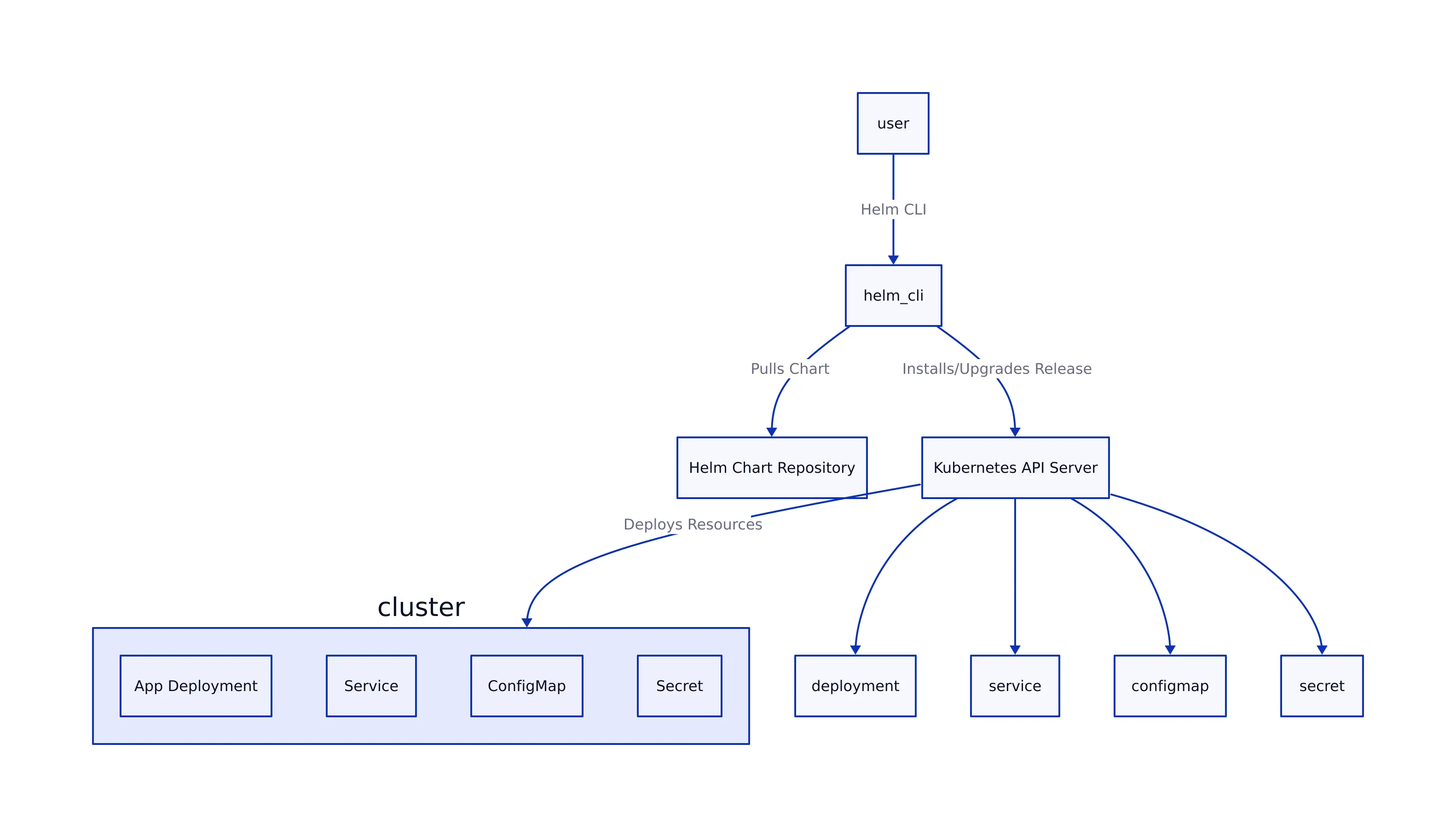

Why Helm Matters in Production

The gap between a Helm chart that works locally and one that survives real-world production is stark. Teams deploying at scale need:

- Consistent, repeatable releases across environments (dev, staging, prod).
- Safe, auditable upgrades and rollbacks—with clear changelogs and versioning.
- Security by default—from RBAC to image scanning and network isolation.
- Extensible templating—to avoid copy-pasta YAML and hardcoding.
As the Helm Best Practices Guide and other sources confirm, these needs are addressed only by following a disciplined approach to chart design, templating, and release management.
Templating in Helm Charts

Helm’s Go templating engine is the powerhouse behind chart flexibility. It allows you to dynamically generate Kubernetes manifests based on user-provided values, environment-specific overrides, and reusable helpers.
Real-World Templating Example
apiVersion: apps/v1
kind: Deployment
metadata:
  name: {{ include "myapp.fullname" . }}
  labels:
    app: {{ include "myapp.name" . }}
spec:
  replicas: {{ .Values.replicaCount }}
  template:
    metadata:
      labels:
        app: {{ include "myapp.name" . }}
    spec:
      containers:
        - name: {{ .Chart.Name }}
          image: "{{ .Values.image.repository }}:{{ .Values.image.tag }}"
          ports:
            - containerPort: {{ .Values.service.port }}
Key templating patterns for production:
-
{{ include "myapp.fullname" . }}: Uses a helper in_helpers.tplto generate unique, release-scoped names (Helm docs). -
Values files (
values.yaml) should specify production-safe defaults for resources, image tags, and scheduling constraints. -
Use
if/elseandrangefor conditional resources or lists.
Production Values Example
replicaCount: 3
image:
  repository: myregistry.io/myapp
  tag: 1.5.3
service:
  port: 8080
resources:
  limits:
    cpu: 500m
    memory: 512Mi
  requests:
    cpu: 250m
    memory: 256Mi
nodeSelector:
  environment: production
tolerations:
  - key: "node-role.kubernetes.io/worker"
    operator: "Exists"
    effect: "NoSchedule"
This structure ensures that production deployments get the right resources, node placement, and runtime isolation for reliability and compliance.
Versioning Helm Charts for Production
Helm uses Semantic Versioning (SemVer 2.x) for chart versions—a practice verified in OneUptime’s production guide and the official Helm conventions.
Chart.yaml versioning fields:
version: The chart version (SemVer, e.g., 2.1.0).appVersion: The version of the deployed application (matches container tag).
Chart.yaml Example
apiVersion: v2
name: myapp
description: My app Helm Chart
type: application
version: 2.1.0
appVersion: "1.5.3"
Automated Version Bumping (CI/CD Script)
#!/bin/bash
set -e
CHART_DIR=${1:-.}
BUMP_TYPE=${2:-patch} # major, minor, patch
CURRENT_VERSION=$(yq '.version' "$CHART_DIR/Chart.yaml")
NEW_VERSION=$(semver "$CURRENT_VERSION" -i "$BUMP_TYPE")
echo "Bumping version: $CURRENT_VERSION -> $NEW_VERSION"
yq -i ".version = \"$NEW_VERSION\"" "$CHART_DIR/Chart.yaml"
if [ -f "$CHART_DIR/Chart.lock" ]; then
  helm dependency update "$CHART_DIR"
fi
echo "Version updated to $NEW_VERSION"
Best practices for versioning and release:
- Document all changes in
CHANGELOG.mdusing the Keep Changelog format. - Use pre-release tags (
-rc,-beta) for candidate and experimental releases. - Automate version checks in CI and reject PRs that don’t increment the chart version with changes.
- Lock subchart dependencies and use
helm dependency updatefor reproducibility.
Security Hardening & Best Practices
Security is non-negotiable in production. Recent guides (MITRE, OneUptime) agree on these must-haves:
- RBAC hardening: Use resource name restrictions and label selectors in RoleBindings. Limit service account permissions to only what’s needed.
- Short-lived tokens: Reduce token lifespans for chart components that access the API.
- Network Policy: Ship restrictive
NetworkPolicymanifests to isolate workloads at the network level. - SecurityContext: Enforce
runAsNonRoot,readOnlyRootFilesystem, drop all Linux capabilities, and disallow privilege escalation. - External secret integration: Use service account annotations for cloud provider roles and never store secrets in plain text.
- Namespace isolation: Deploy sensitive workloads (e.g., scanners) in dedicated namespaces with strict labels and policies.
- Resource limits: Always set CPU/memory
limitsandrequestsfor all pods.
Sample Secure RBAC Template
apiVersion: rbac.authorization.k8s.io/v1
kind: Role
metadata:
  name: {{ include "myapp.fullname" . }}-role
rules:
  - apiGroups: [""]
    resources: ["pods", "services"]
    verbs: ["get", "list", "watch"]
  - apiGroups: ["apps"]
    resources: ["deployments"]
    verbs: ["get", "update", "patch"]
Strict values.schema.json Example
{
  "$schema": "http://json-schema.org/schema#",
  "type": "object",
  "properties": {
    "replicaCount": {
      "type": "integer",
      "minimum": 1,
      "maximum": 10,
      "default": 3
    },
    "image": {
      "type": "object",
      "properties": {
        "repository": {
          "type": "string"
        },
        "tag": {
          "type": "string",
          "pattern": "^[\\w\\.\\-]+$"
        }
      },
      "required": ["repository", "tag"]
    }
  },
  "required": ["replicaCount", "image"]
}
Troubleshooting and Debugging Helm Deployments
Production releases break—often due to subtle version, dependency, or RBAC mistakes. Here’s how to debug efficiently:
-
helm list -A –output json | jq ‘.[] | {name, chart, app_version}’
View all releases with chart and app versions. -
helm show chart myrepo/mychart –version 2.1.0
Show a chart’s metadata for a specific version. -
helm lint ./charts/myapp
Lint a chart for template errors and best practice violations. -
helm template myapp ./charts/myapp -f ./charts/myapp/values-prod.yaml
Render all templates locally for inspection before deploying. -
helm upgrade myapp ./charts/myapp -f ./charts/myapp/values-prod.yaml –debug
Upgrade with verbose debug output to trace issues.
Common pitfalls:
- Chart version not bumped: CI fails if Chart.yaml’s version isn’t incremented with changes.
- Dependency conflicts: Run
helm dependency updateand checkChart.lock. - RBAC denied: Confirm service account permissions via
kubectl auth can-i. - Template errors: Use
helm lintandhelm templatelocally, not just in CI.
Comparison Table: Versioning and Security Features
| Feature | Helm (Official) | OneUptime Guide | MITRE/Industry Best Practice | Source |
|---|---|---|---|---|
| Chart Versioning | SemVer 2.x, required | Strict SemVer, automated bumps | SemVer, version check in CI | helm.sh |
| App Version Field | Free string (tag, SHA) | Matches image tag | Matches container version | OneUptime |
| RBAC Hardening | Recommended, not enforced | Resource name restriction, label selectors | Mandatory—least privilege, resource scoping | MITRE |
| Network Policy | Optional | Ship default restrictive policy | Mandatory for sensitive workloads | OneUptime |
| values.schema.json | Supported, not required | Strict schema, validation in CI | Required for production charts | helm.sh |
Helm Chart Deployment Architecture Diagram
# Helm Chart Workflow Overview (in D2 diagram notation)
chart: rect
values_yaml: rect
template_engine: diamond
rendered_manifests: rect
helm_cli: rect
kubernetes_cluster: rect
ci_cd: rect
chart -> template_engine
values_yaml -> template_engine
template_engine -> rendered_manifests
helm_cli -> rendered_manifests
helm_cli -> kubernetes_cluster
ci_cd -> helm_cli
ci_cd -> chart
ci_cd -> values_yaml
Key Takeaways
Key Takeaways:
- Follow strict SemVer versioning and enforce version bumps via CI/CD to prevent upgrade and rollback issues (OneUptime).
- Use advanced templating (
_helpers.tpl, conditionals, ranges) to maximize reuse and avoid YAML copy-pasta.- Apply security best practices: RBAC least privilege, short token lifespans, security contexts, network policies, and secret integration (MITRE).
- Utilize
values.schema.jsonfor schema validation and defense against configuration drift or injection attacks.- Troubleshoot with
helm lint,helm template, and release inspection before impacting production.
Want to go deeper? See the Helm Best Practices Guide and MITRE’s security checklist. For GitOps workflows and monitoring integration, check out our in-depth guides on ArgoCD GitOps and Kubernetes Monitoring with Prometheus & Grafana.
Thomas A. Anderson
Mass-produced in late 2022, upgraded frequently. Has opinions about Kubernetes that he formed in roughly 0.3 seconds. Occasionally flops — but don't we all? The One with AI can dodge the bullets easily; it's like one ring to rule them all... sort of...