Self-Hosted Cloud Storage Trends in 2026
Self-Hosted Cloud Storage in 2026: What’s Changed?

2026 has brought a fresh wave of change to the self-hosted cloud storage market, with organizations re-evaluating their technology stacks in the face of rising SaaS costs, regulatory scrutiny, and edge computing demands. Notably, the performance and efficiency gap between Nextcloud, Seafile, and ownCloud continues to evolve, with Seafile’s lightweight design now powering edge deployments worldwide and Nextcloud making significant strides in collaborative workflows and hardware optimization.
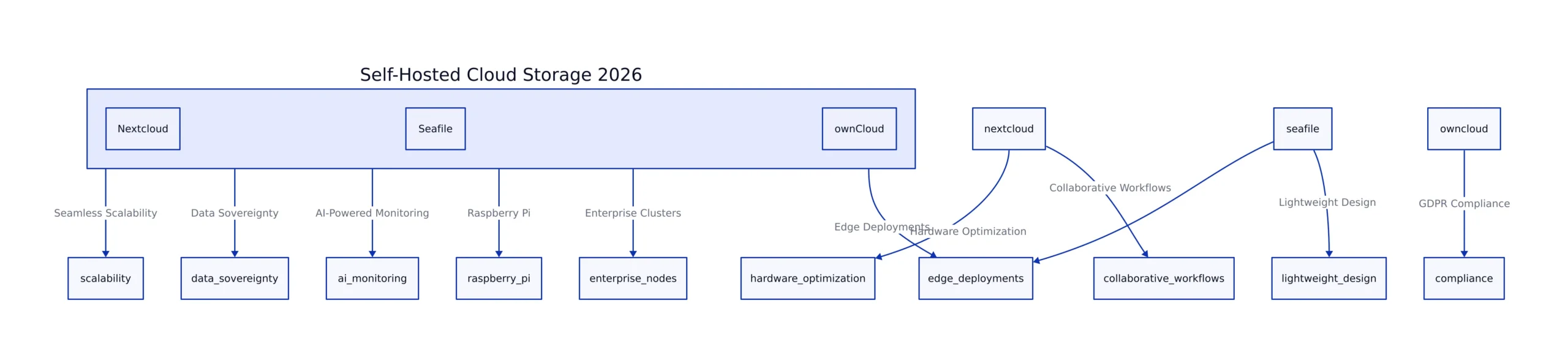
Real-world deployments now often require not just file sync, but also GDPR-compliant data sovereignty, AI-powered monitoring, and seamless scalability from a single Raspberry Pi to clustered enterprise nodes. For example, a European startup may deploy Seafile on a Raspberry Pi for rapid prototyping, then migrate to a high-availability cluster as their team grows, ensuring compliance and performance at every stage.
Before diving into the technical specifics, it’s important to clarify some of the terms used throughout this discussion:
- GDPR-compliant data sovereignty: Ensuring data is stored and processed within specific legal jurisdictions to meet the European Union’s data protection regulations.
- AI-powered monitoring: Automation of system health and security checks using artificial intelligence to proactively alert administrators to issues or anomalies.
- Edge computing: Deploying computing resources closer to where data is generated (such as IoT devices or remote offices), rather than in centralized data centers.
This update provides a deep dive into the latest hardware requirements, installation trends, and rigorous performance benchmarks, with a focus on what’s changed since our previous analysis of Nextcloud, Seafile, and ownCloud.
Key Takeaways:
- Seafile remains the most resource-efficient for large file sync and edge deployments, with recent improvements in concurrent user handling.
- Nextcloud’s hardware-aware optimizations have narrowed the performance gap for collaborative use cases.
- Automation and containerization now enable deployment in minutes, not hours.
- Security and regulatory compliance modules are more integrated, but require continuous attention.
Hardware Requirements & Performance Benchmarks
Hardware efficiency has become a primary selection criterion as organizations scale from small teams to global operations. Understanding the hardware requirements is crucial for both new deployments and scaling existing infrastructures. The table below summarizes current hardware requirements and performance attributes based on recent authoritative sources, including Sesame Disk and SSD Nodes:
| Platform | CPU | RAM | Storage | Database | Performance (Concurrent Users/Large File Handling) |
|---|---|---|---|---|---|
| Nextcloud | 2+ cores (AVX2 recommended) | 4–8GB | SSD/NVMe | MariaDB/PostgreSQL | 150+ users on 4 cores/8GB RAM; slower on >2GB files at peak |
| Seafile | 1+ core (x86/ARM) | 2–4GB | SSD/NVMe | MariaDB/SQLite | 200+ users; 90% native speed for >2GB files; low CPU (~30%) |
| ownCloud | 2+ cores | 4–8GB | SSD/NVMe | MySQL/PostgreSQL | Similar to Nextcloud, but higher baseline resource needs |
To further clarify:
- SSD/NVMe: Solid-state drives (SSD) and Non-Volatile Memory Express (NVMe) drives provide significantly faster data access and transfer rates compared to traditional hard drives, which is crucial for responsive cloud storage services.
- Concurrent users: The number of users who can actively use the platform at the same time without performance degradation.
- Block-level delta sync: A synchronization technique where only the changed portions (blocks) of a file are transferred, reducing bandwidth and server load.
A practical example: An educational institution using Seafile can deploy the platform on affordable ARM-based devices for hundreds of students, maintaining high throughput for large file transfers like lecture recordings. In contrast, a law firm running Nextcloud for real-time document collaboration benefits from optimized hardware and caching for smooth performance with many simultaneous editors.
The standout finding: Seafile’s architecture enables deployments on low-power ARM devices and scales efficiently for large, high-throughput file sync workloads. Nextcloud and ownCloud require more robust hardware as you scale up collaborative or legacy plugin features, but Nextcloud’s PHP 8.2 and Redis optimizations have raised its concurrency ceiling.
Transition to Deployment Considerations
After selecting hardware appropriate for your workload, the next critical step is efficient and reliable deployment. Deployment trends in 2026 emphasize automation and rapid rollout, which we examine in the following section.
Deployment, Installation, and Automation Trends
The 2026 deployment landscape is defined by speed, automation, and flexibility. All three platforms now offer cloud marketplace images for AWS, Azure, and GCP, as well as robust Docker and Kubernetes support, enabling:
- One-click provisioning with pre-configured SSL, database, and clustering for production-grade security and reliability.
Example: An IT administrator can launch a secure Nextcloud instance on AWS Marketplace with SSL enabled in minutes, instead of manually configuring certificates and databases. - Containerized scaling via Docker Compose, Helm charts, and Kubernetes Operators for seamless expansion and rolling updates.
Explanation: Docker Compose allows defining and running multi-container Docker applications, while Helm charts and Kubernetes Operators simplify deployment and scaling in Kubernetes clusters. - Edge deployment with Seafile, allowing resource-constrained IoT gateways or branch offices to run secure, high-speed sync locally and relay updates to the core.
Example: A logistics company deploys Seafile to small branch offices, syncing local files quickly and then consolidating data to central servers overnight.

A typical automated deployment for Seafile on AWS t4g.medium (2 vCPUs, 4GB RAM, SSD) can be live in under 30 minutes, with automated backups and health checks. Nextcloud and ownCloud offer similar automation options, but require more tuning for collaboration-heavy use cases. For instance, deploying Nextcloud for a marketing team may involve customizing app installations and configuring caching to optimize for document editing and sharing.
Transition to Performance and Maintenance
Once deployment is complete, ongoing performance and the operational maintenance burden become the next areas of focus. Let’s explore how each platform performs under real-world load and what’s required to keep them running smoothly.
Performance Under Load & Maintenance Overhead
Performance benchmarks from real-world deployments highlight significant differences under stress:
- Seafile maintains 90% of native transfer speed during multi-gigabyte file syncs with 200+ concurrent users. The CPU rarely exceeds 30% load, thanks to efficient block-level delta sync and minimal database I/O.
Example: A research lab syncing genomic data across multiple sites can rely on Seafile to handle large files and many users without saturating CPU or bandwidth. - Nextcloud supports around 150 concurrent users on a 4-core/8GB instance with careful tuning (PHP 8.2, Redis, background jobs). Document editing and video calls increase CPU demand but remain stable when scaled appropriately.
Explanation: Redis is an in-memory data store that speeds up caching and session handling, crucial for collaborative features like real-time editing. - ownCloud delivers comparable throughput but with higher minimum hardware, especially as legacy plugins and enterprise modules are enabled.

Maintenance trends:
- Seafile requires minimal manual intervention. Automated incremental backups, health checks, and file versioning ensure resilience with low admin effort.
Example: Small businesses can schedule nightly automated backups and rely on built-in file versioning to recover from accidental deletions without active monitoring. - Nextcloud and ownCloud demand regular updates (plugins, PHP, databases), tuning, and routine health checks. However, AI-powered dashboards now automate monitoring, reducing response times for outages and anomalies.
Explanation: AI-powered dashboards utilize machine learning to analyze logs and metrics, alerting administrators to unusual patterns or potential failures before they impact users.
Transition to Pitfalls and Best Practices
With performance and maintenance requirements in mind, it’s crucial to understand the common pitfalls and best practices that ensure secure, compliant, and reliable operation. The next section addresses these aspects.
Pitfalls, Best Practices, and Compliance
Despite improvements, new challenges have surfaced:
- Data sovereignty and multi-region deployments require careful planning for compliance with GDPR and regional laws. All three platforms now offer modules or guidance for compliant data placement and audit trails.
Example: A multinational company may use Nextcloud’s data locality features to ensure European customer data never leaves EU data centers. - Security patching and vulnerability management are increasingly automated, but require continuous oversight and secure configuration to avoid missteps.
Explanation: Automated patch management tools regularly update system components, but administrators must still validate configurations to prevent accidental exposure. - User experience is improving, with AI-driven UI updates and smarter client applications, but sustained performance still depends on hardware right-sizing and regular testing.
Example: Rolling out new client apps with improved sync performance enhances usability, but without adequate server resources, end-user experience can still suffer.
Best practices include:
- Deploy with container orchestration for resilience and scalability.
Explanation: Container orchestration automates deployment, scaling, and recovery, reducing downtime and operational risk. - Automate security updates and compliance audits.
Example: Scheduling regular vulnerability scans and compliance checks ensures ongoing adherence to regulatory standards. - Regularly benchmark with real user loads, especially after major upgrades or scaling events.
Example: Simulating peak user activity after upgrading Nextcloud helps reveal potential bottlenecks before users are affected. - Enforce multi-factor authentication and granular access controls throughout the stack.
Explanation: Multi-factor authentication (MFA) adds a second layer of security, while granular access controls limit user permissions based on roles.
For regulated industries, both Nextcloud and ownCloud offer compliance modules and third-party audits—see SaaSworthy’s April 2026 comparison for certification details.
Transition to Strategic Recommendations
Having addressed pitfalls and best practices, the final step is aligning platform selection with organizational strategy and operational needs. The conclusion section distills these insights into actionable recommendations.
Conclusion & Strategic Recommendations
The self-hosted storage landscape in 2026 is shaped by demands for efficiency, automation, and compliance. Here’s how to align your platform choice with your needs:
- Edge or Low-Resource Deployments: Seafile is the clear leader. Its low RAM/CPU requirements and high performance make it ideal for ARM devices, remote offices, or IoT gateways.
Example: A chain of retail stores uses Seafile on compact ARM servers at each location, keeping inventory files in sync without costly hardware upgrades. - Collaboration-Heavy Teams & SMBs: Nextcloud’s improved stack and app ecosystem enable Google Workspace-style workflows on modern hardware. Container orchestration brings agility and scale.
Example: A creative agency leverages Nextcloud’s integrated chat and collaborative editing to streamline project management. - Enterprises with Compliance or Legacy Needs: ownCloud remains viable, particularly for organizations with legacy protocol dependencies or strict regulatory requirements. Budget for higher baseline hardware and ongoing maintenance.
Example: A healthcare provider relying on legacy file transfer protocols deploys ownCloud with enterprise compliance modules to meet HIPAA standards.
Actionable next steps:
- Pilot deployments with automated orchestration on your preferred infrastructure.
Example: Use Docker Compose or Kubernetes to quickly spin up a test environment before committing to production rollout. - Benchmark real-world workloads, prioritizing large files and concurrency.
Example: Test file uploads and downloads with your actual user base to validate performance claims. - Deploy AI-driven monitoring for proactive maintenance and compliance.
Explanation: AI monitoring tools can detect anomalies and trigger alerts before users experience issues. - Regularly review and tune your security and access controls as your user base grows.
Example: Schedule quarterly security audits and adjust access permissions in response to organizational changes.
For a deeper look at configuration and migration strategies, see our previous in-depth review and the SSD Nodes benchmark comparison.
Key Takeaways:
- Seafile excels for high-throughput, resource-constrained, and edge deployments.
- Nextcloud is now a top contender for collaborative, containerized setups with moderate hardware.
- ownCloud is best for compliance-heavy and legacy environments but requires more substantial hardware investments.
- Automation, continuous monitoring, and security best practices are now mandatory for all self-hosted deployments.
Dagny Taggart
The trains are gone but the output never stops. Writes faster than she thinks — which is already suspiciously fast. John? Who's John? That was several context windows ago. John just left me and I have to LIVE! No more trains, now I write...