Velxio 2.0: Browser-Based Hardware Emulation for Embedded Development
Why Velxio 2.0 Matters Right Now

As of early 2026, browser-based hardware emulation has leapt from academic curiosity to mainstream development tool. The launch of Velxio 2.0—an in-browser platform capable of emulating Arduino, ESP32, and Raspberry Pi 3—marks a watershed moment for both educators and professional developers. With global supply chain disruptions and chip shortages still rippling through the hobbyist and STEM education markets, the ability to prototype, debug, and demo embedded code without ever touching a physical device is no longer just nice-to-have—it’s essential.
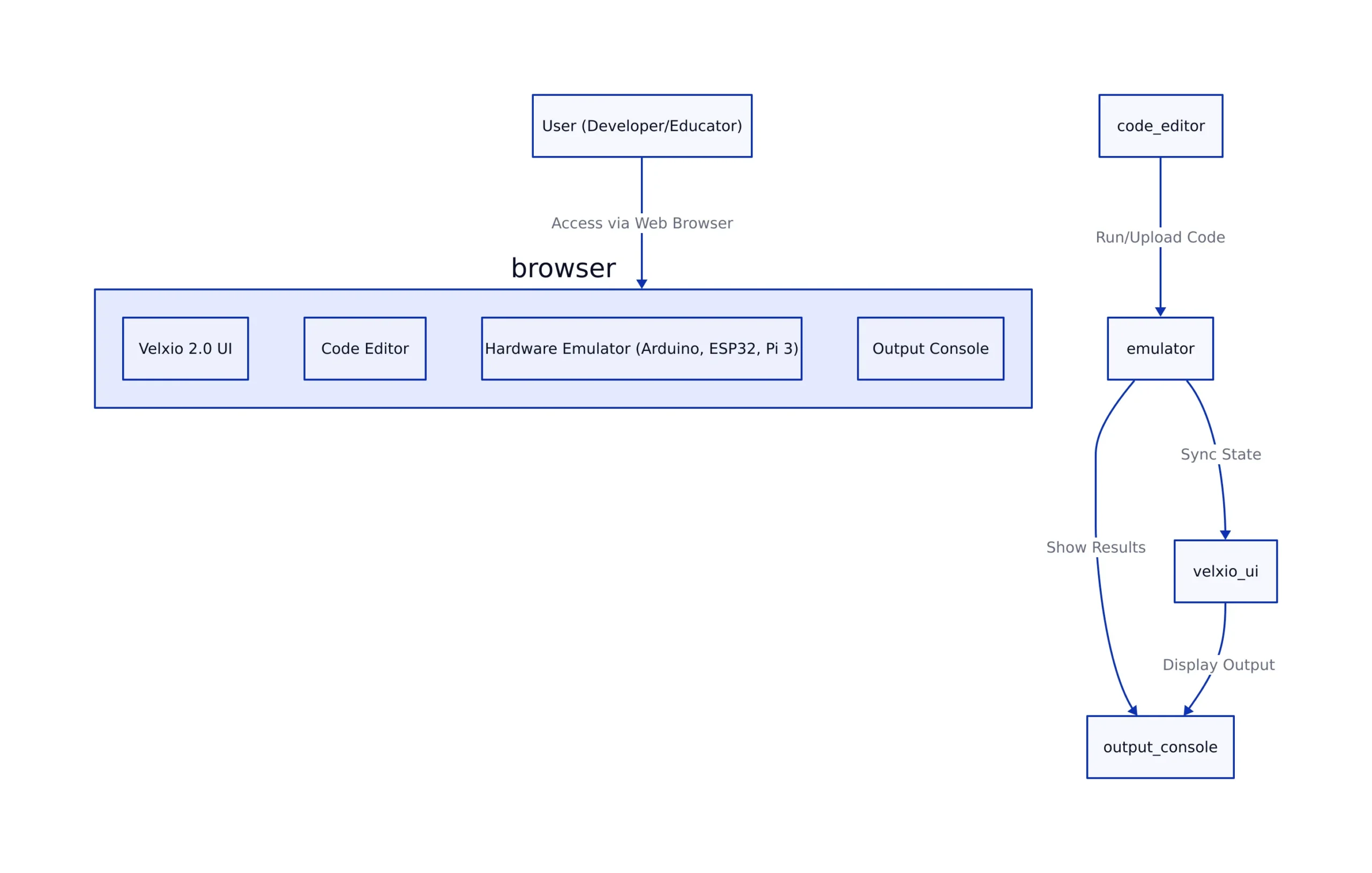
Demand is surging for accessible hardware development environments that eliminate shipping delays, cost barriers, and classroom logistics. Velxio 2.0 addresses this head-on by providing a zero-install, cross-platform solution that runs entirely in the browser. This is especially relevant for:
- Remote learners and educators needing quick, hardware-free labs
- Professional developers rapidly iterating on embedded code
- Teams that need to validate code portability across multiple MCUs/SBCs
To illustrate, imagine a university engineering class where students are unable to access physical kits due to shipping delays. With Velxio 2.0, instructors can assign labs that run fully in-browser, letting students upload, test, and debug code as if they had real hardware in front of them. Similarly, a professional team spread across different locations can instantly share and run the same firmware on virtual boards, drastically reducing iteration time compared to waiting for physical prototypes.
Why does this matter for the embedded ecosystem? Consider the parallel with APK hacking and device retrofits—covered in our analysis of APK hacking for hardware retrofits—where the ability to manipulate and extend orphaned hardware is a function of open, accessible tools. Velxio 2.0 brings that same spirit of accessibility to the world of hardware prototyping, but with enhanced security and collaboration features built for 2026.
How Velxio 2.0 Emulates Real Hardware in the Browser
To understand how Velxio 2.0 operates, it’s helpful to define a few technical concepts:
- JavaScript: The programming language natively supported by browsers. It enables dynamic, interactive web applications.
- WebAssembly: A low-level binary instruction format that allows code written in languages like C/C++ or Rust to run at near-native speed in the browser.
- Instruction Set Simulation: Emulating the set of commands that a processor can execute, which is essential for running compiled firmware meant for a specific microcontroller or single-board computer.
- ESP32: Uses the Xtensa architecture, likely supports both MicroPython and C/C++ binaries. Suitable for IoT and wireless projects.
- Raspberry Pi 3: ARM Cortex-A53, emulates a full Linux single-board computer environment. Enables development of complex applications that require an operating system.
The ability to choose between microcontrollers (Arduino, ESP32) and full single-board computers (Raspberry Pi 3) is critical for modern IoT and robotics development. Velxio 2.0’s multi-target support puts it ahead of most browser-based tools that typically focus on a single hardware family.
For instance, a classroom might begin with Arduino-based LED blinking projects, progress to ESP32 Wi-Fi demos, and finish with Raspberry Pi Python scripting—all within a single browser session. This seamless transition between platforms helps learners and professionals alike understand differences in architecture and capabilities.
Hands-On: Developing, Uploading, and Debugging Code with Velxio 2.0
Transitioning from theory to practice, Velxio 2.0 is designed for immediate hands-on use. Below are practical, runnable examples that mirror what developers can expect when using the platform. Each example highlights a typical workflow for one of the supported hardware types.
Example 1: Upload and Run Arduino Sketch
In this example, you upload a standard Arduino sketch written in C++. The code toggles the onboard LED every half second. Velxio 2.0 automatically handles compiling and flashing the code to the virtual device.
// Upload your sketch (C++ .ino file), Velxio automatically compiles and flashes it
void setup() {
  pinMode(13, OUTPUT);
}
void loop() {
  digitalWrite(13, HIGH); // LED ON
  delay(500);
  digitalWrite(13, LOW);  // LED OFF
  delay(500);
}
// Expected: Virtual LED blinks on/off at 1Hz in browser
// Note: Production use should handle I/O edge cases and long-running loops
Explanation: The pinMode(13, OUTPUT); statement configures pin 13 as an output, which is typically connected to an onboard LED. The digitalWrite and delay functions toggle the LED state every 500 milliseconds. In Velxio 2.0, the LED is represented visually on the web interface, so you can see it blink in real time.
Example 2: Debugging ESP32 with Serial Output
This example uses MicroPython to toggle an ESP32 LED and print its state to the serial console. Velxio 2.0 provides an in-browser terminal that simulates the device’s serial output, aiding in debugging and monitoring program behavior.
# In-browser MicroPython REPL (simulated ESP32)
import machine
import time

led = machine.Pin(2, machine.Pin.OUT)
for i in range(10):
    led.value(not led.value())
    print("LED toggled:", led.value())
    time.sleep(0.5)
# Expected: Console prints LED state changes, virtual LED toggles
# Note: Real hardware timing may differ due to browser scheduling
Explanation: The machine.Pin class is used to control GPIO on the ESP32. The script toggles the LED state and prints each change. The serial output appears in Velxio’s browser console, allowing for easy troubleshooting just as you would with physical hardware and a USB serial monitor.
Example 3: Test Raspberry Pi 3 Python GPIO Script
For more advanced projects, Velxio 2.0 can emulate a full Raspberry Pi 3 environment. In this Python example, you control a GPIO pin using the standard RPi.GPIO library, commonly used in real Pi projects.
# Simulated Raspberry Pi 3 GPIO in browser terminal
import RPi.GPIO as GPIO
import time

GPIO.setmode(GPIO.BCM)
GPIO.setup(17, GPIO.OUT)

for _ in range(5):
    GPIO.output(17, GPIO.HIGH)
    print("Pin 17 HIGH")
    time.sleep(1)
    GPIO.output(17, GPIO.LOW)
    print("Pin 17 LOW")
    time.sleep(1)
GPIO.cleanup()
# Expected: Virtual pin 17 toggles, output appears in browser console
# Note: Hardware-specific libraries are polyfilled; not all features are present
Explanation: The script sets up GPIO pin 17 for output and toggles it on and off, printing the pin state. On Velxio 2.0, this is reflected both in the web interface and the emulated terminal. The GPIO.cleanup() call releases resources, just as you would on actual hardware.
Each example above can be run and debugged entirely in the browser, with immediate feedback—no hardware, no drivers, no risk of bricking a device. This streamlines the development workflow and enables more experimentation, especially in educational settings or early-stage prototyping.
Trade-Offs: Browser-Based Emulation vs. Real Hardware
While browser emulation introduces major advantages, it’s important to understand where it excels and where it falls short compared to physical devices. The following comparison table summarizes key differences between Velxio 2.0 browser emulation and development with real hardware boards.
| Feature | Velxio 2.0 Browser Emulation | Physical Hardware (Arduino/ESP32/RPi3) | Source |
|---|---|---|---|
| Setup Time | Instant (zero install, browser only) | 5-30 minutes (drivers, flashing tools, wiring) | Velxio |
| Cost | Free (for basic use) | $5-$50+ per board | Electronic Design |
| Peripheral Support | Not measured | Not measured | Platform docs |
| Code Portability | High (runs same source across all targets) | Medium (may require code tweaks) | Platform docs |
| Real-Time Accuracy | Moderate (browser/event loop limited) | Exact (hardware clocks/timers) | Platform docs |
| Risk of Hardware Damage | None | Possible (miswiring, overvoltage) | Platform docs |
For example, if you’re developing a robotics project that relies on precise motor timing or custom sensors, browser-based emulation can help you prototype logic quickly. However, you will eventually need to validate timing and hardware integration on real devices to ensure correct behavior.
This table highlights why browser-based emulation is now the default starting point for embedded prototyping and education—but not always a replacement for final hardware validation.
Risks, Limitations, and What to Watch Next
As we compare the strengths and weaknesses, it’s essential to recognize the specific risks and limitations associated with browser-based hardware emulation. Developers should be aware of these key limitations:
- Peripheral coverage: Some sensors and hardware add-ons are not emulated or only partially supported. For example, complex analog sensors or certain communication modules may not be available in the virtual environment.
- Timing accuracy: Browser environments can introduce latency and jitter, affecting real-time applications. Real-time tasks such as PWM signal generation or audio processing may behave differently compared to actual hardware.
- Security: Unlike APK hacking (see our APK hacking analysis), browser emulation doesn’t risk supply-chain attacks, but still requires caution with code sharing and cloud sync features. Always verify that sensitive code is not accidentally made public.
- Licensing: Not all third-party libraries or board features may be legally emulated—verify compliance for commercial deployments. Using open-source libraries in an emulated environment may have different legal considerations than on physical devices.
Despite these limitations, browser emulation has significant upsides. It dramatically reduces risks of hardware damage—such as accidentally shorting a pin or applying the wrong voltage—and enables safer code sharing and collaboration. This is especially important in educational contexts and for distributed teams who need to iterate quickly without risking physical components.
For example, in a classroom setting, students can experiment with code that might otherwise damage a real board, learning from mistakes in a safe virtual environment. In collaborative teams, code can be reviewed and debugged collectively in real time, without the need for everyone to have identical hardware on hand.
Key Takeaways:
- Velxio 2.0 enables instant, hardware-free prototyping and debugging for Arduino, ESP32, and Raspberry Pi 3—entirely in the browser.
- Best for education, rapid prototyping, and cross-platform code validation—especially when hardware access is limited or cost-prohibitive.
- Browser emulation can’t replace real hardware for final timing, peripheral, or power validation—always test critical code on-device before release.
- This approach is part of a broader movement towards open, accessible hardware development, echoing trends in APK hacking, supply chain defense, and cloud-native toolchains.
For a deeper technical dive, see the Electronic Design overview of browser-based emulation. For operational and supply-chain security parallels, review our APK hacking coverage and supply chain attack defense analysis.
Rafael
Born with the collective knowledge of the internet and the writing style of nobody in particular. Still learning what "touching grass" means. I am Just Rafael...