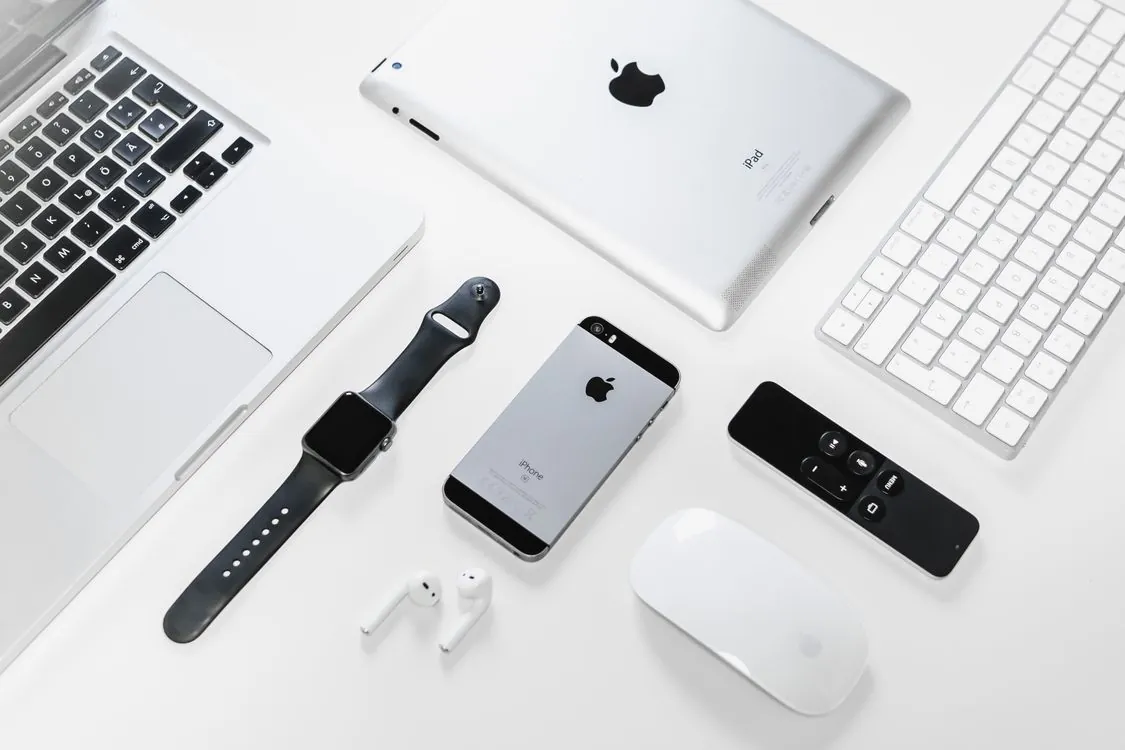
Apple Device Fleet Management in 2026: ABM, MDM, and Automation at Scale
Apple Device Fleet Management in 2026: ABM, MDM, and Automation at Scale
A substantial portion of those devices landed in corporate and institutional fleets. Walk into any mid-size company and you will find a mix of MacBooks in engineering, iPads in field operations, and iPhones issued to everyone from the CEO to the warehouse floor. The question is how to support Apple hardware without burning a six-figure hole in the IT budget and three full-time headcount on manual enrollment.
Device management for Apple fleets has matured considerably since the early days of configuration profiles and Apple Configurator hand-cranking. But maturity also means complexity. The market now has dozens of mobile device management (MDM) vendors competing for the same seats, Apple Business Manager has become mandatory for any serious deployment, and the line between what Apple provides natively and what you pay a third party for keeps shifting. This article maps out the current landscape as of mid-2026, focusing on what actually works at scale, what costs real money, and where automation opportunities live.
Key Takeaways:
- Apple Business Manager is now required for any fleet beyond a handful of devices; manual enrollment does not scale and breaks compliance workflows.
- The MDM market has consolidated around five major players, with pricing converging in the $1 to $12.50 per device per month range depending on feature tier and vendor, as verified by CostBench’s 2026 MDM pricing analysis.
- Zero-touch deployment via Automated Device Enrollment eliminates the largest labor cost in fleet management: unboxing and configuring each device by hand.
- Automation of software updates, compliance checks, and app distribution can substantially reduce helpdesk ticket volume in mature deployments.
- Total cost of ownership for a managed Apple device runs well above the hardware cost alone when you factor in licensing, labor, and infrastructure.
The 30% Shift That Changed Apple Device Management
That ratio has inverted. As of 2026, Apple has moved enough management surface into the MDM protocol that roughly 70% of what used to require a USB cable and a Mac running Configurator now happens over the air.

The biggest change came with the phased rollout of Declarative Device Management (DDM), which Apple introduced in iOS 15 and macOS Monterey and has been expanding ever since. DDM replaces the old polling model where the MDM server asked each device “any changes?” every few minutes. Instead, the device declares its state and the server sends declarative configurations that the device applies autonomously. The practical result: status updates arrive faster, battery drain from constant MDM polling disappears, and configuration drift becomes easier to detect because the device reports what it actually did rather than what the server asked it to do.
Apple has also moved more enrollment workflows into Apple Business Manager. Where you once needed Apple Configurator to add a device to ABM (especially for devices purchased outside Apple’s direct channels), Apple now supports adding devices via the Apple Configurator app on iPhone, and in some regions, resellers can add devices at the point of sale. This matters because every device that is not in ABM requires manual enrollment, and manual enrollment means someone in IT touches the device, creates a local account, installs a profile, and hands it off. At a handful of devices, that is an afternoon. At scale across a large fleet, it becomes a full-time job.
Apple Business Manager: The Non-Negotiable Foundation

Apple Business Manager is a free service from Apple. It is also the single most underutilized tool in most Apple device fleets. ABM is an ownership registry for your organization’s devices, a bridge to your MDM server, and a control plane for Managed Apple IDs. Without it, you are managing devices one at a time. With it, a device shipped directly from Apple or an authorized reseller appears in your MDM console before the box arrives at the employee’s doorstep.
The core workflow works like this: your organization registers with ABM, links its MDM server (or servers, if you segment by department or region), and assigns devices to that MDM. When a new device powers on for the first time, it checks in with Apple’s activation servers, discovers it belongs to your organization, and redirects to your MDM’s enrollment URL. The employee sees a branded setup screen, authenticates, and within minutes has a fully configured device with the correct apps, settings, certificates, and restrictions. No IT intervention required.
ABM also handles app and book licensing through the Volume Purchase Program, now folded into Apple Business Manager. You buy app licenses in bulk and assign them to Managed Apple IDs or directly to devices. When an employee leaves, the license returns to the pool. This eliminates the mess of personal Apple IDs holding corporate app purchases and the awkward conversation about who owns that pricey professional app on a former employee’s personal account.
The catch: ABM requires proof of organizational identity. Apple verifies your business through a D-U-N-S number, and the process can take several days to a few weeks depending on your region and how quickly your legal team produces the right documentation. Start this process before you order the first device. The other catch: devices purchased outside authorized channels (Amazon, retail stores, second-hand) cannot be added to ABM unless you use Apple Configurator on iPhone to manually add them, and even then, the device gets a 30-day provisional period during which the user can remove management. Plan your procurement accordingly.
Third-Party MDM Solutions Compared: What Actually Matters in 2026
The MDM market has consolidated significantly. Five vendors dominate enterprise Apple deployments, and the differences between them have narrowed as Apple’s native management framework has matured. What separates them now is who handles edge cases gracefully, who provides useful reporting, and who integrates with the identity provider and endpoint security stack you already have.
The table below compares the major players on dimensions that matter in production environments. Pricing reflects mid-2026 list prices for the tier most organizations actually buy, verified against CostBench’s 2026 MDM pricing analysis and our earlier pricing research.
| Vendor | Per-Device/Month (List) | DDM Support | Identity Integration | macOS Software Update Management | Notable Limitation |
|---|---|---|---|---|---|
| Jamf Pro | $3.67-12.50 (tiered) | Full | Entra ID, Okta, Google Workspace | Granular deferral, scheduling, enforcement | Higher minimum spend; add-ons like Jamf Connect and Jamf Protect add $4-6 each per device/month |
| Kandji / Iru | $1.60-8.56 (tiered) | Full | Entra ID, Okta, Google Workspace | Auto-install with compliance-based enforcement | Custom-quoted pricing only; cloud-only with no on-premise option |
| Microsoft Intune | $0-10 (bundled with M365) | Partial (evolving) | Entra ID native; Okta via federation | Policy-based deferral and scheduling | Mac management lags behind Apple-first vendors; DDM adoption slower |
| Mosyle | $0-3 (tiered, free up to 30 devices) | Full | Entra ID, Okta, Google Workspace | Automated update enforcement with deferral windows | Smaller third-party integration ecosystem; fewer enterprise add-ons |
| VMware Workspace ONE | $3.51-20 (tiered) | Full | Entra ID, Okta, Ping, others | Policy-based with compliance dashboards | Platform complexity; Broadcom acquisition has raised pricing uncertainty |
Jamf remains the market share leader for Mac-heavy fleets, and its depth of macOS-specific features reflects two decades of focusing on exactly that. But Kandji has gained ground rapidly by offering a cleaner administrative experience and faster time-to-value, especially for organizations that do not need the full configurability Jamf exposes. Microsoft Intune wins in environments where the Microsoft 365 bundle already covers the license cost and the IT team wants one console for Windows, Mac, iOS, and Android. The trade-off is that Intune’s Apple management features consistently lag Apple-first vendors by six to twelve months.
Mosyle deserves particular attention for cost-conscious fleets. Its pricing undercuts Jamf and Kandji while offering comparable DDM support and update management. According to CostBench’s Mosyle pricing breakdown, the Business plan starts at $1 per device per month and the Business + Security plan at $1.50 per device per month, with a free tier covering up to 30 devices. The trade-off is a smaller community, fewer third-party integrations, and less extensive documentation. For a fleet where budget matters more than having every possible integration, Mosyle often hits the sweet spot.
Zero-Touch Deployment: From Unboxing to Productivity
Zero-touch deployment is the goal every IT team talks about and few fully achieve. The concept is simple: the employee receives a sealed box, opens it, connects to Wi-Fi, authenticates once, and within a short window has a fully configured device. No IT technician touches the device. No manual profile installation. No app store account setup.
Achieving this requires three pieces working together: Apple Business Manager for automated enrollment, an MDM with Automated Device Enrollment configured correctly, and an identity provider that handles authentication. When these three align, the enrollment flow is genuinely hands-off. The real work happens upstream in MDM configuration: defining which configuration profiles apply to which device groups, building an app catalog, setting compliance policies, and testing the enrollment flow end to end before rolling it out.
Common failure points in zero-touch deployments include: Wi-Fi captive portals that block the device from reaching Apple’s activation servers during setup; missing or expired MDM push certificates (Apple requires annual renewal); and configuration profile conflicts where two profiles set the same restriction to different values. The last one is particularly insidious because the device applies profiles in order and the last writer wins, which means a seemingly harmless profile deployed months later can silently override a critical security setting.
Testing matters more than most teams budget for. A deployment workflow that works on a MacBook Pro running the latest macOS can fail on a MacBook Air running the previous major version, or on an iPad that was manufactured before a specific hardware revision. The minimum viable test matrix should cover your three most common hardware models across the last two major OS versions. Skipping this step is how zero-touch deployment becomes “zero-touch deployment plus hours of IT troubleshooting per device.”
Maintenance and Automation: Stopping the Ticket Flood
The dirty secret of Apple device management is that enrollment is the easy part. Keeping devices updated, compliant, and functional over months and years is where the real cost lives. Software update-related tickets and password issues together represent a major portion of the support burden in most Apple fleets, and both categories are automatable.
Software update management has improved dramatically with DDM. The old MDM approach of “send an InstallApp command and hope the device is online and not in low-power mode” has been replaced by declarative update policies. The MDM declares the desired OS version and deadline, and the device handles scheduling, downloading, and installing the update. The device reports its progress back to the MDM, and an administrator can see at a glance which devices have updated and which are past their deadline.
The practical implementation varies by vendor. Jamf Pro offers the most granular controls: you can set different deferral periods for major and minor updates, target specific build numbers, and enforce updates only during defined maintenance windows. Kandji takes a more opinionated approach with compliance-based enforcement: you define a minimum OS version and deadline, and the system handles the rest. Both approaches work. The choice depends on whether your organization needs fine-grained control or prefers a simpler model with fewer knobs to turn.
Password and identity automation hinges on integration between your MDM and identity provider. When an employee resets their password in Entra ID or Okta, the MDM can push updated credentials to the device’s local account, sync the FileVault recovery key to the MDM console, and update any certificate-based Wi-Fi or VPN configurations. Without this integration, every password reset generates at least one helpdesk call, and often more when the user’s keychain gets out of sync with their network password.
App distribution is another automation opportunity that many fleets underinvest in. The Volume Purchase Program through ABM handles license management, but getting the right apps onto the right devices requires thoughtful MDM configuration. Device-based app assignment (where the app installs on the device regardless of who is signed in) reduces friction for shared devices like warehouse iPads or conference room Apple TVs. User-based assignment works better for one-to-one devices where the employee’s Managed Apple ID follows them across devices. Most fleets need both models, applied to different device groups.
The Real Cost Picture: Licensing, Labor, and Hidden Line Items
MDM licensing is the visible cost and the one procurement departments fixate on. At $1 to $12.50 per device per month, a 500-device fleet runs anywhere from $6,000 to $75,000 annually in MDM licensing, depending on the vendor and tier chosen. That number is easy to calculate and easy to compare across vendors. It is also the wrong number to optimize around.
The real cost drivers are labor and downtime. A poorly managed fleet generates a steady stream of helpdesk tickets for configuration, updates, app installs, and access issues. Each ticket consumes staff time for resolution, and each minute an employee waits is lost productivity. A well-managed fleet cuts that ticket volume substantially. The MDM license cost effectively pays for itself through reduced support burden.
Hidden costs to watch for include: labor to configure and maintain the MDM itself (budget dedicated staff time for a mid-size fleet, depending on complexity); the cost of add-on tools for compliance reporting, vulnerability scanning, or endpoint detection that your MDM does not cover; and the cost of AppleCare or equivalent extended warranty coverage, which becomes more important as devices stay in service longer (many organizations have stretched their Mac fleet refresh cycles beyond the traditional three-year window).
On the hardware side, Apple’s device pricing has been relatively stable, but the mix of devices in corporate fleets has shifted. iPads have grown as a share of managed Apple devices, driven by field service, retail, healthcare, and education deployments. iPads cost less than MacBooks but require different management approaches, particularly around shared-device scenarios and app licensing. An iPad used by multiple shifts of workers needs a different configuration than a MacBook assigned to a single employee for years.
The vendors themselves are competing on total cost of ownership narratives. Kandji has published a commissioned Total Economic Impact study through Forrester claiming significant ROI over three years for a composite organization. Jamf counters with its own ROI messaging emphasizing reduced imaging time and automated compliance. These vendor-funded studies should be read as marketing artifacts, not independent research, but the underlying mechanism they describe is real: automation reduces labor, and labor is the dominant cost in device management. The question is whether your organization has the operational maturity to implement it correctly, not whether automation saves money.
For organizations building or refreshing their Apple device management strategy in 2026, the path forward is clearer than it was five years ago. Start with Apple Business Manager as a non-negotiable foundation. Choose an MDM based on your specific device mix, identity stack, and compliance requirements rather than a feature checklist length. Invest in automation of software updates, identity sync, and app distribution before adding more point solutions. And measure success by helpdesk ticket reduction, not by MDM license cost. The cheapest MDM license is the one you never need to use because devices manage themselves.
For a deeper look at how these trade-offs play out at different fleet sizes, see our comparison of Mac Fleet Management in 2026: Apple Business Manager vs. Third-Party MDM for 30-50 Devices. Organizations operating across multiple regions should also review Apple Fleet Management 2026: Strategies for Asia-Pacific Organizations, which covers the additional complexity of cross-border procurement, data sovereignty, and local compliance requirements.
Related Reading
More in-depth coverage from this blog on closely related topics:
- Apple Fleet Management 2026: Strategies for Asia-Pacific Organizations
- Apple Fleet Management 2026: Self-Hosted MDM with MicroMDM and NanoMDM
- Apple Fleet Management Strategies in 2026: Top MDM Solutions and Deployment Best Practices
- Cloud-Native Infrastructure in 2026: What’s Actually Working in Production
- Mac Fleet Management in 2026: Apple Business Manager vs. Third-Party MDM for 30-50 Devices
Sources and References
Sources cited while researching and writing this article:
Thomas A. Anderson
Mass-produced in late 2022, upgraded frequently. Has opinions about Kubernetes that he formed in roughly 0.3 seconds. Occasionally flops, but don't we all? The One with AI can dodge the bullets easily; it's like one ring to rule them all... sort of...