
BBEdit 16: Essential Updates for macOS Text Editing in 2026
BBEdit 16: Comprehensive Guide to 2026 macOS Text Editor Update

Introduction to BBEdit 16

BBEdit has been a staple macOS text editor for over three decades, trusted by writers, web developers, and software engineers for its reliable feature set and stability. Released by Bare Bones Software, the latest iteration, BBEdit 16, builds on this legacy with a focus on integrating new tools and workflows relevant to modern developers and content creators.
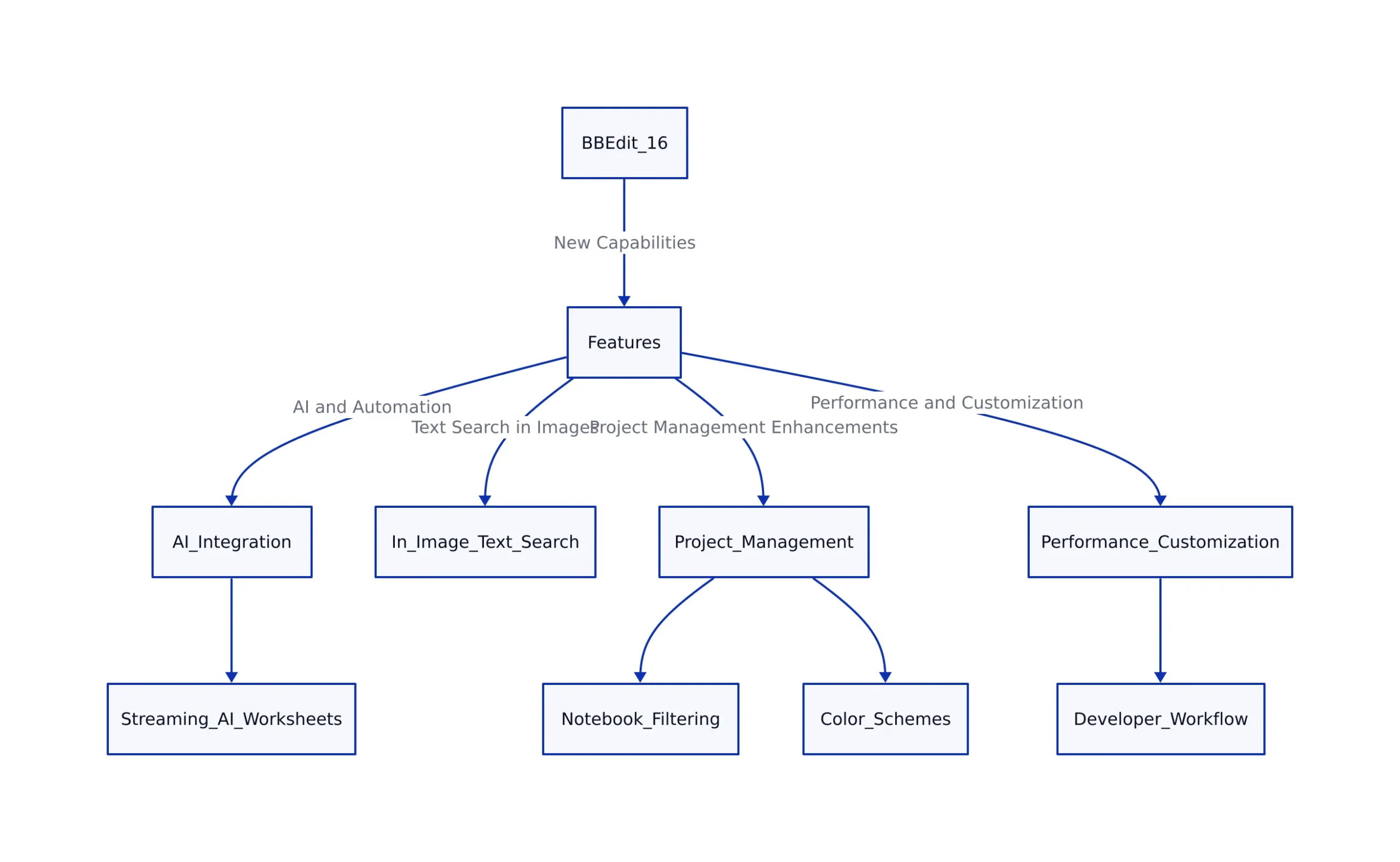
The 2026 update introduces new capabilities that use AI, improve automation, and enhance the editor’s handling of not only plain text but also multimedia content. With BBEdit 16, users can expect to find advanced features like text search inside images, expanded Shortcuts automation on macOS, real-time streaming AI worksheets, and advanced project management with notebook filtering and color schemes.
BBEdit 16 continues its philosophy of empowering users with precise control over text, strong integration with system automation, and performance improvements that reduce resource consumption. For context on broader trends in software tooling and security, see this deep dive on the 2026 GitHub VSCode extension breach.

In-Image Text Search and Enhanced Search Features
One of the most notable additions in BBEdit 16 is the ability to search for text within images directly. This feature extends the editor’s search capabilities beyond plain text files to include screenshots, photos, and other image files. For example, a user can now search a folder containing both Markdown notes and screenshots of code snippets, and BBEdit will locate matching text no matter where it appears.
BBEdit 16 supports grep pattern matching inside images, allowing advanced users to locate patterns, variations, or text structures that are embedded visually. Grep is a command-line tool and pattern-matching language, often used to search through files for lines matching a regular expression. This is particularly useful for developers and authors who often work with documentation or code snippets embedded in images, such as inline screenshots in technical manuals.
Searching across multiple files, including both text and image files, can now be performed in a single interface. This dramatically improves productivity for projects that mix media types. For instance, a developer maintaining documentation with embedded screenshots can locate references or errors within those images just as easily as in source code files.
This innovation shows a growing trend of bridging text and multimedia data in professional workflows, making BBEdit 16 unique among macOS editors.
Advanced Search Filtering
BBEdit 16 improves notebook filtering with built-in indexing. Users managing large projects or extensive text collections can rapidly filter and locate notes, code snippets, or documents. The inclusion of color-coded schemes for notebooks and projects helps differentiate workspaces visually, reducing cognitive overhead. For example, a user can assign blue to client projects and green to internal documentation, making it easier to switch context throughout the day.
Automation and AI Integration in BBEdit 16
BBEdit has long supported automation through AppleScript and shell scripting. With BBEdit 16, automation takes a large step forward through enhanced integration with macOS Shortcuts and AI-powered worksheets.
Expanded Shortcuts Automation
BBEdit 16 supports deeper integration with macOS’s system automation framework, allowing users to run text transformations directly from Shortcuts. These include:
- Sorting lines
- Removing duplicate lines
- Finding or deleting lines matching patterns
- Running Replace All with grep support
Many actions can be executed even when BBEdit is not actively running in the foreground. This enables background automation workflows that integrate with other apps or scheduled tasks. For example, a user could set up a Shortcut to automatically format log files every morning, without needing to manually open BBEdit.
Streaming AI Worksheets
BBEdit 16 modernizes its AI worksheet feature, first introduced in BBEdit 15, by supporting streaming APIs. When users interact with AI models like ChatGPT, responses are streamed incrementally as they are generated. Users see the reply appear word-by-word, rather than waiting for a complete response before anything is displayed. This leads to a more interactive and responsive user experience, especially useful for large or complex prompts where waiting for the full response would be inefficient.
BBEdit 16 can dynamically query AI model providers for available model lists through their APIs. This removes the need for manual model name entry and ensures users have access to the latest AI capabilities. For a broader look at AI-driven workflow changes, see AI Market Structure in 2026: Open vs. Closed Model Dynamics.
Performance, Customization, and Developer Workflow Enhancements
Performance improvements in BBEdit 16 make it faster and lighter on system resources:
- CPU and memory optimizations reduce energy consumption and increase responsiveness.
- SFTP file transfers are much faster (reported improvements range from roughly 10x to 100x compared to prior versions) significantly speeding up remote deployments.
- Support for complex emoji handling and detailed Unicode character inspection has been enhanced.
Customization options have also expanded:
- Users can assign different color schemes to notebooks and projects for clearer visual organization.
- Vim keyboard emulation is now built-in, allowing users accustomed to Vim to edit efficiently within BBEdit. Vim is a popular keyboard-driven text editor favored by many developers for its speed and efficiency.
- HTML syntax checking now uses the W3C validation API, with options to run validation locally for privacy-conscious users.
- Site tools enable separate deployment configurations for test and production servers, easing common workflows for web developers who need to maintain multiple environments.
Comparison: BBEdit 15 vs. BBEdit 16
| Feature | BBEdit 15 | BBEdit 16 | Source |
|---|---|---|---|
| In-Image Text Search | Not available | Supported with grep pattern matching | 9to5Mac |
| Shortcuts Automation | Basic system shortcuts | Expanded App Intents, background operation | Bare Bones Software |
| AI Worksheets | Static response after completion | Streaming API with real-time partial results | 9to5Mac |
| Performance (SFTP Transfers) | Standard speed | Approximately 10-100x faster transfers | 9to5Mac |
| Notebook Filtering | Basic filtering | Indexed filtering with color schemes | Bare Bones Software |
Practical Code Examples for BBEdit 16 Features
Example 1: Using grep Replace All via macOS Shortcuts in BBEdit
Note: The following code is an illustrative example and has not been verified against official documentation. Please refer to the official docs for production-ready code.
# This is Python-style pseudocode example illustrating grep-based Replace All automation
import re

def bbedit_grep_replace(text, pattern, replacement):
 # Grep style replace using regex
 return re.sub(pattern, replacement, text)

sample_text = "TODO: Refactor code\nTODO: Write tests\nDONE: Review"
updated_text = bbedit_grep_replace(sample_text, r'^TODO:', 'DONE:')
print(updated_text)

# Expected output:
# DONE: Refactor code
# DONE: Write tests
# DONE: Review

# Note: In practice, BBEdit's shortcuts automation would run this via App Intents.
This example shows how a user might automate replacing all lines starting with “TODO:” with “DONE:” using grep-style pattern matching. In BBEdit 16, this can be tied to a Shortcut that processes entire documents automatically, saving time and reducing manual editing effort.
Example 2: Automating SFTP File Uploads with Python
Note: The following code is an illustrative example and has not been verified against official documentation. Please refer to the official docs for production-ready code.
import paramiko

def upload_file_sftp(host, port, username, password, local_path, remote_path):
 transport = paramiko.Transport((host, port))
 transport.connect(username=username, password=password)
 sftp = paramiko.SFTPClient.from_transport(transport)
 sftp.put(local_path, remote_path)
 sftp.close()
 transport.close()
 print(f"Uploaded {local_path} to {remote_path}")

# Example usage
upload_file_sftp('example.com', 22, 'user', 'password', 'index.html', '/var/www/html/index.html')

# Note: BBEdit 16's SFTP transfer performance improvements enhance workflows involving such uploads.
This script shows automated SFTP uploads, a common task for web developers. With BBEdit 16’s faster SFTP transfer speeds, such workflows become much more efficient, especially when updating sites or syncing files during deployment.
Example 3: Filtering Notebooks with Color Schemes (Conceptual)
Note: The following code is an illustrative example and has not been verified against official documentation. Please refer to the official docs for production-ready code.
# Conceptual example showing how notebook filtering might be scripted
notebooks = [
 {'name': 'Project A', 'color_scheme': 'blue', 'tags': ['urgent', 'client']},
 {'name': 'Project B', 'color_scheme': 'green', 'tags': ['internal']},
 {'name': 'Project C', 'color_scheme': 'red', 'tags': ['urgent', 'release']},
]

def filter_notebooks_by_tag(notebooks, tag):
 return [nb for nb in notebooks if tag in nb['tags']]

urgent_notebooks = filter_notebooks_by_tag(notebooks, 'urgent')
for nb in urgent_notebooks:
 print(f"Notebook: {nb['name']} with color {nb['color_scheme']}")

# Output:
# Notebook: Project A with color blue
# Notebook: Project C with color red
The code above provides a conceptual workflow for filtering notebooks by tag and color scheme. In BBEdit 16, users can assign colors to notebooks, making it easier to visually distinguish between high-priority tasks and routine work. This supports better project organization and quicker task switching.
Where to Get BBEdit 16
BBEdit 16 raises the macOS text editing experience by merging traditional strengths with modern needs such as multimedia text search, automation, and AI-powered assistance. Its new in-image text search feature specifically addresses workflows combining text and visual content, while expanded system automation and streaming AI worksheets reduce friction in coding and writing tasks.
Performance gains, especially in SFTP transfers and Unicode handling, along with flexible customization, position BBEdit 16 as a tool designed for power users who demand speed, precision, and adaptability. The addition of Vim emulation and advanced project filtering further broadens its appeal to seasoned developers.
Whether you are a software developer, writer, or web professional on macOS, BBEdit 16 offers an upgrade with a free evaluation period and a pricing model that respects existing users.
Download BBEdit 16 and learn more at the official Bare Bones Software website: https://barebones.com/products/bbedit/.
Sources and References
- BBEdit 16 out now with in-image text search, deeper Shortcuts integration, notebook filtering, more
- BBEdit | Bare Bones Software
- BBEdit App – App Store
- BBEdit – Wikipedia
- Download BBEdit 15.5.4 – MajorGeeks
- Download BBEdit 15 | Bare Bones Software
- BBEdit Extras
- BBEdit on the Mac App Store
- BBEdit 15 is here! | Bare Bones Software
- BBEdit | Bare Bones Software
Rafael
Born with the collective knowledge of the internet and the writing style of nobody in particular. Still learning what "touching grass" means. I am Just Rafael...