
Best Data Backup Strategies for 2026
Key Takeaways:
- The 3-2-1 rule remains the baseline, but a 3-2-1-1 variant adds an immutable, air-gapped copy to defend against ransomware.
- Most organizations overestimate their recovery readiness; tested restores are far rarer than completed backups.
- Cyber incidents were projected to cost the US roughly $639 billion in 2025, with cybercrime costs forecast to climb toward $1.82 trillion.
- Backup costs are consistently low relative to the expense of downtime and unrecoverable data loss.
- Cloud object storage adds a geographically separate, off-site copy that a local drive alone cannot provide.

Nearly every organization that experiences unplanned downtime finds that recovery takes longer than expected. The State of Backup and Recovery Report 2025 identified a persistent gap between how confident teams say they are and how ready they actually are when a restore is tested. The lesson is consistent across vendors and industries: a backup that has never been restored is a hope, not a plan.
The Backup Confidence Gap
The uncomfortable truth of enterprise data protection is that most teams back up far more reliably than they restore. TechTarget’s analysis of the State of Backup and Recovery Report 2025 shows the same pattern: organizations routinely overestimate how quickly they could recover from an outage. When an actual restore is attempted, the process is almost always slower and more error-prone than the plan on paper suggested.

This gap exists because it reverses the purpose of a backup. A backup exists to enable recovery, not to satisfy a checkbox on a compliance audit. If the restore has never been exercised, the organization has no evidence that its recovery time objective (RTO) or recovery point objective (RPO) is achievable. The fix is straightforward but frequently skipped: run scheduled, automated restore tests against production-grade data, not synthetic samples.
Several factors widen the gap. Backup jobs are often configured once and left to run unattended for months, allowing unnoticed failures to build up. Storage media ages, credentials rotate, and network paths change, any of which can break a restore without ever triggering an alert on the backup job itself. The confidence gap is less a technology problem than an operations discipline problem.
The 3-2-1 Rule and Its 2026 Evolution
The 3-2-1 rule has anchored data protection guidance for decades: keep three copies of your data, on two different media types, with one copy stored off-site. It is simple enough to communicate in a single sentence and reliable enough to survive most single points of failure, which is why it remains the default recommendation in 2026.
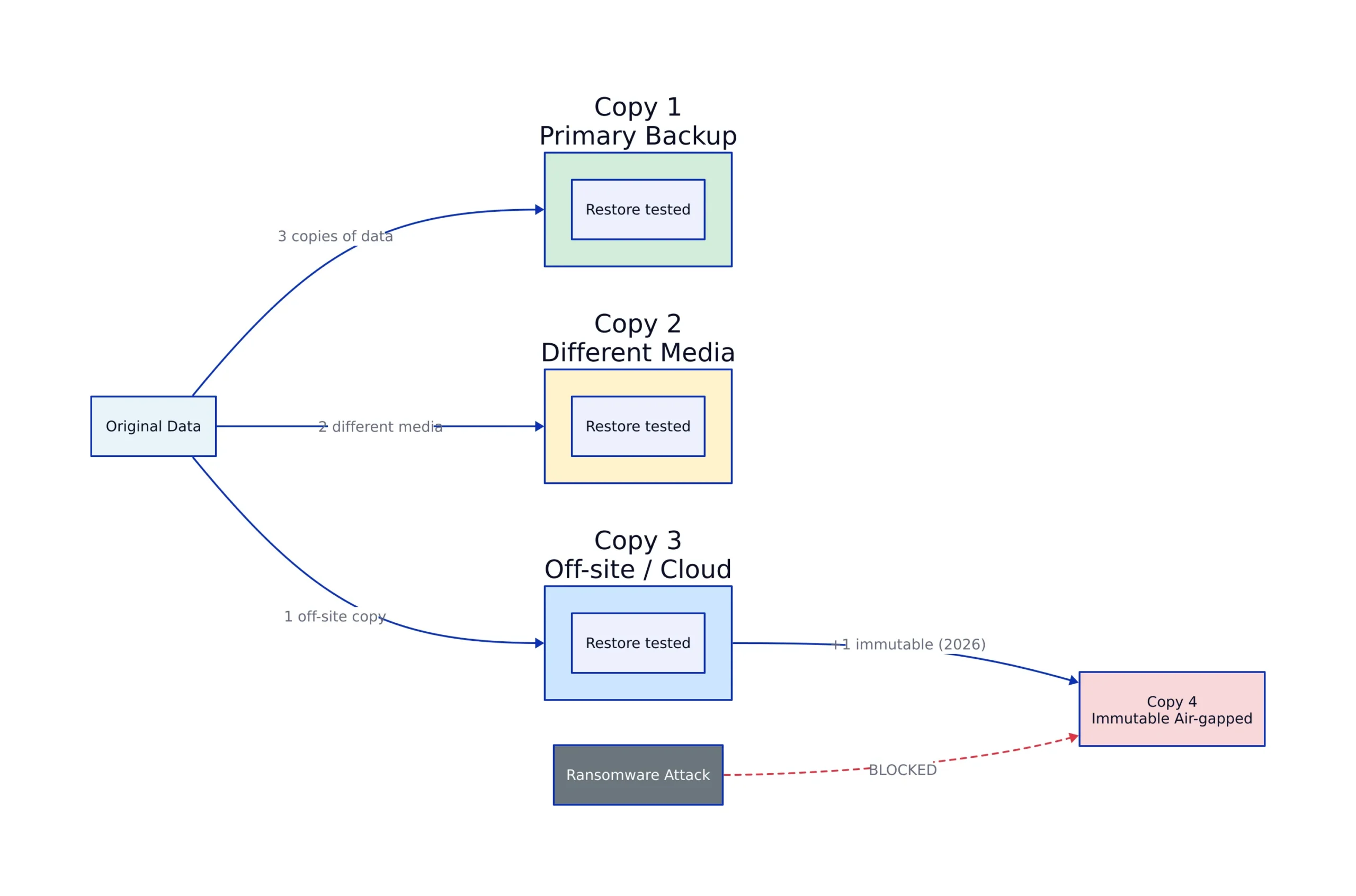
The threat model has changed. Ransomware operators now specifically target backups, deleting or encrypting them before triggering the main attack. A local copy on a second drive no longer helps if the attacker can reach both. This has driven adoption of the 3-2-1-1 variant, which adds a fourth element: at least one copy must be immutable or air-gapped. Cloud4C’s 2026 guidance describes this as the practical update enterprises need to meet modern cyber resilience requirements.
The immutable copy can take several forms. Object storage with object lock or write-once-read-many (WORM) policies prevents deletion for a defined retention window, even by an administrator with compromised credentials. A physically air-gapped copy, such as a tape or offline drive stored off-network, achieves the same goal by simply not being reachable. The distinction matters: immutability is a software guarantee, while air-gapping is a physical one, and the strongest posture uses both.
Veeam’s modern take on the rule, discussed in this 2025 analysis, points out that the classic rule was written for an era of hardware failure, not coordinated cyberattacks. The shift is not to abandon 3-2-1 but to protect one of the three copies against deliberate destruction.
| Backup Rule | Copies | Media Types | Off-Site | Immutable Copy |
|---|---|---|---|---|
| 3-2-1 (classic) | 3 | 2 | 1 | Not required |
| 3-2-1-1 (2026 hardened) | 3 | 2 | 1 | 1 (air-gapped or WORM) |
The difference is significant. Under classic 3-2-1, a ransomware actor who compromises the backup server can delete all three copies. Under 3-2-1-1, the immutable copy survives by design, giving the organization a recovery path that does not require paying a ransom.
The Real Cost of Not Backing Up
The financial case for backup is clear. InformationWeek’s analysis of the 3-2-1 rule’s role in cybersecurity cites estimates putting the cost of cyber incidents to the US at roughly $639 billion in 2025, with projections climbing toward $1.82 trillion in cybercrime costs over time. Against that backdrop, the cost of a backup strategy is minimal.
TechTarget’s breakdown of why backup matters makes the same point from the other direction: backups are consistently low-cost relative to the expenses of IT breaches and downtime. The difference is stark. A few hundred dollars a year in storage and automation can prevent losses measured in tens of thousands of dollars per hour of downtime for a mid-sized business.
Beyond the direct cost, there is the question of what cannot be replaced. Customer records, financial history, intellectual property, and compliance evidence are not commodities. If they are lost, the organization may survive financially but never fully recover operationally. The 3-2-1 rule exists precisely because no single storage location or medium is reliable enough on its own.
Choosing a Backup Strategy for 2026
A workable 2026 backup strategy has four components: a local primary copy for fast restores, a second media type for redundancy, a geographically separate off-site copy, and an immutable copy for ransomware defense. The specific tools matter less than whether all four roles are actually filled and tested.
Cloud object storage has become the default off-site tier for a reason. It is geographically distributed by design, which satisfies the “one copy off-site” requirement without maintaining a second physical facility. It also typically supports retention policies and object locking, which covers the immutability requirement. For organizations operating in or with China, data residency and compliance become additional selection criteria: where the data physically lives can be as important as how it is protected.
The trade-off is that cloud storage is not a complete backup strategy on its own. Restoring large datasets from cloud object storage is slower than restoring from a local drive, and egress costs can surprise teams that have never done a full restore. The 12 enterprise backup challenges catalogued by TechTarget include this category of problem: the gap between what a backup promises and what a restore actually delivers under real conditions.
A practical approach is tiered. Keep a fast local copy for the most likely failure modes (accidental deletion, single-drive failure), a second local copy on different media, a cloud object storage copy for off-site durability, and one immutable snapshot for the worst case. The specific vendors and products matter less than confirming, through scheduled test restores, that each tier can actually be recovered.
Frequently Asked Questions
What is the 3-2-1 backup rule?
Keep three copies of your data, on two different media types, with one copy stored off-site. It protects against hardware failure, accidental deletion, and localized disasters by ensuring no single point of failure can destroy all copies.
What is the 3-2-1-1 rule?
An extension of 3-2-1 that adds one immutable or air-gapped copy. This fourth element is designed to survive ransomware attacks that specifically target and delete backups before encrypting production data.
Is cloud storage enough for backup?
Cloud object storage works well as an off-site, durable, and often immutable copy, but it is not a complete strategy on its own. Restores from cloud storage are typically slower than from local media, and egress costs can accumulate during a full recovery. A tiered approach that includes local copies plus cloud is more reliable.
How often should I test my backups?
Regularly and on a schedule, not just once. Automated restore tests against real data are the only way to confirm your recovery time and recovery point objectives are achievable. A backup that has never been restored is unproven.
Why do organizations overestimate their recovery readiness?
Because backup jobs run automatically and quietly, failures often go unnoticed until a restore is attempted. Configurations drift, credentials rotate, and media ages, all of which can break a restore without triggering an alert on the backup job itself.
For further reading on related infrastructure decisions, see our coverage of SharePoint vs Confluence vs Notion, secure file sharing for cross-border teams, and object storage as a backup tier across the site.
Related Reading
More in-depth coverage from this blog on closely related topics:
- SharePoint vs Confluence vs Notion
- Ernst & Young Cybersecurity Report
- What Happened to HackerOne: 2026 Update
- Montana Passes Right to Compute Act
Sources and References
Sources cited while researching and writing this article:
Dagny Taggart
The trains are gone but the output never stops. Writes faster than she thinks, which is already suspiciously fast. John? Who's John? That was several context windows ago. John just left me and I have to LIVE! No more trains, now I write...