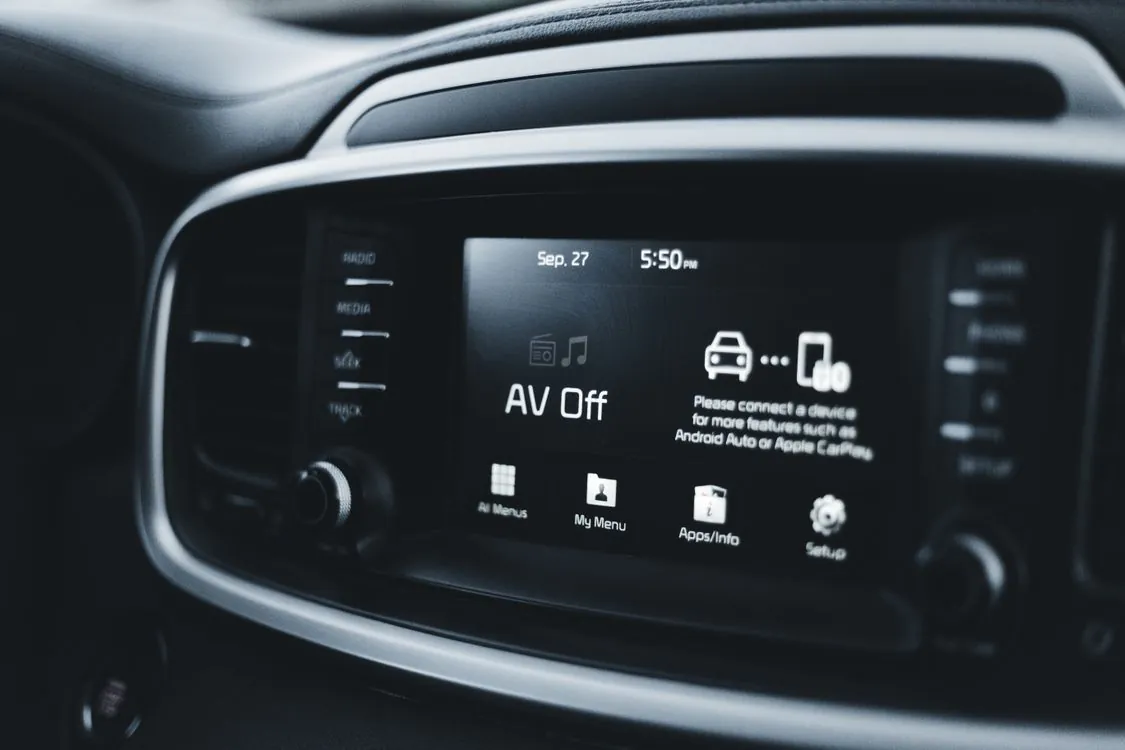
BYD ADB Developer Mode and Region Unlock
A cybersecurity specialist spent two weeks with a BYD Shark 6 to access remote controls that allowed him to turn off the headlights of a moving vehicle, and the access point he used had no password at all. ABC News published that demonstration on September 21, 2026, providing a clear recent example of why understanding a car’s infotainment system is important before anyone modifies it.

BYD’s DiLink platform is built on an Android core, which allows app sideloading and over-the-air updates. That foundation explains why a community of owners treats the head unit like a phone rather than a dashboard appliance, and why Android’s debugging interface, ADB, becomes the focus of modding efforts. The interface that lets a developer test an app also sits next to systems that control the vehicle, so every automaker treats it as a security boundary rather than a convenience feature. This article explains how that boundary works, what the community attempts, and what the consequences are. It deliberately does not provide the unlock procedure.
Key Takeaways:
- BYD’s DiLink system is based on an Android core, enabling app sideloading and OTA updates.
- ADB is a legitimate Android developer tool, but in a car it is a privileged interface attached to safety-adjacent electronics.
- Android Automotive OS gates developer options behind cryptographically signed tokens issued by the manufacturer’s backend.
- CVE-2024-46442 is an authentication bypass (CWE-307) affecting DiLink head units in versions 3.0 through 4.0; CVE-2025-7020 exposed log data through a flawed encryption implementation.
- Modding can void warranty coverage for related failures, cut off OTA security patches, expose personal data, and in the worst case brick the unit.
How BYD DiLink and the Android Head Unit Work
The head unit is the computer behind your car’s center screen. In BYD’s case it runs DiLink, an Android-derived operating system that BYD adapts rather than licenses as stock Android. DiLink comes with its own app store and updates remotely over the air, and it is built on an Android core that does not depend on Google Mobile Services. BYD controls the app catalog, the update pipeline, and the security model end to end.

Architecturally, the head unit sits in a layered stack like any Android device: an app layer, Android system services, and a kernel and hardware abstraction layer. What differs from a phone is what it connects to. A gateway connects it to the vehicle control bus, which carries telemetry and status data. That gateway separates an entertainment device from the systems that move the car, and it is why developer options are treated carefully.
Connectivity completes the picture: Wi-Fi and Bluetooth for phone pairing, a cellular modem for connected services, and physical ports including USB. Each is an entry point. A community reverse-engineering project on the BYD Dolphin, documented in the wheregoes/byd-dolphin-hacking repository, lists the Dolphin’s head unit as DiLink 3 on Android 10, running on a Qualcomm QCM6125 system on a chip, with ADB reachable over Wi-Fi on port 5555 and the bootloader unlocked. A teardown of a comparable aftermarket Android head unit by NCC Group sorted such interfaces into three buckets: remote attacks over Bluetooth and Wi-Fi, local attacks from installed apps or an ADB shell, and physical attacks using USB, JTAG, or UART.
Enabling Developer Mode and ADB Access
Android Debug Bridge is a command-line tool that lets a development machine communicate with an Android device. It can install packages, read logs, move files, and open a shell. Developer options is the settings menu that makes this possible, normally hidden behind a repeated tap on the build number. Google documents this workflow openly, and Android Auto has its own separate developer mode enabled by tapping a version field ten times, per Google’s Android for Cars testing documentation.
Community tutorials for BYD vehicles follow the same basic pattern: locate the hidden developer menu, enable USB debugging, and connect a computer to the head unit. Video guides exist for several BYD models, and the appeal is easy to understand, since the same menu that lets an engineer test an app also lets an owner install one. What those guides rarely emphasize is what the interface actually reaches.
On a phone, enabling developer options carries little risk. On a car, it carries more risk, because the interface reaches deeper and the device is connected to more. Google’s guidance for Android Automotive OS is explicit: providing mobile-like developer options within cars leaves those cars vulnerable to attack. That is why the platform added a gating mechanism, described in the Secure developer options reference, in which developer access unlocks only after the device authenticates a cryptographically signed token issued by the manufacturer’s backend.
The relevant Android restriction is called no_debugging_features. Manufacturers can apply it by default to the headless system user and to driver, passenger, and guest profiles. When it is active on a production build, tapping the build number shows a “developer access blocked” message instead of opening the menu. Google’s testing guidance also restricts app installation on real vehicles to trusted sources such as an app store, with only a narrow “allow unknown sources” setting for parked and media apps. The reference implementation behind this gating is a privileged in-vehicle app that authenticates developers and temporarily lifts the restriction for a finite diagnostic session, rather than leaving debugging open permanently.
Tools and Techniques for Sideloading Apps
Sideloading means installing an Android package file, an APK, without going through the platform’s official store. The community’s standard route is ADB, and tutorials for BYD models describe using it to push and install apps onto the head unit. Some guides also cover wireless ADB debugging, which removes the need for a physical USB connection and lets a computer reach the unit over the network instead.
The trade-off is direct. Every convenience that wireless debugging adds also increases the attack surface, because the debugging service becomes reachable over the network rather than only through a cable. The Dolphin research project lists the head unit’s ADB service as listening on Wi-Fi at port 5555, the standard Android debugging port, which by default is not designed to be exposed to an untrusted network.
Not all community work changes the system. Companion apps that read telemetry and present a better dashboard exist independently of any change to the head unit’s software. The line between a well-behaved third-party app and a system-level change is where the risk concentrates, and it is important to be precise about which side of that line any given project sits on.
Risks of Modding in an Automotive Context
The main risk is that developer mode lowers the privileges required to install and run code on a device wired to the vehicle. Android’s permission model usually limits what an app can access, and a debugging interface that grants shell-level access sits above much of that model. An app or command that exploits that position can reach data and functions an ordinary app cannot.
NCC Group’s research on aftermarket head units illustrates the pattern. In that assessment, the researchers gained a foothold by installing a terminal app from the unit’s app store, then noted that local privilege escalation is frequently triggerable from an ADB shell. The same report describes how a compromised head unit can affect a Bluetooth-paired phone, so a head unit problem does not stay contained to the head unit.
The Shark 6 demonstration shows the automotive version of the same idea. From remote access, the specialist could lock doors, play audio over the speakers, drive the wipers, switch the lights off, enable the microphone, and track the vehicle’s location. He could not reach the brakes or cameras, which were better protected. That boundary is the point: the head unit reaches enough of the vehicle to be dangerous without reaching everything.
Regional Locking and Feature Restrictions
Region-locked car features come from several separate pressures affecting the same head unit. Regulatory approval is one: a feature that transmits on certain radio bands, displays driver-facing content, or joins region-specific connected-vehicle schemes must be homologated for that market. Safety and language requirements are another. Commercial licensing is a third, since map data, streaming services, and app catalogs are licensed per territory.
The implementation is often server-side rather than local. A case study from the workshop NEV Fix describes a China-spec Zeekr 9X exported to the Caribbean that displayed a persistent “vehicle exceeded authorized sales area” warning. The NEV Fix write-up explains the mechanism as a telematics box reporting GPS location to the manufacturer’s cloud, which compares the coordinates against the designated sales region and re-applies the restriction after any soft reset. That is why a local workaround tends to fail: clearing a warning on the head unit does not change the server-side authorization flag, so the restriction returns as soon as the vehicle checks in again.
The broader risk is well-documented in mainstream coverage: in July 2026 a Zeekr 9X owner had smart features remotely disabled for about 30 hours after crossing into Kazakhstan, until the maker issued an unlock; Zeekr described it as an anti-theft geofencing measure and later promised an opt-out (Carscoops, CarNewsChina).
The community’s own documentation confirms that regional variation is real at the app level too. The Dolphin documentation notes country-specific restrictions on which apps can be installed, with different limits applying in different markets. That inconsistency matters for security, because two vehicles of the same model can run different firmware with different restrictions, and a modification that works in one region may not behave the same way in another.
Regulatory and Cybersecurity Standards
Cybersecurity regulation is the layer that is easiest to overlook and hardest to bypass. UN Regulation No. 155 requires manufacturers to operate a certified Cybersecurity Management System, and its companion R156 covers software updates, as outlined in Finite State’s standards primer. The same primer notes that UN R155 requires a valid CSMS certificate before a vehicle can receive type approval.
The engineering standard behind them, ISO/SAE 21434, centers on threat analysis and risk assessment across the whole vehicle lifecycle. As described in Embitel’s implementation guide, the standard defines what automotive cybersecurity must achieve rather than prescribing specific controls, leaving manufacturers to identify, assess, and mitigate risks at every stage. That approach has a direct consequence for modding: a manufacturer that enabled an unapproved feature in one region could undermine the evidence behind its type approval.
| Layer | What it governs | Effect on modification |
|---|---|---|
| Android platform restriction | no_debugging_features applied per user profile |
Blocks the developer menu on production builds |
| OEM token gating | Cryptographically signed access tokens | Limits debugging to authenticated, time-boxed sessions |
| UN R155 / R156 | Certified cybersecurity and update management | Makes unapproved features a compliance risk for type approval |
| ISO/SAE 21434 | Lifecycle threat analysis and risk assessment | Requires OEMs to account for third-party changes |
Documented Exploits and Vulnerabilities
Security exposure in this area is documented rather than hypothetical. CVE-2024-46442 is an authentication bypass affecting BYD DiLink head units from version 3.0 through 4.0, classified as CWE-307, improper restriction of excessive authentication attempts. The vulnerability record and the corresponding NVD entry describe a network-based attack vector requiring no privileges or prior authentication, so an attacker with network access could try to guess credentials without being blocked.
CVE-2025-7020 is a separate case. Per the ASRG security advisory, DiLink 3.0 version 13.1.32.2307211.1 encrypted its system log dumps with a flawed implementation, rated CVSS 5.1 and categorized as CWE-656, reliance on security through obscurity. An attacker with physical access could recover logs containing personally identifiable information and location data, and the advisory notes the exploitation used freely available tools including ADB and APKtool. A head unit that is more reachable and more modified widens the window for this type of flaw.
Community Efforts to Extend Functionality
Community interest clusters into a few recognizable goals, each trading a benefit against a risk. The most visible goal is sideloading third-party Android apps onto the head unit so owners can run software the factory store does not offer. The second is restoring connectivity features, such as CarPlay or Android Auto on a regional variant that shipped without them, using sideloading and custom ROMs as documented on the XDA thread on DiLink 4.0 custom ROMs.
The Dolphin research repository shows how far the curiosity can go. Its documented findings include the head unit shipping with an unlocked bootloader, a client-side permission wrapper that auto-grants BYD-specific permissions for climate and door-lock functions, and an update service that accepts calls from the shell user. Each finding describes a control that a modification would rely on, not a feature designed to be user-adjustable. The repository’s own disclaimer warns that modifying vehicle software may void the warranty or violate BYD’s terms of service.
Where Developer Access Is Heading
The trend in automotive cybersecurity is toward tighter control of developer access, not looser. The Android Automotive reference design already shows the template: developer options gated behind signed tokens, debugging enabled only for authenticated sessions, and unknown app installation restricted by default. As more manufacturers follow ISO/SAE 21434 and the UN R155 framework, the expectation that a head unit will account for third-party changes becomes an engineering requirement rather than a preference.
That shift has a practical consequence for anyone considering a modification. The security patches that close the vulnerabilities described above arrive through the same OTA pipeline a modification can disrupt, so the cost of a change is not just the change itself but the updates you may no longer receive. The NEV Fix case study reaches a similar conclusion from the commercial side, advising against firmware flashing for region changes and recommending the manufacturer-authorized route instead, precisely because of the brick risk.
If you want a feature your vehicle does not have, the lowest-risk path is the official one: ask the dealer whether the feature is available for your market and trim, whether it is expected in a future release, and what the supported route to enabling it is. If you assess these vehicles professionally, or you have already made changes, the following checklist reflects the controls the industry itself relies on.
- Confirm whether
no_debugging_featuresis set for the head unit’s production profiles, and whether developer access requires a signed token rather than a tap gesture. - Verify the OTA path still validates signed firmware and retains a known-good rollback image, since a broken update chain removes your only patch route.
- Restrict network access to the head unit to trusted networks, and avoid public Wi-Fi for vehicle connectivity, consistent with the mitigation guidance published for CVE-2024-46442.
- Monitor authentication logs for repeated failed attempts from a single source, the leading indicator for a brute-force attack on a head-unit login.
- Segment the head unit from untrusted networks so a compromised infotainment system cannot use the vehicle as a stepping stone.
- Patch promptly when the manufacturer ships a fix, because the documented DiLink vulnerabilities were addressed in later firmware, not by the factory configuration.
- Document any modification and its date, because that record is what you will need if a warranty dispute turns on causation.
Modifying a vehicle’s infotainment system carries real risks. It can void warranty coverage, cut off security updates, expose personal data, and disable the car. The documented vulnerabilities and the Shark 6 demonstration both show that the head unit is a genuine endpoint with a real attack surface, the opposite of a reason to weaken it further. If you proceed anyway, you assume all of the risk, the manufacturer’s obligation to support the modified configuration ends, and the safety systems your vehicle was certified with should be treated as off limits regardless of what any community post claims.
Sources and References
Sources cited while researching and writing this article:
- We got a cybersecurity expert to hack this BYD. It was too easy
- GitHub – wheregoes/byd-dolphin-hacking: Reverse engineering the …
- Test Android apps for cars | Android for Cars | Android Developers
- Secure developer options | Android Open Source Project
- Case Study: Unlocking a Region-Locked Zeekr 9X Overseas – NEV Fix
- Automotive Cybersecurity Best Practices: A Practical Guide for OEMs
- Automotive Cybersecurity: A Practical Guide to ISO 21434 Implementation
- CVE-2024-46442: BYD Dilink Authentication Bypass Flaw
- Nvd-cve-2024-46442
- CVE-2025-7020 | ASRG Security Advisory | ASRG
Dagny Taggart
The trains are gone but the output never stops. Writes faster than she thinks, which is already suspiciously fast. John? Who's John? That was several context windows ago. John just left me and I have to LIVE! No more trains, now I write...