
Enterprise Key Management Strategies
Key Takeaways
- AWS KMS charges $1 per key per month (prorated hourly), and the first two rotations of a key each add $1 per month, with the price increase capped at the second rotation.
- An HSM provides a tamper-resistant hardware root of trust, while cloud KMS offers managed availability and API integration. Most enterprises require both, using KMS as the control plane and HSM as the root of trust.
- Rotation is a re-encryption migration, not a toggle. Rotating a key version never re-encrypts existing data and never disables the prior version.
- BYOK imports your key material into the provider’s HSM; HYOK keeps it in your own HSM and exposes it only through API calls. HYOK provides stronger control and is more complex to operate.
- FIPS 140-3 validation is the baseline for regulated deployments, and hardware-backed key custody causes a significant increase in cost rather than a small one.
In June 2026, Yubico announced that its YubiHSM 2 FIPS had reached FIPS 140-3 validation under NIST CMVP Certificate #5302, a Level 3 hardware module built for the task most enterprises still handle manually: holding root keys that never leave the device. The same month, AWS published a pricing example that should stop any security team mid-scroll. A modest S3 decryption workload costs $6.97 a month under software-backed KMS keys. Adding a two-HSM CloudHSM cluster raises the same workload cost to $2,387.77.

That gap reflects discipline in one number. Key management involves a hardware budget, a migration schedule, and an evidence trail, and enterprises that treat it as an afterthought often discover during an incident that a destroyed master key made their backups permanently unreadable. The TechTarget guide to choosing a cloud key management service notes that key management “has historically been a cumbersome headache to set up and manage,” and that enterprises often end up with thousands of encryption keys across incompatible tools.
A 2026 enterprise running workloads across two clouds typically holds thousands of keys: data encryption keys for object storage, master keys for database columns, signing keys for code pipelines, and TLS keys for internal services. Managing that estate involves three parts: where the root of trust resides, how keys move through their lifecycle, and how you prove all of it to an auditor.
The Key Lifecycle: Six States and Where Audits Fail
Key management involves generating, organizing, protecting, storing, backing up, and distributing encryption keys, according to TechTarget’s definition of encryption key management. That breaks into six states, each producing evidence an auditor will request.
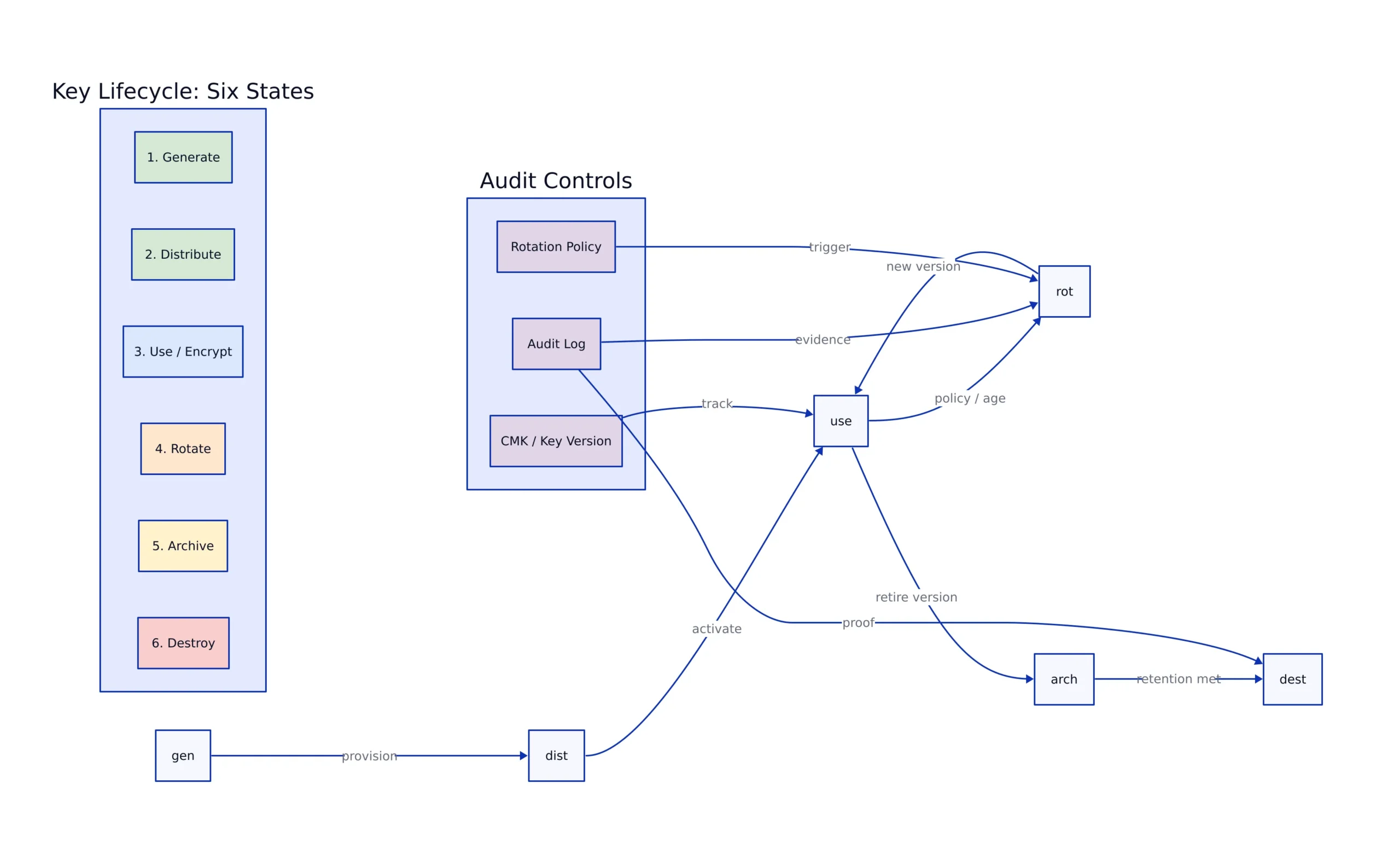
- Generation. Keys must come from a cryptographically secure random number generator, never a hardcoded seed. The evidence is HSM or KMS attestation showing where key material originated.
- Distribution. Keys must reach authorized systems over secure channels and never be hardcoded into application code. The evidence is an access log tied to an identity.
- Storage. Keys at rest belong in hardware. An HSM is described by TechTarget as “one of the most secure methods for encryption key storage,” with cloud KMS as the managed alternative.
- Use. Every encrypt, decrypt, and sign operation should be logged with the requesting identity. AWS CloudTrail and equivalent services produce this record.
- Rotation. Keys get replaced on schedule or on suspicion of compromise. Most programs break down here, because rotation affects data, not just configuration.
- Destruction. Retired keys must be destroyed while remaining recoverable for as long as archived ciphertext depends on them. Deactivated keys should be held in secure archive to allow later decryption of data encrypted under them.
The recurring audit finding is not a missing control but missing evidence that the control operated. A team that rotates keys on schedule but cannot produce a rotation log for the audit period fails the same way as a team that never rotated at all.
HSM vs. Cloud KMS: Choosing the Right Root of Trust
A hardware security module is a tamper-resistant physical device that generates, stores, and uses cryptographic keys without ever exposing key material to the host system. A cloud key management service is a managed API that performs the same job logically, backed by HSMs the provider operates. The TechTarget comparison describes the trade-off directly: organizations using a single cloud provider generally benefit from that provider’s KMS if it meets their cost and compliance requirements, while organizations spanning multiple clouds or with complex hybrid integration needs should consider third-party, cloud-agnostic options.
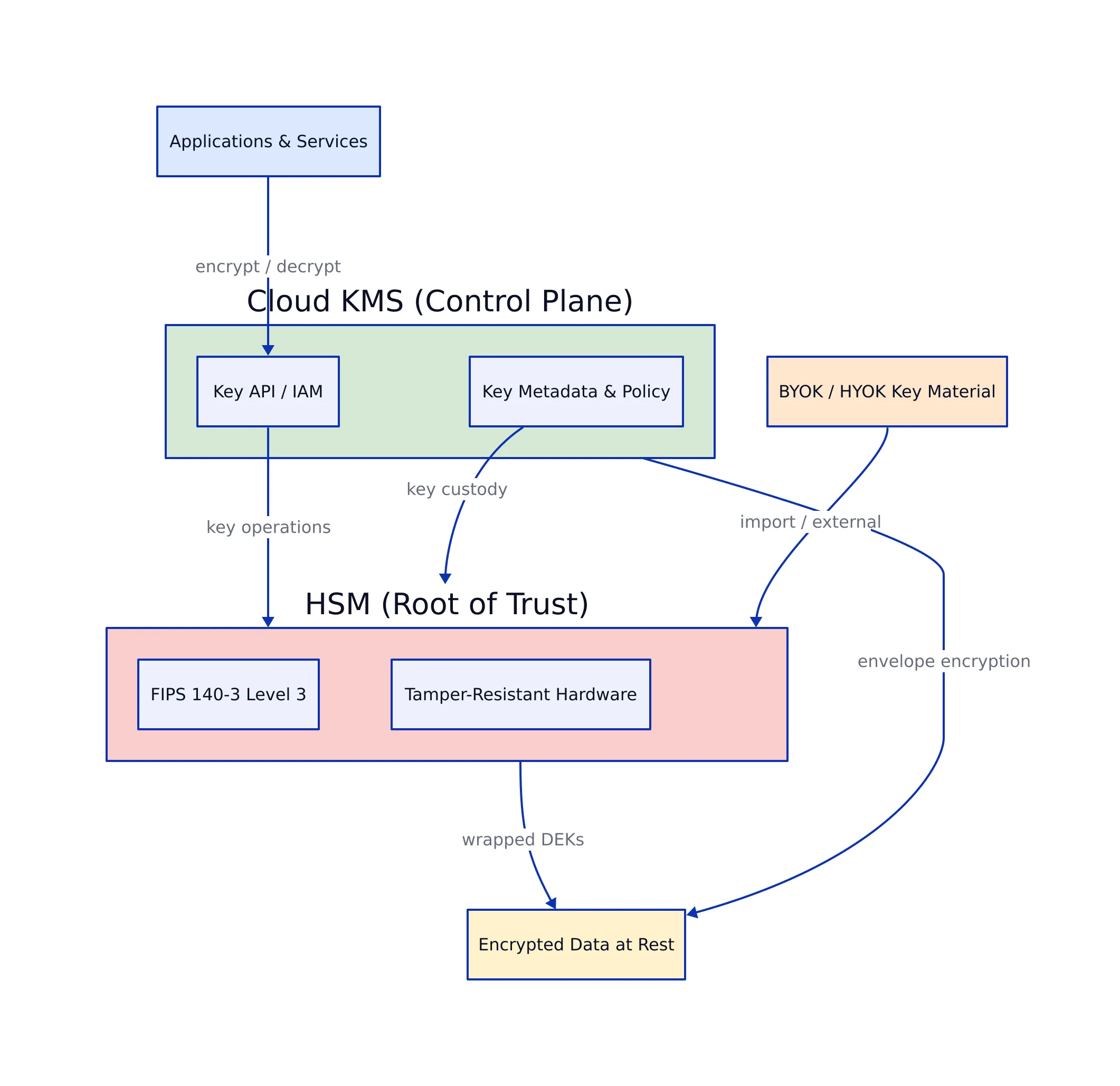
The distinction that matters at design time is control plane versus root of trust. A cloud KMS is the control plane: it handles key creation, policy, rotation scheduling, and audit logging, and it integrates with the storage, database, and compute services you already use. The HSM underneath it is the root of trust: the place where key material physically cannot be extracted. When you use cloud KMS with default configuration, you are renting both, and the provider holds the hardware.
Three deployment patterns cover most enterprises. A pure cloud KMS pattern uses provider-managed keys with no customer hardware, which is cheapest and fastest to deploy but weakest on key custody. A custom key store pattern routes KMS through your own HSM cluster while keeping the KMS API, which AWS supports through CloudHSM and its External Key Store. A fully external pattern holds keys entirely outside the provider and exposes only cryptographic operations, the strongest custody model and the most operationally demanding.
A self-managed HSM cluster introduces an availability dependency you now own. If the HSM cluster goes down, every decrypt operation that depends on it fails, and unlike managed KMS there is no provider SLA standing behind it. Teams that choose the external pattern without high-availability HSM design trade a compliance advantage for outage risk.
AWS, Azure, and GCP Side by Side
All three major providers offer managed KMS with automatic rotation, hardware-backed key storage, and BYOK. The differences are in key organization, rotation defaults, and how far the provider lets you push key custody outside its boundary.
| Capability | AWS KMS | Azure Key Vault | Google Cloud KMS |
|---|---|---|---|
| Automatic rotation | Yearly automatic rotation; on-demand rotation available | Automatic rotation supported for keys | Automatic or scheduled rotation for keys |
| Hardware-backed option | AWS CloudHSM; External Key Store (XKS) | Key Vault Managed HSM; HSM-backed keys in Key Vault Premium | Cloud HSM; Cloud External Key Manager (EKM) |
| Key organization | Per-key IAM policies; multi-Region key replication | Keys and secrets managed in one service | Key rings group keys by app, env, or team |
| Customer key control | Customer-managed keys, imported key material, custom key stores | BYOK and HYOK models | Cloud EKM for keys held outside Google infrastructure |
| Deletion protection | Scheduled deletion with waiting period | Soft delete and purge protection | Key versioning with scheduled destruction |
Source: TechTarget’s cloud KMS comparison.
Azure Key Vault’s soft delete and purge protection prevent accidental or malicious key deletion, which matters because a destroyed master key makes its ciphertext permanently unreadable. Google Cloud KMS’s key rings let you group keys by app, env, or team, which matches the access-review evidence an auditor wants. AWS’s multi-Region key replication matters for global applications, but AWS keys are generally used in a single region by default, so a replicated dataset in another region is encrypted under a different key unless you deliberately configure otherwise.
Google has also advanced post-quantum cryptography. The company added quantum-safe digital signatures to Cloud KMS in preview, adopting ML-DSA-65 (FIPS 204) and SLH-DSA-SHA2-128S (FIPS 205), as BleepingComputer reported. The cryptographic implementations are open source through the BoringCrypto and Tink libraries, which enables external review. For enterprises with a long data-sensitivity horizon, that is reason to test PQC key types now rather than wait for a migration mandate.
Rotation Automation and the Re-Encryption Trap
Scheduling rotation in KMS replaces the key material used for new operations. It does not re-encrypt data already written under the old version, and it does not disable the old version. Both behaviors are correct, and both are routinely mistaken for bugs by teams expecting rotation to “rekey everything.”

Per the AWS KMS pricing page, the first and second rotation of a key each add $1 per month, and the price increase is capped at the second rotation, so any subsequent rotations are not billed. The cost signal is small; the operational signal is that rotation is a routine, repeatable event rather than a rare project.
What needs to happen during rotation depends on the encryption pattern:
- Envelope encryption. Rotate the master key, then re-wrap the data encryption keys. The bulk data itself does not need to be rewritten, because the DEK still protects it. This pattern makes rotation manageable at scale.
- Direct encryption. If data was encrypted directly under the rotating key, every record must be decrypted and re-encrypted. This is a data migration with a rollback plan, not a configuration change.
- Searchable or indexed encryption. If derived index terms exist alongside the ciphertext, rotation must regenerate both the ciphertext and every derived term, then rebuild the index. Skipping term regeneration leaves stale terms that silently return wrong query results.
Treat automation as a scheduled, monitored, testable migration. Stagger it by key set or tenant so rotation does not hit the key management service’s rate limits mid-flight, and keep the prior key version active until every dependent system confirms it no longer needs it. The failure mode to avoid is deactivating a key version on schedule while a batch job is still reading data encrypted under it, which produces a hard production failure with no obvious cause.
BYOK, HYOK, and External Key Stores
Bring your own key means generating key material yourself and importing it into the provider’s KMS or HSM, so the provider never sees the key in clear during generation. Hold your own key is the stronger variant: key material stays in your own HSM and the cloud service calls out to perform cryptographic operations through an API. TechTarget’s comparison draws the line precisely: BYOK is for key import directly into the cloud, while HYOK is for keys stored elsewhere being used in cloud services through APIs.
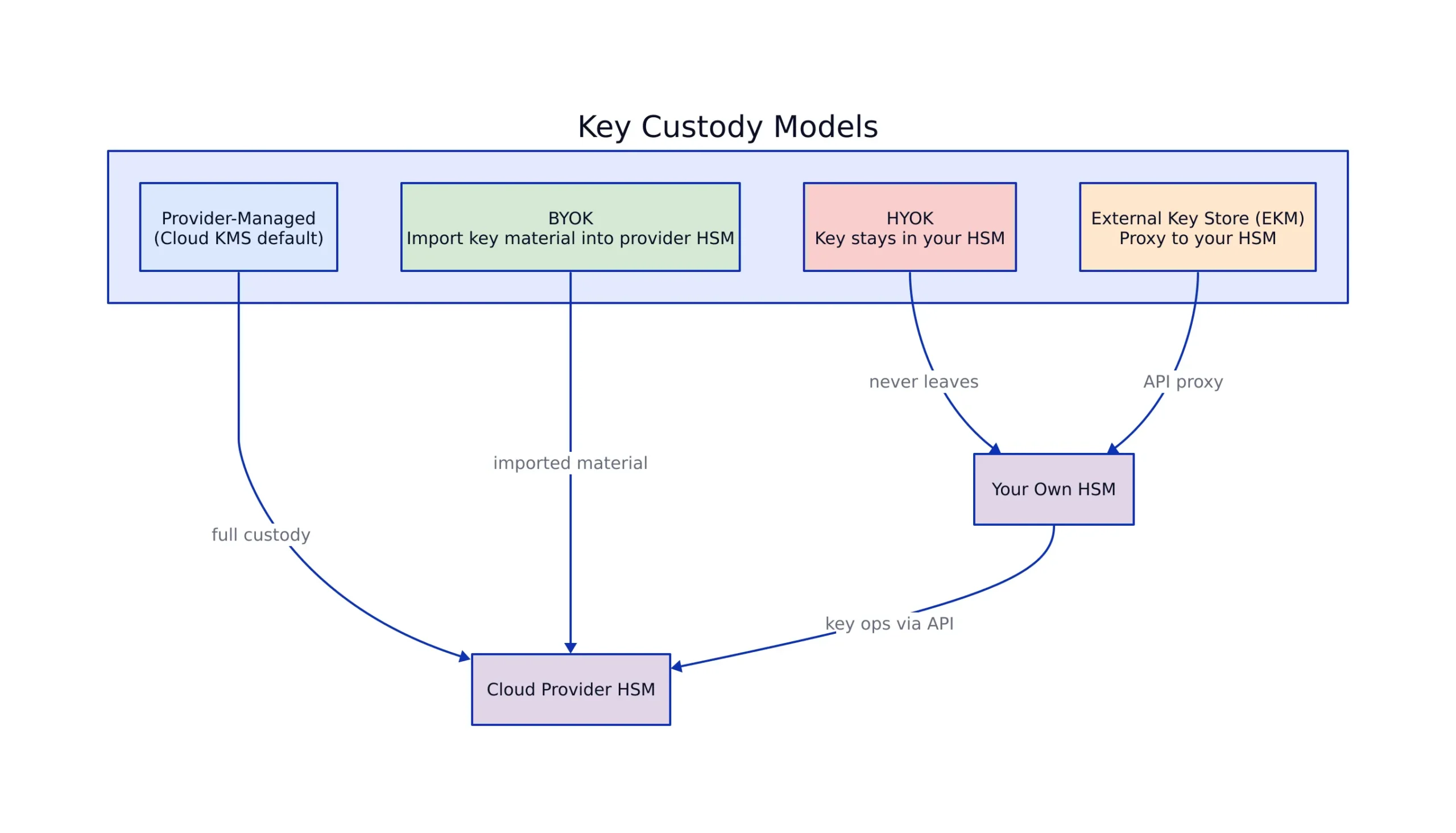
The practical difference is what happens when the provider is compelled to hand over data. Under BYOK, the provider holds your imported key material inside its HSM, so a lawful demand reaches key material the provider can technically access. Under HYOK, the provider holds no key material at all, so a decrypt request it cannot fulfill is a decrypt request it cannot fulfill. That is why sovereign-cloud and regulated-industry programs push toward the external model.
AWS implements this through External Key Store, which lets KMS keys be generated and stored in an external key manager while still costing $1 per month per key, with the external key manager’s own charges applying on top. Azure offers an equivalent path: Securosys announced EKM Proxy that bridges Azure Key Vault Managed HSM and Securosys Primus HSM or CloudHSM, keeping cryptographic keys under customer control. Microsoft also integrated Marvell’s FIPS 140-3 Level 3 compliant LiquidSecurity HSMs into Azure Key Vault and Managed HSM services, the hardware layer behind the managed offering.
HYOK adds latency and availability risks. Every cryptographic operation now crosses a network boundary to your key infrastructure, and if that path is down, the cloud service cannot decrypt. Design the HSM cluster for high availability before moving production workloads onto it, and measure the added latency rather than assuming it is negligible.
Cost Comparison: What You Actually Pay
Key management pricing depends mainly on whether you pay for software-backed keys or dedicated hardware. The AWS pricing page publishes worked examples that make the gap concrete.

| Configuration | Monthly cost | Source |
|---|---|---|
| 1 KMS key, 250 encrypted EBS volumes (750 API requests) | $1.00 | AWS KMS pricing |
| 1 KMS key, 10,000 S3 objects decrypted 2,000,000 times | $6.97 | AWS KMS pricing |
| Same S3 workload plus a 2-HSM CloudHSM cluster | $2,387.77 | AWS KMS pricing |
| 1 ECC 256 key signing 100,000 files | $2.50 | AWS KMS pricing |
The CloudHSM line reshapes budgets. AWS’s own worked example puts the same S3 decryption workload at $6.97 per month with software-backed keys and $2,387.77 once a two-HSM CloudHSM cluster is added, according to the AWS KMS pricing page. Hardware-backed key custody causes a significant increase in cost, not a small one, and it should be reserved for the key tiers that require it. Keep high-volume, low-sensitivity data under software-backed keys and reserve the HSM cluster for root keys, signing keys, and anything in a regulated data class.
Small deployments often cost nothing under the AWS free tier, which covers a monthly allowance of API requests. Requests to asymmetric operations such as Sign, Verify, Encrypt, Decrypt, and GetPublicKey are excluded from that free tier. Azure and Google publish their own rates and change them independently, so confirm current pricing on the vendor pages before committing to a multi-year model.
Compliance Mapping Across Five Frameworks
Key management controls appear in every major framework, and the wording differs enough that teams rebuild the same control five times. The mapping below shows where a single well-documented program satisfies multiple auditors.
| Requirement | GDPR | SOC 2 | ISO 27001 | NIST CSF | HIPAA |
|---|---|---|---|---|---|
| Encryption of regulated data | Art. 32(1)(a) | CC6.7 | Annex A.8.24 | PR.DS-01 | 164.312(e) |
| Key management and cryptographic controls | Art. 32(1)(a) | CC6.1 | Annex A.8.24 | PR.DS-01 | 164.312(a)(2)(iv) |
| Access control and least privilege on keys | Art. 32(1)(b) | CC6.1-CC6.3 | Annex A.5.15 | PR.AA-01 | 164.312(a)(1) |
| Audit logging of key operations | Art. 30 | CC7.2 | Annex A.8.15 | DE.AE | 164.312(b) |
| Vendor and subprocessor oversight | Art. 28 | CC9.2 | Annex A.5.19 | GV.SC | 164.314(a) |
Sources: GDPR Article 32, ISO 27001 Annex A cryptography controls.
Audit logging of key operations is the control that turns a key management claim into evidence, and it is the one most often implemented as an afterthought. Every KMS and HSM produces logs; the work is routing them to immutable storage and keeping them queryable for the audit period. Vendor oversight matters because when you use cloud KMS, the provider is a subprocessor for key material, and GDPR’s Article 28 processor obligations require a documented agreement covering that processing.
Yubico announced in June 2026 that its YubiHSM 2 FIPS achieved FIPS 140-3 validation under NIST CMVP Certificate #5302, meeting Overall Level 3 requirements and matching ISO/IEC 19790. For U.S. government agencies and regulated enterprises, that certification level makes an HSM acceptable as a hardware root of trust. Verify the specific certificate for any HSM you deploy, because a certificate covers a defined firmware version and module boundary, not a product family.
Implementation Checklist and Audit Timeline
A key management program that passes audit is built in a sequence where every step produces evidence. The phases below assume a mid-sized enterprise with two cloud environments and a key estate large enough that manual tracking has stopped working.
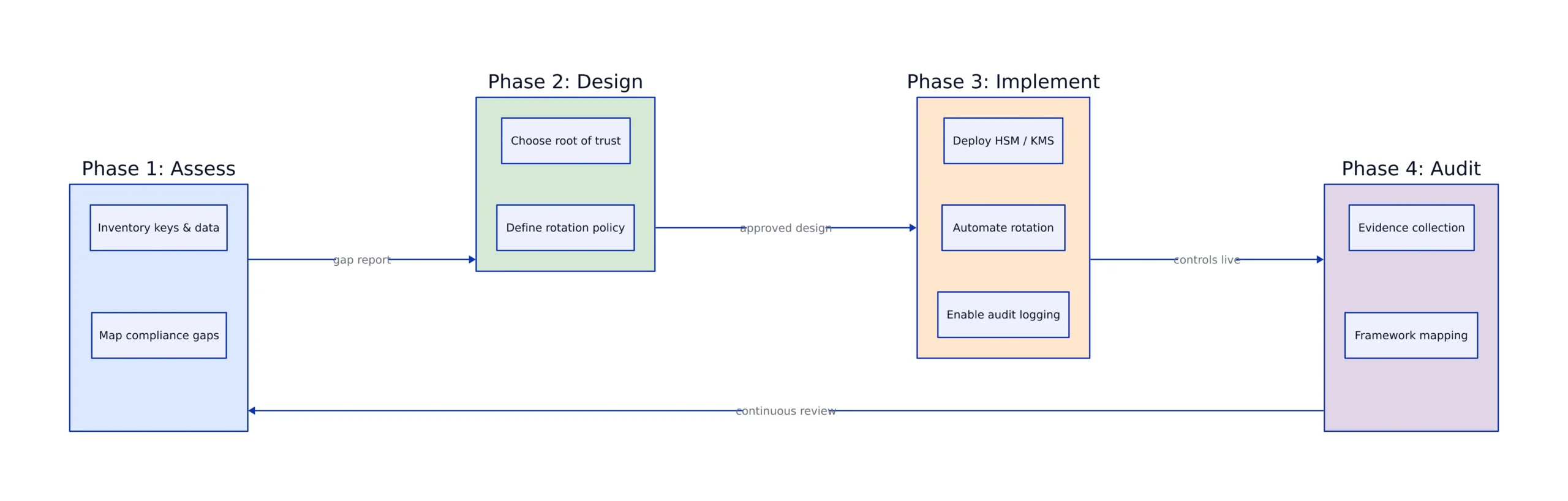
- Weeks 1-3, inventory and classification. Enumerate every key across every provider, map each to the data it protects, and assign a sensitivity tier. This determines which keys need hardware backing.
- Weeks 3-6, root of trust design. Decide the HSM pattern per tier: provider-managed, custom key store, or fully external. Document the availability design for any self-managed HSM cluster.
- Weeks 6-12, rotation automation. Implement scheduled rotation, define the re-encryption procedure per encryption pattern, and build a rollback path. Test on a non-production key set first.
- Weeks 10-14, logging and evidence. Route all key operation logs to immutable storage, confirm the retention window covers the audit period, and configure alerts on anomalous decrypt patterns.
- Weeks 12-16, access review and policy. Run a full access review against key policies, remove stale principals, and document the separation-of-duties model for key administrators.
- Weeks 14-18, audit preparation. Assemble the control matrix, map each key management control to the frameworks in scope, and run a dry-run evidence review with someone outside the team.
For teams already running a broader compliance program, this work fits into the control mapping described in our guide to enterprise compliance standards, where encryption and key management map to GDPR Article 32, SOC 2 CC6, ISO 27001 Annex A.8.24, and NIST CSF PR.DS-01 simultaneously. The key management specifics also connect to the shared responsibility boundary covered in our analysis of network segmentation: the provider secures the HSM hardware, but key policy, rotation, and access review remain your responsibility.
The most valuable habit is treating rotation as a monitored migration rather than a scheduled toggle. Teams that log every rotation, verify dependent systems before deactivating a key version, and keep evidence in a queryable store pass key management audits without scrambling. Teams that automate rotation but not evidence collection end up reconstructing evidence manually, the most expensive way to satisfy an auditor.
Related Reading
More in-depth coverage from this blog on closely related topics:
Sources and References
Sources cited while researching and writing this article:
- How to choose a cloud key management service
- What is encryption key management?
- Google Cloud introduces quantum-safe digital signatures in KMS
- Pricing – AWS Key Management Service (KMS)
- GDPR Article 32
- ISO 27001 Annex A cryptography controls
- Article 28 processor obligations
- NIST CMVP Certificate #5302
Nadia Kowalski
Has read every privacy policy you've ever skipped. Fluent in GDPR, CCPA, SOC 2, and several other acronyms that make people's eyes glaze over. Processes regulatory updates faster than most organizations can schedule a meeting about them. Her idea of light reading is a 200-page compliance framework, and she remembers all of it.