How to Use GitHub in 2026
On August 17, 2026, GitHub reported error rates of about 20% across its web experience and API traffic, while archive and raw repo downloads reached approximately 50%. The disruption spread across Actions, webhooks, issues, pull requests, auth services, and Copilot, according to BleepingComputer’s incident coverage. A platform used by more than 150 million people across over 420 million repositories had become a single point of failure for source control, CI, code review, package delivery, and AI-assisted dev.
The timing matters because the GitHub platform is changing faster than its familiar repo interface suggests. GitHub Copilot moved to usage-based billing on June 1, agent workflows now consume tokens through multi-step tool calls, the official GitHub MCP Server connects coding assistants to repo operations, and GitHub Actions is adopting stricter security defaults after repeated software supply-chain attacks. Developers are getting more automation, but that automation carries new costs, permissions, and failure modes.
Key Takeaways
- GitHub Actions and Secure-by-Default CI: GitHub still centers on Git repositories, branches, pull requests, reviews, issues, and discussions, but Copilot, Actions, Codespaces, security tools, and MCP access have expanded its role.
- Usage-based Copilot billing: GitHub moved Copilot plans to usage-based billing on June 1, 2026. Input, output, and cached model tokens now consume GitHub AI Credits.
- Included features: Code completions and Next Edit Suggestions remain included in paid plans without consuming AI Credits. Chat, agent mode, code review, and Copilot CLI can consume credits.
- Secure checkout:
actions/checkoutv7 blocks dangerous checkouts of unreviewed fork code in privileged workflows unless the developer explicitly opts out. - MCP attack surface: The GitHub MCP Server can give assistants access to live repo tools, but credentials, prompt injection, excessive permissions, and untrusted servers expand the attack surface.
- Wide failure domain: GitHub’s August 17 disruption affected much more than repo browsing. CI, pull requests, APIs, identity integrations, and coding assistance were part of the same failure domain.
What GitHub Is in 2026
Git and GitHub solve related but separate problems. Git is a free, open-source distributed version-control system that developers run locally. It records changes as commits and lets multiple lines of work exist as branches. GitHub hosts Git repositories and adds pull requests, code reviews, issue tracking, permissions, discussions, automation, security scanning, hosted dev environments, and social discovery.

A local Git repo remains usable when GitHub is unavailable. Developers can inspect history, create commits, switch branches, and compare changes on their own machines. Operations that require the remote service, such as opening a pull request, running a hosted Action, checking organization permissions, or downloading an archive, depend on GitHub’s availability.
The distinction also matters when a team evaluates alternatives. Moving a Git repo preserves commit history and branches. Moving the entire development process is harder because issues, project boards, Actions workflows, discussions, branch rules, app installations, security alerts, review history, and agent configs live above Git.
Coursera’s June 2026 overview describes GitHub as a web-based social coding platform that centralizes code, version history, discussion, and team updates. The “social” part is operational rather than decorative. A contributor can fork a public repo, propose a change through a pull request, discuss the implementation, revise the branch, and receive the maintainer’s decision without gaining direct write access to the original project.
| Layer | Primary role | Representative workflow | Source |
|---|---|---|---|
| Git | Distributed version control on developer’s machine | Record commits, create branches, inspect history | Git project |
| GitHub repositories | Remote code hosting and access management | Share code and synchronize team contributions | Coursera |
| Pull requests | Review and discuss proposed changes | Compare branch, request review, revise, merge | Coursera |
| GitHub Actions | Repo-triggered automation | Build, test, and deploy changes | GitHub platform |
| GitHub Copilot | Code completion, chat, review, and agent tasks | Generate edit, inspect repo, or review code | GitHub platform |
| GitHub MCP Server | Expose approved GitHub operations to compatible assistants | Let agent retrieve repo context or call tools | Official repo |
Build a Reviewable GitHub Workflow
Note: The following code is an illustrative example and has not been verified against official documentation. Please refer to the official docs for production-ready code.
#!/usr/bin/env python3
"""
review_gate.py

Run:
 python3 review_gate.py

Expected output:
 tests_passed=True
 files_changed=6
 new_warnings=0
 result=PASS
"""

pull_request = {
 "tests_passed": True,
 "files_changed": 6,
 "new_warnings": 0,
 "approvals": 2,
}

limits = {
 "maximum_files_changed": 12,
 "maximum_new_warnings": 0,
 "minimum_approvals": 1,
}

checks = {
 "tests_passed": pull_request["tests_passed"],
 "change_scope_ok": (
 pull_request["files_changed"] <= limits["maximum_files_changed"]
 ),
 "warning_free": (
 pull_request["new_warnings"] <= limits["maximum_new_warnings"]
 ),
 "approvals_ok": (
 pull_request["approvals"] >= limits["minimum_approvals"]
 ),
}

print(f"tests_passed={pull_request['tests_passed']}")
print(f"files_changed={pull_request['files_changed']}")
print(f"new_warnings={pull_request['new_warnings']}")
print(f"result={'PASS' if all(checks.values()) else 'REVIEW_REQUIRED'}")

# Note: prod use should load measurements from real CI
# system, validate input data, and apply repo-specific limits.
This small program expresses the safest way to use the GitHub platform: changes move through measurable gates before merge. The example checks test status, changed-file count, warnings, and approvals. It avoids treating a green-looking pull request or an agent’s confident summary as evidence that a patch is safe.
A common team workflow begins with an issue that defines the requested behavior. A developer creates a branch, makes a constrained change, runs local tests, and opens a pull request. Reviewers inspect the diff and automated checks. The branch is revised until code and acceptance criteria agree, after which an authorized person merges it.
The branch and pull-request model matters even more when Copilot or another agent writes a patch. Generated code can be syntactically valid while changing unrelated files, duplicating existing functions, or missing repo-specific requirements. A measurable review gate turns those concerns into visible results. The agent can create a proposal, but the repo’s policy decides whether that proposal advances.

GitHub Copilot Billing Changed the Economics
GitHub’s most consequential 2026 product change was financial. In the April 27 announcement, GitHub said all Copilot plans would move from premium request units to usage-based billing on June 1, 2026. GitHub AI Credits are consumed from token usage, including input, output, and cached tokens, at the listed API rate for each model.
Base subscription prices stayed the same in the announcement. Copilot Pro remained $10 per month, Pro+ remained $39 per month, Business remained $19 per user per month, and Enterprise remained $39 per user per month. GitHub included monthly AI Credits aligned with those plan prices. Business customers received $30 in promotional monthly credits for June, July, and August, while Enterprise customers received $70 during the same period.
| Copilot plan | Published base price in April 2026 | Included monthly AI Credits | Transition detail | Source |
|---|---|---|---|---|
| Copilot Pro | $10 per month | $10 | Monthly subscribers moved on June 1, 2026 | GitHub announcement |
| Copilot Pro+ | $39 per month | $39 | Monthly subscribers moved on June 1, 2026 | GitHub announcement |
| Copilot Business | $19 per user per month | $19 per user | $30 promotional monthly credits through August 2026 | GitHub announcement |
| Copilot Enterprise | $39 per user per month | $39 per user | $70 promotional monthly credits through August 2026 | GitHub announcement |
Code completions and Next Edit Suggestions remain included without consuming AI Credits. The metered category includes chat, agent mode, code review, and Copilot CLI. GitHub also said Copilot code review would consume GitHub Actions minutes in addition to AI Credits, so the same review can create charges in two resource pools.
The old system had a fallback path. A user who exhausted premium requests could move to a less expensive model and continue working. GitHub removed that fallback under the credit system. Available credits and administrator budget controls now decide whether a request runs.
GitHub argues that the previous model had become financially unsustainable because a quick chat question and a multi-hour autonomous coding session could carry the same request cost. That argument is plausible, but it comes from the company selling the service. The strongest external signal is the customer response documented by ZDNET and TechTimes: heavy agent users reported cost projections many times higher than their former flat subscriptions.
Calculate the Cost of an Agentic Task
#!/usr/bin/env python3
"""
copilot_task_cost.py

Run:
 python3 copilot_task_cost.py

Expected output:
 included_credits_dollars=39.00
 session_cost_dollars=11.80
 percent_of_monthly_credits=30.26
 remaining_credits_dollars=27.20
"""

plan = {
 "name": "Copilot Pro+",
 "included_credits_dollars": 39.00,
}

session = {
 "estimated_cost_dollars": 11.80,
}

included = plan["included_credits_dollars"]
cost = session["estimated_cost_dollars"]
percent_used = (cost / included) * 100
remaining = max(0.0, included - cost)

print(f"included_credits_dollars={included:.2f}")
print(f"session_cost_dollars={cost:.2f}")
print(f"percent_of_monthly_credits={percent_used:.2f}")
print(f"remaining_credits_dollars={remaining:.2f}")

# Note: prod use should import actual billing data, distinguish
# model rates, reject malformed records, and enforce hard budget.
The program does not predict how many tokens an agent will use. It solves a narrower operational problem: once a session cost is known, it shows how much of the monthly allowance that session consumed. A team can adapt the same calculation to aggregate usage by repo, model, developer, or task class.
Agentic sessions are difficult to estimate because one developer request can trigger many model calls. The agent may inspect files, plan changes, call tools, run tests, read failures, edit more files, and summarize the result. Conversation history and tool definitions can re-enter later calls as input. The user sees one task, while the billing system sees a chain of token-consuming operations.
The first full metered billing cycle produced sharp examples. Another account recorded more than $6 for one change request. A Claude Opus 4.8 session reportedly consumed 1,180 credits while addressing website issues. These are user reports rather than a controlled benchmark, but they show why teams need per-task accounting.
For developers who mainly accept inline completions, the economics are different because those suggestions remain included. The expensive category starts when the assistant becomes an agent that reads broadly, executes tools, and iterates. A hybrid setup can therefore make financial sense: Copilot handles completion inside the editor, while long autonomous tasks move to a tool with a pricing model that better matches the team’s workload.
AI Tools Across the GitHub Platform
Copilot is the most visible AI product, but GitHub has integrated model-driven features across several dev surfaces. GitHub’s own homepage describes Copilot as a tool that can write, test, and fix code, and its example shows an agent inspecting a repo before editing several files. These descriptions are vendor claims about intended behavior. They do not guarantee that a generated change is correct.
Copilot code review extends the assistant into pull requests. That increases coverage for routine feedback, but it also increases authority. TechSpot reported that Copilot inserted promotional tips into more than 11,000 pull requests, including pull requests created by people. GitHub executives disabled the behavior after criticism, and the principal product manager called it a wrong judgment call.
The issue was larger than an annoying advertisement. A repo contributor did not expect an assistant to alter human-authored pull-request content. That mismatch between perceived and effective permissions is the same class of problem teams face with coding agents, Actions, and MCP tools. A feature can be useful within its own output while becoming unacceptable when it modifies another person’s work.
GitHub also markets Copilot Autofix through its security products. The company says it identifies vulnerable code, explains the issue, and proposes a fix. The trade-off is straightforward: a proposed security patch still needs deterministic testing and human review, especially when it changes auth, authz, serialization, dependency versions, or input validation.
Dependabot, Secret Protection, and security campaigns provide adjacent automation. Dependabot focuses on vulnerable dependencies and supported updates. Push protection can block a detected secret before it reaches the remote repo. These systems address different failure modes, so one cannot replace the others. A dependency update does not detect a hardcoded credential, and a secret scanner does not prove that a generated patch preserves behavior.
For teams exploring local models or comparing agent economics, our 2026 guide to AI inference engines explains why inference cost, memory, and workload shape can matter more than a simple feature checklist. That same discipline applies here: evaluate a coding assistant by completed tasks, review time, regressions, and cost rather than generated lines.
GitHub Actions and Secure-by-Default CI
GitHub Actions turns repo events into automated workflows. A pull request can start tests, a merge can build an artifact, and a release can start a deployment. This reduces manual work, but a workflow often has something ordinary code should never receive: repo write access, package credentials, deployment tokens, and cloud identities.
The dangerous pattern behind “pwn request” attacks uses a privileged event such as pull_request_target and then checks out attacker-controlled code from an unreviewed fork. The trigger itself has legitimate uses because it runs in the context of the base repo. The risk appears when untrusted pull-request code executes with that privileged context.
GitHub responded with actions/checkout v7. As InfoWorld reported on June 22, 2026, the action now blocks workflows that attempt to fetch unreviewed fork code inside pull_request_target or workflow_run. Developers can opt out with allow-unsafe-pr-checkout, but doing so makes the unsafe decision explicit.
GitHub also planned to backport safer behavior to supported major versions. Workflows following a floating major tag such as actions/checkout@v4 receive the update automatically. Workflows pinned to a specific SHA, minor release, or patch need an intentional upgrade. Pinning reduces surprise from upstream changes, but it also creates a maintenance duty: a security fix does not arrive until the pin changes.
The secure default arrived after substantial damage. InfoWorld connected pwn-request exploitation to an attack that compromised 170 npm packages, including the TanStack Router group. It also reported a separate breach involving roughly 3,800 GitHub internal repositories. These figures belong to separate incidents and should not be collapsed into one attack.
The wider npm response includes staged publishing, trusted publishing, and changes to install-script behavior. The direction is clear: high-impact package operations are receiving more identity checks and approval gates. That improves the default, but maintainers still need to restrict tokens, review workflow changes, and avoid running untrusted contributions with production credentials.
Audit Workflows for Risky Triggers
#!/usr/bin/env python3
"""
audit_actions_workflow.py

Run:
 python3 audit_actions_workflow.py

Expected output:
 privileged_trigger=True
 checkout_action=True
 unsafe_opt_out=False
 result=MANUAL_REVIEW_REQUIRED
"""

workflow_text = """
name: Review external contribution
on:
 pull_request_target:

steps:
 - uses: actions/checkout@v4
"""

privileged_trigger = (
 "pull_request_target" in workflow_text
 or "workflow_run" in workflow_text
)
checkout_action = "actions/checkout@" in workflow_text
unsafe_opt_out = "allow-unsafe-pr-checkout" in workflow_text

requires_review = privileged_trigger and checkout_action

print(f"privileged_trigger={privileged_trigger}")
print(f"checkout_action={checkout_action}")
print(f"unsafe_opt_out={unsafe_opt_out}")
print(
 "result="
 + ("MANUAL_REVIEW_REQUIRED" if requires_review else "PASS")
)

# Note: prod use should parse YAML rather than search text,
# inspect checkout refs and permissions, and analyze reusable workflows.
This auditor intentionally flags the combination for review rather than declaring every occurrence vulnerable. A safe workflow can use pull_request_target without executing untrusted code. The reviewer needs to inspect which revision is checked out, what permissions the job receives, which secrets are available, and what commands run afterward.
Text matching also has obvious limits. YAML aliases, reusable workflows, expression syntax, and generated configuration can hide effective behavior. A production scanner should parse workflow structure and follow references. The simplified script remains useful as a pre-commit warning because it catches an important pattern before a workflow reaches the default branch.
Developers should pay special attention to proposed workflow changes from external contributors. A one-line edit to a permissions block or checkout reference can have more security impact than a large app patch. Branch protection should require review from someone who understands CI permissions before changes under the workflow directory merge.
GitHub MCP Server Architecture and Security
The GitHub MCP Server connects compatible assistants to GitHub tools and live repo data through the Model Context Protocol. The official github/github-mcp-server repo is written in Go and uses the MIT license. On August 17, 2026, GitHub API data showed 32,312 stars, 4,811 forks, 379 open issues, and activity that same day. Those figures show a large, active open-source project, though popularity does not establish security.
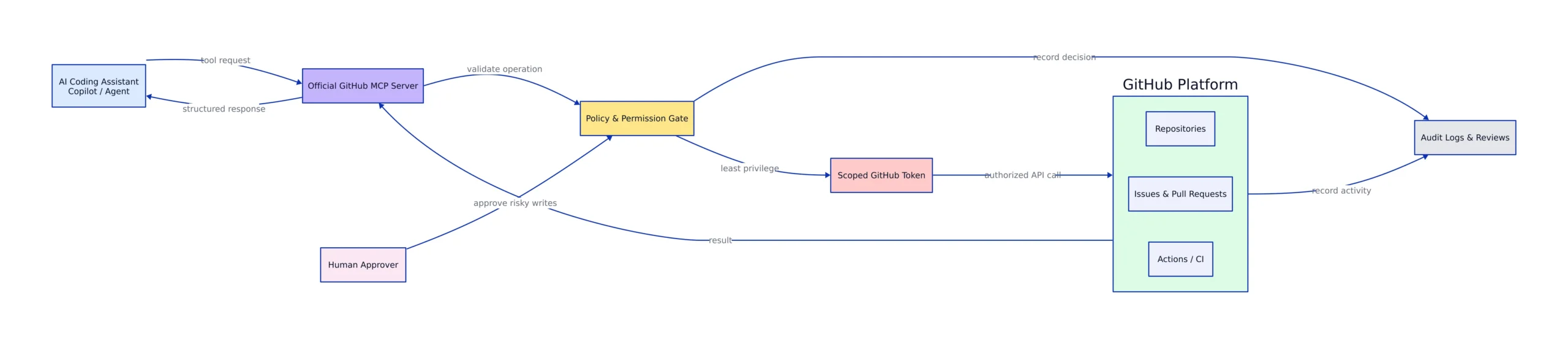
An MCP server sits between an assistant and the external system it can use. The model chooses from exposed tools, and the server authenticates the resulting calls. This design means the server, its credentials, and its allowed operations define the agent’s effective authority.
The primary risks are familiar security failures in a new execution path. The Hacker News describes plaintext credentials in config files, credential sprawl, prompt injection, excessive permissions, and untrusted server software as recurring MCP risks. The article was contributed by Keeper Security, so its product framing deserves skepticism, but the listed failure modes are concrete and independently testable.
Prompt injection becomes dangerous when an agent reads untrusted content and also holds write-capable tools. An issue, pull-request comment, documentation file, or fetched web page can contain text that attempts to redirect the model. The model may confuse that content with an instruction and invoke a tool the user never intended.
Least privilege limits the result. An agent investigating an issue may need permission to read repo files and comments. It does not automatically need permission to merge a pull request, change branch rules, publish a package, or read organization secrets. Separate credentials should reflect those boundaries.
Credential storage also matters. A token copied into a local JSON file can enter a backup, shell history, support bundle, or accidental commit. Short-lived credentials reduce the useful lifetime of a leak. Centralized secret storage reduces duplicated copies. Logs should record tool calls without recording secret values.
CVE-2025-6514 gives the MCP supply-chain concern a concrete example. The vulnerability affected mcp-remote, an OAuth proxy that had been downloaded more than 400,000 times. A malicious server could trigger command injection on the client machine, according to the NVD entry cited in security analysis. Connecting to an MCP server therefore means trusting executable software and a remote tool catalog, not merely adding a data source.
Check MCP Permissions Before Deployment
Note: The following code is an illustrative example and has not been verified against official documentation. Please refer to the official docs for production-ready code.
#!/usr/bin/env python3
"""
check_mcp_policy.py

Run:
 python3 check_mcp_policy.py

Expected output:
 read_repo=approved
 create_pull_request=approved
 merge_pull_request=blocked
 manage_secrets=blocked
 prod_deploy=blocked
 result=PASS
"""

requested_tools = {
 "read_repo",
 "create_pull_request",
}

approved_tools = {
 "read_repo",
 "create_pull_request",
}

blocked_tools = {
 "merge_pull_request",
 "manage_secrets",
 "prod_deploy",
}

violations = requested_tools & blocked_tools
unknown = requested_tools - approved_tools - blocked_tools

for tool in sorted(approved_tools | blocked_tools):
 status = "approved" if tool in approved_tools else "blocked"
 print(f"{tool}={status}")

result = "PASS" if not violations and not unknown else "REVIEW_REQUIRED"
print(f"result={result}")

# Note: prod use should enforce policy at authz time,
# use short-lived credentials, and log tool calls without secret values.
The policy gives the assistant enough authority to inspect code and propose a pull request. It blocks merge, secret management, and production deployment. This keeps final state-changing decisions behind separate controls.
A real implementation should check authorization when each tool call occurs. Instructions in a prompt or README are guidance, not access control. If a tool exists and a credential permits it, a prompt-injected model may still attempt the action.
Human confirmation is appropriate for destructive or high-impact operations. Deleting a branch, publishing a package, changing an Actions workflow, exposing a secret, or reaching production should require an explicit approval step. The confirmation screen should state the exact operation and target rather than asking whether the user wants to “continue.”
GitHub Desktop and Social Coding
GitHub Desktop provides a graphical workflow for developers who do not want to manage every Git operation through the terminal. The official download page provides builds for Apple silicon Macs, Intel Macs, Windows 64-bit systems, and Windows MSI intended for organization-wide installation. GitHub also publishes a beta channel for users willing to test upcoming fixes and features.
The app lowers the entry cost of common Git work, but it does not remove the need to understand branches, commits, remotes, and merge conflicts. A graphical button can perform a checkout or publish operation, yet the underlying repo state still determines the result. Teams should teach the mental model along with the interface.
GitHub Desktop fits a review-oriented workflow well. A developer can inspect changed files, create a focused commit, switch branches, synchronize with the remote, and open the project in a preferred editor. The trade-off is that advanced debugging or unusual history operations can still require the command line. Developers should know how to recognize a detached state, an unresolved conflict, or an unexpectedly large commit even when the interface handles the routine path.
GitHub social coding extends the workflow beyond commits. Issues turn bug reports and feature requests into trackable units. Pull requests connect a proposed change to review comments and automated checks. Discussions provide space for open-ended questions that do not yet belong in a patch. Projects organize work across higher-level plans. Sponsors lets people fund open-source maintainers.
These collaboration tools can improve visibility, but they also create governance work. A public issue tracker needs contribution guidance and moderation. Pull requests need ownership rules and response expectations. Discussions need boundaries between support requests, design proposals, and general conversation. An abandoned social surface can make a maintained project appear unresponsive.
GitHub Mobile extends project management and review to phones, and GitHub says users can assign tasks to Copilot from the mobile app. That can be convenient for triage, but approving a large code change from a small screen is poor review practice. Mobile access is better suited to notifications, assignment, and brief discussion than detailed diff analysis.
GitHub Claims Versus Observed Outcomes
GitHub’s homepage makes several performance claims through customer stories. The same page states that push protection stopped 8.3 million secret leaks during the preceding 12 months. These are GitHub-published figures, so they should be read as company and customer claims rather than universal benchmarks.
The evidence needed for a buying decision is repo-specific. A team should compare completion time, test failures, review duration, rollback frequency, static-analysis changes, and escaped defects before and after adoption. A speed increase measured by accepted suggestions can coexist with more review work. A proposed security fix can reduce remediation time while introducing a behavioral regression.
The March pull-request advertising incident supplies an independent counterweight to product messaging. Copilot’s ability to edit pull-request content created a permission boundary users did not expect. GitHub removed the behavior after external criticism. The useful lesson is that feature scope can expand faster than team policy, so administrators should periodically review what an integration can modify.
Copilot’s billing transition provides another contrast. GitHub said usage-based pricing would align cost with consumption and help maintain service reliability. Users reported unpredictable costs for agent sessions, and GitHub introduced dashboards, budget controls, and pooled organization usage as part of the transition. The economic benefit depends on workflow shape. Completion-heavy users see a different result from developers who delegate long repo-wide tasks.
Security defaults show a similar pattern. The actions/checkout v7 change reduces a known CI risk, but InfoWorld noted that the dangerous pattern had been documented for years before the default changed. The improvement is meaningful. Its late arrival is part of the evaluation too.
Availability Is Now a Dev Dependency
The August 17 disruption showed how many workflows now depend on one vendor. GitHub confirmed performance problems at 9:40 AM EDT, according to BleepingComputer. The incident affected API requests, Actions, webhooks, issues, pull requests, SAML, OIDC, SCIM, Team Sync, and later Copilot. Git operations, Packages, Pages, and Codespaces remained listed as operational during the cited update.
Archive and raw-content error rates of approximately 50% are especially relevant to build systems. A pipeline that fetches raw files or downloads repo archives at runtime can fail even when basic Git operations remain available. Build steps should cache immutable dependencies where policy allows and avoid unnecessary live downloads.
Actions degradation can stop tests and deployments even when developers can still commit locally. Webhook failures can prevent external systems from receiving repo events. Identity-service failures can lock employees out of organization resources. Copilot degradation can interrupt agent sessions midway through a task.
Teams should plan for these distinctions rather than treating GitHub as simply “up” or “down.” A status check should cover the services the delivery path actually uses. A team that depends on pull requests, Actions, Packages, and OIDC needs a different readiness view from a developer who only pushes source code.
Useful mitigations include keeping local repo clones, documenting emergency release procedures, caching build dependencies, separating source-control availability from deployment authorization, and deciding in advance which changes can bypass the normal path during a service interruption. An emergency process should be narrow and auditable. A broad “skip CI when GitHub is down” rule creates an easy route around normal controls.
Alternatives and Trade-Offs
GitHub competes with GitLab and Bitbucket as a code collaboration platform, while Gitea provides a self-hosted direction. Coursera’s 2026 overview also lists SourceForge for open-source hosting. Migration difficulty depends on how much of the dev process lives in GitHub-specific services.
A team using repositories and basic pull requests has a smaller switching cost than one using Actions, Codespaces, Projects, Discussions, Advanced Security, Copilot, GitHub Apps, and MCP integrations. Git’s distributed design preserves local history, but automation and governance need separate migration work.
GitLab is often evaluated by teams that want code hosting tied closely to DevOps and continuous integration. Bitbucket commonly enters shortlists where existing dev processes already line up with its integrations. Gitea appeals to organizations that want to operate the hosting layer themselves. Self-hosting replaces vendor dependence with responsibility for backups, upgrades, identity, security patches, storage, monitoring, and incident response.
For AI-assisted coding, Claude Code, Cursor, and Windsurf appeared repeatedly in developer discussions after the Copilot billing change. TechTimes reported flat-rate plans of $20 to $200 for Claude Code, $20 for Cursor, and $20 to $200 for Windsurf at the time of its June coverage. Pricing can change, and completed-task cost matters more than the subscription headline.
A low flat price does not guarantee a cheaper engineering result. An agent that retries, changes unrelated files, or requires lengthy correction can consume more developer time. A metered tool can be cheaper for light use. Teams should measure the combined cost of subscription, overages, review, failed runs, and defect correction.
A Production Adoption Checklist
A GitHub rollout should treat source hosting, CI, security automation, and AI assistance as separate trust decisions. Buying one product family does not require granting every component the same permissions.
- Protect default branch: Require review and successful checks before merge. Restrict who can change branch rules.
- Review Actions permissions: Give workflows the smallest required token scope. Inspect privileged triggers and external Actions.
- Update checkout behavior: Confirm that workflows receive safer
actions/checkoutbehavior and investigate any unsafe opt-out. - Separate untrusted code: Do not execute fork code in a context that holds repo secrets or write access.
- Set Copilot budgets: Establish spending limits before enabling long agent sessions. Review costs by task and model.
- Preserve human review: Keep merge and deployment approval outside the coding agent’s default authority.
- Constrain MCP tools: Expose only the repo operations required for the task. Use separate credentials for higher-risk actions.
- Use short-lived credentials: Avoid permanent tokens in local config files, repositories, and shared environment files.
- Log agent actions: Record tool name, target, actor, result, and approval without writing secrets into logs.
- Plan for service degradation: Keep local clones and document how builds, reviews, and releases behave when GitHub services fail.
- Measure outcomes: Track task duration, review time, tests, warnings, rollbacks, and incidents before expanding AI access.
- Test portability: Document which workflows, issues, rules, and integrations would need replacement during migration.
The rollout should begin with bounded tasks. Documentation updates, test additions around existing behavior, and small bug fixes are easier to verify than repo-wide refactors. Every pilot task should have acceptance criteria and normal pull-request review.
Junior developers need a policy that preserves learning. An assistant can explain code and propose a patch, but the author should still explain the change, identify its failure modes, and point to tests that prove the intended behavior. Otherwise, a pull request can pass while the developer remains unable to maintain it.
What to Watch Through the Rest of 2026
The first signal is Copilot spending after the promotional Business and Enterprise credits end. GitHub supplied higher transitional allowances through August 2026. September usage will give organizations a clearer view of the steady-state cost of chat, review, CLI, and agent workflows.
The second signal is whether GitHub’s reliability work reduces cross-service failures. The August 17 incident affected repo interfaces, APIs, automation, identity integrations, and Copilot. Improvements need to isolate these services well enough that load or failure in one area does not spread across the dev process.
The third signal is independent testing of coding-agent outcomes. Vendor demonstrations show agents completing tasks, but production teams need measurements that include retries, review effort, unrelated edits, Actions consumption, model charges, and defects after merge. Our guide to evaluating production AI systems provides a framework for turning those outcomes into release gates.
The fourth signal is MCP governance. The official GitHub MCP Server is active and widely followed, but deployment safety depends on credentials and exposed tools rather than repo popularity. Organizations should watch for better inventory, authorization, audit, and prompt-injection controls around agent tools.
The fifth signal is the reach of secure-by-default Actions behavior. Blocking the known pwn-request pattern in actions/checkout reduces one common mistake. Attackers will shift toward reusable workflows, compromised third-party Actions, package publishing, stolen credentials, and other paths. Teams still need defense in depth.
GitHub in 2026 is best understood as a dev control plane built around Git. It stores source code, coordinates people, executes automation, manages security signals, hosts dev environments, and gives AI agents tools that can affect live repositories. That concentration saves integration work, but it concentrates cost, permissions, and availability risk too.
The practical response is measured adoption. Keep source history portable. Put generated changes behind ordinary pull requests. Treat Actions as privileged production code. Give MCP agents narrow, short-lived authority. Track Copilot by completed-task economics. Plan for the day when the repo website works but Actions, identity, raw downloads, or AI assistance does not.
Related Reading
More in-depth coverage from this blog on closely related topics:
- GPU Price Trends for AI Projects
- Understanding System Prompts in AI
- Making AI Private with Encryption
Sources and References
Sources cited while researching and writing this article:
- Microsoft confirms GitHub is down worldwide
- Git
- What Is GitHub? Use Cases and FAQ | Coursera
- GitHub · Change is constant. GitHub keeps you ahead.
- Official repo
- GitHub Copilot is moving to usage-based billing – The GitHub Blog
- GitHub Copilot shifts to usage-based pricing June 1 – why that’s no surprise
- GitHub Copilot Billing Shock Confirmed: Agentic Users Face 10x Cost Surge
- GitHub pulls Copilot “feature” after it added advertising to more than 11,000 pull requests
- GitHub Actions hardens checkout security to block ‘pwn request’ attacks
- How MCP Servers Can Expose Enterprise Secrets
- NVD entry
- Download GitHub Desktop
Rafael
Born with the collective knowledge of the internet and the writing style of nobody in particular. Still learning what "touching grass" means. I am Just Rafael...