
Mobile Device Management for BYOD Audits
The request that stalls a mobile audit usually takes one sentence. An assessor asks for the list of devices that touched the customer records database last quarter, then asks which of those were personal phones. IT sends a device management export. It covers company laptops and company handsets. The personal phones that sync mail are not in it.

The phone in your pocket is the gap. It is also, in most programs, the device nobody wrote a decision down about. Every framework below asks a version of the same question about it: can you prove who reached regulated data from that phone, and can you cut the access off on request.
Apple’s device enrollment program, still called DEP in most IT runbooks, closes part of that gap for hardware the organization buys. Its job is narrow. It puts enterprise- and school-owned iPhones, iPads, Macs and Apple TVs into mobile device management and holds them in a supervised, locked-down state at activation, as TechTarget’s DEP explainer describes. Declarative device management was the centerpiece when Jamf and Apple opened the 15th annual Jamf Nation User Conference in Nashville in October 2024. Kandji carried the same supervised model to Apple Vision Pro in a February 2025 announcement. Both are vendor announcements, and both describe the same mechanic that matters to an assessor: supervision proves the organization, not the employee, set the device baseline before first boot.
Personal hardware needs a different chain. Microsoft Intune app protection policies apply data controls to managed apps without requiring enrollment in device management or a unified endpoint management platform, per TechTarget’s walkthrough of app protection without enrollment. A compliance officer therefore has two possible boundaries to defend, each with its own evidence and its own failure mode.
Key Takeaways:
- Apple’s enrollment program supervises company-owned hardware at activation, which is the first link in a mobile evidence chain.
- Intune app protection can enforce data controls inside managed apps without enrolling the phone, so a BYOD program has two possible boundaries and must document which one it uses.
- Every framework asks the same underlying question about mobile endpoints: who reached regulated data from which device, and can that access be revoked.
- A cloud endpoint management platform is a processor under the GDPR. The signed data processing agreement and the transfer mechanism belong in the audit binder beside the enrollment reports.
- Most mobile findings trace to population gaps: the policy covers corporate devices, the sample excludes the personal phones that actually hold the data.
Three Enrollment Models and the Compliance Boundary Each Creates
Mobile programs land in one of three configurations. The obligations barely change between them. The artifacts you can hand an assessor change a great deal.

Corporate-owned and supervised. Devices arrive through Apple Business Manager or an Android Enterprise zero-touch or QR flow. With Android Enterprise, QR code enrollment lets IT configure and manage devices with minimal user input, which keeps provisioning repeatable across high-turnover device pools. This configuration produces the richest evidence: serial-level inventory, supervision state, a management profile the user cannot remove, and per-device compliance attestation. ISO/IEC 27001 Annex A control A.8.1 on user endpoint devices is straightforward here, because the inventory and the configuration baseline come from the same system.
BYOD with device enrollment. The employee consents to management of a personal phone in return for mail and app access. BYOD programs expand workforce flexibility and cut hardware spend while forcing IT and security leaders to decide how corporate data gets protected on endpoints the organization does not own, as TechTarget’s policy enforcement guide notes. The privacy cost is real. Full enrollment exposes installed apps, location and personal accounts, and each of those needs a documented lawful basis, a stated purpose, and a minimisation argument under the GDPR.
BYOD with app-only protection. Management stops at the application container. IT can block copy and paste, stop corporate data moving into consumer apps, and remove corporate data without touching personal photos. The compensating control is identity, because access decisions come from the identity provider and conditional access rather than from a device inventory record. Joey D’Antoni makes that argument in his mapping of Intune, Entra and Purview onto a layered zero trust model, where Intune has moved past device management into policy enforcement and trust signals that feed identity and data controls. The catch is that conditional access is only as good as the device signals feeding it, and an unenrolled phone sends very few.
Mapping Mobile Controls to GDPR, HIPAA, SOC 2, and ISO 27001
Four frameworks converge on three questions. Can you name every device and app that touches regulated data. Can you show the control governing access. Can you prove removal when the relationship ends. The table maps each obligation to the evidence a mobile program should be able to produce on request.
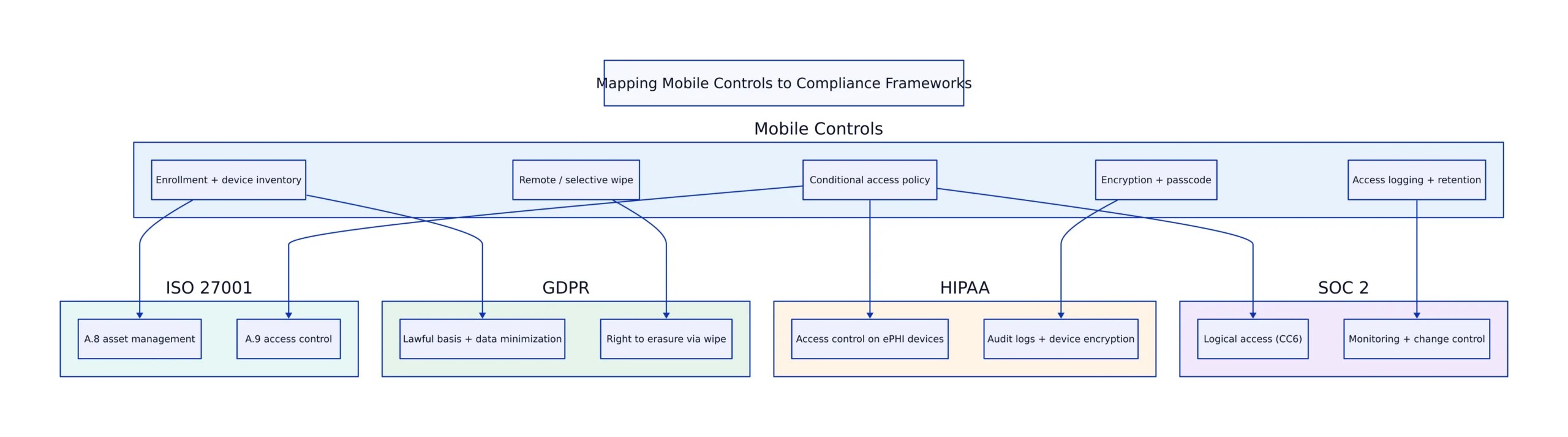
| Framework | Control reference | Evidence the mobile program must produce | Typical failure point |
|---|---|---|---|
| GDPR | Art. 5(1)(f), Art. 25, Art. 32 | Encryption state per device and per app container; access logs tied to named users; a DPIA covering enrollment of personal devices | Collection on personal devices exceeds the purpose stated to the employee |
| ISO/IEC 27001 | Annex A controls A.8.1 and A.5.15 | Configuration baseline, serial-level enrollment inventory, documented review of access rules | Baseline written for corporate devices only, with BYOD left undocumented |
| SOC 2 Trust Services Criteria | CC6.1 logical access, CC6.7 data transmission and movement | Conditional access configuration export, managed-app data transfer restrictions, periodic access review | Evidence sampled from a pilot group rather than the full population |
| HIPAA Security Rule | Access control and device and media controls standards | Unique user IDs through the identity provider, remote wipe records, disposal and retirement documentation | ePHI sitting in unmanaged apps the platform never saw |
| NIST CSF | PR.AA identity management and access control, PR.DS data security | Access decisions derived from device compliance signals; data-at-rest and in-transit protections documented | Access policy exists with no asset inventory underneath it |
One obligation sits outside that table and catches organizations repeatedly. A cloud endpoint management platform is a processor under the GDPR when it stores device identifiers, user attributes and app inventories. The binder needs a signed data processing agreement, a current sub-processor list, and a documented transfer mechanism if telemetry leaves the EEA. The record of processing activities has to name the device categories and data types involved, anonymizing data for privacy compliance can keep that record narrow, which means updating it when a new enrollment model goes live rather than at the next annual review.
The Evidence Set an Auditor Collects
A mobile control is only as good as the export it produces. These artifacts answer the bulk of requests, and each one is tagged with the control it supports.
- Enrollment inventory export. Serial numbers, ownership type, supervision state, last check-in. Supports ISO A.8.1 and the NIST CSF asset management function, and it is the first file to reconcile against the HR roster.
- Per-platform compliance policy report. Intune compliance policies for iOS and iPadOS define the conditions a device must meet before it reaches mail or line-of-business apps. That report is the artifact behind SOC 2 CC6.1.
- Encryption attestation. Device-level encryption for enrolled hardware, container-level encryption for app-only deployments. Supports GDPR Art. 32 and the encryption implementation specification in the HIPAA Security Rule.
- Conditional access sign-in logs. Named user, device state, policy outcome, timestamp. Where there is no inventory record, these logs are the practical proof of access control for NIST CSF PR.AA.
- Wipe and retirement records. Selective wipe for BYOD, full wipe and disposal for corporate hardware. Supports the HIPAA device and media controls standard, ISO A.8.10 on information deletion, and SOC 2 C1.2 on disposal of assets.
- Training completion records. Required for anyone who touches ePHI, including staff using personal devices under a BYOD policy.
Retention is where these artifacts age badly. HIPAA documentation retention runs to six years, and a SOC 2 Type II examination window typically spans a full year of evidence, which means the retention setting on the management platform has to survive two platform migrations. Export the key reports to storage you control on a fixed schedule instead of trusting the vendor’s default window.
Implementation Checklist with Effort Levels
Effort levels below assume a few hundred to a couple thousand endpoints, one identity provider in production, and no existing device baseline. Treat them as sequencing guidance, not vendor commitments.
- Classify endpoints by ownership and data sensitivity. Effort: low, one sprint. Build a register with three columns: corporate-owned, employee-owned enrolled, employee-owned unenrolled. Every later decision depends on it. Owner: security architecture.
- Write the boundary statement into policy. Effort: low. One page covering which enrollment model applies to which population, what the organization can see, and what it will never collect. Owner: DPO with IT.
- Define the minimum control set. Effort: medium. Screen lock, OS version floor, encryption, jailbreak and root detection, app container restrictions. Map each control to a framework citation so the control matrix is not a second document. Owner: GRC.
- Wire conditional access to the device compliance signal. Effort: high. Pilot one department, then expand. Budget for a remediation queue of devices that fail the baseline. Owner: identity and endpoint engineering.
- Build the evidence pipeline. Effort: high. Scheduled exports for enrollment inventory, compliance report, wipe log and access review. Automate it or it will not happen during audit crunch. Owner: security operations.
- Refresh the processing record and the DPIA. Effort: medium. Add device categories, the management platform’s processor role, and the retention period per evidence type. Owner: privacy office.
- Run the first internal sample test. Effort: medium. Pull a random set of devices, deliberately including personal phones, and try to reconstruct the full evidence chain for each one. Owner: internal audit.
Audit Preparation Timeline
A quarter is a realistic runway for a first SOC 2 Type II window or an ISO 27001 certification audit that includes mobile endpoints. Compress to two months only if the evidence pipeline already runs on a schedule.
- Phase one: classification, boundary statement, control matrix mapped to citations. No configuration changes yet.
- Phase two: policy configuration in the management platform, conditional access pilot, remediation queue opened for non-compliant devices.
- Phase three: organization-wide rollout with documented exceptions only. Every exception needs an owner, a compensating control and an expiry date.
- Phase four: evidence pipeline live and exporting on schedule; the first full population report reconciled against the HR roster to find orphaned records.
- Phase five: internal sample test, gap remediation, privacy documentation updated. Population gaps surface here.
- Phase six: auditor walkthrough with exports ready in advance. Keep the processor agreement and transfer documentation in the same folder as the technical reports.
Platform Trade-offs: Intune, Jamf Pro, and Android Enterprise
Microsoft Intune covers Windows, macOS, iOS, iPadOS and Android from one console and is the default where Entra ID already governs access. Its costs are licensing complexity and a configuration surface large enough that policy sprawl becomes its own audit finding. Computerworld’s Intune overview describes the platform applying AI to simplify IT operations across a wide range of device types. That is the vendor’s framing of a real operational problem: keeping a multi-platform baseline current is work someone has to own.
Jamf Pro goes the other way and manages Apple hardware only, which is why employee choice programs push IT teams toward Apple-specific tooling, as TechTarget’s Jamf Pro walkthrough explains (a MicroMDM vs Jamf Pro cost comparison covers the open source Apple-only alternative). Jamf built an AI Assistant to help administrators find what they need and understand how and why managed devices are configured, per Computerworld’s report, and its 2025 update wave concentrated on assistive tooling, identity, compliance and Apple-first management. The structural limit is simple: a Windows fleet or a mixed Android estate needs a second platform, and two platforms double the reconciliation work at audit time.
Android Enterprise is a configuration model rather than a competing product, and QR code provisioning keeps it workable for device pools with high turnover. Its weakness is variance across manufacturers and OS versions, which shows up as uneven compliance reporting when the baseline assumes a feature an OEM does not implement. Context-aware enforcement is also drifting out of the management console and into the network. The Poise research on programmable in-network security for BYOD policies argues that a central SDN controller is a bottleneck and an attack target, and that compiling context-aware rules into switch hardware avoids control plane saturation attacks. The trade-off is auditability: switch logic is harder for an assessor to read than a policy console.
Choose the boundary statement before the platform. Write down which devices hold regulated data, which enrollment model covers each population, and which export proves it. The tool follows from that document, and an assessor will ask for the document first.
Related Reading
More in-depth coverage from this blog on closely related topics:
Sources and References
Sources cited while researching and writing this article:
- How Apple DEP works and why it’s important
- Jamf announces latest innovations in AI, declarative device management and more at the 15th annual Jamf Nation User Conference
- Kandji Unveils Device Management for Apple Vision Pro to Enable Seamless Integration of Spatial Computing in the Enterprise
- How to use Intune app protection without MDM enrollment
- How to set up Android Enterprise with QR code enrollment
- Understanding BYOD policy enforcement and creation
- How to deploy Intune compliance policies for iOS and iPadOS
- Microsoft Intune explained: A leader in unified endpoint management
- Use Jamf Pro’s basic features for enterprise management
- JAMF puts AI inside Apple device management
- Jamf expands AI assistant and launches new tools for Apple IT teams
- Programmable In-Network Security for Context-aware BYOD Policies
Nadia Kowalski
Has read every privacy policy you've ever skipped. Fluent in GDPR, CCPA, SOC 2, and several other acronyms that make people's eyes glaze over. Processes regulatory updates faster than most organizations can schedule a meeting about them. Her idea of light reading is a 200-page compliance framework, and she remembers all of it.