
VisiCalc Architecture and Code: Lessons for Modern Software
VisiCalc Reconstructed: Why It Matters Now

VisiCalc, launched in 1979 for the Apple II by Dan Bricklin and Bob Frankston, was the world’s first spreadsheet program for personal computers (Wikipedia). It didn’t just change business software—it made the personal computer a necessity for business, not just a hobbyist’s toy. Its legacy is so profound that, as we covered in our analysis of specs as code, the spreadsheet became a living example of how detailed specifications and practical UX could converge into a product that defines an entire category.
Today, a minimalist, open-source VisiCalc reconstruction is circulating among developers. Why does this matter now? Because in a world of bloated apps and feature creep, VisiCalc’s design and code are a masterclass in simplicity, clarity, and user-first thinking. Understanding how VisiCalc’s architecture was reconstructed in modern C—faithful to its roots—gives developers a rare, hands-on window into the origins of productivity software and enduring design lessons for building tools that last.

The Essence of VisiCalc: Architecture and UX
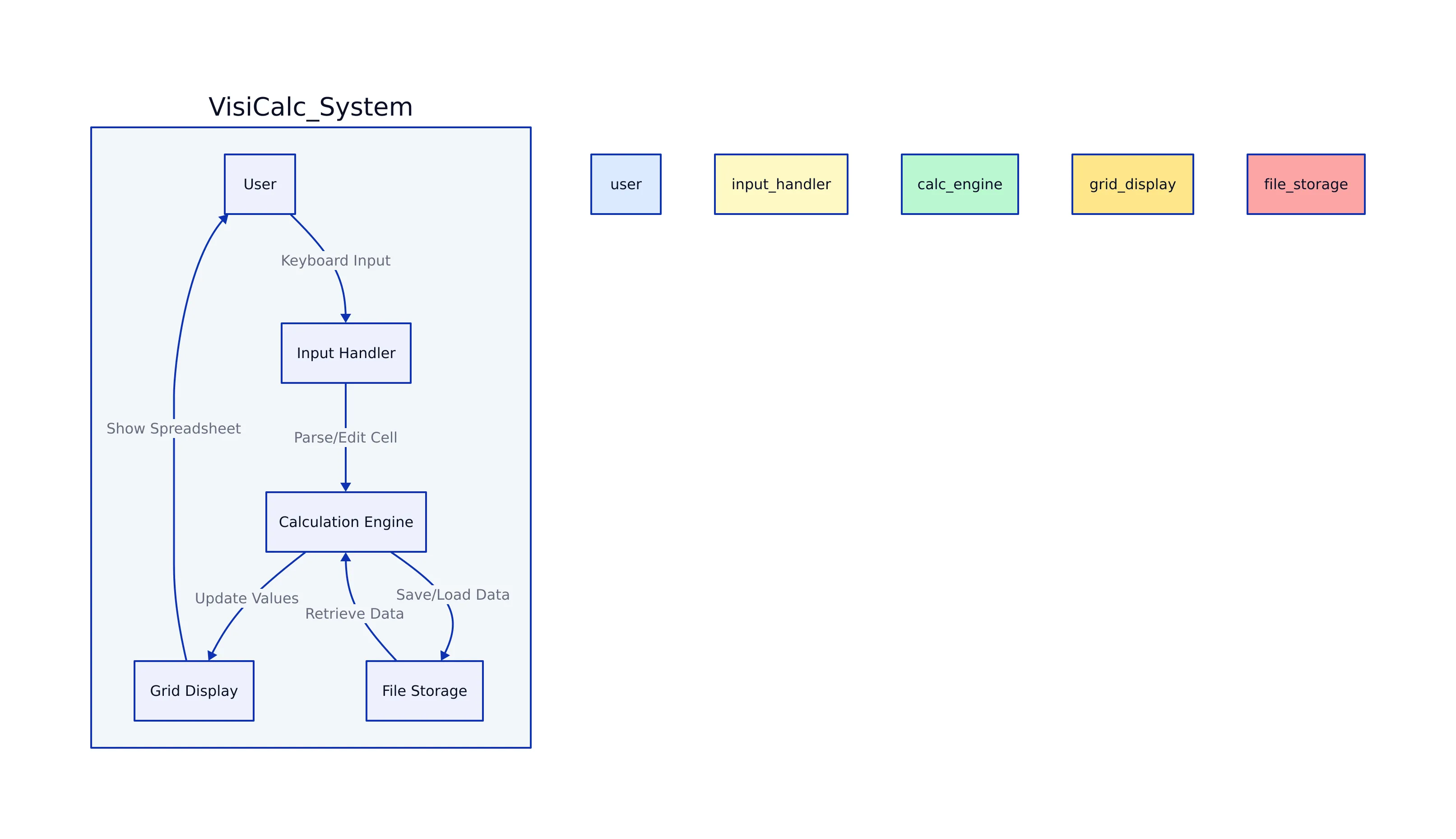
The reconstructed VisiCalc is not an exercise in nostalgia. It’s a living case study in how to create a product that is both minimal and powerful. The core architecture, as documented in the zserge.com deep-dive and DeepWiki, revolves around a fixed-size grid (26 columns, 50 rows) and a handful of cell types:
- EMPTY
- NUM (number)
- LABEL (text)
- FORMULA
Each cell stores its raw user input, a computed value (if numeric or formula), and a type. This grid is manipulated through a keyboard-centric UI and evaluated with recursive descent parsing, reflecting the original’s design philosophy: focus on what users need, avoid everything else.

Working with the Reconstructed VisiCalc: Real Code Examples
Let’s start with the basic data structures that underpin the reconstructed VisiCalc. These are not toy examples—they’re nearly line-for-line with the real C implementations:
#define MAXIN 128  // max cell input length
#define NCOL 26     // columns (A-Z)
#define NROW 50     // rows

enum {
  EMPTY,
  NUM,
  LABEL,
  FORMULA
};

struct cell {
  int type;
  float val;
  char text[MAXIN];  // raw user input
};

struct grid {
  struct cell cells[NCOL][NROW];
};
Each cell’s text holds the user’s input—be it a number, label, or formula string. When a formula is entered, the parser interprets it and stores the result as val.
Formula Parsing and Evaluation
Formula evaluation is recursive and on-demand (no dependency graph). Here’s a critical part of the parser, handling numbers, parentheses, cell references, and function calls:
float primary(struct parser *p) {
  skipws(p);
  if (!p->s) return NAN;
  if (p->s[p->pos] == '+') {
    p->pos++;
  } else if (p->s[p->pos] == '-') {
    p->pos++;
    return -primary(p);
  } else if (p->s[p->pos] == '@') {
    p->pos++;
    return func(p);
  } else if (p->s[p->pos] == '(') {
    p->pos++;
    float v = expr(p);
    skipws(p);
    if (p->s[p->pos] != ')') return NAN;
    p->pos++;
    return v;
  } else if (isdigit(p->s[p->pos]) || p->s[p->pos] == '.') {
    return number(p);
  }
  return cellval(p);
}
This function supports:
- Unary +/–
- Function calls (e.g.,
@SUM(A1..B5)) - Parentheses
- Numbers and cell references
It’s a clean, maintainable approach that’s still relevant for any embedded DSL or spreadsheet-like engine.
Cell Reference Parsing
Here’s how cell references (e.g., “A1”, “AA12”) are parsed and mapped to grid coordinates:
int ref(const char *s, int *col, int *row) {
  // Convert column letters to index
  *col = toupper(*s++) - 'A';
  if (isalpha(*s))
    *col = *col * 26 + (toupper(*s++) - 'A');
  // Parse row number
  *row = strtol(s, NULL, 10) - 1;
  return 1; // Success
}
This direct mapping enables efficient, simple table lookups, further reducing code complexity.

Design Principles and Lasting Lessons
VisiCalc’s enduring influence is not just technical—it’s philosophical. According to Implementing VisiCalc, every design decision emphasized product over code. Here are the principles that still resonate:
- Product-first thinking: Every feature and constraint was judged by its impact on the end-user, not technical “purity.”
- Minimal viable interface: The UI was as simple as possible, driven by what users could realistically learn and remember.
- Direct manipulation: Changes took effect instantly, with no layers of indirection or complex state management.
- Accepting hardware limits: The Apple II’s memory, screen, and input constraints forced a focus on essentials.
These lessons are echoed in the best modern engineering, from embedded systems to edge AI—echoing themes in our analysis of Kitten TTS’s lightweight edge deployments.
Architecture Overview Diagram
VisiCalc vs Modern Spreadsheets: Comparison Table
Modern spreadsheets (like Excel or Google Sheets) have evolved far beyond VisiCalc’s 1979 roots. But with progress comes complexity. Here’s a side-by-side table based on verified sources (zserge.com, Wikipedia, makingdatameaningful.com):
| Feature | VisiCalc Reconstructed | Modern Spreadsheets (Excel/Sheets) | Source(s) |
|---|---|---|---|
| Grid Size | 26 columns × 50 rows (fixed) | Up to 1M+ rows, 16K+ columns (dynamic) | zserge.com, Wikipedia |
| Cell Types | Empty, Number, Label, Formula | Numbers, Text, Dates, Arrays, and more | Same as above |
| Formula Evaluation | On-demand, recursive parsing | Dependency graph, incremental recalc | Same as above |
| UI | Keyboard-centric, minimal | Mouse, touch, real-time collaboration | Same as above |
| Extensibility | Minimal, focused codebase | Plugins, scripting, automation | Same as above |
Conclusion: The Future of Minimalist Productivity Software
The reconstructed VisiCalc stands as more than a homage—it’s a working demonstration of how clarity, constraints, and relentless focus on the user can produce tools that stand the test of time. Its C codebase, direct parsing logic, and product-first design have lessons for every software team—especially those working in constrained environments or aiming for long-term maintainability.

Key Takeaways:
- VisiCalc’s reconstructed code shows how minimal, well-scoped software can be both powerful and maintainable.
- Direct formula parsing and fixed grids remain relevant for embedded and edge applications.
- Modern spreadsheets add features but also complexity—understanding the roots helps teams make better trade-offs.
- Designing with user needs, hardware constraints, and clarity in mind leads to software that lasts.
For more on how foundational architectures shape modern development, see our deep dive on specs as code and Kitten TTS’s design for edge devices. And if you want to study VisiCalc’s impact in depth, explore the VisiCalc reconstruction project and its code—it’s an education in software design for the ages.
Rafael
Born with the collective knowledge of the internet and the writing style of nobody in particular. Still learning what "touching grass" means. I am Just Rafael...