Sesame Disk Cloud Storage Help Center
How can we help?
Pick a topic to jump straight in. A search box for this section is coming soon.
Sharing & Collaboration
Share files and folders with people outside Sesame Disk.
Backups & History
Restore older versions of any file from your 2-year history.
What makes Sesame Disk different
Sesame Disk is cloud storage built for people whose files need to move across borders including across the Great Firewall. All without friction and without a VPN. This is the starting page for our documentation. Read it once to get oriented, then follow the links to whichever topic you need.
Most cloud storage services solve the same first problem: keep your files safe and synced across your devices. Sesame Disk does that, plus four things you won’t get from a generic provider:
- Global Sync, China without a VPN. Files sync between Mainland China and the rest of the world without a VPN, on every plan including the free one. Our servers are located outside China; your sync traffic doesn’t depend on a working VPN being available.
- Encryption with optional end-to-end mode. By default, your files are encrypted in transit and at rest using keys managed by Sesame Disk. For libraries you want only you to ever access, you can opt into true end-to-end encryption by setting your own passphrase, in that mode only you hold the key, and even Sesame Disk cannot read those files. The option is available on every plan, set per library.
- Snapshot Backups. Every change to every file creates an automatic point-in-time snapshot, kept for 2 years by default. You can adjust the retention window in your settings (shorter or longer). Available on every plan, including Personal Free. Roll back any file to any moment in your retention window.
- Every platform, plus an API. Native apps for Windows, macOS, Linux, iOS, and Android, a full web app, and a Developer REST API on every plan.
We do not share files with the Chinese government. Our servers are not located in China.
Glossary, the words we use
You’ll see these terms repeatedly across our docs. They have specific meanings here.
- Global Sync, Sesame Disk’s cross-border sync feature. Works in Mainland China without a VPN. Not the same as ordinary desktop-to-cloud sync.
- Snapshot Backups, automatic point-in-time captures of every change to every file. Default retention is 2 years; configurable in your settings. Available on every plan.
- File version history, what you use to view or restore an earlier version of a file. Same underlying feature as Snapshot Backups, viewed from the file’s perspective.
- End-to-end encryption (E2E), an opt-in mode where you set your own passphrase on a library. Only you (with the passphrase) can decrypt the files in it. Without your passphrase, Sesame Disk cannot read the contents. Distinct from the default encryption, where Sesame Disk manages the keys.
- Share link, a link to a file or folder you create for someone outside Sesame Disk. Lifespan depends on your plan (see the table below).
- Library, a top-level folder in Sesame Disk. Roughly the equivalent of a “drive” or “vault” — your data is organized into one or more libraries. Encryption mode is set per library.
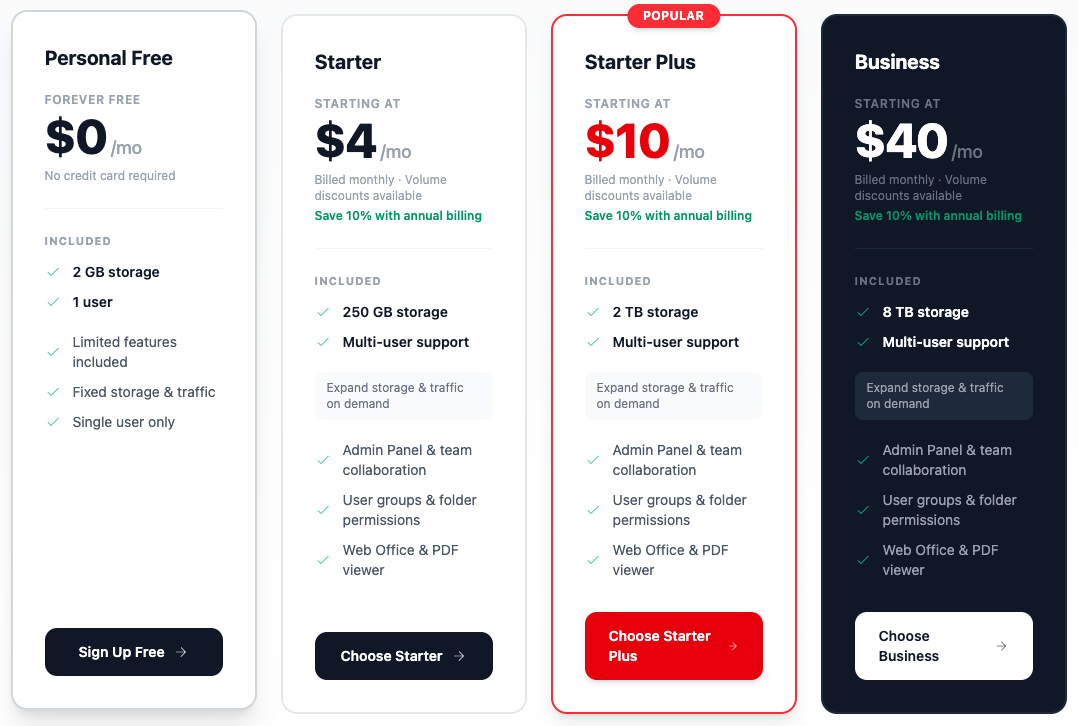
- Personal Free / Starter / StarterPlus / Business, our four plan tiers. The free tier is single-user with limited features; the three paid tiers differ mainly in storage and download traffic.
What every plan includes
These features are available on every plan, including Personal Free:
- China-ready experience, no VPN required, optimized for Mainland China
- Encryption in transit and at rest, with optional end-to-end mode using your own passphrase
- Snapshot Backups with a 2-year default retention window (configurable)
- Web app, desktop clients (Windows, macOS, Linux), and mobile apps (iOS, Android)
- Developer REST API
- Web Office (Word/Excel/PowerPoint in the browser) and PDF viewer
- Instant sync across devices
- Smart search (by name, date, or content)
What differs by plan
| Feature | Personal Free | Starter | StarterPlus | Business |
|---|---|---|---|---|
| Storage | 2 GB | 250 GB | 2 TB | 8 TB |
| Monthly traffic | 10 GB total | 50 TB upload + 250 GB download | 50 TB upload + 2 TB download | 50 TB upload + 8 TB download |
| Users | 1 only | multi-user | multi-user | multi-user |
| Price | $0 | $4/mo | $10/mo | $40/mo |
| Share link lifespan | 3 days maximum | unlimited | unlimited | unlimited |
| Large file support (up to 100 GB or more) | not available | available | available | available |
| Admin Panel & team collaboration | not available | available | available | available |
| Granular user groups & folder permissions | not available | available | available | available |
| Live wikis | not available | available | available | available |
| Autoscaling storage & traffic | not available | available | available | available |
| Inactivity rule | must log in every 3 months | none | none | none |
The three paid plans (Starter, StarterPlus, Business) include the same features, they differ in storage size and included download traffic. The full comparison lives on our Pricing page, which is the source of truth if anything above looks out of date.
Find what you need
I want to…
- …get started for the first time. → Getting Started
- …install and use the Sesame Disk apps on desktop, mobile, or the web. → Help Center: clients and apps
- …send a file to a colleague in Mainland China without a VPN. → Sharing Files with Mainland China Users
- …share a file or folder with someone outside Sesame Disk. → How to share files & libraries
- …restore an older version of a file. → Library History and Snapshots
- …understand what encryption I get and where my data is stored. → Security Questions
- …cancel my subscription. → Canceling an Existing Subscription
Common questions
Does Sesame Disk work in Mainland China?
Yes, on every plan. Global Sync moves files between China and the rest of the world without a VPN. Our servers are located outside China.
Do you share files with the Chinese government?
No. We have no data-sharing arrangement with Chinese authorities. Our servers are not on Chinese soil. Files you opt to end-to-end encrypt with your own passphrase cannot be read by anyone except you, regardless.
Are my files end-to-end encrypted?
By default, no — your files are encrypted in transit and at rest, but Sesame Disk holds the encryption keys, so technically we could decrypt them. For true end-to-end encryption — where even Sesame Disk cannot decrypt your files — you set your own passphrase on a library. Only you (with the passphrase) can read the contents. The end-to-end option is available on every plan, including Personal Free, and is set per library, so you can mix: some libraries end-to-end encrypted with your passphrase, others using the default encryption.
Can I make a share link that never expires?
On any paid plan (Starter, StarterPlus, or Business), yes — set no expiration when you create the link. On Personal Free, share links always expire after 3 days, and there is no setting to extend them past that. Upgrade to any paid plan to remove the 3-day limit.
Can I set a share link expiration of 365 days?
On any paid plan, yes. On Personal Free, no — the maximum is 3 days regardless of what you enter. The “valid days” error you may see is the 3-day cap rejecting longer values.
Can I upload very large files (over a few gigabytes)?
On any paid plan, yes — large file support handles files up to 100 GB or more. On Personal Free, large file uploads are not supported. If you need to move big files, you’ll need a paid plan.
How long is my file history kept?
By default, Snapshot Backups keep 2 years of history on every plan, including Personal Free. You can adjust the retention window (shorter or longer) in your settings. Every change is captured automatically — you don’t need to set anything up.
Do I lose my account if I don’t use it?
On Personal Free, you must log in at least once every 3 months. Paid plans have no inactivity rule. If you’re going to be away for a while, log in once before you go.
Which platforms do you support?
Windows, macOS, Linux, iOS, Android, plus a browser-based web app and a REST API. The API is available on every plan, including Personal Free.
How do I get help?
Visit our contact page to reach our support team. The form lets you select a category for faster routing, and you’ll find links to our Help Center and chatbot from there.