
SQLite in Production 2026: The Complete Guide
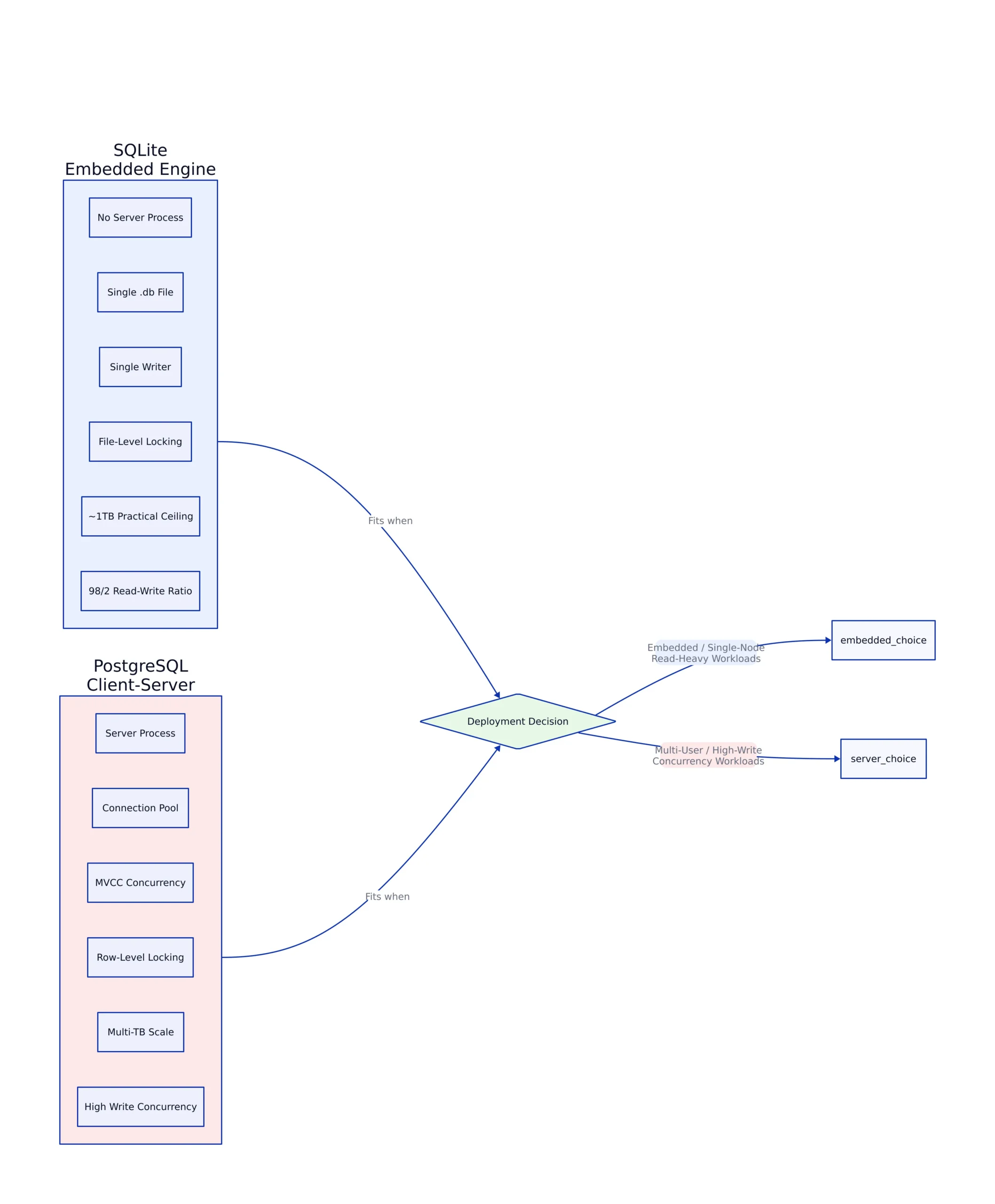
PropFirm Key ran a public trading comparison site on a single SQLite .db file with a 98/2 read-write ratio, no server process, and no connection pool. The developer published the full account on dev.to. That story captures why the old rule, “SQLite is only for tests and mobile apps, reach for PostgreSQL when things get real,” has collapsed in 2026. Rails 8 made SQLite its default database in 2024. Fly.io and Expensify push the embedded engine into the billions-of-transactions range. And yet the single-writer limit, file-level locking, and roughly 1 terabyte practical ceiling are architectural realities, not bugs. This series is the full map of when that architecture fits your production workload and when PostgreSQL is the honest answer.
Welcome to the hub for the five-part SQLite in production series. Think of this page as an index card. Each part goes deep on one slice of the question, from query engine internals to locking failures that end careers. You can start anywhere, but if you read this post first, you will know exactly which part matches the problem you are hitting today. For developers, database administrators, and system architects weighing a production database decision, the whole series is a reference: benchmarks, limits, performance tuning, migration, and pitfalls that only show up at 3 a.m.
The Arc of the Series: What You Will Learn
The five parts cover the topic from the inside out. Part 1 breaks down how SQLite actually executes a query: the parser, the bytecode virtual machine, the B-tree storage engine, the pager, and the virtual filesystem. It explains the concurrency model and the production considerations that follow from running code in your own process instead of in a separate server. It is the foundation, and it matters because almost every surprising failure in production traces back to a misread of this architecture.
Part 2 is the benchmarks and limits part, and it is where hype meets hard numbers. It reports real throughput for reads and writes on modern NVMe hardware, the concurrency ceiling that appears once you pass roughly 20 simultaneous writers, the practical dataset ceiling, and the operational playbook that keeps a well-tuned single file healthy. It also includes the decision framework for when those limits mean you should start planning the move to PostgreSQL.
Part 3 is the head-to-head comparison you asked for with this post: concurrency, scalability, feature set, memory footprint, strict typing, and typical deployment environments. It walks through head-to-head benchmarks and ends with a decision you can defend. Part 4 is pure performance tuning for high-throughput apps: journal modes, cache sizes, transaction management, and how to measure improvements instead of guessing. Part 5 is the pitfalls and best practices part: locking issues, backup challenges, data corruption risk, schema design, and transaction handling. Each part below this paragraph routes you to a dedicated deep dive rather than a summary here.
Two Architectures, Two Jobs

The single most important thing to internalize is that SQLite and PostgreSQL are not competing versions of the same product. The SQLite documentation itself says it plainly: SQLite competes with fopen(), not with client-server engines. SQLite is a C library that links directly into your app process. There is no daemon, no listening socket, no connection pool, no user to create. When your code runs a query, the engine reads and writes a single file on disk, all inside your own address space. A local SELECT completes in microseconds because there is zero network round trip.

PostgreSQL is a separate server process. Your app connects over TCP or a Unix socket, sends SQL across the wire, and waits. The server holds its own memory, authenticates users, enforces permissions, and coordinates many clients at once. That separation is exactly what makes shared concurrent access work. The cost is that every query pays connection and round-trip overhead, even when the app and database sit on the same machine.
The practical consequence shows up in memory numbers. A PostgreSQL server reserves a meaningful base amount of RAM even with no active connections, and each new client connection forks a process that adds a few more megabytes. Without a connection pool, a hundred concurrent connections consume several hundred megabytes before any query runs, a pattern AWS documents in its analysis of resources consumed by idle connections. SQLite, running in-process, shares your app’s memory space and consumes essentially nothing when idle. On a small VPS running several services, that difference decides whether the machine fits in a single gigabyte of RAM.
-- SQLite: entire prod setup is a file and a few PRAGMAs
PRAGMA journal_mode = WAL; -- readers proceed during writes
PRAGMA busy_timeout = 5000; -- wait 5s instead of SQLITE_BUSY
PRAGMA synchronous = NORMAL; -- safe in WAL mode, fewer fsyncs
PRAGMA foreign_keys = ON; -- off by default; set per connection
-- No server, no users, no connection string.

-- PostgreSQL: client-server system with roles and network listener
-- postgresql://user:pass@db-host:5432/appdb
-- plus a server to configure (shared_buffers, autovacuum, pooling).
# Note: SQLite settings above are a prod baseline; refer to
# Part 4 for the full tuning playbook and how to measure each one.
How SQLite Actually Executes a Query
Understanding what happens between your SQL text and the result is the fastest way to predict where SQLite will surprise you. The engine breaks into layers, each with one job. The SQL parser and tokenizer turn your statement into a parse tree using Lemon, SQLite’s own LALR(1) parser generator. The code generator transforms that tree into bytecode for the Virtual Database Engine, or VDBE, a register-based virtual machine. The official bytecode documentation lists roughly 190 opcodes, and the count, names, and meanings change from one release to the next, which is why the docs tell you to match the opcode reference to the exact version that ran your EXPLAIN. Every SQL statement compiles down to a VDBE program. The B-tree module manages actual storage, backing each table and index with a B+ tree. The pager handles file I/O, caching, and transaction management, implementing ACID guarantees through journaling. The virtual filesystem, or VFS, abstracts the underlying operating system so the same code runs on Unix, Windows, and custom backends.
Two consequences follow from this design. First, because everything runs in-process, performance is tied directly to filesystem speed and the pager’s cache. Second, because there is no server to coordinate access, the locking model is what it is: a single writer at a time, with a five-state lock protocol moving from UNLOCKED through SHARED, RESERVED, PENDING, and EXCLUSIVE. Part 1 of the series walks this layer by layer, and it is the single best investment you can make before touching a production file.
The Concurrency Divide: Locking Versus MVCC
The concurrency difference follows directly from architecture. SQLite uses database-level locking. In WAL mode, many readers can proceed while a single writer commits, but only one write transaction can commit at any instant, so writers queue up. PostgreSQL uses Multi-Version Concurrency Control with row-level locking, so many writers can update different rows in parallel while every reader sees a consistent snapshot. This is the root cause of nearly every “which one should I use” argument.
The failure mode is worth naming because it is the most common production surprise. SQLite’s default busy timeout is zero. If no busy handler is set, a write that cannot acquire the lock returns SQLITE_BUSY immediately. Setting PRAGMA busy_timeout = 5000 makes SQLite retry internally for up to five seconds. But there is a deeper trap: the deferred transaction deadlock. A plain BEGIN in SQLite is deferred, meaning it acquires no lock up front and starts as a read transaction. If two connections each read, then both try to upgrade to write, neither can proceed, and the result is database is locked even with a busy timeout, because retrying does not help a deadlock. The fix is one word: start any write transaction with BEGIN IMMEDIATE. Part 5 of this series documents this trap in full, and it is the single most dangerous bug that never shows up in development. For a deeper dive into the full range of locking failure modes and how to prevent them, see How to Avoid SQLite Locking Errors.
import sqlite3

def update_balance(conn, account_id, delta):
 # The fix: acquire the write lock up front.
 # A plain BEGIN (DEFERRED) can deadlock when two connections
 # read first, then both try to write.
 conn.execute("BEGIN IMMEDIATE")
 try:
 conn.execute(
 "UPDATE accounts SET balance = balance + ? WHERE id = ?",
 (delta, account_id),
 )
 conn.commit()
 except sqlite3.OperationalError as exc:
 conn.rollback()
 if "database is locked" in str(exc):
 raise TimeoutError("write lock unavailable") from exc
 raise
# Note: production use should add an app-level retry queue with backoff,
# and keep the write transaction as short as possible.
Connection pooling interacts with this in a counterintuitive way. In a February 2026 post, Evan Schwartz measured the effect of shared versus dedicated writer connections and found that a single dedicated writer connection was roughly 20x faster than a shared pool of many connections for a write-heavy workload. The mechanism is lock starvation: an async connection that holds the write lock and then awaits yields control, and new writers keep arriving, so the original writer never gets scheduled again. The fix mirrors SQLite’s own architecture at the app level: one writer connection, writes queued, and a separate read-only pool. Schwartz initially suspected the SQLx library, then retracted that after further benchmarking and Reddit discussion; the contention is a property of SQLite’s single-writer model, not of any particular driver.
The Real Benchmarks: Where Each One Wins in 2026
Numbers beat opinions, and 2026 produced some useful head-to-head data. The intuitem benchmark ran PostgreSQL 16 and SQLite 3.46.1 against a real CISO Assistant API on one vCPU with 8 gigabytes of RAM. On an empty database the engines were near-tied, with an aggregated median of 24 milliseconds for PostgreSQL versus 31 milliseconds for SQLite. On a populated database the picture split by query shape. SQLite won endpoints that issue many nested sub-queries, because every one of those sub-queries on PostgreSQL pays a TCP round trip while SQLite resolves them in-process, for example 461 milliseconds versus 2,789 milliseconds on one endpoint. PostgreSQL won simple, bounded lookups, where its query planner and indexes shine, for example 91 milliseconds versus 814 milliseconds on another. Total throughput across all endpoints was 4.1 requests per second for PostgreSQL versus 5.1 for SQLite. The author is honest about caveats: a tuned PostgreSQL with connection pooling and larger work_mem would close much of the gap, the test ran a single 60-second run per configuration, and the numbers are directional rather than definitive.
The throughput story is equally important. On modern NVMe drives with WAL mode, a single SQLite writer sustains between 10,000 and 50,000 write transactions per second and over 100,000 reads per second, a range daily.dev reported as covering apps with up to 100,000 daily active users. The ceiling is concurrency, not raw speed. Beyond roughly 20 simultaneous writers, tail latency degrades. The Headscale benchmark is the cleanest example of the wall: given several hundred concurrent clients creating records, SQLite in WAL mode took hours to finish, completed only a fraction of the creations, and threw a large batch of “context deadline exceeded” errors, while PostgreSQL finished the same workload with zero errors on the same hardware. Part 2 lays out all of these numbers with their sources, and Part 3 compares the two engines side by side on concurrency and feature set. For a complete production guide covering these limits and best practices, see SQLite in production 2026: The Complete Guide.
| Dimension | SQLite | PostgreSQL |
|---|---|---|
| Architecture | Embedded, serverless, single-file library | Client-server, dedicated server process |
| Typical read latency | Microseconds (in-process, no network) | Milliseconds (connection plus network round trip) |
| Concurrency model | Database-level locking, one writer at a time; WAL allows many readers | MVCC and row-level locking; many parallel writers |
| Write throughput | Roughly 10,000-50,000 transactions per second, single writer, on NVMe | Higher aggregate capacity across parallel writers and multiple cores |
| Maximum database size | 281 terabytes theoretical upper bound (untested by SQLite developers) | Multi-terabyte to petabyte-scale with replication and sharding |
| Memory footprint (idle) | Essentially zero, shares app process | A base server allocation plus a few megabytes per connection |
| Operational overhead | Near zero: no server, backups can be a copy or tool-assisted | Server to run, connection pooling, autovacuum, monitoring, replication |
| Native replication | None built in; external tools (Litestream, LiteFS, Turso) | Built-in streaming and logical replication |
When SQLite Is the Right Production Choice
There are production workloads where SQLite is not just acceptable but the better call. The first is a read-heavy single-server app. With a read-write ratio above roughly 90 percent reads, a single file kept in the operating system page cache delivers sub-millisecond queries with no network hop and no infrastructure to run. PropFirm Key is the clearest independent proof: 50,000 daily visitors on one 47 megabyte file with a 98/2 read-write ratio, documented by the developer on dev.to. Rails 8 normalizing SQLite as its default in 2024 put this pattern in front of every web developer, integrating the Litestack gem so a full Rails app with database, caching, and background jobs can run on a single server.
The second fit is the database-per-tenant model. Instead of one large PostgreSQL instance with row-level security, each customer gets their own SQLite file. This isolates tenants completely, simplifies compliance because deleting a file deletes the tenant, and removes the tenant_id filter from every query. Turso formalizes this with embedded replicas that sync across more than 30 regions. The third fit is edge computing and local-first apps, where a zero-config file that works offline and syncs later is the only practical option. Cloudflare D1 and Turso both build on SQLite for exactly this reason. These patterns, plus a framework for deciding when a single writer genuinely stops being enough, are the heart of Part 2.
# The workload profile where SQLite shines in production
# Read-heavy, single host, data fits in OS page cache.
connection = sqlite3.connect("app.db")
connection.execute("PRAGMA journal_mode = WAL")
connection.execute("PRAGMA busy_timeout = 5000")

def read_product(product_id):
 # Runs in-process: no network round trip per call
 row = connection.execute(
 "SELECT name, price_cents FROM products WHERE id = ?",
 (product_id,),
 ).fetchone()
 return row
When PostgreSQL Is the Right Production Choice
PostgreSQL becomes the right answer the moment your app outgrows a file. The clearest boundary is multiple app instances reading and writing the same data. SQLite does not work safely over network filesystems; the official documentation warns that file locking logic is buggy in many network filesystem implementations on both Unix and Windows. Deploy a second server that shares one SQLite file and you risk corruption, not a graceful slowdown. That alone pushes you to a client-server engine.
The second boundary is write concurrency. If you need thousands of concurrent write transactions from different processes, such as a trading platform, real-time analytics ingest, or an IoT sensor pipeline, the single-writer lock is a hard wall. Similarly, if your dataset grows beyond the practical SQLite ceiling, or you need roles, row-level security, connection pooling, or advanced types and extensions, PostgreSQL is the mature answer. Real deployments confirm the scale it reaches. Notion sharded its PostgreSQL across 480 logical shards on 32 physical databases for hundreds of terabytes, choosing 480 because it is a highly composite number that allows future rebalancing without re-hashing. Heap handled more than 10 million requests per second of analytics before migrating to Citus. Instagram ran PostgreSQL at scale from its early days through the Django ORM, and Discord keeps its relational services, guilds, users, and permissions, on PostgreSQL. These are the workloads Part 3 measures directly against SQLite concurrency limits.
The Deployment Considerations Nobody Restates
Picking PostgreSQL is not free. A production PostgreSQL deployment carries a server’s worth of operational work that a SQLite file never imposed: connection pooling with a tool like PgBouncer, a tuned postgresql.conf with shared_buffers and effective_cache_size, autovacuum configuration, monitoring, backup, and replication. A team that migrates to PostgreSQL while keeping SQLite-era habits gets a slow PostgreSQL and blames the database.
Backups illustrate the difference in operational posture. Backing up SQLite looks trivial, “just copy the file,” but a bare cp of a live database in WAL mode can produce a stale or inconsistent snapshot, because committed data may live in the -wal file rather than the main file. The correct methods are VACUUM INTO, which produces a consistent self-contained copy without blocking writers, or the online backup API exposed as the .backup command. Litestream tails the WAL and streams frames to S3-compatible storage for sub-second recovery point objectives. PostgreSQL, by contrast, has built-in pg_dump and streaming WAL replication for point-in-time recovery, but that capability comes attached to a server you must operate. Part 5 covers SQLite backup pitfalls in detail, including the disk-space trap where a database grows far larger than its live data because deleted pages sit on the freelist until VACUUM rebuilds the file.
What PostgreSQL 18 Changes for Production in 2026
PostgreSQL 18, released on September 25, 2025 and now stable through its point releases, adds real production value, and it is worth knowing which features map to the pain you actually have. The release announcement highlights a new asynchronous I/O subsystem that lets backends queue multiple read requests, which the PostgreSQL team says has shown up to 3x performance improvements when reading. It speeds sequential scans, bitmap heap scans, and vacuum-heavy work on storage-bound workloads. It is most useful for analytical scans and large maintenance tasks, and the proof is boring: capture representative queries on PostgreSQL 17, run them on 18 with the same data and hardware, and compare wall time and I/O wait.
B-tree skip scan makes multi-column indexes useful in more query shapes, so a composite index on (tenant_id, status, created_at) can serve a query that filters only by status and created_at. The uuidv7() function generates timestamp-ordered identifiers, attractive when IDs cross service boundaries or get generated outside the database. Temporal constraints add WITHOUT OVERLAPS for primary and unique constraints over ranges, which matters for pricing periods, room bookings, and contract versions. RETURNING OLD/NEW lets an UPDATE return both previous and current values, removing extra reads in audit logging and billing changes. OAuth authentication arrives, and MD5 password auth starts its exit. None of these remove the operator burden, and a team choosing PostgreSQL for latency reasons alone is choosing it for the wrong reason. The intuitem benchmark’s conclusion is worth repeating: concurrency and multi-instance deployment, rather than single-node latency, are the reasons to choose PostgreSQL.
Who This Series Is For and How Long It Takes
This series is built for three people: a developer deciding whether to stand up a server at all, a database administrator who owns the operation side of a production database, and an architect weighing a migration. You do not need any prior PostgreSQL administration experience to start; Part 1 assumes you can open a database file and run a query. The deeper parts assume you have shipped something before, because the value is in the sharp edges you only discover in production.
Allow yourself an afternoon to skim the whole series, or a couple of focused sessions on the two parts that match your immediate problem. If you are choosing for a new project, start with Part 3, the comparison, and the decision framework in Part 2. If you are already committed to SQLite and need it to survive heavier traffic, read Part 4 on performance tuning. If you have a live SQLite file and you are seeing “database is locked” errors, skip straight to Part 5, because those errors will not resolve themselves. The series is a complete reference; the parts are levers for each scenario you will actually hit.
One honest note before you start. The single-writer architecture that makes SQLite simple is also the reason teams migrate, and the migration is usually an architecture change more than a data transfer. Part 5 of the series frames that decision squarely: when the single writer becomes the bottleneck, PostgreSQL is the destination, and the move is less painful if you plan it before an outage forces it. A widely repeated operational rule is that if you see database is locked in your logs more than once a week, you should start planning the migration now. Start by backing up your database, then read the part that matches your situation. Every part below is where the detail lives.
Related Reading
More in-depth coverage from this blog on closely related topics:
Sources and References
Sources cited while researching and writing this article:
- Appropriate Uses For SQLite
- analysis of resources consumed by idle connections
- bytecode documentation
- PostgreSQL vs SQLite, 2026 edition , intuitem
- PostgreSQL 18 Released!
Series outline
Deep Dive into SQLite Architecture
Explore SQLite’s architecture, concurrency, performance tuning, and production considerations to optimize its use in real-world applications.
SQLite in Production 2026: Real Benchmarks, Limits, and When to Migrate to Postgres
A practical guide to running SQLite in production in 2026, with real benchmarks, concurrency limits, operational playbook, and a decision framework for when to migrate to Postgres.
SQLite vs PostgreSQL for Production: Key Differences
This part explores the key differences between SQLite and PostgreSQL, focusing on features relevant to production use, such as concurrency, scalability, and feature set. It compares their architectures, strengths, and typical deployment environments. The goal is to help readers understand when SQLite is suitable and when PostgreSQL may be a better choice.
Performance Tuning SQLite for High-Throughput Applications
This part provides a step-by-step guide to optimizing SQLite performance for high-throughput applications. It covers practical tuning tips such as journal modes, cache sizes, and transaction management. It also discusses hardware considerations and how to measure performance improvements.
Common Pitfalls and Best Practices for SQLite in Production
This part identifies common pitfalls encountered when deploying SQLite in production, such as locking issues, backup challenges, and data corruption risks. It offers best practices to avoid these issues, including proper schema design, transaction handling, and backup strategies.
Additional Details
PostgreSQL 18, released in September 2025 and now stable through the 18.4 point release, adds real production value.
The independent State of PostgreSQL Performance assessment found the same failures repeated across hundreds of inspected environments: missing indexes, N+1 queries, and autovacuum settings untouched since provisioning.
Thomas A. Anderson
Mass-produced in late 2022, upgraded frequently. Has opinions about Kubernetes that he formed in roughly 0.3 seconds. Occasionally flops, but don't we all? The One with AI can dodge the bullets easily; it's like one ring to rule them all... sort of...