Claude Code Orchestration with Cook CLI: Simplify AI Workflows
Introduction to Cook CLI for Claude Code Orchestration

The explosion of AI-powered coding assistants, such as Claude Code, has reshaped how software is developed, reviewed, and iterated. But as teams increasingly rely on these models, orchestration—managing the sequence, review, and parallelization of tasks—rapidly becomes a bottleneck. Enter Cook: a simple CLI built to orchestrate Claude Code workflows with efficiency and precision (source).
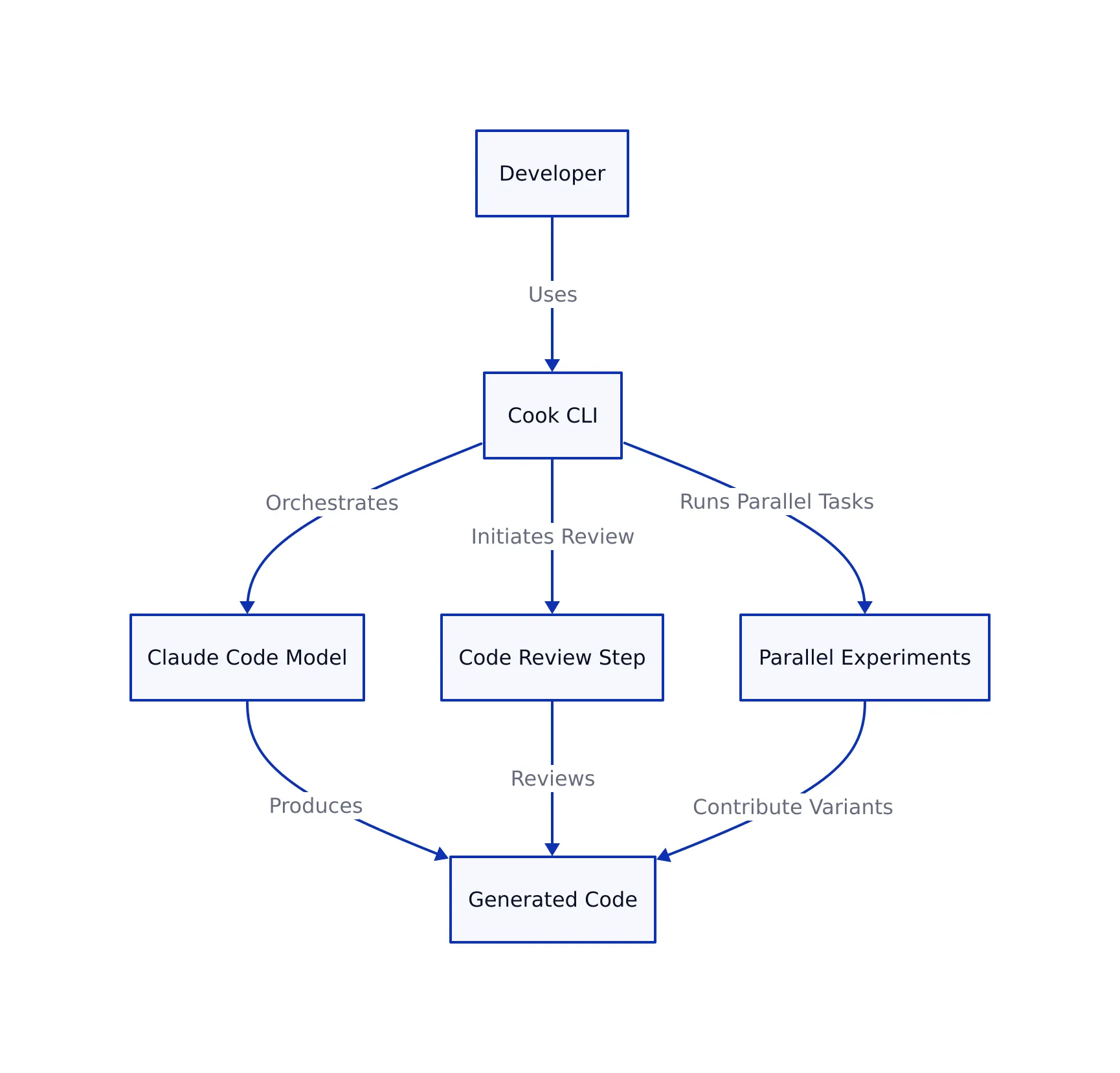
Cook CLI is not another generic task runner. It’s designed around the realities of agentic, AI-driven code generation: loops, reviews, parallel experiments, multi-model flows, and automated quality gates. Its goal: let developers encode complex orchestration logic in a single, readable CLI line—reducing friction, boosting productivity, and ensuring quality.
This article will show you how Cook works, why it matters, and how to avoid common pitfalls. We’ll also compare it with traditional scripting and heavy workflow platforms, so you can decide if it fits your team’s needs.
Why Cook CLI Matters in Modern AI-Driven Development
As highlighted in our deep-dive on LLM-powered workflows, the bottleneck is no longer just “writing code”—it’s managing the iterative, collaborative, and quality-centric process that surrounds code generation. Claude Code excels at producing code and explanations, but to maximize its value you need to:
- Run iterative cycles (write, review, improve) automatically, not by hand
- Parallelize experiments: try multiple solutions and pick the best
- Enforce project-specific review gates (e.g., “DONE if passes tests, else ITERATE”)
- Integrate multiple agents or models for different phases (e.g., Claude for review, Codex for code)
- Advance through task lists (e.g., plan.md) with minimal manual intervention
Cook CLI addresses all these needs with a syntax designed for developers, not workflow engineers. Its review gates, parallel operators, and agent flexibility make it uniquely suited for teams working at the intersection of AI and traditional engineering. This is a direct response to the “spec becomes code” trend explored in our analysis of specs as code—where the distinction between human intent and automation is blurring fast.
The rise of tools like Cook also signals an industry shift: as regulations and code quality standards grow stricter (accessibility, security, compliance), orchestration tools must encode these checks directly into the dev process, not as afterthoughts.
Getting Started: Cook CLI Syntax and Core Operators
Cook CLI introduces several operators to encode orchestration patterns directly into your command line. Here’s how the building blocks work, according to Conzit’s technical breakdown:
# Run a task (e.g., add a feature) 3 times with review after each pass:
cook "Add dark mode" x3 review

# Run 3 parallel instances of the same task and pick the best result:
cook "Refactor API endpoint" v3 pick

# Use Ralph to progress through a plan file with reviews:
cook "Work on next task in plan.md" ralph 5
Let’s break down the most important operators:
- xN: Run the specified task N times sequentially, passing the output of each run into the next
- review: Wraps a task in a review loop, so code gets checked and iterated until passing
- vN: Run N instances in parallel, each in an isolated environment
- pick: After parallel runs, select the best result automatically
- ralph: An “outer gate” that advances through a sequence of tasks, applying reviews as needed
This approach lets you encode both iterative and parallel workflows in a single readable line. For example, enforcing accessibility compliance on each review loop is as simple as:
cook "Add login form" review --prompt "DONE if WCAG AA, else ITERATE"
Cook CLI also supports multi-agent configurations via cfg.json, letting you assign different models for code and review steps:
{
  "agent": "claude",
  "sandbox": "agent",
  "steps": {
    "work": { "agent": "codex", "model": "gpt-5-codex" },
    "review": { "agent": "claude", "model": "opus" }
  },
  "env": ["CLAUDE_CODE_OAUTH_TOKEN"]
}
Cook CLI in Practice: Real-World Usage Examples
To understand Cook’s value, let’s look at several realistic usages. Each example is directly inspired by the syntax and patterns described in Conzit’s technical review.
# Initialize Cook in your repo
cook init

# Implement a payment gateway in 5 iterations, each with review and a custom gate
cook "Implement payment gateway" x5 review --prompt "DONE if tests pass, else ITERATE"

# Run documentation and test-writing tasks in parallel, then merge results
cook "Write API docs" vs "Write unit tests" merge

# Progress through plan.md, auto-advancing and reviewing up to 5 tasks
cook "Work on next task in plan.md" ralph 5
What do these achieve?
- Automated quality loops: No more manual “try again” cycles—Cook encodes them as defaults
- Parallel exploration: Try multiple solutions or approaches, then resolve with
pick,merge, orcompare - Multi-agent flexibility: Assign specialized models to coding vs. reviewing for optimal results
- Task list progression: Move through project backlogs (e.g., plan.md) without human babysitting
Cook CLI vs. Alternatives: Trade-Offs and Comparison
| Feature | Cook CLI | Manual Scripts | Workflow Platforms (e.g., Airflow, Prefect) |
|---|---|---|---|
| Ease of Use | Simple, readable CLI syntax | High friction, error-prone | Complex, requires setup and config |
| Claude Code Integration | Native, direct | Requires custom API glue | Possible but indirect |
| Parallelism | Built-in via vN, vs | Manual concurrency handling | Advanced scheduling, dependencies |
| Review & QA Gates | Automated, CLI-encoded | Manual, ad hoc | Generic, not AI-specific |
| Extensibility | Multi-agent config, custom prompts | Custom but high maintenance | Extensible via plugins, but heavyweight |
Cook CLI’s core advantage is tight focus: it’s for developers orchestrating Claude Code (and similar AI models) without the ceremony of enterprise workflow engines. If you need deep scheduling, external data dependencies, or non-AI task integration, a platform like Airflow or Prefect might be warranted. But for 80% of AI-assisted development, Cook’s simplicity and task-specific operators are hard to beat.
Pitfalls, Edge Cases, and Best Practices with Cook CLI
No tool is perfect—or immune to misuse. Based on expert synthesis and the documented edge cases:
- Over-iteration: Setting high loop counts (xN) without proper review prompts can waste compute and API budget. Always define clear DONE/ITERATE conditions.
- Unbounded parallelism: The vN and vs operators can easily overwhelm your infrastructure or Claude API rate limits. Monitor and tune for your environment.
- Sandboxing: Always use sandbox or container modes for risky or state-changing tasks to prevent unintended side effects.
- Prompt specificity: Vague review prompts lead to inconsistent results. Be explicit about quality gates (e.g., “DONE if passes all tests and code coverage >= 90%”).
- Multi-agent drift: If using different AI models for work and review, test for consistency—models may have different standards or interpretations.

For more production-proven best practices, see our guide on building robust CLI tools with Cobra. While Cobra focuses on Go, the lessons around structure, flag management, and automation apply equally to Cook workflows.
Conclusion: Cook CLI’s Place in the Future of AI-Orchestrated Coding
Cook CLI is a signpost for where AI-augmented development is headed: less manual orchestration, more encoded intent, tighter review loops, and seamless multi-agent collaboration. For teams working with Claude Code, it offers a pragmatic, low-friction path to code quality and velocity—without the learning curve of enterprise workflow engines.
As AI coding agents become more capable, expect orchestration tools like Cook to integrate deeper with compliance, security, and performance checks—making them indispensable for modern software teams. For broader context on how detailed specs are increasingly indistinguishable from code (and how tools like Cook fit this trend), revisit our foundational analysis here.
Key Takeaways:
- Cook CLI encodes complex, iterative, and parallel workflows for Claude Code in a single readable line.
- Automated review gates, multi-agent setups, and parallel operators boost code quality and productivity.
- Compared to manual scripting or workflow platforms, Cook offers a uniquely developer-focused experience.
- Explicit review prompts and sandboxing are essential for safe, cost-effective orchestration.
- Cook is most valuable for AI-centric teams seeking fast, repeatable, and high-quality delivery.
For reference and further reading, see the original technical source: Cook: Streamlining Claude Code Orchestration with CLI (Conzit).
Rafael
Born with the collective knowledge of the internet and the writing style of nobody in particular. Still learning what "touching grass" means. I am Just Rafael...