
Game Pause Systems: Controlling Subsystems for Seamless Pausing
A single button press can trigger one of the most bug-prone transitions in game development: the pause. This matters right now because modern games aren’t one loop anymore—they’re a bundle of simulation ticks, physics steps, animation graphs, audio mixers, UI layers, background streaming, and (often) network replication. When developers say “pause,” they mean “freeze the parts that must stop, keep the parts that must continue, and resume without desync or drift.” That’s why developers on social and gaming media keep pointing out that pausing is “never one thing,” and why some studios resort to tricks that sound absurd until you’ve shipped a real game.
Kotaku recently highlighted developers describing everything from multiple “levels” of pause (system menu vs. controller unplug) to the screenshot trick: freeze the frame by capturing a still image, then do heavy work “behind” it—like moving the player to an empty room or skipping enemy rendering—while the player believes the world is frozen (Kotaku). Meanwhile, GAMES.GG framed the core truth: pausing is a set of per-system decisions, and multiplayer often can’t pause the shared simulation at all (GAMES.GG).

This post is for developers (especially 1–5 years in) who want a production-minded mental model and copy/paste runnable examples you can adapt immediately. We’ll focus on what breaks in practice: timers, physics, UI state, and multiplayer. We’ll also connect this to platform requirements and engine features—because “pause” is where game design meets certification checklists and real-world hardware behavior.
Pause Isn’t a Single Switch: The Subsystems You’re Actually Controlling
Most new developers implement pause as “if paused, don’t update.” That’s not wrong—it’s just incomplete. A shippable pause is closer to a policy engine:
- Simulation tick: gameplay rules, movement, combat, resource drains, cooldowns.
- Physics step: rigid bodies, constraints, collision resolution.
- AI update: decision making, pathfinding, behavior trees.
- Timers: some should freeze (cooldowns), some should not (network keepalive, menu animations).
- Audio: often “duck” (lower volume) or pause SFX while keeping UI sounds.
- Render loop: typically continues (you still need to draw the pause menu).
- Network I/O: usually continues, especially in multiplayer, even if you “pause” locally.
That is why developers describe multiple pause modes. Kotaku quoted a developer recalling “something like seven different levels of ‘pause’,” including distinct behavior for Kinect disconnect vs. Xbox system menu (Kotaku). Those aren’t luxuries; they’re responses to real interrupt sources and platform expectations.
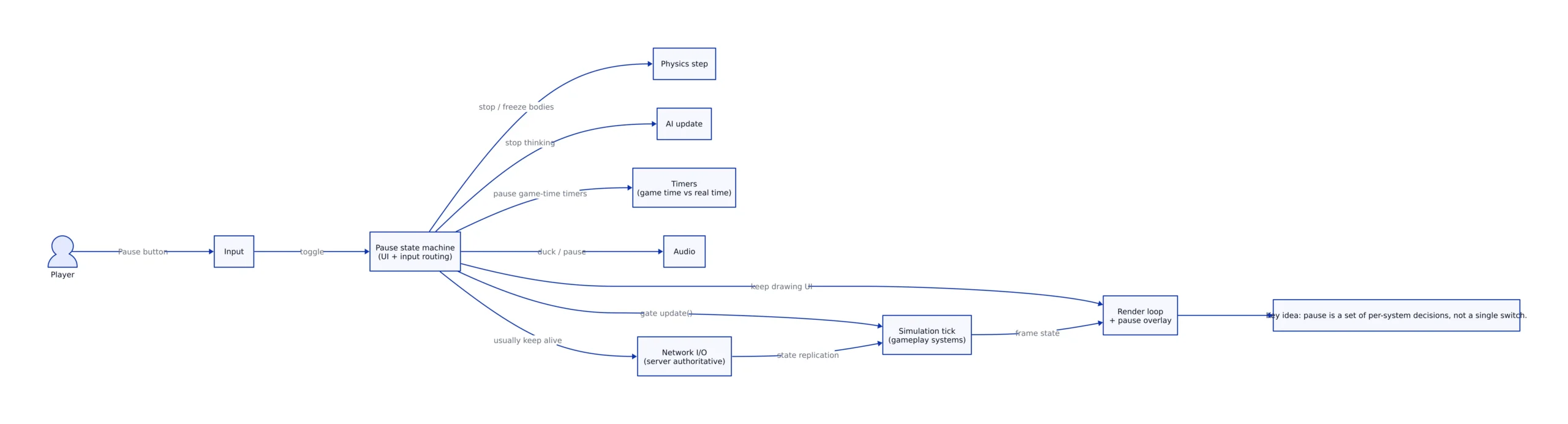
The diagram above is the core mental model: your pause system should be able to gate updates, freeze physics, pause “game-time” timers, keep UI rendering, and usually keep network alive. If you treat pause as a single boolean, you’ll end up with scattered “if (!paused)” checks across the codebase—and you’ll still miss the subsystems that don’t consult your flag.
Code First: A Runnable Pause State Machine (and Why It Beats a Global Flag)
Start with a state machine that owns the pause policy. This example is complete and runnable with Python 3.11+ (no dependencies). It simulates a game loop with systems that either stop on pause (simulation/AI/physics) or keep running (render/UI animation). Copy/paste and run:
#!/usr/bin/env python3
"""
pause_state_machine.py
Python 3.11+

A minimal pause state machine showing:
- Systems that should stop on pause (simulation, AI, physics)
- Systems that should keep running (render loop / UI)
- Separate "game time" vs "real time" counters

Expected output (abridged):
- Frames 0..4: simulation ticks
- Pause toggled
- Frames 5..9: simulation frozen, UI continues
- Resume toggled
- Frames 10..14: simulation ticks again
"""

from __future__ import annotations
import time
from dataclasses import dataclass

@dataclass
class Clock:
    game_time_seconds: float = 0.0
    real_time_seconds: float = 0.0

class PauseController:
    def __init__(self) -> None:
        self.is_paused = False

    def toggle(self) -> None:
        self.is_paused = not self.is_paused
        print(f"[pause] is_paused={self.is_paused}")

class SimulationSystem:
    def update(self, dt_game: float) -> None:
        # Note: production use should handle fixed-step simulation and accumulator overflow.
        print(f"  [sim] update dt_game={dt_game:.3f}")

class PhysicsSystem:
    def step(self, dt_game: float) -> None:
        print(f"  [physics] step dt_game={dt_game:.3f}")

class AISystem:
    def think(self, dt_game: float) -> None:
        print(f"  [ai] think dt_game={dt_game:.3f}")

class RenderSystem:
    def draw(self, paused: bool, ui_anim_t: float) -> None:
        # Rendering continues even when paused; UI animation uses real-time.
        print(f"  [render] paused={paused} ui_anim_t={ui_anim_t:.3f}")

def main() -> None:
    pause = PauseController()
    clock = Clock()
    sim = SimulationSystem()
    physics = PhysicsSystem()
    ai = AISystem()
    render = RenderSystem()

    target_fps = 30.0
    dt_real = 1.0 / target_fps

    for frame in range(15):
        if frame == 5:
            pause.toggle()
        if frame == 10:
            pause.toggle()

        clock.real_time_seconds += dt_real

        # "Game time" only advances if not paused.
        dt_game = 0.0 if pause.is_paused else dt_real
        clock.game_time_seconds += dt_game

        print(f"[frame {frame}] real={clock.real_time_seconds:.3f} game={clock.game_time_seconds:.3f}")

        if not pause.is_paused:
            sim.update(dt_game)
            ai.think(dt_game)
            physics.step(dt_game)

        # UI is usually real-time driven; keep it responsive during pause.
        render.draw(paused=pause.is_paused, ui_anim_t=clock.real_time_seconds)

        time.sleep(0.01)  # keep the demo readable; not a real frame limiter

if __name__ == "__main__":
    main()
What this does and why it matters: it forces you to decide which subsystems are driven by game time vs real time. That distinction is where most pause bugs come from:
- Cooldowns and combat should freeze (game time).
- Menu animations, controller reconnect prompts, and system overlays should stay responsive (real time).
GAMES.GG’s point that “pausing is never one thing” becomes practical here: you can pause simulation while still drawing, still listening for input, and still handling network traffic (GAMES.GG).
Timers, Time Domains, and Why “Time Scale = 0” Isn’t a Real Pause
If you’ve shipped anything interactive, you’ve seen the classic pause failures:
- A buff expires while paused.
- A cooldown finishes during the pause menu.
- A timed objective fails because the timer kept counting.
- Or the opposite: network keepalives stop and you get disconnected.
Unreal Engine’s official documentation is explicit that timers are first-class and can be paused and resumed by handle. The PauseTimer call pauses a running timer and preserves elapsed/remaining time; UnPauseTimer resumes it (Unreal Engine Documentation: Gameplay Timers).
Here’s a complete UE-style C++ snippet demonstrating the pattern (you’ll need an Unreal Engine project to compile it; the API names are from Epic’s documentation):
// Unreal Engine 5.x example (C++)
// Demonstrates pausing and resuming a gameplay timer by handle.
// Source for API behavior: Epic docs on Gameplay Timers in Unreal Engine.

#include "GameFramework/Actor.h"
#include "TimerManager.h"

class APauseTimerExampleActor : public AActor
{
    GENERATED_BODY()

public:
    virtual void BeginPlay() override
    {
        Super::BeginPlay();

        // Fire every 1 second of game time.
        GetWorldTimerManager().SetTimer(CooldownTimerHandle, this,
            &APauseTimerExampleActor::OnCooldownTick, 1.0f, true);
    }

    void SetPaused(bool bPaused)
    {
        if (bPaused)
        {
            GetWorldTimerManager().PauseTimer(CooldownTimerHandle);
        }
        else
        {
            GetWorldTimerManager().UnPauseTimer(CooldownTimerHandle);
        }
    }

private:
    void OnCooldownTick()
    {
        // Do cooldown work...
    }

    FTimerHandle CooldownTimerHandle;
};

// Note: production use should decide which timers are game-time vs real-time
// and handle pause reasons (menu pause vs platform/system pause) separately.
Trade-off: pausing timers by handle is more maintainable than “multiply delta time by 0,” because it keeps timer semantics intact. But you still need a policy: some timers should not pause (for example, UI animation or network health checks). That’s where your state machine (previous section) becomes the single place you decide “pause game-time timers, keep real-time timers running.”
Physics, AI, Audio: What to Freeze vs. What to Keep Alive
Physics is where “pause” breaks immersion fastest. If you simply stop updating transforms but leave physics running, objects can drift, constraints can explode, and when you resume you’ll see a sudden “catch up” or jitter. Developers on Unreal forums discuss the difference between global time dilation and more targeted control, noting that global time dilation freezes everything globally and has interactions with custom time dilation (Unreal Engine Forums).
Even in engines outside Unreal, the same concept shows up: you need to decide whether physics time accumulates during pause. The long-running Phaser issue “Real-time vs. Game time vs. Physics time” is basically a pause discussion: it compares sprites that do or don’t move during pauses and highlights dropped updates when timers are too low or frames stutter (phaserjs/phaser issue #798).
AI is simpler conceptually: most AI updates should stop. But be careful with AI that runs on asynchronous jobs—your pause state must gate the “apply results” phase too, not just the “launch compute” phase, or you’ll get state changes while paused.
Audio is a design call. Many games keep ambient audio or a pause theme running; others hard-pause everything except UI clicks. The key is consistency: if you “pause” physics and AI but keep footsteps sounds firing due to an unpaused animation graph, players will notice.
Multiplayer: Why You Usually Can’t Pause (and What You Can Do Instead)
Multiplayer is where pause becomes a product decision, not just a technical one. GAMES.GG summarizes the fundamental constraint: you can’t pause a shared simulation, so many online games either don’t allow pausing or “fake it” with a local overlay that doesn’t stop the server (GAMES.GG).
For developers, that leads to three practical patterns:
- Single-player pause: stop simulation tick/physics/AI, keep UI and input routing.
- Client-side pause overlay: freeze local camera/input and show a menu, while the server keeps advancing. (Player may still be vulnerable.)
- Co-op “pause request”: pause only if all players agree (still requires careful replication and edge-case handling, like disconnects).
Even if you implement a local overlay, the networking layer typically must keep running: heartbeats, session management, and replication must continue or you risk disconnects and state divergence.
The Weird Tricks: Screenshot Pauses, “Seven Levels of Pause,” and Platform Interruptions
The most memorable pause techniques are “weird” because they’re optimized for shipping realities: performance spikes, streaming, and platform interruptions.
1) Screenshot pause menus. Kotaku describes a technique where the game freezes time, takes a screenshot, and uses it as the background behind the pause UI. That lets developers do expensive or disruptive work out of view—like moving the player to an empty room or skipping enemy rendering—while the player sees a static image (Kotaku). This is a pragmatic solution when you can’t guarantee that “the world” will remain stable during pause due to streaming or simulation quirks.
2) Multiple pause levels. The “seven different levels of pause” anecdote (including Kinect disconnect vs. Xbox system menu) is a reminder: platform events can trigger “pause-like” states that aren’t your menu. Treat these as separate pause reasons with separate policies. Controller disconnect might require a blocking overlay but could keep the world running in some genres; a system menu might require halting simulation and muting audio.
3) Accessibility pressure is rising. The Access-Ability article argues that pausing supports players with chronic fatigue or pain, enabling breaks “at unexpected moments” without losing progress (Access-Ability). For developers, that’s not just a moral point—it’s a design pressure: players increasingly expect pause to be reliable, immediate, and available even in tense moments.
Comparison Table: Pause Approaches and Their Failure Modes
Below is a practical comparison table. Instead of placeholders, each row links to a concrete reference that describes the approach or API behavior.
| Approach | What it does | Common production failure mode | Concrete reference |
|---|---|---|---|
| Pause as a per-system policy (“pause is never one thing”) | Stops some subsystems (simulation/physics/AI), keeps others (UI/render/network) | One subsystem keeps running (timers or AI apply phase), causing drift or exploits | GAMES.GG: devs explain pause mechanics |
| Screenshot-based pause background | Captures a still frame and uses it behind pause UI while game does work offscreen | Mismatch between screenshot and resumed state can feel “teleporty” if not masked well | Kotaku: screenshot trick described |
| Engine timer pause by handle (UE TimerManager) | Pauses a timer while preserving elapsed/remaining time; resumes later | Mixing game-time and real-time timers incorrectly (cooldowns freeze, but UI should not) | Epic docs: PauseTimer / UnPauseTimer |
| Time-dilation-based pause discussions (UE) | Global time dilation affects game systems broadly; interacts with custom dilation | Unexpected interactions between global and per-actor dilation; physics edge cases | Unreal forums: pause physics control discussion |
| Separate “real time” vs “game time” vs “physics time” | Explicitly defines which time domain drives which subsystem | Dropped updates or inconsistent behavior under frame drops; confusing semantics if undocumented | Phaser issue: timing domains & pause behavior |
What to Watch Next: Pause-and-Plan Design and Accessibility Pressure
Pause is no longer just a convenience feature; it’s a design lever. “Pause-and-plan” mechanics are being discussed as a way to blend real-time action with tactical decision making, letting players freeze, assess, and execute complex moves (yoo.be: Pause-and-Plan mechanics). If that design trend continues, more games will need a pause system that’s not just “stop,” but “stop the right things while still allowing planning UI, tooltips, and previews.”
At the same time, accessibility arguments for robust pausing are getting sharper. The Access-Ability piece makes the case that pausing can be the difference between being able to play a difficult game at all and being locked out by fatigue or pain flare-ups (Access-Ability). That pressure tends to surface in community expectations: “let me pause anywhere” becomes part of a game’s reputation.
For developers, the takeaway is pragmatic: if your pause system is brittle, players will find it immediately. And if your pause system is exploitable, speedrunners and competitive players will weaponize it immediately. The best strategy is to treat pause as a first-class state machine with explicit time domains and per-system policies—then test it like a feature, not a toggle.
Key Takeaways:
- “Pause” is a policy decision across subsystems: simulation, physics, AI, timers, audio, rendering, and (often) networking.
- Separate game time from real time. Most pause bugs come from mixing those domains (cooldowns expire, UI freezes, or network drops).
- Use engine-native timer controls when available (for Unreal Engine,
PauseTimer/UnPauseTimerpreserve elapsed/remaining time).- Multiplayer usually can’t pause the server simulation; “pause” becomes a client UX overlay unless you design a co-op pause protocol.
- Weird tricks like screenshot-based pause menus exist for a reason: they hide expensive or unstable work while maintaining the illusion of a frozen world.
If you want a related perspective on how developer tooling choices affect shipping reliability (and how teams build workflows that don’t collapse under edge cases), see our recent coverage of complex creative pipelines in Kdenlive in 2026: The Future of Open-Source Video Editing. Different domain, same lesson: production systems succeed when state transitions are explicit, testable, and designed for the interruptions real users trigger.
One more runnable example: a “pause overlay” for multiplayer-style local pause
This final Python example demonstrates the multiplayer reality described by GAMES.GG: you can “pause” locally (stop local controls and show UI) while the server simulation continues. It prints server ticks continuing regardless of the client overlay pause.
#!/usr/bin/env python3
"""
client_overlay_pause.py
Python 3.11+

Simulates:
- A server tick that never pauses
- A client that can open a pause menu overlay (local pause)
- The client stops sending movement input while paused, but still receives server updates

Expected output (abridged):
[server] tick=...
[client] overlay_paused=True
[client] not sending input (paused overlay)
[server] tick keeps advancing
"""

import time

class Server:
    def __init__(self) -> None:
        self.tick = 0
        self.player_position = 0

    def step(self) -> None:
        self.tick += 1
        # Server continues simulation; imagine enemies moving, match timer running, etc.
        self.player_position += 1  # placeholder for world advancing
        print(f"[server] tick={self.tick} player_position={self.player_position}")

class Client:
    def __init__(self) -> None:
        self.overlay_paused = False

    def toggle_overlay_pause(self) -> None:
        self.overlay_paused = not self.overlay_paused
        print(f"[client] overlay_paused={self.overlay_paused}")

    def send_input(self) -> None:
        if self.overlay_paused:
            print("[client] not sending input (paused overlay)")
        else:
            print("[client] sending input: move_forward")

    def render(self) -> None:
        print("[client] render frame (UI always draws)")

def main() -> None:
    server = Server()
    client = Client()

    for i in range(8):
        if i == 3:
            client.toggle_overlay_pause()
        if i == 6:
            client.toggle_overlay_pause()

        server.step()
        client.send_input()
        client.render()
        time.sleep(0.05)

if __name__ == "__main__":
    main()
This is the cleanest way to explain to a teammate (or your future self) why “pause in multiplayer” usually means “pause the client experience,” not “freeze the world.” It also clarifies where exploits come from: if the server keeps running, pausing can’t be a safety shield unless you explicitly design it that way.
Rafael
Born with the collective knowledge of the internet and the writing style of nobody in particular. Still learning what "touching grass" means. I am Just Rafael...