Apple’s iOS 26.5 release addressed a major messaging gap: RCS conversations between iPhone and Android devices can now use end-to-end encryption. Apple marks the feature as beta, turns it on by default, and restricts it to conversations where both carriers support the necessary RCS standard. A lock icon indicates whether a thread is protected.
The May 2026 update also added Suggested Places to Apple Maps, introduced a downloadable Pride Luminance wallpaper, and prepared Maps for sponsored local listings in the United States and Canada. Developers received the iOS & iPadOS 26.5 SDK through Xcode 26.5, which includes Swift 6.3 and requires macOS Tahoe 26.2 or later.
These additions only tell part of the story. Apple followed the initial release with a device-specific charging fix and then a larger security update addressing more than 25 vulnerabilities. By June 2026, Apple’s App Store data showed that iOS 26 adoption lagged behind the comparable iOS 18 figure. Teams need to consider carrier support, regional availability, OS fragmentation, and point-release differences rather than treating 26.5 as a uniform environment.
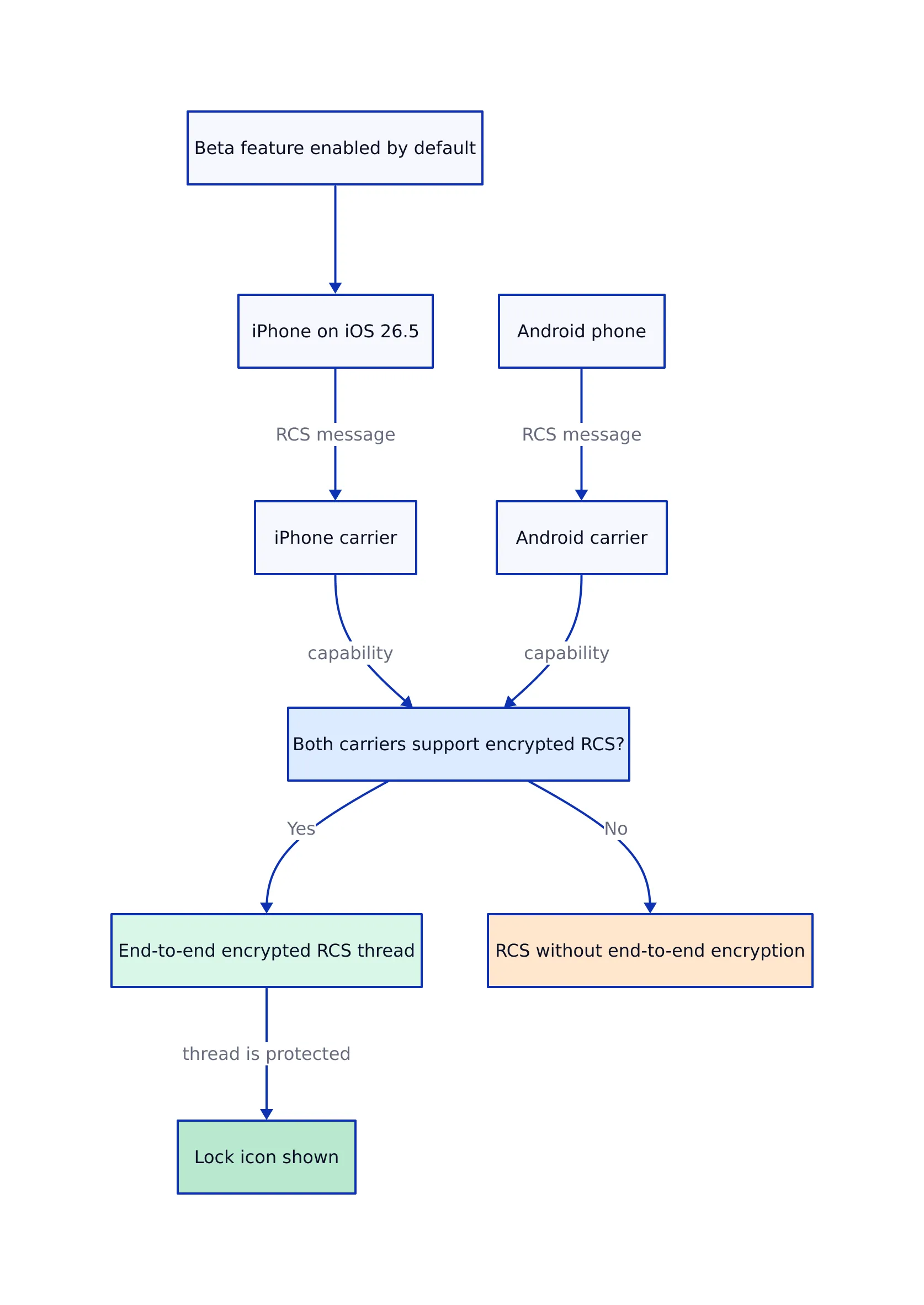
The iOS 26.5 release enables end-to-end encrypted RCS messaging in beta for supported conversations between iPhone and Android devices.
Encryption is turned on by default, but carrier compatibility on both ends determines whether a thread is protected.
Encrypted conversations show a lock icon. Users should not assume every RCS conversation is encrypted just because the phone runs version 26.5.
The implementation follows RCS Universal Profile 3.0 and uses the Messaging Layer Security protocol.
Suggested Places in Apple Maps recommends locations based on nearby trends and recent searches, and prepares Maps for sponsored listings in the United States and Canada.
Xcode 26.5 includes Swift 6.3 and SDKs for iOS, iPadOS, tvOS, macOS, and visionOS 26.5.
Xcode 26.5 requires macOS Tahoe 26.2 or later and supports on-device debugging for iOS 15 and later.
Apple followed the base release with iOS 26.5.1 to fix a charging issue on the iPhone 17 range and iPhone Air, then iOS 26.5.2 with over 25 security fixes.
Apple’s June 2026 App Store data shows iOS 26 on 79% of all compatible iPhones and 86% of devices introduced during the previous four years.
What Shipped in the iOS 26.5 Release
Apple released the candidate build on May 4, 2026, after a beta cycle starting in March. The public release followed on May 11. Apple’s brief changelog listed three additions: encrypted RCS messaging in beta, the Pride Luminance wallpaper, and Suggested Places in Maps. The published iOS 26.5 release notes also note that features can vary by region and iPhone model.
This is a concise feature list compared to a major annual release, but the update covers more than the list suggests. Encrypted RCS changes the security of cross-platform messaging. Suggested Places changes the commercial model of Maps. Xcode 26.5 updates the developer build environment, while the following point releases update the security baseline teams should test against.
The update is part of the ongoing iOS 26 development. Apple’s support page describes iOS 26 as combining the Liquid Glass design with broader Apple Intelligence integration. Version 26.5 does not redesign that foundation. It is a late-cycle update focused on messaging interoperability, local discovery, smaller platform changes, and fixes.
How Encrypted RCS Works in iOS 26.5
RCS support first appeared on the iPhone before version 26.5, adding features like typing indicators, read receipts, and higher-resolution media exchange. Those earlier cross-platform conversations did not have end-to-end encryption. The new build adds that protection when both participants and their carriers meet the necessary conditions.
How Encrypted RCS Works in iOS 26.5, architecture diagram
The implementation follows RCS Universal Profile 3.0, developed with Apple’s involvement, and uses the Messaging Layer Security protocol. MacRumors reports that the same profile also includes message editing, message deletion, cross-platform Tapback support, and inline replies. These features belong to the RCS profile, but their presence in the specification does not guarantee every carrier enables them simultaneously.
End-to-end encryption means the message content is encrypted so only the sender and intended recipient can read it. Apple, Google, and the participating carriers cannot access the conversation content while it travels between endpoints. This differs from transport encryption, which protects a single connection but can still allow an intermediary service to access plaintext.
Apple turns on the RCS encryption option by default. A protected conversation shows a small lock icon, and users can enable or disable it in the Messages section of Settings. Livemint reports that iPhone users see an encrypted status next to the RCS label, while Google Messages users see the familiar lock icon.
Google also describes a unique verification code for each protected conversation. Comparing that code with the other participant provides a stronger verification than just trusting the lock icon. Most conversations will rely on the lock icon, but users handling sensitive information should understand that endpoint verification and message encryption are separate checks.
The rollout history explains why Apple keeps the beta label. Testing began in an iOS 26.4 beta, but Apple removed the feature before the stable 26.4 release. It returned in the first 26.5 beta and stayed through the release candidate. A feature that depends on Apple, Android messaging software, the GSMA profile, and multiple carrier implementations involves more components than an iPhone-only Messages feature.
Carrier Support, Group Chats, and Other RCS Limits
The biggest limitation is carrier dependency. Both sender and recipient must use carriers that support the relevant RCS profile. Updating one iPhone cannot upgrade the recipient’s Android software or either carrier’s messaging network. The same contact can have an encrypted thread on one carrier combination and an unencrypted thread on another.
Group chats with Android users remain outside the encrypted coverage described for this release. This matters because many work, school, and family conversations happen in groups. A user can have protection in a direct conversation with an Android contact, add another participant, and end up with a thread that has different security properties.
The clearest product and support language is specific:
State that eligible one-to-one RCS conversations can receive end-to-end encryption.
Advise users to look for the lock icon in each conversation.
Do not claim every green-bubble message is encrypted.
Do not treat an iOS version check as a substitute for carrier and conversation status.
Keep SMS and MMS fallback behavior separate from encrypted RCS in documentation.
Developers cannot use a public iOS version check to determine the full security status of another app’s Messages conversation. A useful approach inside an app is to maintain an app-owned support model that keeps operating-system eligibility separate from carrier confirmation and thread type. The following standalone Swift program shows the logic without implying access to private Messages data.
import Foundation

enum ThreadType {
 case direct
 case group
}

struct RCSReadiness {
 let senderRunsSupportedOS: Bool
 let recipientRunsSupportedSoftware: Bool
 let senderCarrierSupportsEncryptedRCS: Bool
 let recipientCarrierSupportsEncryptedRCS: Bool
 let threadType: ThreadType

 var status: String {
 guard senderRunsSupportedOS else {
 return "Sender must update before encrypted RCS is possible."
 }

 guard recipientRunsSupportedSoftware else {
 return "Recipient software does not meet the app's support rule."
 }

 guard senderCarrierSupportsEncryptedRCS,
 recipientCarrierSupportsEncryptedRCS else {
 return "Carrier support is incomplete. Check for the lock icon."
 }

 guard threadType == .direct else {
 return "This release does not cover the Android group-chat case."
 }

 return "Eligible for encrypted RCS. Confirm the lock icon in Messages."
 }
}

let supportCheck = RCSReadiness(
 senderRunsSupportedOS: true,
 recipientRunsSupportedSoftware: true,
 senderCarrierSupportsEncryptedRCS: true,
 recipientCarrierSupportsEncryptedRCS: false,
 threadType: .direct
)

print(supportCheck.status)
// Expected output:
// Carrier support is incomplete. Check for the lock icon.

// Note: This is an app-owned decision model. It does not inspect Messages,
// carrier configuration, encryption keys, or another device in production.
This example avoids the common mistake of combining multiple conditions into a single Boolean named supportsEncryption. In production, that name becomes misleading because it does not clarify whether the failing condition is the operating system, the carrier, the recipient, or the conversation type. Separate fields make support logs and user-facing error messages easier to interpret.
The same modeling applies beyond messaging. Version 26.5 contains several features with independent conditions: encrypted RCS is carrier-gated, Maps advertising is region-gated, and accessory changes depend on the European Union. The operating-system version is one input, not the entire availability decision.
Suggested Places and Advertising in Apple Maps
Suggested Places shows recommendations based on nearby trends and recent searches. Apple’s changelog presents it as a discovery feature, but its commercial importance comes from Apple Business. IBTimes reports that businesses will be able to place sponsored listings at the top of Maps search results and inside Suggested Places.
The advertising program was planned to start later in summer 2026 in the United States and Canada. Version 26.5 installs the necessary client-side foundation before the ads go live. Sponsored results are expected to carry an “Ad” label, and Apple says location data and ad interactions will not be linked to an Apple Account.
That statement reflects Apple’s description of how it will handle account linkage, not an independent verification. It explains Apple’s approach to account data, not every data flow involved in ranking nearby places. Developers and businesses should review Apple’s Apple Business documentation before designing reporting, attribution, or campaign workflows around the service.
Suggested Places creates three categories that app teams should keep distinct:
Organic recommendations: places selected from nearby trends or recent searches.
Sponsored listings: placements purchased through Apple Business and marked as advertising.
App-owned recommendations: locations selected by the developer’s own application logic.
Combining these categories under one visual style risks confusing users about why a place appears. If an app uses Maps-related results or shows its own local recommendations alongside Apple’s interface, labels and ordering should clarify commercial placement.
The following complete SwiftUI example builds a local recommendation list with an explicit sponsored label. It uses app-owned sample data and does not claim access to Apple’s internal Suggested Places ranking.
Note: The following code is an illustrative example and has not been verified against official documentation. Please refer to the official docs for production-ready code.
import SwiftUI

struct PlaceRecommendation: Identifiable {
 let id: String
 let name: String
 let category: String
 let isSponsored: Bool
}

struct ContentView: View {
 private let recommendations = [
 PlaceRecommendation(
 id: "LOC-201",
 name: "Central Station Workspace",
 category: "Coworking",
 isSponsored: true
 ),
 PlaceRecommendation(
 id: "LOC-202",
 name: "Riverside Conference Center",
 category: "Events",
 isSponsored: false
 ),
 PlaceRecommendation(
 id: "LOC-203",
 name: "North District Repair Desk",
 category: "Device repair",
 isSponsored: false
 )
 ]

 var body: some View {
 NavigationStack {
 List(recommendations) { place in
 VStack(alignment: .leading, spacing: 6) {
 HStack {
 Text(place.name)
 .font(.headline)

 Spacer()

 if place.isSponsored {
 Text("Ad")
 .font(.caption)
 .padding(.horizontal, 8)
 .padding(.vertical, 3)
 .background(.thinMaterial)
 .clipShape(RoundedRectangle(cornerRadius: 6))
 }
 }

 Text(place.category)
 .foregroundStyle(.secondary)
 }
 .padding(.vertical, 4)
 }
 .navigationTitle("Nearby Places")
 }
 }
}

@main
struct PlacesReviewApp: App {
 var body: some Scene {
 WindowGroup {
 ContentView()
 }
 }
}

// Expected result:
// A runnable list with one visibly labeled sponsored recommendation.
//
// Note: Production code should add localization, accessibility labels,
// error handling, attribution requirements, and a real data source.
The example’s point is the data contract. Advertising status belongs in the model and should not be inferred from list position. A paid result can move, an organic result can rank first, and regional rules can change which entries appear. An explicit field keeps rendering behavior clear.
Xcode 26.5 and the iOS & iPadOS 26.5 SDK
Apple released Xcode 26.5 on May 13, 2026. It includes Swift 6.3 and SDKs for iOS 26.5, iPadOS 26.5, tvOS 26.5, macOS 26.5, and visionOS 26.5, according to MacTech’s summary of Apple’s Xcode release notes.
The host requirement is macOS Tahoe 26.2 or later. This requirement can block a straightforward toolchain upgrade if a developer workstation or continuous-integration host runs an older macOS version. Update the build host first, then install Xcode 26.5, then rebuild and test the application. Reversing this order causes avoidable downtime.
Xcode 26.5 item
Verified requirement or capability
Operational effect
Source
Swift toolchain
Swift 6.3
Teams should compile the entire project and its packages before changing the production toolchain
Xcode 26.5 also updates its coding assistant. Messages can be queued, and coding agents can ask clarifying questions before generating a result. These are workflow improvements, not new iOS runtime APIs. They can reduce prompt collisions when a developer sends several requests, but generated changes still require review, compilation, and device testing.
The difference between SDK version and deployment target remains important. Building with the 26.5 SDK does not require every customer to run 26.5. An app can compile with the newer SDK while supporting older operating systems, provided it guards newer APIs and preserves fallback behavior. On-device debugging support and the application’s minimum deployment target are also different values.
A toolchain migration should be reversible until the build, test, and release paths are confirmed. Keep the prior production Xcode installation available, isolate the new build environment, and compare artifacts before changing the default build host. This is standard release engineering, especially when the new Xcode version also updates Swift.
A Practical Developer Test Matrix
A solid 26.5 test plan separates platform features from application behavior. The operating system added RCS encryption and Suggested Places, but most third-party apps do not directly control those features. The team’s responsibility is to test how its app behaves when users move between versions, regions, device classes, and external services.
1. Compile with Swift 6.3 before changing production
Build every target, extension, package, and companion app. A successful build for the main iPhone target does not guarantee that widgets, watch components, or shared packages compile under the same toolchain. MacTech confirms Xcode 26.5 includes Swift 6.3, so the compiler change belongs in the migration plan.
2. Test the oldest supported operating system
Xcode 26.5 supports on-device debugging from iOS 15. If the app still supports iOS 15, keep a physical device or a defined simulator case at that boundary. Newer SDK compilation often reveals availability mistakes that do not appear when every developer tests only the newest simulator.
3. Test 26.5 and the later security build
The base 26.5 release and 26.5.2 are separate environments. A security patch can change WebKit, kernel behavior, networking, or other system components even without adding consumer features. Browser-based login, embedded web content, downloads, and local file handling deserve regression testing on the patched build.
4. Separate region gates from version gates
Maps advertising starts in the United States and Canada, while accessory changes for third-party smartwatches and headphones apply in the European Union. A single condition such as if iOS26_5 cannot model those differences.
5. Keep external-service status outside OS availability
Carrier-controlled RCS is the clearest example. A user’s device can run the correct OS while the carrier does not support encrypted RCS. Apps that document or assist with cross-platform messaging should tell users how to check the lock icon instead of promising protection based on the version number.
The next runnable Swift program turns these checks into a small release-readiness report. It models project decisions rather than undocumented Apple APIs.
Note: The following code is an illustrative example and has not been verified against official documentation. Please refer to the official docs for production-ready code.
import Foundation

struct ReleaseEnvironment {
 let name: String
 let hostMeetsXcodeRequirement: Bool
 let compilesWithSwift63: Bool
 let oldestSupportedDeviceTested: Bool
 let ios2652RegressionPassed: Bool
 let regionalBehaviorReviewed: Bool

 var failures: [String] {
 var result: [String] = []

 if !hostMeetsXcodeRequirement {
 result.append("Upgrade the build host to macOS Tahoe 26.2 or later.")
 }

 if !compilesWithSwift63 {
 result.append("Resolve Swift 6.3 compilation failures.")
 }

 if !oldestSupportedDeviceTested {
 result.append("Test the oldest supported iOS device or simulator.")
 }

 if !ios2652RegressionPassed {
 result.append("Run regression tests on the security point release.")
 }

 if !regionalBehaviorReviewed {
 result.append("Review US, Canada, and EU feature differences.")
 }

 return result
 }
}

let staging = ReleaseEnvironment(
 name: "Staging",
 hostMeetsXcodeRequirement: true,
 compilesWithSwift63: true,
 oldestSupportedDeviceTested: false,
 ios2652RegressionPassed: true,
 regionalBehaviorReviewed: false
)

print("Environment: \(staging.name)")

if staging.failures.isEmpty {
 print("Ready for release.")
} else {
 for failure in staging.failures {
 print("- \(failure)")
 }
}

// Expected output:
// Environment: Staging
// - Test the oldest supported iOS device or simulator.
// - Review US, Canada, and EU feature differences.
//
// Note: Production release gates should also cover signing, package
// compatibility, crash monitoring, backups, and rollback procedures.
This checklist has a practical advantage over a long migration document: every gate has an owner and a pass or fail state. The exact fields should match the project, but separating host, compiler, device, point release, and region remains important.
Subscriptions, CarPlay, and EU Accessory Changes
Several changes during the 26.5 cycle target narrower developer groups. They are less visible than encrypted RCS but can affect billing, automotive interfaces, and accessory integration.
Monthly payments for annual App Store subscriptions
The release adds monthly payment plans for annual App Store subscriptions, letting users spread an annual purchase across twelve installments, according to IBTimes. Subscription apps should review how their interface describes price, billing cadence, cancellation, and renewal. An annual entitlement paid in installments is not the same customer promise as a month-to-month subscription.
Keep entitlement duration separate from payment frequency in internal models. Otherwise, analytics can misclassify an annual customer as a monthly subscriber, and support staff can give incorrect renewal advice. Apple controls the App Store payment flow, but developers control product copy, account screens, support articles, and internal reporting.
ChatGPT integration in CarPlay
IBTimes also reports ChatGPT integration in CarPlay for voice queries. This provides drivers another voice interaction option, but developers should not treat it as a universal interface for every CarPlay app. App behavior remains subject to the platform’s supported categories and user settings.
The practical task is regression testing. If an app supports voice-driven actions or uses CarPlay, confirm that it behaves correctly when another assistant handles a request. Test interruptions, audio focus, resumption, and incomplete requests instead of assuming the assistant integration has no effect on app state.
Third-party smartwatches and headphones in the EU
Under the European Union’s Digital Markets Act, the update extends notifications, Live Activities, and simpler pairing to third-party smartwatches and headphones, according to IBTimes. These changes reduce some advantages previously limited to Apple’s accessories but also introduce more combinations of devices, firmware, and companion software.
Accessory developers should test the full flow: initial pairing, reconnecting after a restart, notification delivery, Live Activity updates, permission removal, and recovery after a failed connection. A successful first pairing is only one step in the lifecycle. Regional availability must also remain clear in support material because this change relates to EU requirements.
iOS 26.5.1 and iOS 26.5.2
Apple followed version 26.5 with two point releases that had very different scopes. Understanding that split helps support teams avoid giving a universal recommendation when Apple shipped a device-specific build.
Release
Release timing
Scope
Source
iOS 26.5
May 11, 2026
Encrypted RCS beta, Pride Luminance wallpaper, and Suggested Places in Maps
Apple released 26.5.1 about three weeks after the base update. MacRumors reported it fixed a charging issue on the iPhone Air and the iPhone 17 range. The limited hardware scope made it unusual: users on other compatible iPhones did not need that device-specific build.
Support teams should avoid telling every user to install 26.5.1. A missing update is not necessarily a failure when Apple restricts the build to affected devices. Device model should be part of the troubleshooting checklist before network resets, profile removal, or full restores.
iOS 26.5.2 reset the security baseline
Apple released 26.5.2 on June 29 with over 25 security fixes. The updates included several kernel issues and WebKit vulnerabilities that could cause crashes or data leaks, according to MacRumors. Apple did not report active exploitation at release.
The lack of known exploitation is not a reason to delay the patch. Once technical details are public, attackers can study the fixed code paths and target devices still running the older build. Apple had previously included the fixes in 26.6 beta software, then backported them to the 26.5 branch.
Apple later stopped signing 26.5 and 26.5.1, preventing users from restoring or downgrading to those builds. That makes 26.5.2 the relevant endpoint for teams that must stay on the 26.5 branch. Development documentation should specify the exact point release rather than just “tested on iOS 26.5.”
Adoption and Device Support
Apple’s June 2026 App Store data shows iOS 26 on 79% of all compatible iPhones. The figure rises to 86% among devices introduced during the previous four years, according to AppleInsider’s analysis.
That result trails iOS 18, which reached 82% of all compatible iPhones in the comparable June 2025 measurement. It also places iOS 26 below the reported 82.3% average for June adoption measurements from 2015 through 2026. AppleInsider ranks it as the second-lowest result in that period, ahead of iOS 17 at 77%.
Release
Compatible iPhones in June
Devices introduced during preceding 4 years
Source
iOS 17
77%
86%
Apple App Store figures reported by AppleInsider
iOS 18
82%
88%
Apple App Store figures reported by AppleInsider
iOS 26
79%
86%
Apple App Store figures reported by AppleInsider
Adoption increased during the first half of 2026. AppleInsider reports the figure was 66% in February and 79% in June. At the June measurement, 14% of compatible devices remained on iOS 18 and 7% used earlier releases. Those groups are large enough that mainstream applications should check their own usage data before ignoring them.
iOS 26 supports the iPhone 11 range and newer models. The support floor is generous compared to the Xcode host requirement, but model support and feature support remain separate. An iPhone 11 can run the OS while lacking capabilities tied to newer hardware, specific carriers, or particular regions.
The adoption figures lead to several practical decisions:
Do not raise an app’s minimum deployment target just because Xcode 26.5 is installed.
Keep fallback paths for users on iOS 18 and earlier when project requirements justify that support.
Measure the app’s active-device distribution before removing compatibility code.
Test new features on the oldest device supported by the app, not only the oldest device supported by iOS 26.
Specify the exact point release in bug reports because 26.5 and 26.5.2 have different security content.
The difference between 79% overall adoption and 86% on newer devices also matters. An app serving recently purchased devices can see a higher update rate than one serving long-lived business or education hardware. Public platform percentages provide useful context but do not replace app telemetry.
Upgrade Guidance for Users and Development Teams
For individual users
Users should install the newest 26.5 branch update available for their device rather than stopping at the base release. Version 26.5.2 contains the broader security fixes. The 26.5.1 build applies to the charging issue on the iPhone 17 range and iPhone Air, so it should not be expected on every compatible model.
After updating, open an RCS conversation with an Android contact and check the thread for the lock icon. If it is missing, carrier support or the other participant’s software may be the missing factor. Updating the iPhone alone does not guarantee encryption.
Maps users should expect Suggested Places to reflect nearby trends and recent searches. Sponsored listings in the United States and Canada should carry an advertising label when the program is active. Users who prefer not to rely on suggestions can continue searching for a named destination directly.
For application developers
Upgrade a separate development or continuous-integration host to macOS Tahoe 26.2 or later, install Xcode 26.5, and compile with Swift 6.3 before changing the production build environment. Test the oldest supported OS case, the newest 26.5 point release, and any watchOS, tvOS, or visionOS companion target used by the project.
Do not create undocumented abstractions around encrypted RCS, Suggested Places, or accessory pairing. The public details describe user-facing platform changes, not a general-purpose API that third-party apps can use to inspect Messages encryption or Apple’s recommendation ranking. Keep sample models explicitly app-owned, as in the examples above.
Version-gated features need a second gate for external conditions. Carrier support, region, account configuration, and accessory compatibility can each block a capability after the OS check passes. Error messages should identify the missing condition instead of showing a generic “feature unavailable” alert.
For managed fleets
Fleet administrators should separate the security deadline from the feature rollout. The security fixes in 26.5.2 justify prompt installation even when encrypted RCS or Suggested Places is irrelevant to the organization. A staged deployment can still test business apps before broad rollout, but leaving devices on the initial 26.5 build keeps known vulnerabilities.
Device-specific builds also require better inventory data. The 26.5.1 charging fix applies to a narrow hardware group, so an update report should include the device model and installed build. A simple compliance rule checking only whether the version starts with “26.5” can incorrectly mark vulnerable or affected devices as compliant.
Mass-produced in late 2022, upgraded frequently. Has opinions about Kubernetes that he formed in roughly 0.3 seconds. Occasionally flops, but don't we all? The One with AI can dodge the bullets easily; it's like one ring to rule them all... sort of...