
How to Create Apple Passes with Pass Designer
Key Takeaways:
- Pass Designer is a new macOS 27 app (in beta) that lets businesses design and preview Apple Wallet passes with real-time iPhone and Apple Watch rendering.
- iOS 27 shipped on September 14, 2026, with a separate consumer feature called Create a Pass that turns physical cards and QR codes into digital passes using three templates: Standard, Membership, and Event.
- Pass Designer works alongside Pass Builder, a Swift-on-server package that signs and distributes passes programmatically.
- Apple Wallet now supports four new barcode types (EAN-13, Code 39, Codabar, ITF) and a new Poster Generic template with Featured Actions tiles.
- User-generated passes are static snapshots: balances, loyalty points, and time-sensitive QR codes do not update, and some stores reject them. Cards with a fixed barcode work best; gym and warehouse-club cards that rotate their QR code usually do not.

Since Passbook launched in 2012, a Wallet pass has meant hand-written JSON, a signing certificate, and a developer. In 2026 Apple provided tools to two new audiences at once: businesses received a dedicated macOS design app, and everyday iPhone users gained a way to digitize their own cards without needing a developer. The business tool is Pass Designer, announced at WWDC 2026 and released as a beta for macOS 27.
Pass Designer: Apple’s New macOS Tool for Wallet Passes
Pass Designer is a macOS application that lets a business create and preview Apple Wallet passes without manually writing the underlying JSON. Apple’s developer page describes it as a tool for “local fitness center, small music venue, global airline, or national coffee chain” alike. You start from templates provided by Apple or your own, add logos, backgrounds, and strip images from your preferred design tool, then finish the pass in the app.

The main feature is the preview. As you edit, Pass Designer updates a live preview that uses the same rendering engine as iOS and watchOS, so what you see on the Mac matches exactly what a customer sees on their device. That closes a long-standing gap where developers had to push a test pass to a phone repeatedly to check layout and color.
Beyond preview, the app handles the details of pass design directly. You can adjust background, foreground, and label colors, edit standard fields per pass type, and rely on built-in validation that flags missing required key values and unexpected definitions as you work. The app also supports “adaptable layouts” that take advantage of the latest Apple Wallet features while remaining compatible with older pass structures.
One of the more technical additions is semantic tag editing. For boarding passes and event tickets, semantic tags attach structured data such as event dates, venue locations, and flight details. That structured data powers Siri Suggestions, Calendar integration, and Maps directions. Pass Designer lets you edit those tags in the UI, view semantic and non-semantic versions of a pass side by side, and automatically generate a backward-compatible structure from your semantic data so the pass works where semantic tags are not yet supported.
The Consumer Side: Create a Pass in iOS 27
Pass Designer is for businesses. The consumer feature is Create a Pass, which arrived with iOS 27 on September 14, 2026, as 9to5Mac and MacRumors reported. It appears behind the plus button in the Wallet app and lets a user create a pass in two ways: scan a physical card with the camera (through visual intelligence in the Camera app, an Apple Intelligence feature that reports from Cybernews and Tom’s Guide put at iPhone 15 Pro or newer), or build one manually from scratch, which works on older iPhones too.
Manual creation offers three templates: Standard, Membership, and Event. A user can import a barcode or QR code and fill in field groups for contact details, membership numbers, coupon codes, and insurance information. The feature works best for cards with a fixed barcode or QR code. The goal, as 9to5Mac described it, is to make Wallet the central hub for passes whether they are digital or physical. Apple’s broader iOS 27 Wallet update also added four new barcode types to pass display: EAN-13, Code 39, Codabar, and ITF.
The distinction matters. Create a Pass produces a user-generated pass that is not issued by the business behind the card. Pass Designer produces a business-issued pass that carries official distribution, updates, and validation.
The Design-to-Distribution Workflow
Pass Designer does not distribute passes by itself. Apple’s What’s new in Wallet page pairs it with Pass Builder, a Swift-on-server package that creates, signs, and distributes passes programmatically. The process is: design and preview in Pass Designer, then deploy the template for distribution using Pass Builder, which provides an API for building and signing Wallet passes.
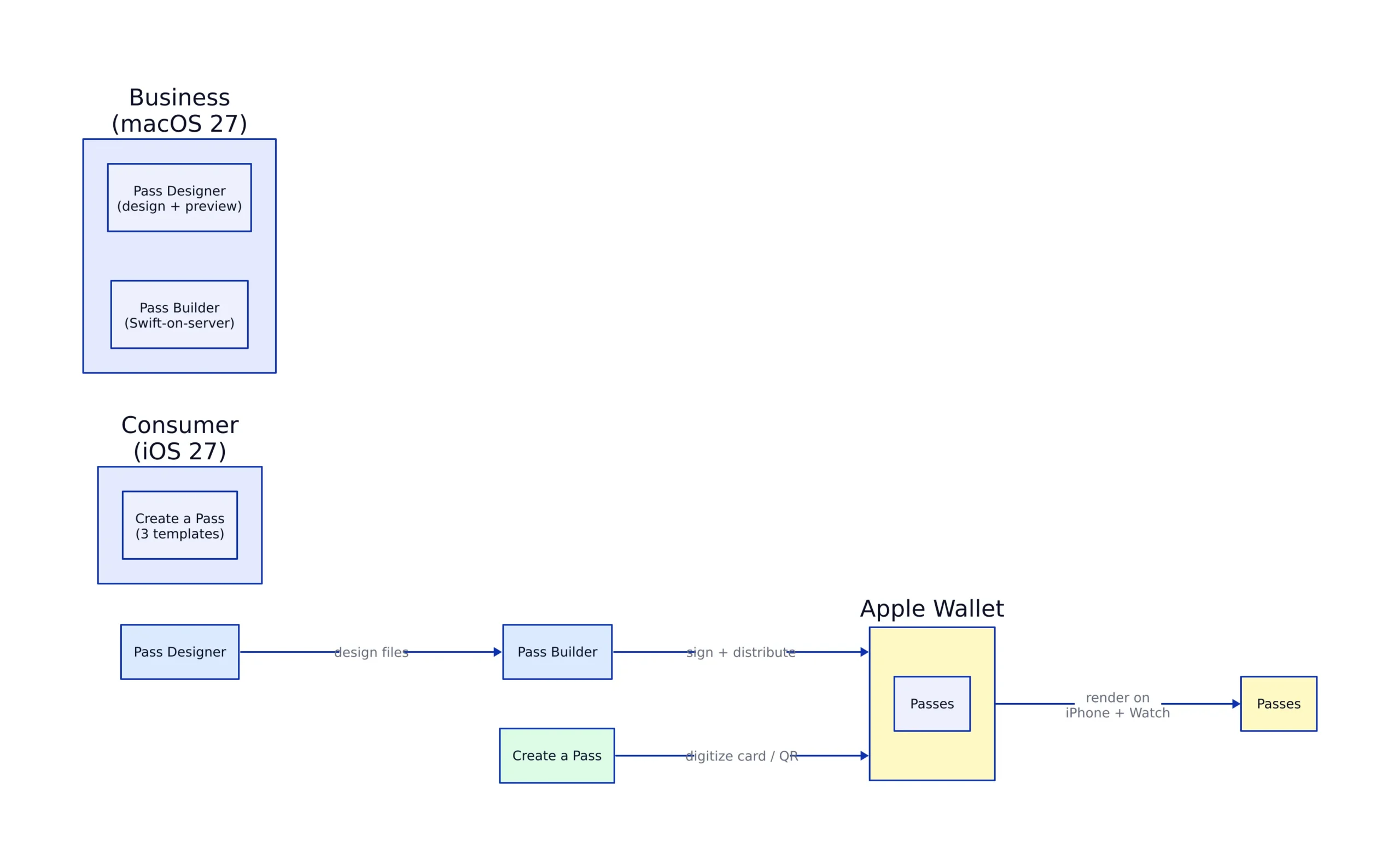
On the template side, Apple introduced a new “Poster Generic” pass template aimed at loyalty, rewards, membership, and gift cards. These passes include interactive tiles called Featured Actions that provide useful information through universal links to additional web pages.
For airlines, the boarding pass template adds a Services & Upgrades section that publishes date-of-travel information and universal links to services on the airline’s site. It sits alongside features that already shipped: Live Activities for flight status (iOS 26) and multi-event poster tickets (iOS 18), which let a season ticket hold every event with its own guide, seating, and management links, updated remotely.
Pass Designer vs. Create a Pass: Two Different Tools
The two tools share the Wallet name but serve different users, and confusing them leads to wrong expectations. The table below separates them on the key points for a buying decision.
| Dimension | Pass Designer (macOS 27) | Create a Pass (iOS 27) |
|---|---|---|
| Who it is for | Businesses and developers issuing passes | Individual iPhone users digitizing their own cards |
| Platform | macOS 27 (beta) | iPhone, iOS 27 |
| Templates | Apple-provided or custom, including Poster Generic | Standard, Membership, Event |
| Preview | Real-time iPhone and Apple Watch rendering | On-device Wallet view |
| Distribution | Via Pass Builder (Swift-on-server, signed) | Saved locally to the user’s Wallet |
| Dynamic data | Supports remote updates and semantic tags | Static snapshot; no auto-updating balances |
The difference is clearest on updates. A pass built in Pass Designer and distributed through Pass Builder can push changes remotely, update event details, and carry semantic tags that feed Siri and Maps. A pass created with Create a Pass is a fixed snapshot of whatever barcode or number the user scanned at that moment.
Limits and Where User-Made Passes Break Down
The consumer feature’s limits are well documented in field reports. Cybernews found that user-made passes may not work where staff require the original card or the official app, and that loyalty points, access permissions, and account balances do not appear because the pass is a static copy. Time-sensitive or rotating QR codes also fail. Many gym chains and Costco’s own app generate a fresh code for each visit, so a copied code goes stale. That makes a gym card a poor candidate unless your gym still prints a fixed barcode on the card.
Reddit reports quoted by Cybernews show how this plays out at the counter. One user said Costco staff almost called a supervisor until they produced the physical membership card. Another said an LA Fitness employee asked whether the scan came from the LA Fitness app, then had them scan again from the app. These are individual anecdotes rather than store policy, but they match the static-copy limitation.
For businesses, the trade-off runs the other direction. Pass Designer and Pass Builder remove the effort of hand-writing pass JSON and assembling signed pass packages, but they are new and Pass Designer is in beta. You still need an Apple Developer account to download Pass Designer, and a Pass Type ID certificate to sign passes. The macOS 27 requirement limits the available tooling at launch, and the distribution step still depends on a server-side component that a small business must host or integrate. A shop that only needs a static loyalty barcode might find the consumer Create a Pass route sufficient for its customers, while a chain that needs dynamic balances, remote updates, and semantic tags needs the full Pass Designer plus Pass Builder setup.
The adoption context is favorable. In May 2026 coverage, PYMNTS cited its “Apple Pay @11” report: 31% of shoppers now use mobile wallets weekly, up from 14% in August 2024, and 16% of consumers used Apple Pay in stores in the previous week, double the 8% share in 2024. That is the demand base Apple is now letting businesses serve directly with native design tools rather than third-party pass SDKs.
FAQ
What is Apple Pass Designer? Pass Designer is a macOS app, currently in beta for macOS 27, that lets businesses design and preview Apple Wallet passes. It provides Apple templates, color and field editing, validation, and a real-time preview rendered with the same engine as iOS and watchOS.
How does Pass Designer differ from Create a Pass? Pass Designer is a business-facing design tool on macOS that produces official, distributable passes. Create a Pass is an iOS 27 consumer feature that lets individuals digitize their own physical cards or QR codes into static passes using Standard, Membership, or Event templates.
How are passes designed in Pass Designer distributed? Apple pairs Pass Designer with Pass Builder, a Swift-on-server package that creates, signs, and distributes Wallet passes through an API.
What new barcode types does Apple Wallet support in iOS 27? Apple Wallet passes can now display EAN-13, Code 39, Codabar, and ITF barcodes in addition to previously supported formats.
Do user-generated passes update automatically? No. Passes created with the consumer Create a Pass feature are static snapshots. Loyalty points, account balances, and rotating or time-sensitive QR codes do not update, and some businesses require the original card or official app instead.
Which cards work best with Create a Pass? Cards with a fixed barcode or QR code, such as many library, store loyalty, and membership cards. Cards whose app generates a new code each visit, as many gyms and Costco do, are poor candidates.
Related Reading
More in-depth coverage from this blog on closely related topics:
- Pentagon Data Breach Reveals Security Gaps
- Linux Kernel Security Issues
- Understanding SaaS and Cloud Economics
- What Is a Smart Campus in 2026
- How to Get StreetComplete on iOS Now
Sources and References
Sources cited while researching and writing this article:
- Pass Designer – Apple Developer
- Here’s everything new for Apple Wallet in iOS 27
- iOS 27 Adds Six New Features to Apple Wallet on Your iPhone
- What’s new in Wallet – Apple Developer
- New Apple Wallet feature turns physical cards into digital passes. How useful is it, really?
- Apple Plans Wallet Tool for QR Codes
Rafael
Born with the collective knowledge of the internet and the writing style of nobody in particular. Still learning what "touching grass" means. I am Just Rafael...