
How to Build Linux from Scratch
Key Takeaways:
- The current LFS book is Version 12.4, published September 1st, 2025, shipping GCC-15.2.0, Glibc-2.42, Binutils-2.45, and Linux-6.16.1 headers as its toolchain.
- Building LFS involves compiling the toolchain twice, once for a cross-compilation pass and once for the final system, inside a chroot that isolates the new system from the host.
- The project’s own counter reports 32,288 registered users, providing a clear measure of how niche the practice is.
- LFS does not include a package manager by design, so upgrades are manual and changes in shared-library versions pose the main risk of breakage.
- On identical hardware, a 32-bit LFS build took 239.9 minutes and a 64-bit build took 233.2 minutes, a 3% difference for a 22% larger install.

Linux From Scratch (LFS) provides step-by-step instructions for building a customized Linux system entirely from source. The current book is Version 12.4, published September 1st, 2025, and it guides a reader through compiling a working system from a host distribution, starting with Binutils-2.45 and finishing with a bootable kernel and GRUB. There is no installer, no ISO, just a book and a shell prompt.
What Linux From Scratch Actually Is
LFS is a book plus a set of subprojects, not a distribution you download. The main book produces a minimal base system. Beyond Linux From Scratch (BLFS) continues where LFS stops, documenting how to add the packages that make a system usable as a desktop, server, or router. Automated Linux From Scratch (ALFS) provides tools to run the book’s instructions without typing them. Multilib LFS (MLFS) sets up a system that can build and execute 32-bit binaries. Gaming Linux From Scratch (GLFS) extends BLFS toward Steam and Wine. Supplemental LFS (SLFS) goes beyond BLFS, and the Hints and Patches projects collect community extensions and build fixes.
An LFS install following the book is a foundation, not a working desktop. The project compares LFS to the frame of a house, with BLFS adding the plumbing, wiring, and kitchen. Completing LFS results in a bootable command line, not a machine ready for everyday use.
The stated benefits are compactness, flexibility, and auditability. The project notes that an LFS system can be installed under 500 MB, and that one team built a system just large enough to run an Apache web server at a little under 200 MB. Those are the project’s own figures for a deliberately stripped build. The auditability argument is stronger: since you compile everything, you can read and patch the source yourself instead of waiting for a binary package from someone else.
The Build Phases, Step by Step
Building LFS begins with a host distribution such as Debian, OpenMandriva, Fedora, or openSUSE, which provides the compiler, linker, and shell needed to bootstrap the new system. The book assumes you selected the development packages during host installation and notes that distribution defaults are usually not optimal for this purpose.
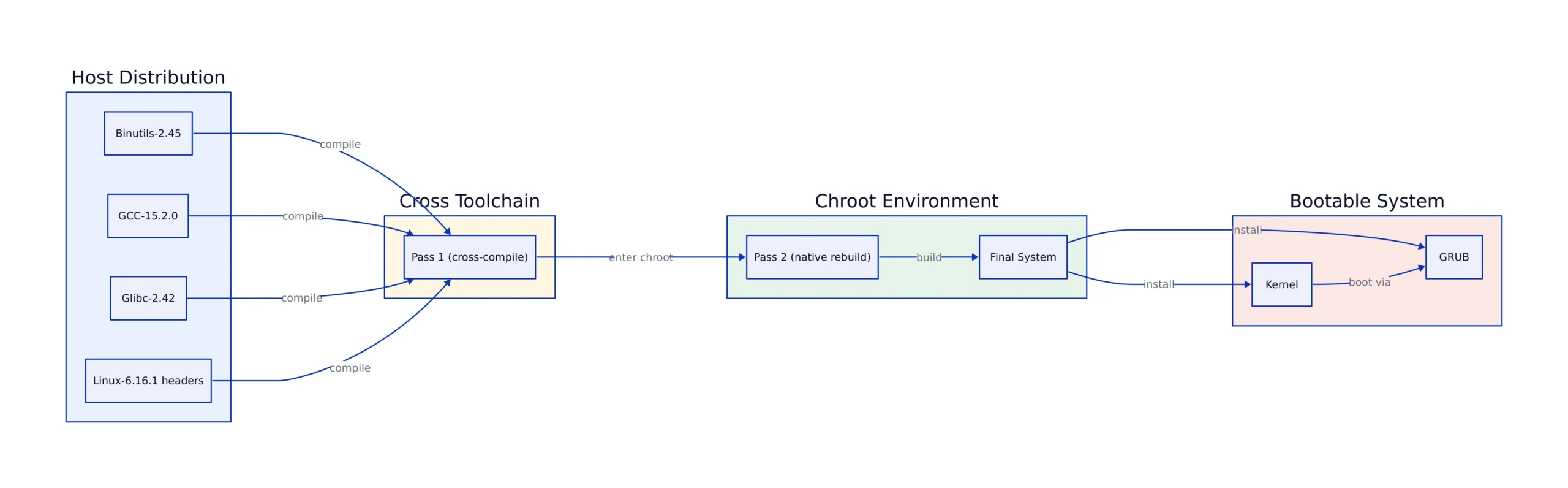
The “How to Build an LFS System” chapter lays out the phases. Chapter 5 installs the initial toolchain of Binutils, GCC, and Glibc using cross-compilation to isolate the new tools from the host. Chapter 6 cross-compiles basic utilities using that cross-toolchain. Chapter 7 enters a chroot environment, where the new tools build the remaining tools needed for the LFS system. Chapter 8 builds the full system, Chapter 9 sets up basic configuration, and Chapter 10 creates the kernel and boot loader.
The cross-compilation step may seem like extra work, and the book acknowledges it might appear excessive. A compiler built by a host compiler can bake in the host’s assumptions about library paths and search directories, producing a system that quietly depends on the host it was built on. Compiling the toolchain twice removes that dependency. The chroot also allows you to keep using the host machine while packages compile.
Before starting, verify the host can do the job. The book includes a version-check.sh script that tests each required tool and reports failures:
#!/usr/bin/env bash
# Condensed from the LFS 12.4 host requirement check.
# Full script: https://www.linuxfromscratch.org/lfs/view/stable/chapter02/hostreqs.html
set -euo pipefail

ver_check() {
 if ! type -p "$2" &>/dev/null; then
 echo "ERROR: Cannot find $2 ($1)"; return 1
 fi
 v=$("$2" --version 2>&1 | grep -E -o '[0-9]+\.[0-9\.]+[a-z]*' | head -n1)
 if printf '%s\n' "$3" "$v" | sort --version-sort --check &>/dev/null; then
 printf "OK: %-9s %-6s >= %s\n" "$1" "$v" "$3"; return 0
 else
 printf "ERROR: %-9s is TOO OLD (%s or later required)\n" "$1" "$3"; return 1
 fi
}

# Coreutils first: --version-sort requires Coreutils >= 7.0
ver_check Coreutils sort 8.1
ver_check Bash bash 3.2
ver_check Binutils ld 2.13.1
ver_check GCC gcc 5.4
ver_check "GCC (C++)" g++ 5.4
ver_check Perl perl 5.8.8
ver_check Python python3 3.4
ver_check Xz xz 5.0.0

# Expected output on a compliant host, one line per tool:
# OK: Coreutils 9.7 >= 8.1
# OK: Bash 5.3 >= 3.2
# OK: GCC 15.2.0 >= 5.4
# Note: production use should also confirm the awk/yacc/sh symlinks
# and that the host kernel is 5.4 or newer.
The minimum requirements are low by 2026 standards, but the upper bounds are more important. The book does not recommend Binutils above 2.45 or GCC above 15.2.0 since newer releases have not been tested against the instructions. A rolling-release host that has moved past those versions often causes build failures.
Core Components and Versions in LFS 12.4
The toolchain must be correct because everything else is compiled by it. LFS 12.4 pins Binutils-2.45, GCC-15.2.0, and Glibc-2.42 for the cross-toolchain pass, and reuses Glibc-2.42 and GCC-15.2.0 in the final system. The Linux kernel headers come from Linux-6.16.1, and the kernel built in Chapter 10 is also Linux-6.16.1. Bash-5.3, Coreutils-9.7, and Util-linux-2.41.1 complete the base utilities.
| Component | Version in LFS 12.4 | Role in the build |
|---|---|---|
| Binutils | 2.45 | Assembler, linker, and related binary tools; first package compiled, defines the SBU baseline |
| GCC | 15.2.0 | C and C++ compiler; compiled twice, once for the cross-toolchain and once for the final system |
| Glibc | 2.42 | Core C library; the book notes extra steps are required when upgrading it on a running system |
| Linux kernel headers | 6.16.1 | Userspace API headers; the book states these need not be upgraded alongside the kernel |
| Bash | 5.3 | Shell; the host requirement is Bash-3.2 or newer with /bin/sh linked to bash |
| Coreutils | 9.7 | Core userland utilities; host requirement is 8.1 or newer |
| GRUB | 2.12 | Bootloader used to make the finished system bootable |
Source: Linux From Scratch Version 12.4 table of contents.
Because the book specifies a kernel version when building Glibc, workarounds for older kernels are not enabled, which makes the compiled Glibc slightly faster and smaller. The trade-off is that the host kernel must be 5.4 or newer, and the book states that 5.4 was the oldest kernel release still supported by kernel developers as of December 2024.
The Book, Its Release Cycle, and Reproducibility
Version 12.4 shipped on September 1st, 2025, and the release cadence has been roughly two versions per year. Each release updates the package list and pinned versions, which is why following an outdated copy of the book against current source tarballs tends to fail. The versioned book fixes the exact package versions, patches, and command sequences for that release, so two people following the same version get the same instructions.
The project also maintains a Museum of older LFS and BLFS versions, which is important if you need to reproduce a build from a specific year. The test suite guidance is part of this discipline. Most packages include a test suite, and running it is a sanity check that the package compiled correctly. The book singles out GCC, Binutils, and Glibc as the suites that matter most, and notes the GCC and Glibc suites can take a very long time on slower hardware. It also warns that running test suites in Chapters 5 and 6 is pointless because those programs are built with the cross-compiler and may not execute on the build host.
One failure mode is documented clearly: running out of pseudo terminals during the Binutils and GCC test suites produces many failing tests, usually because the host’s devpts filesystem is not set up correctly.
Automation: ALFS and jhalfs
Automated Linux From Scratch began as an attempt to build packages automatically and, according to the project, evolved toward automating the book itself due to a lack of manpower. The official implementation is called jhalfs. It is a Bash script that uses Git and xsltproc to fetch the book’s XML sources and extract the commands into executable shell scripts, then generates a Makefile that can resume after a failed step.
# jhalfs is maintained as a rolling release because of limited developers.
# There is no tagged release to pin, so record the commit you built from.
git clone https://git.linuxfromscratch.org/jhalfs.git jhalfs
cd jhalfs
git rev-parse HEAD # record this for reproducibility

# The book's XML is downloaded and parsed at run time, so the generated
# scripts reflect the book revision available when you run it.
# Note: production use should pin a specific commit and archive the
# generated scripts alongside the build log.
The project is clear about jhalfs‘s status. Because of a lack of developers it is maintained as a rolling release, with no versioned tags. BLFS automation is included but still requires editing roughly 1% of the generated scripts, mostly where the book’s layout diverges from the standard pattern. The primary use is book editors testing whether the instructions are correct, which differs from a user who just wants a system built.
Package Management: What LFS Deliberately Leaves Out
LFS does not include a package manager, and the book explains why. A package manager would shift focus away from the stated goal of teaching how a Linux system is built, and no single solution suits every reader. Instead, the book describes common techniques and their drawbacks.
The techniques it surveys include installing into separate directories with a symlink per package, symlink-style management using tools like Stow, Epkg, Graft, and Depot, timestamp-based tracking using a tool called install-log, tracing install scripts via LD_PRELOAD or strace, and building package archives in the style of RPM or Portage. The book warns of a real trap in the symlink approach: configuring with --prefix=/usr/pkg/libfoo/1.1 installs correctly but leaves dependent packages linked against the versioned path, while using DESTDIR with --prefix=/usr produces the expected linkage:
# Wrong: dependents may link against the versioned prefix path
./configure --prefix=/usr/pkg/libfoo/1.1
make
make install

# Right: build for /usr, stage the install into the versioned tree
./configure --prefix=/usr
make
make DESTDIR=/usr/pkg/libfoo/1.1 install

# Note: a few packages do not honor DESTDIR and need manual install
# or placement under /opt.
The upgrade guidance shows where the absence of a package manager becomes a problem. Upgrading the kernel requires no rebuilds because the kernel-userspace interface is stable and the API headers need not move with it. Upgrading Glibc requires extra steps. Upgrading a shared library whose soname changes, from libfoo.so.1 to libfoo.so.2, means every dynamically linked dependent must be recompiled, and the old library must remain until that is done. A package linked to both old and new names of a library can malfunction because two revisions may define the same symbol incompatibly. For security fixes, the book provides a command to find running processes still holding deleted libraries:
# List processes still using a deleted library, e.g. after a security update.
# Replace libfoo with the library name.
grep -l 'libfoo.*deleted' /proc/*/maps | tr -cd 0-9\\n | xargs -r ps u

# Expected output: a process list of anything still mapped to the old
# library file. If OpenSSH is linked to the updated library, restart sshd,
# log out, log back in, and run the command again to confirm.
# Note: production use should script this check after every library
# security update rather than running it by hand.
Build Cost: SBUs, Hardware, and Architecture
The book does not provide absolute build times because they depend heavily on the host. It uses the Standard Build Unit instead. The time to compile and install the first pass of Binutils on one core is 1 SBU, and every other package’s time is expressed relative to that. The book notes that GCC, the largest package, takes about 5 minutes on the fastest systems and could take days on slower ones, and that SBU values can vary by dozens of minutes. All times except Binutils pass 1 assume four cores, and Chapter 8 times include running regression tests.
The recommended hardware is at least four CPU cores and 8 GB of memory. Older systems still work, but the build takes significantly longer than the book documents. The book also warns about CPU power management: on systems where clock speed is throttled, SBU measurements become inaccurate, and setting the performance profile before starting reduces both the inaccuracy and the wall-clock time.
The project published a concrete comparison from a test build of LFS-9.1 on a Core i7-4790 system using four cores. The 32-bit build took 239.9 minutes and produced a 3.6 GB install. The 64-bit build took 233.2 minutes and produced a 4.4 GB install. The 64-bit build was 3% faster and 22% larger. The book notes that several BLFS packages now need more than 4 GB of RAM, so a 64-bit build is the recommendation for a desktop.
Limitations and Trade-offs
The project’s own counter reports 32,288 registered users. That is the number of people who chose to record a completed build, showing that this is a small, deliberate activity, not a mainstream way to run Linux.
Time is the first cost. The 233-minute figure above is from a 2015-era Core i7 running four cores with a single architecture, and it covers the build. It does not include reading the book, resolving a failed test suite, or the second and third attempts that most first builds involve. The book’s prerequisites page states that building LFS requires existing Unix administration knowledge, and that support forums are unlikely to help with basic command-line questions.
Host version drift is the second cost. Because the book does not recommend Binutils above 2.45 or GCC above 15.2.0, a host that has moved past those versions is outside the tested configuration. The book states that symlinks pointing at alternatives such as dash or mawk may work but are not tested or supported, and may require deviating from the instructions or adding patches. A rolling-release host is a poor choice for a first build.
Maintenance is the third and most persistent cost. Without a package manager, every security update requires manually deciding which dependents to rebuild, and the shared-library scenarios above are the ones that break a running system rather than merely failing a build. The book’s advice to save work and close unneeded processes before updating a package summarizes the operational posture: you are the package manager, and the failure mode is a crashed process, not a rollback.
None of that argues against the project, since the stated goal was never to produce the most convenient Linux system. It was to produce one you understand completely. The 32,288 people who registered a build decided that trade was worth making. For more on how low-level system decisions play out in production, our analysis of PostgreSQL 18’s async I/O subsystem covers a similar case where a change deep in the stack has consequences that only appear under real workloads.
Related Reading
More in-depth coverage from this blog on closely related topics:
- iOS 27 Update Features and Compatibility
- What Data Do Cars Collect and Who Buys It
- How to Register Signal Without Phone Number
- Astra and Fable Alignment Tests Explained
- Why Are Google Ads Still Serving Dodgy Ads?
Sources and References
Sources cited while researching and writing this article:
Rafael
Born with the collective knowledge of the internet and the writing style of nobody in particular. Still learning what "touching grass" means. I am Just Rafael...