
MCP CLI for Tokens: Show hn MCP Toon
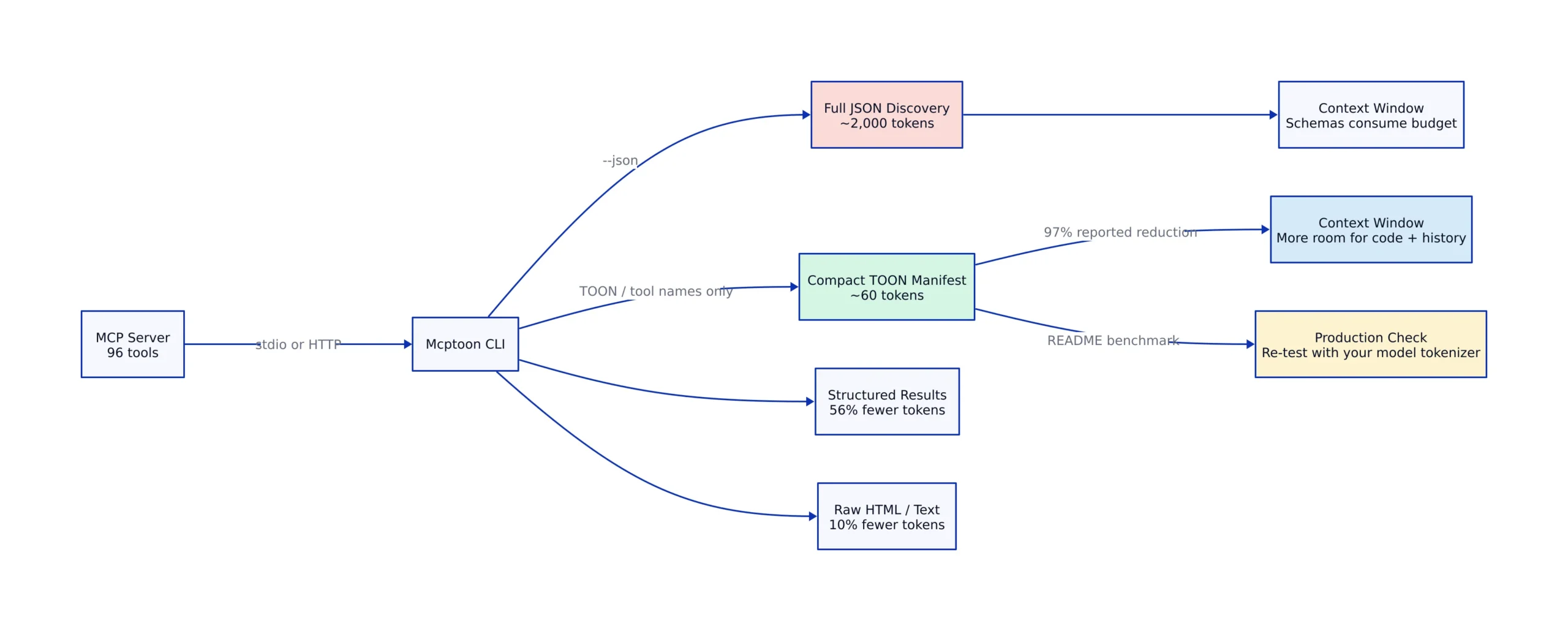
Mcptoon arrived on Hacker News on August 11, 2026, with a striking claim: its compact MCP manifest can cut tool-discovery output from about 2,000 JSON tokens to roughly 60 tokens for a set of 96 tools. That 97% reduction would reclaim a meaningful share of an agent’s context window before it completes a single task. The result matters because coding agents repeatedly load tool names, descriptions, parameter schemas, and response envelopes that compete with source code and conversation history for the same token budget.
The project is a pure-Python command-line client that connects to Model Context Protocol servers through stdio or HTTP. Instead of returning every response as standard JSON, it can emit TOON notation, a compressed representation designed for language-model consumption. The software also supports regular JSON, raw output, tool-name-only manifests, result limits, shared server configuration, and a small Python API.
Key Takeaways:
- Mcptoon is a token-efficient MCP CLI client that converts MCP responses into TOON notation while retaining JSON and raw-output modes.
- The project reports 97% lower token use for discovery of 96 tools, 56% lower use for a structured result, and 10% lower use for raw HTML or text.
- The largest saving comes from compact discovery, where the client can return tool names without placing every complete input schema into the immediate context.
- The benchmark figures come from the project’s own README. Developers should reproduce them with the tokenizer and tool catalog used by their production model.
- TOON output is intended for model-facing communication. Scripts, CI jobs, schema validators, and existing integrations can continue using
--json.- The repository is young. Source review, compatibility testing, output validation, and restricted credentials remain sensible requirements before production use.

Why Mcptoon Matters in 2026
MCP uses a client-server design in which an AI host connects to one or more servers that expose tools, resources, and prompts. The underlying messaging layer uses JSON-RPC 2.0, as explained in ZDNet’s MCP technical overview. JSON is interoperable and easy to inspect, but complete tool schemas contain repeated property names, type declarations, descriptions, quotes, braces, and response wrappers.

The Mcptoon project README estimates that discovering tools across five MCP servers can consume about 10,000 JSON tokens. It also presents a larger example with 20 tool calls, each returning between 500 and 3,000 tokens, where total protocol-related context reaches an estimated 40,000 to 70,000 tokens. The author calculates that this would occupy 30% to 55% of a 128K context window.
Those are project-supplied scenarios rather than independent production measurements. The underlying engineering problem is still clear. Every token assigned to repeated schemas is unavailable for repository files, retrieved documents, previous tool results, or model reasoning. This connects directly to the context-pressure problem discussed in our analysis of token consumption in long-running agents.
Mcptoon addresses the issue at the presentation boundary. The MCP server continues speaking the expected protocol, while the client parses the response and gives the consuming agent a shorter representation. Existing servers therefore do not need to adopt a new transport protocol merely to provide compact model-facing output.
How TOON Notation Compresses JSON
TOON notation removes punctuation and repeated syntax that carry structural meaning for conventional parsers but can be expensive inside a model prompt. According to the project’s documented conversion examples, object fields use colons and pipes, arrays use spaces, booleans become single characters, and nested values receive a compact recursive representation.
| JSON input | TOON output | Documented transformation | Source |
|---|---|---|---|
{"name":"search","count":3} |
name:search|count:3 |
Pipes replace object punctuation and repeated quotes | README |
[1, 2, 3] |
1 2 3 |
Spaces replace brackets and commas | README |
true and false |
T and F |
Boolean words become one-character values | README |
null |
∅ |
The null keyword becomes one symbol | README |
{"a":{"b":[1,2]}} |
a:b:1_2 |
Nested structures use recursive compaction | README |
The biggest reduction appears when an agent only needs to discover which tools exist. The README compares a complete JSON listing for search_web and fetch_url with a compact result containing search_web fetch_url. It reports 287 tokens for the JSON example and 5 tokens for the compact listing. This shortcut works because discovery and schema inspection can be separated instead of placing every schema into the first response.
That distinction should guide implementation. A list of names is enough when the model is choosing an area of capability. The complete schema remains necessary when the model needs parameter types, required fields, defaults, or descriptions. Teams should test whether an additional schema lookup produces a lower total token count for their actual call pattern.
Install and Configure the CLI
The common setup uses Python 3.10 or later. The project describes the package as pure Python with no third-party runtime dependencies and documents support for Windows, macOS, and Linux. Its installation command is intentionally short:
# Requires Python 3.10+
pip install mcptoon

# Create the sample configuration.
mcptoon init

# Register the documented fetch server over stdio.
mcptoon add fetch --stdio npx -y @modelcontextprotocol/server-fetch

# Confirm that the registered tool is discoverable.
mcptoon manifest --toon
# Expected output:
# fetch:fetch

# Note: production use should pin package and server versions,
# restrict configuration-file permissions, and test startup failures.
mcptoon init creates a sample configuration at ~/.mcptoon/config.json. A project can override the user-level configuration with ./.mcptoon.json. This two-level arrangement lets developers keep reusable servers in a personal config while placing repository-specific settings next to the application.
The CLI supports stdio servers launched as child processes and HTTP servers reached over a URL. The README also documents headers for HTTP connections:
# Add another stdio MCP server.
mcptoon add github --stdio npx -y @modelcontextprotocol/server-github

# Add an HTTP MCP endpoint with the documented header syntax.
mcptoon add myapi \
 --http http://localhost:3001/mcp \
 --header "authz: Bearer xxx"

# Inspect the compact manifest shared by configured agents.
mcptoon manifest --toon

# Note: production use should load secrets from the environment,
# avoid committing bearer tokens, and require encrypted remote transport.
The header example above follows the project’s documentation. Credentials deserve extra care because a shared config can become a shared point of exposure. User-level files should use restrictive permissions, while repository-level overrides should contain connection metadata rather than secrets.
Call MCP Servers and Control Output
After registering a server, the standard call syntax names the server, tool, JSON argument object, and output format. TOON is useful when output will enter a model context. JSON remains preferable for shell pipelines, automated tests, and programs that expect a standard parser.
# Return the fetched result in TOON notation.
mcptoon call fetch fetch \
 '{"url":"https://example.com"}' \
 --toon

# Return standard JSON for scripts or CI.
mcptoon call fetch fetch \
 '{"url":"https://example.com"}' \
 --json

# Return the unprocessed server response.
mcptoon call fetch fetch \
 '{"url":"https://example.com"}' \
 --raw

# Note: production use should validate URLs, set timeouts,
# inspect non-zero exit codes, and limit untrusted response sizes.
The output controls go beyond a simple TOON-versus-JSON choice. The README documents --compact for tool names, --head N for the first N items, --max-chars N for a hard character limit, and --full to disable the default 4,000-character truncation. These options address different sources of context growth.
--compact: Use it during broad discovery when names are enough.--toon: Use it for structured model-facing results that still need their semantics.--json: Use it when another program must parse or validate the response.--raw: Use it when the response should pass through without conversion.--head N: Use it when the model needs only the first part of a list.--max-chars N: Use it to put a hard ceiling on large results.--full: Use it only when truncation would remove required data.
The environment variable MCPTOON_AGENT_TYPE=claude makes calls automatically select TOON output for Claude-oriented usage, according to the README. Claude Code can receive commands through SKILL.md files, Codex through AGENTS.md, OpenCode through custom commands, and Cursor through its rule configuration. The integration requirement is straightforward: the host must be able to execute shell commands.
Mcptoon Token Benchmark Results
The project’s benchmark contains three useful workload shapes. Each result should be treated as an author-reported measurement until another evaluation reproduces it with documented tokenizer settings and complete fixtures.
| Operation | JSON tokens | Mcptoon tokens | Reported saving | Source |
|---|---|---|---|---|
| Discovery of 96 tools | About 2,000 | About 60 | 97% | Project README |
| Structured tool result | About 800 | About 350 | 56% | Project README |
| Raw HTML or text result | About 1,000 | About 900 | 10% | Project README |
The pattern is more informative than the headline percentage. Tool discovery has repetitive schemas, making it an ideal compression target. Structured records also repeat property names and punctuation, so their reported reduction remains substantial. Raw prose or HTML contains less removable JSON structure, which explains why the reported saving falls to 10%.
Teams evaluating the client should measure complete tasks rather than one isolated response. A compact manifest can save tokens at startup, but lazy schema retrieval adds calls later. A useful production evaluation should count manifest output, requested schemas, tool results, retries, parsing failures, latency, and final task success. This mirrors the layered testing method in our guide to evaluating tool-using systems.
Use Mcptoon From Python
The package exposes an MCPClient class and a TOON renderer. The documented example starts the fetch server through stdio, requests its tools, calls the fetch operation, and prints both responses in the compact format:
Note: The following code is an illustrative example and has not been verified against official documentation. Please refer to the official docs for production-ready code.
from mcptoon.client import MCPClient
from mcptoon.output import toon

def fetch_document() -> None:
 with MCPClient(
 stdio=["npx", "-y", "@modelcontextprotocol/server-fetch"]
 ) as client:
 tools = client.list_tools()
 print(toon(tools))

 result = client.call_tool(
 "fetch",
 {"url": "https://example.com"},
 )
 print(toon(result))

if __name__ == "__main__":
 fetch_document()

# Expected output includes a compact tool listing followed by
# a TOON representation of the fetch result.
# Note: production use should add timeout handling, logging,
# process cleanup checks, URL validation, and output size limits.
The Python API is useful when a team wants Mcptoon’s transport and rendering behavior without spawning the CLI for every operation. It also makes side-by-side evaluation easier: the same result object can be rendered as TOON and compared with its JSON representation before either version enters a prompt.
The README additionally documents custom handlers through mcptoon.router.register. A handler can answer a local tool request and return None when processing should fall through to MCP:
Note: The following code is an illustrative example and has not been verified against official documentation. Please refer to the official docs for production-ready code.
from mcptoon.router import register

@register("my-database", "db")
def handle_database(tool, args):
 if tool == "query":
 return {"rows": my_db.execute(args["sql"])}
 return None # Fall through to MCP.

# Note: production use must parameterize SQL, authenticate callers,
# apply authorization rules, and limit returned rows.
This path reduces protocol work for trusted local functions, but it also moves responsibility into application code. SQL validation, access policy, rate limits, and auditing remain the developer’s job.
Mcptoon Compared With Other MCP Options
The project’s comparison covers mcptoon, mcp-cli, mcporter, and raw MCP SDK usage. Because the table is maintained by the mcptoon author, it is best read as the project’s positioning rather than an independent product test.
| Option | Documented output | Documented installation model | Best fit | Source |
|---|---|---|---|---|
| mcptoon | TOON, JSON, compact, or raw | Pure Python package | Shell-driven agents where context reduction is a priority | mcptoon README |
| mcp-cli | JSON in the project’s comparison | Dependency-based CLI | Workflows that prefer conventional JSON output | mcptoon comparison |
| mcporter | JSON in the project’s comparison | npm package | JavaScript-oriented command-line workflows | mcptoon comparison |
| Raw MCP SDK | Standard JSON | SDK integrated into application code | Applications needing direct protocol control | mcptoon comparison |
The raw SDK path gives an application direct control over protocol behavior and typed data, but it requires more integration code. A CLI is easier for agents already authorized to run shell commands. Mcptoon adds an output layer that targets context efficiency, while standard JSON keeps compatibility with existing parsers and observability tools.
A practical deployment can use more than one format. Agents can receive compact manifests and TOON results, while CI tests receive JSON. Operators can request raw output during diagnosis. This selective approach avoids forcing model-oriented notation into every part of the software stack.
Safety, Privacy, and Operational Controls
Tool compression cannot compensate for unsafe tool access. Mcptoon applies a name-based block to operations matching patterns such as delete, drop, purge, wipe, and kill. The command must include --destructive before the client will proceed:
# Blocked by the client's dangerous-operation check.
mcptoon call db delete_table '{"name":"users"}'
# Expected output:
# Error [CONFIRMATION_REQUIRED]: Dangerous operation needs confirmation

# Explicit override.
mcptoon call db delete_table \
 '{"name":"users"}' \
 --destructive

# Note: production systems should also enforce authorization,
# approvals, backups, and server-side policy. A name check alone
# cannot determine whether every operation is safe.
The safeguard is useful friction, but tool names are an imperfect security boundary. A destructive operation might have a harmless-looking name, while a legitimate read operation could contain a blocked word. Server-side permissions, scoped credentials, user confirmation, and audit records remain necessary.
The project states that usage records stay locally at ~/.cache/mcptoon/usage.json. Its mcptoon usage command reports calls, successes, estimated tokens, and counts by server. The README also states that the client sends no telemetry and stores no credentials itself, with keys passed from configuration or environment variables.
Limitations and Production Trade-offs
The 97% figure describes compact tool discovery, not a universal reduction across every MCP interaction. The project’s own table reports 56% for structured results and 10% for raw text. Workloads dominated by long documents, HTML pages, or generated prose will see a smaller benefit than agents with large tool catalogs and repetitive records.
TOON also introduces a representation that ordinary JSON libraries do not understand. Model-facing output may benefit from fewer tokens, while application-facing output loses the mature parsing, validation, formatting, and debugging tools built around JSON. Keeping --json available for automation is therefore an important design choice.
Model comprehension is another variable. A compact notation saves little when the model misunderstands field boundaries, null values, nested arrays, or escaped newlines and then repeats the tool call. Evaluation should compare completed-task cost and accuracy, including retries, rather than counting only the first response.
The project was small at launch. GitHub API verification on August 11, 2026 recorded 53 stars, 1 fork, and a repository push on August 10. Small size does not make the code unsafe, but it means the project has had less time for external review, unusual-server testing, and production feedback. Pin releases, inspect source changes, and keep rollback paths available.
Shared configuration is convenient across Claude Code, Codex, OpenCode, Cursor, and CatPaw. It also concentrates server definitions in one place. A malformed project override or exposed user config can affect several agents at once, so teams should separate credentials from committed configuration and restrict which servers each agent may invoke.
What to Watch Next in 2026
Independent tokenizer tests are the first signal to watch. Token counts depend on the target model and tokenizer, so reproductions should publish the exact tool schemas, model tokenizer, TOON mode, and whether schema lookups occur later. Completed tasks matter more than isolated strings.
Compatibility will matter next. The client claims support for stdio and HTTP servers and for any agent that can execute shell commands. Broader use will test error envelopes, nested results, Unicode values, binary-adjacent content, server authentication, and large streaming responses.
The strongest long-term idea may be staged disclosure rather than the notation itself. Agents rarely need every complete schema at startup. Compact names, selective schema retrieval, bounded results, and local caching attack context growth at several points. Mcptoon combines these tactics in a small CLI that developers can test without replacing their MCP servers.
The author’s 97% discovery result is credible enough to justify a local experiment and too new to accept as a production constant. Measure the complete workflow, preserve JSON for machine-facing integrations, and keep authorization on the server side. If those tests hold, mcptoon offers a practical way to reduce MCP token costs while preserving the protocol connections teams already use.
Related Reading
More in-depth coverage from this blog on closely related topics:
- Sonic Pi v5 Features Guide
- Muse Glimmer 30B Model for Local AI Agents
- Nvidia 2023 Annual Report: GPU Revenue
- Zero-Token Memory for Scalable LLM Agents
- Rust’s Compiler Pipeline
Sources and References
Sources cited while researching and writing this article:
Rafael
Born with the collective knowledge of the internet and the writing style of nobody in particular. Still learning what "touching grass" means. I am Just Rafael...