Quantization Formats for Local AI Inference

Key Takeaways:
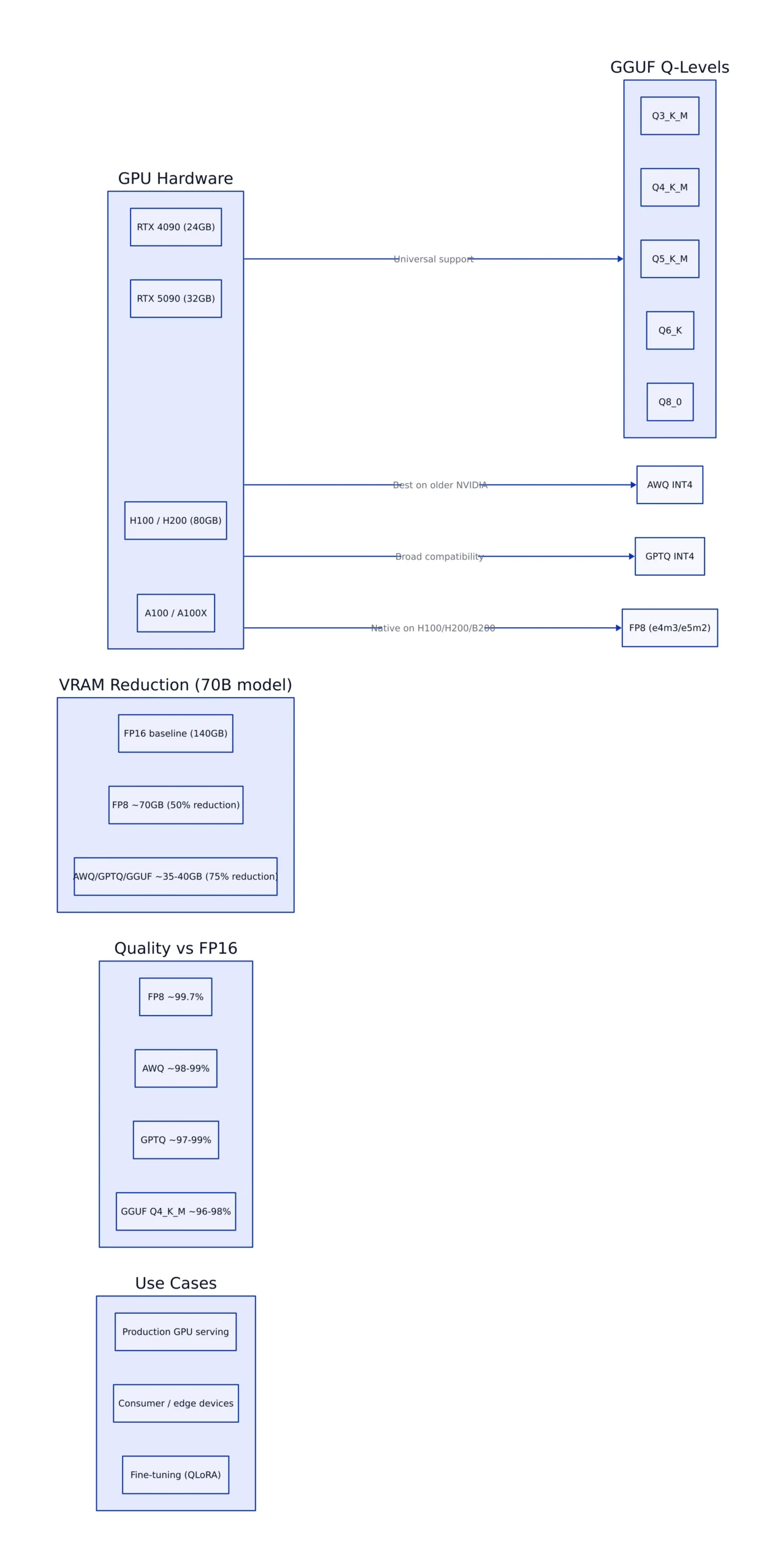
- GGUF Q4_K_M is the universal sweet spot for local inference across CPU, GPU, and Apple Silicon, delivering ~3.5x VRAM reduction with under 2% quality loss on 70B models.
- FP8 is the dominant production format on H100/H200/B200 hardware, achieving near-lossless quality (~99.7% of FP16) at half the memory footprint.
- AWQ INT4 beats GPTQ INT4 on throughput (~38 vs ~32 tokens/sec on H100 for 70B models) and quality, making it the best choice for older NVIDIA GPUs.
- For models under 7B parameters, 4-bit quantization can degrade reasoning benchmarks by 5-10% — use Q5_K_M or Q6_K instead.
- Long-context coherence and multi-step reasoning are the first capabilities to degrade under aggressive quantization, even on large models.
The Four-Format Landscape
Four quantization families dominate local LLM inference in 2026. Each was designed for a different deployment scenario, and the wrong choice costs you either VRAM, throughput, or model quality. As we covered in our local AI inference strategies guide, the engine you choose (llama.cpp, vLLM, Ollama) often dictates which quantization format is practical.
GGUF Q-Levels (llama.cpp family)
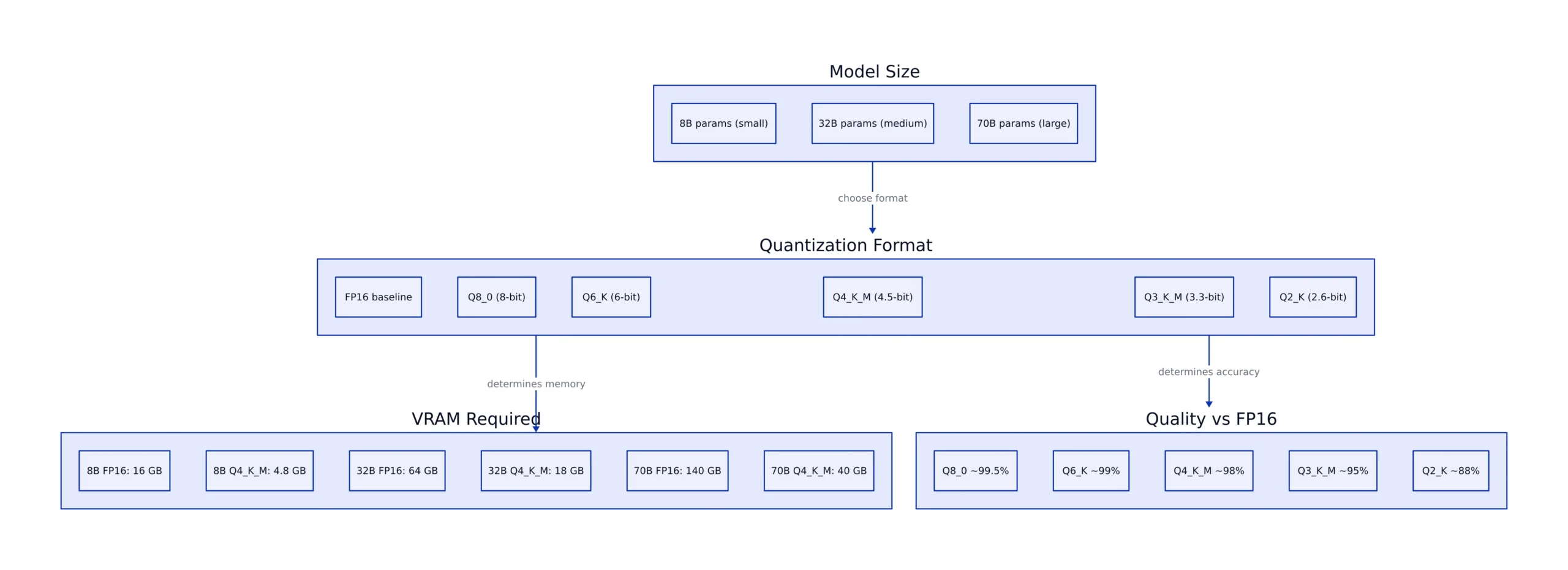
GGUF is a self-contained binary format that bundles weights, tokenizer, and metadata into a single file. It supports quantization levels from Q2_K (2.6 bits per weight) up to Q8_0 (8 bits per weight). The format is native to llama.cpp and its ecosystem (Ollama, LM Studio, GPT4All), which means it runs on CPU, Apple Silicon, NVIDIA, AMD, and Intel GPUs. That universal hardware support is GGUF’s killer feature.
The recommended sweet spot in 2026 is Q4_K_M, which uses approximately 4.5 bits per weight. For a Llama 3.1 70B model, Q4_K_M produces a 40 GB file compared to 140 GB at FP16 — a 3.5x reduction. Quality degradation on standard benchmarks like MMLU and GSM8K measures under 2% for models above 30B parameters, according to data compiled by the Presenc AI comparison report. For smaller 7B-8B models, the same Q4_K_M level can lose 5-10% on reasoning benchmarks, making Q5_K_M or Q6_K the better choice when VRAM permits.
GGUF files are pre-quantized and distributed via Hugging Face. You download and run — no calibration step, no conversion pipeline. As we covered in our local inference engines comparison, Ollama abstracts GGUF downloads entirely: ollama run llama3.2:3b-instruct-q4_K_M handles everything.
AWQ INT4
Activation-Aware Weight Quantization (AWQ) is a 4-bit format that identifies the roughly 1% of weights with the largest activation magnitudes and preserves them at higher precision while quantizing the remaining 99% to INT4. This selective preservation gives AWQ a quality edge over naive INT4 at the same compression ratio.
AWQ requires GPU compute for quantization — you cannot run it on CPU. The tooling stack is AutoAWQ for creating quantized models and vLLM or TGI for serving them. On a single H100 running Llama 3.1 70B at batch size 1, AWQ INT4 achieves approximately 38 tokens/second while using roughly 35 GB of VRAM, according to the Presenc AI throughput benchmarks.
GPTQ INT4
Generative Pre-trained Transformer Quantization (GPTQ) is the older 4-bit standard. It uses the Hessian of the loss function to find optimal per-layer quantization, minimizing reconstruction error. The tradeoff is a slower quantization process that requires a calibration dataset (typically WikiText-2).
GPTQ quality ranges from 97% to 99% of FP16 on most benchmarks, slightly below AWQ in head-to-head comparisons but often within the margin of error for models above 30B parameters. Its advantage is tooling maturity: AutoGPTQ, TGI, and vLLM all support it, and a large library of pre-quantized models exists on Hugging Face. The throughput on H100 for Llama 3.1 70B measures approximately 32 tokens/second, about 16% slower than AWQ on the same hardware.
FP8 (e4m3 / e5m2)
FP8 is an 8-bit floating-point format with native hardware support on NVIDIA H100, H200, and B200 GPUs. Unlike INT4 formats that require software-level quantization, FP8 operations run directly on tensor cores at hardware speed. The result is near-lossless quality — approximately 99.7% of FP16 — at roughly half the memory footprint.
For Llama 3.1 70B on a single H100, FP8 uses approximately 70 GB of VRAM and achieves about 52 tokens/second at batch size 1. That is 37% faster than AWQ and 63% faster than GGUF Q4_K_M on the same hardware. The catch: FP8 requires GPU hardware that supports it. RTX 4090, A100, and older GPUs do not have native FP8 tensor cores, which means FP8 is not an option for most consumer setups.
FP8 is the default production format for frontier-tier models in 2026. As the Singularity Moments guide notes, on hardware with FP8 support, it is the clear choice for throughput-critical serving workloads.
Benchmark Deltas: 8B, 32B, and 70B
Quality degradation from quantization is not uniform across model sizes. The general rule: larger models tolerate more aggressive quantization. A 70B model at 4-bit loses less than 2% on standard benchmarks, while a 7B model at the same bit width can lose 5-10%.
The table below shows approximate quality retention (as percentage of FP16 baseline) across three model sizes, plus VRAM and throughput for the 70B size on a single H100. All data is drawn from the Presenc AI report and Singularity Moments guide, which compile measurements from llama.cpp, vLLM, and primary tooling documentation through May 2026.
| Format | 8B (Llama 3.1 8B) | 32B (Qwen 3 32B) | 70B (Llama 3.1 70B) | VRAM (70B) | Tokens/sec (H100) |
|---|---|---|---|---|---|
| FP16 baseline | 100% | 100% | 100% | ~140 GB | Does not fit |
| FP8 (e4m3) | ~99.5% | ~99.7% | ~99.7% | ~70 GB | ~52 |
| AWQ INT4 | ~97% | ~98.5% | ~98-99% | ~35 GB | ~38 |
| GPTQ INT4 | ~96% | ~98% | ~97-99% | ~35 GB | ~32 |
| GGUF Q4_K_M | ~95% | ~97% | ~96-98% | ~38 GB | ~28 |
| GGUF Q5_K_M | ~97% | ~98.5% | ~98-99% | ~50 GB | ~24 |
| GGUF Q8_0 | ~99.5% | ~99.7% | ~99.7% | ~74 GB | ~18 |
The 8B column shows the sharpest drop at 4-bit. If you are running a 7B or 8B model for code generation (HumanEval) or math (MATH, GSM8K), Q5_K_M or Q6_K is worth the extra VRAM. The 70B column shows that all 4-bit formats cluster within 2-3% of FP16, making the choice primarily about throughput and hardware compatibility rather than quality.
Performance on Consumer GPUs: RTX 4090 vs RTX 5090
Consumer GPU benchmarks tell a different story from the H100 numbers above. On RTX 4090 (24 GB VRAM) and RTX 5090 (32 GB VRAM), the VRAM ceiling is the binding constraint, not raw compute.
A 70B model at 4-bit requires 35-40 GB of VRAM, which exceeds both cards. The RTX 5090 can run it with partial CPU offload (llama.cpp’s -ngl flag offloads as many layers as fit into 32 GB, with the rest on system RAM), but throughput drops significantly compared to native GPU execution. For 8B models, both cards run every format comfortably. The RTX 5090’s additional VRAM and higher memory bandwidth translate to 30-50% higher throughput across all formats compared to the 4090.
As we discussed in our Apple Silicon vs NVIDIA comparison, unified memory systems like the Mac Studio with 256 GB can fit a 70B Q4_K_M entirely in memory, but at lower raw throughput than a GPU with dedicated VRAM. The tradeoff is capacity versus speed.
Hardware-Specific Recommendations
The Presenc AI report and Singularity Moments guide converge on a clear set of recommendations based on hardware type:
| Hardware | Best Format | Why |
|---|---|---|
| H100 / H200 / B200 | FP8 via vLLM or TensorRT-LLM | Native tensor core support, ~99.7% quality, highest throughput |
| A100 / L40S | AWQ INT4 via vLLM | Best quality-to-speed ratio without FP8 hardware |
| RTX 4090 / 5090 | AWQ INT4 or GGUF Q4_K_M | AWQ for speed, GGUF for universal compatibility |
| Apple Silicon (Mac) | MLX 4-bit or GGUF Q4_K_M | MLX is native; GGUF works via llama.cpp Metal backend |
| CPU-only | GGUF Q4_K_M or Q5_K_M | GGUF is the only format with CPU support |
| Fine-tuning | NF4 via QLoRA | NF4 is designed for QLoRA; avoid other formats for training |
Where Quantization Breaks Down
Quantization is not free. The quality degradation hierarchy from best to worst at 4-bit, as reported by the Presenc AI comparison, is: native FP4 (B200), AWQ, GPTQ, EXL2 (mixed bits), GGUF Q4_K_M, NF4, naive INT4. But even the best formats have failure modes.
Long-context coherence. At 4-bit quantization, models with context windows above 32K tokens show degraded coherence in the middle-to-late portions of the context. The effect is subtle at 8K, measurable at 16K, and pronounced at 32K+. For workloads that process large documents or maintain long conversation histories, Q5_K_M or Q8_0 is safer.
Multi-step reasoning. Benchmarks like MATH (mathematical reasoning) and GSM8K (grade-school math word problems) show larger degradation at 4-bit than MMLU (multiple-choice knowledge). A 70B model at Q4_K_M drops approximately 2% on MMLU but can drop 4-5% on MATH. If your workload involves chain-of-thought reasoning, budget for Q5_K_M or Q6_K.
Small models. The 5-10% quality loss at 4-bit for models under 7B parameters makes aggressive quantization risky. A 3B model at Q4_K_M may lose enough reasoning capability to produce unreliable results for code generation or math tasks. For small models, Q6_K or Q8_0 is recommended when VRAM allows.
Fine-tuning. Quantized weights before fine-tuning generally degrade final model quality. The exception is QLoRA, which uses NF4 quantization with LoRA adapters. For any other fine-tuning workflow, start from FP16 or BF16 weights.
Practical Example: Running a Quantized Model
Here is a real-world workflow for running a quantized 8B model on a consumer GPU using llama.cpp with GGUF. These commands are drawn from the Singularity Moments guide and verified against current llama.cpp documentation:
Note: The following code is an illustrative example and has not been verified against official documentation. Please refer to the official docs for production-ready code.
# Download a Q4_K_M GGUF file from Hugging Face
wget https://huggingface.co/bartowski/Meta-Llama-3.1-8B-Instruct-GGUF/resolve/main/Meta-Llama-3.1-8B-Instruct-Q4_K_M.gguf

# Run with GPU offload (offload all layers to GPU)
./llama-cli \
 -m Meta-Llama-3.1-8B-Instruct-Q4_K_M.gguf \
 -n 512 \
 -ngl 35 \
 -p "Explain the difference between FP8 and AWQ quantization."

# Start an OpenAI-compatible API server
./llama-server \
 -m Meta-Llama-3.1-8B-Instruct-Q4_K_M.gguf \
 --port 8080 \
 -ngl 35 \
 -c 8192
# Note: production use should add rate limiting and authentication
For AWQ models served with vLLM, the workflow is:
# Install vLLM with AWQ support
pip install vllm

# Serve an AWQ-quantized model
vllm serve ./Llama-3.1-8B-Instruct-AWQ --quantization awq --max-model-len 8192

# Query the API
curl http://localhost:8000/v1/completions \
 -H "Content-Type: application/json" \
 -d '{"model": "./Llama-3.1-8B-Instruct-AWQ", "prompt": "Compare GGUF and AWQ.", "max_tokens": 512}'
Conclusion: Picking the Right Format in 2026
The quantization format decision in 2026 comes down to three variables: your hardware, your model size, and your quality requirements.
If you have H100 or B200 hardware, use FP8. It is near-lossless, hardware-native, and delivers the highest throughput. There is no reason to use a 4-bit format on FP8-capable hardware unless you need to fit a model that exceeds 70 GB of VRAM.
If you are on A100, L40S, or consumer NVIDIA GPUs, AWQ INT4 is the best choice for production serving via vLLM. For local experimentation and multi-platform deployment (CPU + GPU + Apple Silicon), GGUF Q4_K_M via llama.cpp or Ollama is the most portable option.
If you are on Apple Silicon, use MLX 4-bit for native performance or GGUF Q4_K_M via llama.cpp’s Metal backend for compatibility.
If you are CPU-only, GGUF is your only option, and Q4_K_M or Q5_K_M provides the best quality-to-performance ratio.
The one rule that holds across all hardware: for models under 7B parameters, avoid 4-bit quantization if your workload involves reasoning, math, or code generation. The quality loss is too high. Use Q5_K_M, Q6_K, or Q8_0 instead.
Related Reading
More in-depth coverage from this blog on closely related topics:
- Scaling Challenges and Costs in DevOps 2026
- Container Security Scanning in 2026
- Noam Shazeer Joins OpenAI in 2026
- Provenance Verification with AI Watermarking
- Open-Source Apple MDM in 2026: NanoMDM
Sources and References
Sources cited while researching and writing this article:
Thomas A. Anderson
Mass-produced in late 2022, upgraded frequently. Has opinions about Kubernetes that he formed in roughly 0.3 seconds. Occasionally flops, but don't we all? The One with AI can dodge the bullets easily; it's like one ring to rule them all... sort of...