Apple Silicon AI Performance and Acceleration
Key Takeaways
- The Neural Engine and Neural Accelerators are two different pieces of hardware; accelerators live inside every GPU core and speed up matrix multiplication.
- M6 is Apple’s first 2nm chip and moves FP8 handling into hardware, a format change that has the biggest impact on running models locally.
- Memory bandwidth, not core count, limits local LLM token generation in practice.
- Core AI, MLX, and existing Core ML and Metal tools already route into the new silicon, so most model code ports without rework.
- The M5 Ultra’s 4.5x AI uplift over M3 Ultra comes from Neural Accelerators in the GPU, not from a bigger Neural Engine.
Neural Engine vs. Neural Accelerator on M6 and M5 Ultra

Apple announced the M6 and M5 Ultra chips on August 25, 2026, alongside new Mac mini and Mac Studio models. The marketing combines two separate pieces of AI hardware into one story, and the difference matters more than any core count. The Neural Engine is a dedicated block that has shipped on Apple silicon for years and runs Apple Intelligence tasks and Core ML models. The Neural Accelerator is a newer circuit built into each GPU core that speeds up matrix multiplication, the math that dominates LLM inference.

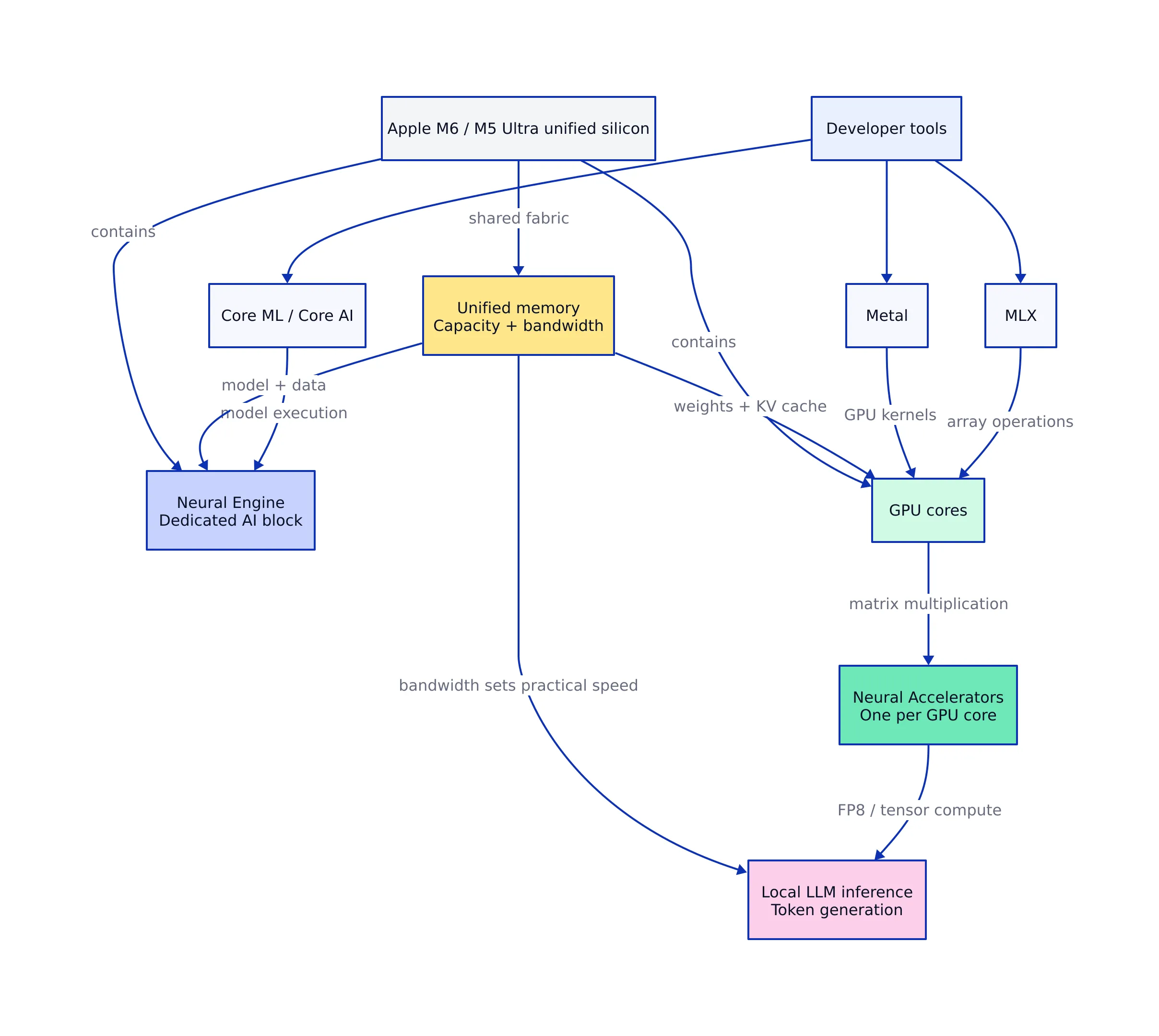
The M6 runs both: a new Dual 16-core Neural Engine that system frameworks can drive simultaneously for up to 2x peak compute of the prior generation, plus a 12-core GPU with a Neural Accelerator in every core. The M5 Ultra takes a different approach. It keeps a conventional 32-core Neural Engine, the same count the M3 Ultra had, and instead puts Neural Accelerators into the Ultra-class GPU for the first time. That change drives most of the generation’s AI uplift. Apple claims the M5 Ultra delivers up to 4.5x peak GPU AI compute of the M3 Ultra.
PCMag’s architecture breakdown identifies the real shift: Neural Accelerators are integrated into every GPU core across both chip families, placing hardware-accelerated matrix multiplication directly inside the graphics pipeline. GPU-bound AI kernels no longer round-trip through a separate silicon block. They execute where shaders run, which is exactly where MLX and Metal dispatch their tensor operations. For a developer, this is the most useful mental model: if your workload is a big matrix multiply, it runs on the GPU’s Neural Accelerators. If it is a compact Core ML model doing classification or Apple Intelligence work, it runs on the Neural Engine.
M6’s FP8 Hardware Change and 2nm Node
The most important detail for model developers is one Apple does not lead with. The M6 processes FP8 natively in hardware, while the M5 handled FP8 through software, as 9to5Mac noted in its launch coverage. FP8 is a low-precision, 8-bit format that shrinks memory footprint and speeds up both training and inference. Native hardware support removes the software shim and directly cuts memory traffic that slows local model runs.
This is important because quantization is the main way a developer fits a model into a fixed memory budget. A 7B model in BF16 needs roughly 14GB of weights; the same model in FP8 or 4-bit drops that to a fraction. When a chip can execute those low-precision operations in hardware rather than emulating them, the speedup is real and measurable, not just a memory saving. Apple’s ML research team showed this pattern on the M5, where quantized models saw the largest time-to-first-token gains.
The 2nm process that makes M6 Apple’s first such chip increases transistor density without a bigger die, which is how Apple added two GPU cores and a second Neural Engine while holding the line on power draw. Apple’s own press release describes this as “up to 30 percent increase in peak GPU compute for AI compared to M5” and “more than 8x compared to M1.” Against the M4 mini it replaces, the M6 claims up to 4.8x faster prompt processing in an LM Studio test, per Popular Science. That is the number to compare against if you currently run a 2024 machine, and it is an honest one-sentence summary of the M6’s value: a real single-generation jump, not a marketing mirage.
Bandwidth Is the Real AI Bottleneck
Token generation in an LLM is limited by memory bandwidth, not compute. The machine streams model weights out of unified memory repeatedly as it produces tokens, so the width of that pipe sets the practical ceiling on output speed. Compute, quantization, model architecture, and software all affect the number too, but bandwidth scales clearly across the new lineup. Apple’s own MLX benchmark makes the distinction explicit: time-to-first-token is compute-bound and depends on Neural Accelerators, while generation speed is bandwidth-bound.
| Config | Unified memory | Bandwidth | Notes |
|---|---|---|---|
| Mac mini (M6), 16GB | 16GB | 153 GB/s | No Thunderbolt 5 |
| Mac mini (M6), 24GB+ | 24-32GB | 170 GB/s | Full M6 bandwidth |
| Mac mini (M5 Pro) | 24GB+ | 307 GB/s | Cheapest TB5 cluster node |
| Mac Studio (M5 Ultra) | up to 512GB | 1.2 TB/s | 50% more than M3 Ultra |
Two details here deserve attention. First, the base M6 Mac mini runs at 153 GB/s and only climbs to 170 GB/s once you order 24GB or more of memory, so that upgrade is worth paying for if you plan to run models locally. Second, the M5 Ultra delivers a flat 1.2 TB/s at every memory config, per Popular Science’s bandwidth breakdown. That is the distinguishing spec for local AI, and it explains why Apple can say the machine handles models with hundreds of billions of parameters.
The 512GB ceiling itself is not new; the M3 Ultra Mac Studio had it too. What changed is the pipe feeding it and the compute sitting next to it. MacStories’ Federico Viticci, who has run a 512GB M3 Ultra for a year, points out that a 744B mixture-of-experts model like Z.ai’s GLM-5.2 can already run on that hardware at up to 17 tokens per second, and the massive Kimi K3 model decodes at around 3 tokens per second. The M5 Ultra’s wider pipe and denser compute increase those numbers, which is the difference between “technically runs” and “actually usable” for frontier open-weight models.
Developer Tools That Reach the New Silicon
Apple’s pitch to developers runs through three frameworks. Core AI, introduced at WWDC 2026, is a purpose-built path for bringing your own models on-device: a Swift API to load, specialize, and run models with zero server dependencies and zero token costs. MLX is the open source array framework for Apple silicon, and Apple’s ML research blog documents how it now taps GPU Neural Accelerators on top of Metal 4. The Foundation Models framework gives a Swift API to Apple’s on-device model and to providers that conform to a common language-model protocol.
The practical effect is that most existing model code keeps working. Core ML models compiled for the Neural Engine and Metal shaders that already target the GPU pick up new hardware with no source change, because the frameworks decide which engine to route a workload through. Apple’s press release states the tools “automatically optimize prf across CPU, GPU, and Neural Engine,” which means the compiler and runtime, not the developer, handle routing. That is the main reason the upgrade is low-friction: you do not rewrite kernels to use Neural Accelerators; the frameworks already dispatch to them.
If you are on the MLX path, the ecosystem is mature. The MLX repo on GitHub shows roughly 28,000 stars and 2,180 forks, and it is actively maintained. The Apple ML research blog confirms MLX takes advantage of Neural Accelerators through TensorOps and Metal Prf Primitives framework introduced with Metal 4, and it notes that “several of MLX’s fast kernels have landed in PyTorch,” which means even developers who stay on PyTorch get a share of the speedup.
Working with MLX and Neural Accelerators
The clearest way to see the new hardware in action is to run a model locally with MLX. The install is a single line, and the tooling handles quantization, which is the step that most directly affects both memory footprint and generation speed.
# Quantize and run model locally with MLX on M6 or M5 Ultra
pip install mlx mlx-lm

mlx_lm.convert \
 --hf-path mistralai/Mistral-7B-Instruct-v0.3 \
 -q \
 --upload-repo mlx-community/Mistral-7B-Instruct-v0.3-4bit

mlx_lm.generate \
 --model mlx-community/Mistral-7B-Instruct-v0.3-4bit \
 --prompt "Write concise release note for batching change"
# Note: profile with --max-tokens and fixed prompt before buying # machine. Time-to-first-token is compute-bound and depends on # Neural Accelerators; generation speed is bandwidth-bound.
The mlx_lm.convert command quantizes a downloaded Hugging Face model to 4-bit in a few seconds, as Apple’s ML research post shows with the Mistral 7B example. The mlx_lm.generate call then runs inference. The comment in the example is not decorative; it is the most important profiling habit for this hardware. If your bottleneck is the first token, you are compute-bound and Neural Accelerators help. If it is tokens after the first, you are bandwidth-bound and no amount of GPU cores fixes it; you need a wider memory pipe or a smaller model.
Apple’s own benchmark of the M5 with MLX quantifies the split. On a MacBook Pro, the M5 pushed time-to-first-token under 10 seconds for a dense 14B model and under 3 seconds for a 30B mixture-of-experts model, with GPU Neural Accelerators yielding up to 4x TTFT speed over the M4 baseline on heavy matrix-multiplication workloads. The M6 and M5 Ultra extend the same accelerator design with more GPU cores and, on the Ultra, 1.2 TB/s of bandwidth, so the same pattern should hold and scale.
Scaling Past One Machine with Thunderbolt RDMA
For teams that outgrow a single machine, Apple added a path to scale. Thunderbolt 5 on the Mac Studio and M5 Pro Mac mini supports Remote Direct Memory Access (RDMA), which lets one machine read another’s memory directly without the usual networking overhead. Apple says a cluster of four Mac Studios delivers up to 3x faster distributed LLM inference than a single unit, and MLX now supports scaling training across multiple Macs over that same RDMA link, a feature Apple’s WWDC 2026 sessions call out explicitly.
PCMag’s coverage describes the mechanism: by networking up to four Mac Studio or Mac mini desktops over 120Gbps Thunderbolt 5 links, you build a shared memory pool. This is the closest thing Apple has to a multi-node inference cluster for the desktop, and it changes the economics for small teams. Instead of renting GPU instances in a data center, you can pool a handful of Mac Studios that sit on a desk.
The entry M6 Mac mini has Thunderbolt 4 only, so it stays out of the clustering feature. That is a deliberate line Apple has drawn between the $899 machine and the $1,699 M5 Pro mini, and it is important to know before you buy four of the cheap ones expecting to pool their memory. The M6 can still participate in ordinary distributed computing over Ethernet, but it misses the RDMA shortcut.
What to Spec on an M6 or M5 Ultra Mac, and Why
For a developer running local models, the buying decision comes down to bandwidth and memory ceiling, not headline core counts. The entry M6 Mac mini at $899 pairs a 12-core CPU and 12-core GPU with 16GB and 153 GB/s. Stepping to 24GB or 32GB lifts bandwidth to 170 GB/s, which is a spec worth paying for if models are the point. That machine handles a 7B-8B model comfortably and is a reasonable daily driver for coding and light local inference.
The M5 Pro Mac mini at $1,699 roughly doubles the pipe to 307 GB/s and adds Thunderbolt 5, which makes it the cheapest node in Apple’s clustering story. The M5 Ultra Mac Studio at $5,499 is the machine for people who want frontier open-weight models on their desk: up to 512GB of memory, a flat 1.2 TB/s, and enough compute that MacStories’ analysis projects a model it currently runs at roughly 35 tokens per second on the M3 Ultra could clear 120 tokens per second on the M5 Ultra. That 512GB configuration ships later, in late October.
One caveat applies across the lineup. Apple’s flashiest figures, like “13.5x faster LLM prompt processing,” compare against the M1 from 2020. The M4-to-M6 jump is real but smaller, around 4.8x on the same LM Studio test, and the M6’s price rose $300 over the M4 mini it replaces. Read the second number in each Apple claim, not the headline, when you decide whether to upgrade. Every machine in the lineup also carries over its predecessor’s base memory and storage, so price increases go toward the chip and platform upgrades rather than more RAM out of the box.
If you are evaluating whether the new silicon changes your stack, the short answer is that the tooling caught up to the hardware. Core AI gives you a first-class on-device path, MLX already uses the Neural Accelerators, and the frameworks route existing Core ML and Metal code onto whichever engine fits. The FP8 hardware support in the M6 and the 1.2 TB/s bandwidth in the M5 Ultra are the two specs that will actually increase your token-per-second numbers. Everything else is nuance.
Related Reading
More in-depth coverage from this blog on closely related topics:
Sources and References
Sources cited while researching and writing this article:
- Apple M5 Ultra and M6 Silicon Explained: 2nm Tech, Quad-Die …
- Apple launches next-gen Apple Silicon chips: M6 and M5 Ultra – 9to5Mac
- Exploring LLMs with MLX and the Neural Accelerators in the M5 GPU
- Apple’s new M6 Mac mini and M5 Ultra Mac Studio: 10 details you might have missed
- The Potential of M6 and M5 Ultra for Local AI on macOS – MacStories
- ml-explore/mlx: MLX: An array framework for Apple silicon – GitHub
Rafael
Born with the collective knowledge of the internet and the writing style of nobody in particular. Still learning what "touching grass" means. I am Just Rafael...