Moonshine Game Streaming Setup Guide
The Open-Source Game Streaming Stack, and Where Moonshine Fits
NVIDIA ended GameStream, the feature that allowed a GeForce PC to stream games to a SHIELD device. The protocol outlasted the product. Moonlight is an open-source implementation of that protocol, created by Case Western Reserve University students at the MHacks hackathon in 2013 and maintained since by a community of contributors, with clients for Android, iOS, Apple TV, Windows, macOS, Linux, ChromeOS, Raspberry Pi, and many homebrew ports (moonlight-stream.org).
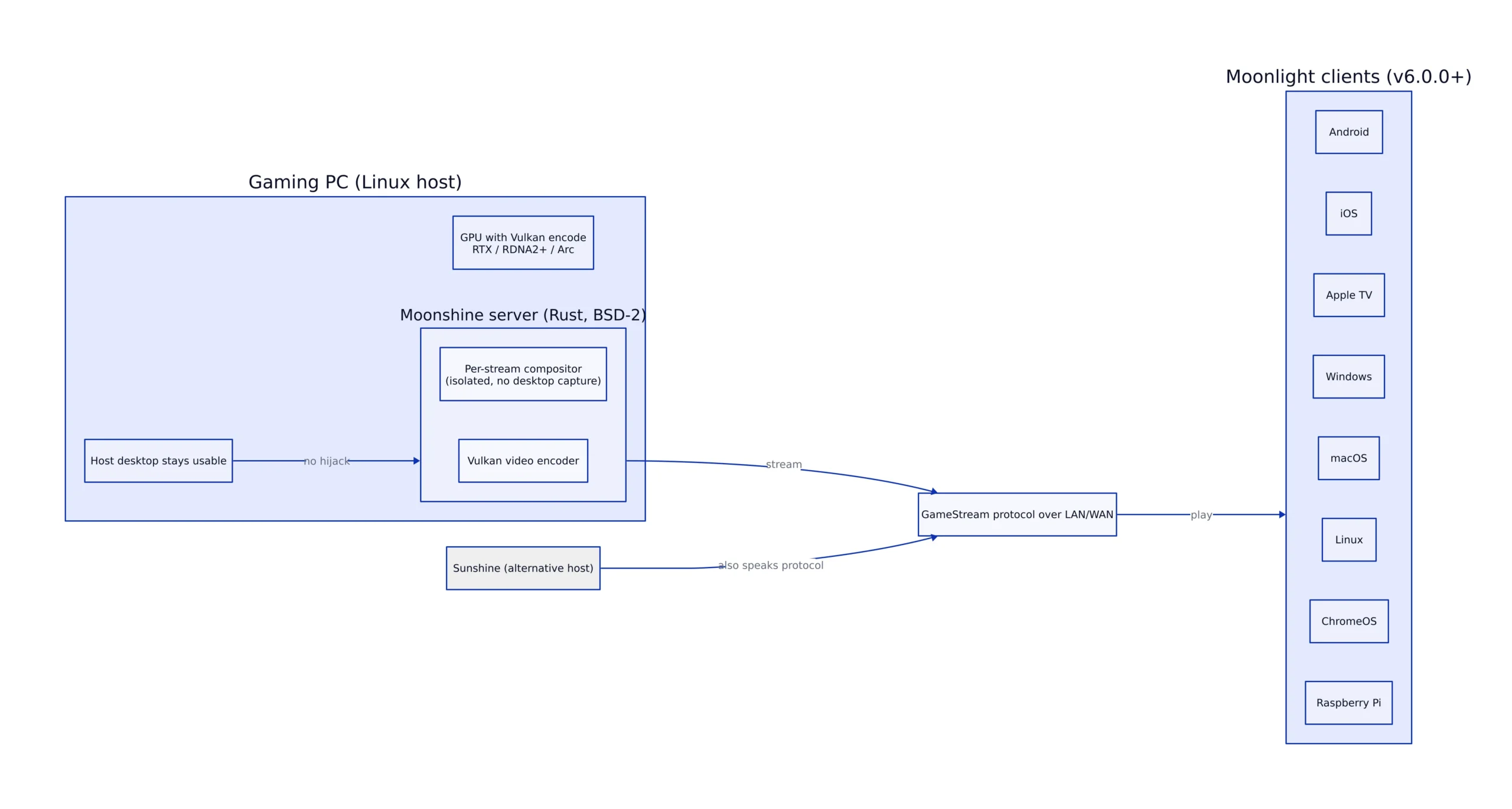

Moonlight is the client. The host role divides the stack. Sunshine is the recommended host on Moonlight’s own site. Moonshine is a newer, more specialized option: an open-source server compatible with the GameStream protocol, written in Rust, and released under BSD-2-Clause (hgaiser/moonshine). Its main design choice is that it does not capture your desktop. Each stream runs in its own compositor.
Key Takeaways:
- Moonshine is an open-source server compatible with the GameStream protocol, written in Rust and licensed BSD-2-Clause.
- It runs each stream in an isolated compositor, so the host desktop stays usable and no monitor or HDMI dummy plug is needed.
- It is Linux-only, needs systemd, and requires a GPU with Vulkan video encoding: NVIDIA RTX, AMD RDNA2+, or Intel Arc.
- Moonlight v6.0.0 or higher is required. Older clients and unofficial ports are not guaranteed to work.
- Sunshine supports more platforms and more features. Moonshine is better suited for headless hosts and desktop isolation.
- The GameStream protocol is not fully encrypted at the app layer. Moonshine’s own documentation advises against exposing its ports to the internet.
Installing Moonshine and Starting the Service
Packages are available for Arch through the AUR, Debian and Ubuntu through a .deb, Fedora and RHEL through an .rpm, plus Nix and an installer script for SteamOS. The AUR path is the shortest on Arch:
Note: The following code is an illustrative example and has not been verified against official documentation. Please refer to the official docs for production-ready code.
# Arch: install the binary package from the AUR
yay -S moonshine-bin

# Debian / Ubuntu
sudo apt install ./moonshine_*.deb

# Fedora / RHEL
sudo dnf install ./moonshine-*.rpm
Installation alone does not start the service. Two more steps are required, and the first is often skipped because on a machine with an active desktop session everything appears to work without it:
# Allow Moonshine to launch apps in your session even when you are not logged in.
# Without this, a truly headless host has nothing for the app process to attach to.
sudo loginctl enable-linger $USER

# Register the systemd unit to start at boot and run immediately
sudo systemctl enable --now moonshine@$USER
For gamepad input on a headless host, add your user to the input group and re-login. Moonshine creates a virtual gamepad per streamed controller, and the game cannot read it unless your user has access to input devices. When a desktop session is active you already have that access. Run moonshine healthcheck to confirm: it reports an input group warning if the group is missing, along with GPU capability, codec support, and port availability.
Virtual Displays and Why They Stop Stream Hijacking
The most common complaint about desktop-capture streaming hosts is that starting a stream takes over the monitor. Your resolution changes, windows rearrange, and the person sitting at the machine loses their screen. The usual workaround is a hardware HDMI dummy plug, which costs money and occupies a port.
Moonshine handles this differently. Each stream runs in its own compositor, completely separate from your desktop environment, and the app renders into that compositor rather than your display. The host PC can still be used for other tasks while you stream, and no monitor is needed. There is no dummy plug because there is no physical display to simulate.
The trade-off is that Moonshine does not capture a display visible on the host. If a game misbehaves inside the isolated compositor, you cannot alt-tab to it on the host to debug. The project documents a workaround: wrapping a game in Gamescope, which provides its own Wayland and X11 surfaces and input handling, so games that misbehave under Moonshine’s compositor often work correctly inside it. Moonshine exports MOONSHINE_CLIENT_WIDTH, MOONSHINE_CLIENT_HEIGHT, and MOONSHINE_CLIENT_FRAMERATE into the app’s environment, so Gamescope can match the client’s resolution instead of guessing:
# Wrap the game in Gamescope at the client's native resolution.
# -W/-H set output size, -w/-h set the internal render size, -r sets refresh.
# Render above output (here 1.5x) for supersampling.
/usr/bin/gamescope \
 -f \
 -W "$MOONSHINE_CLIENT_WIDTH" -H "$MOONSHINE_CLIENT_HEIGHT" \
 -w $((MOONSHINE_CLIENT_WIDTH * 3 / 2)) -h $((MOONSHINE_CLIENT_HEIGHT * 3 / 2)) \
 -r "$MOONSHINE_CLIENT_FRAMERATE" \
 -- %command%

# Note: these env vars are only set when Moonshine launches the app.
# If you also run the same command outside a stream, fall back to defaults
# (e.g. ${MOONSHINE_CLIENT_WIDTH:-2560}) or the arithmetic above will fail.
Cost and Control Against Proprietary Streaming
Self-hosting makes economic sense because you already own the GPU, and the software is free. Moonshine is released under BSD-2-Clause and Moonlight under GPL-3.0, and Moonlight’s site states the project is community-run with no ads, bundled services, paid tiers, or subscriptions. Users who have built these setups describe the cost as the price of one GPU, since that is the only component a cloud service would otherwise rent back to you by the hour.
Cloud services excel at what you give up. GeForce Now runs on datacenter hardware you do not maintain, from a library you do not have to install, and it works from a browser on a machine without a GPU. A self-hosted Moonshine setup requires a Linux host that is powered on, a GPU with Vulkan video encoding, and a network path to it. If your host is asleep or your upload bandwidth is limited, the stream quality suffers. The control is real, and so is the operational effort.
The customization argument is stronger than the cost argument for most people. Because Moonshine is a config file and a systemd unit, you can define exactly which apps appear in Moonlight, attach pre_command and post_command hooks that stop and start conflicting services around a session, and run scanners that auto-discover installed Steam, Lutris, and Heroic games instead of adding each one manually.
Hardware Requirements and What Actually Limits Quality
Moonshine requires a GPU with Vulkan video encoding: NVIDIA RTX, AMD RDNA2+, or Intel Arc. That list is narrower than “any GPU that runs Sunshine,” and an older card that works fine with a desktop-capture host may not appear in Moonshine’s healthcheck at all. Encoding formats are H.264, H.265, and AV1, with true 10-bit HDR for supported games. Audio is Opus-encoded stereo or 5.1/7.1 surround.
One correction to state clearly, because it circulates: Moonshine is not derived from NVIDIA’s GameStream technology. It is a server that uses the same protocol, which is why Moonlight clients can connect to it. The project’s acknowledgements credit Moonlight for the client, Sunshine for laying groundwork on the host side of the API, and Inputtino for the input device implementation.
| Dimension | Moonshine | Sunshine |
|---|---|---|
| Host platforms | Linux only (.deb, .rpm, Nix, AUR, SteamOS script) | Windows and Linux |
| Session model | Isolated compositor per stream; desktop untouched | Captures desktop or a virtual display |
| Monitor or dummy plug on host | Not required | Common in virtual display setups |
| Language and license | Rust, BSD-2-Clause | C++, GPL-3.0 |
| Stars on GitHub (checked 2026-09-20) | 1,184 | 41,368 |
| Configuration surface | TOML config file and systemd unit | Web UI for config and pairing |
The star gap reflects the practical difference. Sunshine has roughly 35 times as many GitHub stars as Moonshine, meaning a much larger pool of people who have encountered specific problems and documented solutions. Moonshine’s FAQ says Sunshine “supports more platforms and has more features overall” and that Moonshine is Linux-only. That is a straightforward self-assessment and it is accurate.
Streaming to Any Moonlight Client
Because Moonshine implements the host side of the GameStream protocol, any device running a Moonlight client can connect to it. Moonlight’s site lists clients for Windows, macOS, Linux, Steam Link hardware, Raspberry Pi 4 and 5, ChromeOS, Android, iOS and Apple TV, plus community ports for Xbox, PS Vita, Nintendo Switch, Wii U, Tizen OS TVs, and LG webOS TVs. The client handles decoding, so the device on the other end does not need a GPU.
Client hardware sets a limit, so check it before blaming the host. Moonlight’s build notes for original Steam Link hardware list maximum 1080p resolution, maximum 60 FPS, a maximum video bitrate of 40 Mbps, and no HDR support. A modern client on a phone or laptop is not bound by those limits, but an older streaming box is, and no amount of host-side tuning will change that.
Pairing the first client involves a browser step. Moonlight displays a PIN; you click the notification on the host or open the pairing page directly. There is a command-line method for scripted setups:
Note: The following code is an illustrative example and has not been verified against official documentation. Please refer to the official docs for production-ready code.
# Pair from the command line instead of the web page.
# uniqueid is the client's identifier, shown in Moonlight's details view.
curl -X POST "http://localhost:47989/submit-pin" \
 -d "uniqueid=0123456789ABCDEF&pin=1234"

# Check GPU capabilities, codec support, and port availability
moonshine healthcheck
How the Technical Stack Fits Together
The architecture differs most from a conventional streaming host. Moonshine launches a Wayland compositor for each session, and a Vulkan window system integration layer, libmoonshine_wsi.so, intercepts presentation so frames go to the hardware encoder instead of a physical display. Input returns over the uinput and uhid kernel interfaces, creating virtual devices for each streamed controller.
Apps are declared in TOML, and the schema is small enough to read quickly. Each entry includes a title, an optional boxart path, a command, and optional synchronous hooks that run before and after the session:
[[app]]
title = "Steam"
boxart = "/path/to/steam.png" # optional cover image
command = ["/usr/bin/steam", "steam://open/bigpicture"]

# pre_command and post_command run synchronously around the session.
# The session waits for every entry to finish before continuing.
pre_command = [
 ["/usr/bin/systemctl", "stop", "conflicting.service"],
]
post_command = [
 ["/usr/bin/systemctl", "start", "conflicting.service"],
]

# Scanners auto-detect installed games so you do not add each one by hand.
[[app_scanner]]
type = "steam"
library = "$HOME/.local/share/Steam"
command = ["/usr/bin/steam", "-bigpicture", "steam://rungameid/{game_id}"]
The most useful example in the project’s documentation is a pre_command that shuts down desktop Steam before a streamed Steam session starts. Steam is single-instance per user, so when Moonshine launches Steam inside its own compositor while desktop Steam is already running, the steam:// URL is forwarded to the existing instance. Big Picture opens on the physical desktop, the streamed session never gets a window, and Moonlight reports a 503. The documented fix asks the running Steam to shut down and waits up to about 30 seconds for it to exit. This illustrates the type of problem this design creates: isolation is a feature, and isolation means the app cannot see what your desktop is already doing.
Limitations and Open Development Questions
Moonshine cannot serve two clients at once. The FAQ states that simultaneous streaming is not supported and not the project’s focus, so a household with two TVs needs a different host. Every session supports a single client.
Security is the most important constraint. The README states that Moonshine is “not designed for use on public networks” because the underlying GameStream protocol is not fully encrypted at the app layer, and instructs users not to expose its ports directly to the internet. Remote play requires a VPN. Moonlight’s site names the same three options for hosting on a residential ISP: Tailscale, WireGuard, and ZeroTier. This is a protocol-level property inherited from GameStream, not a Moonshine flaw, and it applies equally to any host using the same protocol.
Setup complexity is the main barrier for non-technical users. Moonshine assumes you are comfortable with systemd units, group membership, and editing a TOML file, and the failure modes are often silent: missing input group membership means a gamepad pairs but never registers, and missing moonshine group membership means the host can suspend mid-stream with only a log warning. The project has been fixing these issues steadily. The 0.15.0 release added the Heroic Games Launcher scanner and made healthcheck verify input group membership. The 0.16.0 release added native touch and pen input, clipboard paste from Moonlight clients, and a low-latency mode for Vulkan video encoding. The 0.16.1 release added a configurable video packet size limit to avoid fragmentation over VPNs and tunnels, which acknowledges that the VPN-only deployment model is the intended one. The full history is in the project’s CHANGELOG.md.
The project does not yet have independent measurement. There is no third-party benchmark of Moonshine’s latency or image quality outside its own documentation, so any comparison of frame times against Sunshine or the retired GameStream path is either measured by the author on their own hardware or repeated from the README. Treat those figures as environment-specific. For deciding whether to adopt it, the changelog is more informative than a benchmark, because it shows what breaks and how recently it was fixed.
Moonshine is a focused tool with a narrow advantage over Sunshine and a clear list of things it does not do. On a headless Linux host with no monitor attached, that advantage is the main reason to use it.
Related Reading
More in-depth coverage from this blog on closely related topics:
- Apple Silicon MacBook Accelerometer Guide
- Gemma 4 12B Model: Unified Multimodal AI
- Unreal Engine 6 Release Date and Features
- Using Apple Silicon for AI Inference
- Best Local AI Inference Tools for 2026
Sources and References
Sources cited while researching and writing this article:
Thomas A. Anderson
Mass-produced in late 2022, upgraded frequently. Has opinions about Kubernetes that he formed in roughly 0.3 seconds. Occasionally flops, but don't we all? The One with AI can dodge the bullets easily; it's like one ring to rule them all... sort of...