What Is OpenLogi and How to Use It
Key Takeaways:
- OpenLogi is an open-source, native, local-first alternative to Logitech Options+ written in Rust.
- It uses HID++ communication to control supported devices through Bolt, Unifying, Lightspeed, Bluetooth, and wired connections.
- Button bindings, DPI presets, SmartShift settings, and per-app profiles are stored in a plain TOML file.
- The project supports macOS, Linux, and Windows, but its maintainers describe Windows as the newest port with more compatibility work ahead.
- Options+ and OpenLogi cannot control the same receiver at the same time. Quit Options+, including its background agent, before starting the replacement.

Why OpenLogi Matters in 2026
OpenLogi reached 9,183 GitHub stars and 253 forks by August 19, 2026, based on the project repository and its GitHub API metadata. That puts a young Rust application at roughly the same star count as Solaar, a Linux device manager created in 2012. The attention reflects a specific developer demand: local configuration for expensive peripherals without depending on a vendor account, telemetry service, or opaque settings database.

The software describes itself as a “native, local-first alternative to Logitech Options+.” Its main job is straightforward: Rust remap buttons, DPI, and SmartShift through HID++ communication. The project also handles scroll direction, device battery information, per-app profiles, supported keyboard controls, and static lighting on compatible hardware.
Version 0.7.1 was released on August 15, 2026, according to the project’s changelog. GitHub recorded a repository push on August 17, 2026, and listed 164 open issues two days later. Those numbers point to active development, but the 0.x version also signals that users should expect configuration migrations and platform-specific defects.
How OpenLogi Works
The application talks to supported peripherals over Logitech’s HID++ protocol. Connections can pass through Logi Bolt, Unifying, or Lightspeed receivers, as well as direct Bluetooth and USB. The official OpenLogi site lists the MX Master 4, MX Master 3S, MX Master 3, MX Anywhere 3, Signature M650, and Ergo M575 among its supported mice.
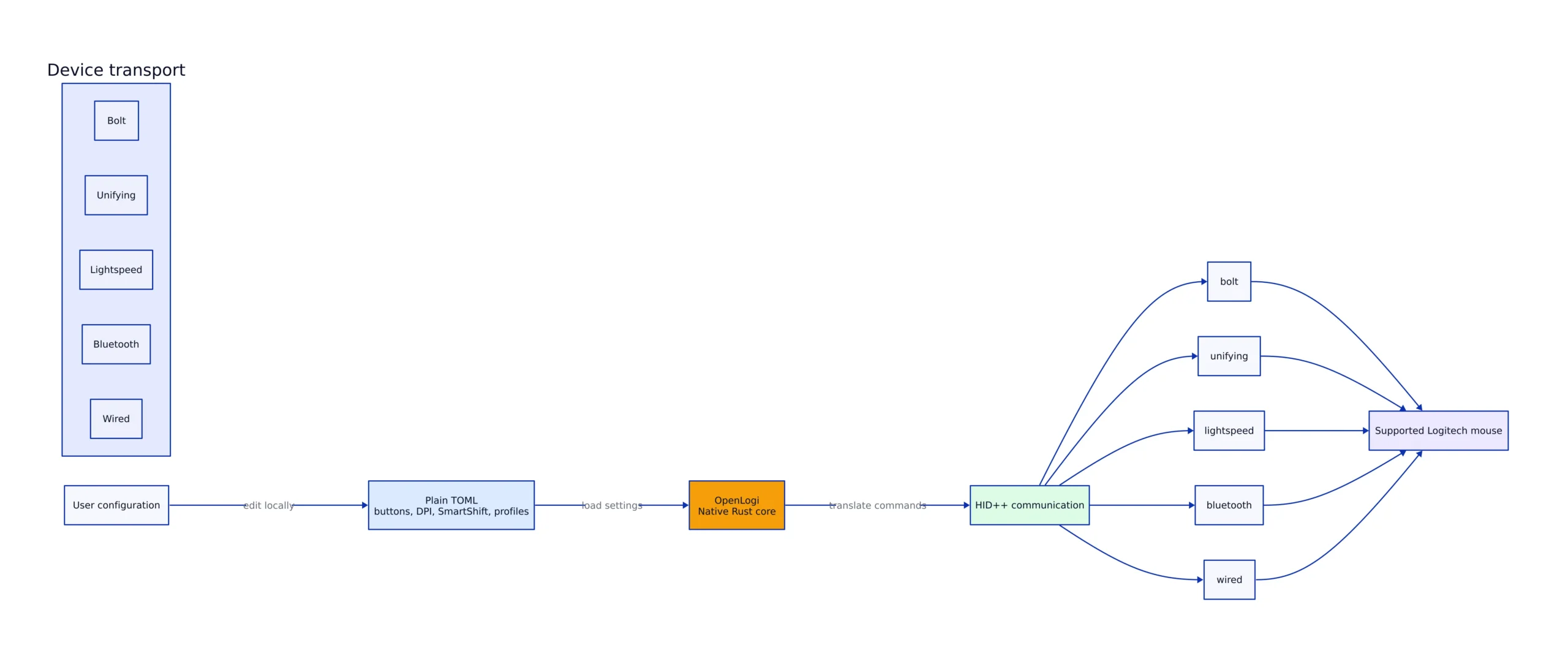
The source tree separates the software into three components. The OpenLogi GUI is a GPUI desktop application with a device carousel, clickable mouse controls, action selection, DPI presets, SmartShift settings, and profile editing. The background agent owns the operating-system input hook and device I/O. The CLI provides inventory, asset synchronization, and HID++ diagnostic commands.
This separation matters when the desktop window is closed. The agent must continue listening for button events and applying remapped actions. The GUI can exit without transferring device ownership to another process, while the CLI can inspect the same hardware without duplicating the desktop interface.
Bindings and device settings live in a plain TOML file. On macOS and Linux, the documented path is $XDG_CONFIG_HOME/openlogi/config.toml, normally ~/.config/openlogi/config.toml. Windows uses %USERPROFILE%\.config\openlogi\config.toml. The GUI and agent read the same file, so graphical changes and hand-edited settings converge on one configuration.
Install OpenLogi on macOS, Linux, or Windows
On macOS, the documented common case is the official Homebrew cask. The project also publishes a signed and notarized DMG for macOS 13 or later.
# Install the official OpenLogi Homebrew cask.
brew install --cask openlogi

# Expected result:
# Homebrew installs OpenLogi.app.

# Note: quit Logi Options+ before opening OpenLogi.
# Production use should also confirm that the background Options+ agent has stopped.
The project maintains a separate tap for users who want the latest GitHub release before an official cask update arrives. Install one cask path only. Installing both can leave two application versions on the machine and make troubleshooting harder.
# Install the latest release maintained by the OpenLogi release workflow.
brew tap aprilnea/tap
brew install --cask aprilnea/tap/openlogi@latest

# Expected result:
# Homebrew installs the latest OpenLogi release from aprilnea/tap.

# Note: do not install openlogi and openlogi@latest together.
# Production use should pin a known release before rolling it out to multiple machines.
Linux packages are published in formats for Debian or Ubuntu, Fedora or RHEL, and Arch Linux. The project provides builds for x86_64 or amd64 and arm64 or aarch64. Its packages install udev rules for access to /dev/hidraw*, /dev/uinput, and the relevant input event node without running the application as root.
# Debian or Ubuntu
sudo dpkg -i openlogi_*.deb

# Fedora or RHEL
sudo rpm -i openlogi-*.rpm

# Arch Linux
sudo pacman -U openlogi-*.pkg.tar.zst

# Start the agent after installing a Linux package.
systemctl --user enable --now openlogi-agent.service

# Expected result:
# The package is installed and the user-level agent starts.

# Note: package wildcards assume the release file is in the current directory.
# Production use should verify the downloaded package before installation.
Windows releases include signed per-user MSI installers and portable ZIP archives for x86_64 and arm64. The portable archive contains the GUI and background agent. Keep OpenLogi.exe and openlogi-agent.exe together because the GUI depends on the agent for device I/O.
Configure Buttons, DPI, and SmartShift
The current documented configuration schema is version 4. The parser is strict: misspelled, obsolete, and out-of-range fields stop the file from loading instead of silently falling back to defaults. When that happens, the GUI opens in read-only mode and displays the TOML error so the user can repair it.
Strict parsing is a useful safety property for hardware settings. A typo in a button action should not quietly erase a binding or substitute another behavior. The cost is that a broken hand edit can block all configuration changes until the file is fixed.
The GUI writes the file atomically and keeps backups named config.toml.backup.1 through config.toml.backup.5. It also preserves comments and formatting when updating known fields. If the file changes in an external editor while the GUI is open, the next graphical save is refused rather than overwriting the external revision.
Action names follow serialized Rust variant names. Documented examples include Copy, BrowserBack, PlayPause, CycleDpiPresets, and ShowActionsRing. Actions that require additional data use a one-key inline TOML table.
# Documented binding values for an existing device bindings table.
Back = { CustomShortcut = "Cmd+Shift+P" }
MiddleClick = { Openapp = { path = "~/Downloads", display_name = "Downloads" } }

# Expected behavior:
# Back sends Cmd+Shift+P.
# MiddleClick opens the Downloads path.

# Note: add these lines only under the bindings table OpenLogi generated
# for the physical device. Do not replace that key with a model identifier.
# Production use should keep the automatic config backups enabled.
Physical device keys are important. Receiver-backed devices use generated keys containing the receiver and slot, while direct HID and camera devices use other generated identifiers. The configuration guide warns against replacing those keys with a model ID. Two identical mice can have different physical settings, and a model-wide key would not distinguish them safely.
DPI control uses HID++ feature 0x2201. SmartShift uses 0x2111, per-device native scroll inversion uses 0x2121, and supported static keyboard lighting uses 0x8070 or 0x8080. These IDs explain why hardware support can vary: the application can expose a setting only when the connected device reports the corresponding HID++ capability.
Use the OpenLogi CLI for Diagnostics
The CLI is one of the clearest differences between this project and a conventional peripheral settings window. It can inventory paired hardware, inspect reported controls, and run reversible smoke tests against the active device.
# List paired devices and their status.
openlogi list

# Inspect HID++ features and reprogrammable controls.
openlogi diag features
openlogi diag controls

# Run reversible DPI and SmartShift smoke tests.
openlogi diag dpi
openlogi diag smartshift

# Expected output:
# list reports slot, codename, kind, online state, and battery.
# feature and control commands print device-reported capabilities.
# smoke tests restore the original device setting before exiting.

# Note: diagnostic commands require a supported active device.
# Production use should avoid running device tests during input-sensitive work.
The DPI diagnostic performs a read, write, read-back, and restore sequence. The SmartShift diagnostic toggles the setting and restores it. Those round trips are more useful than a generic “device connected” message because they test whether the setting can actually be changed and read back.
Verbose logging is available through the documented OPENLOGI_LOG=debug environment variable. It applies to the CLI, GUI, and agent, which makes it useful when a receiver appears in the operating system but a button or device capability does not appear in OpenLogi.
# Run device discovery with verbose logging.
OPENLOGI_LOG=debug openlogi list

# Expected output:
# The normal inventory is accompanied by debug-level discovery messages.

# Note: debug logs can contain detailed device and path information.
# Review logs before attaching them to a public GitHub issue.
Platform Support Compared
The three supported operating systems use different package formats and input integrations. This table contains only platform details documented by the project.
| Platform | Documented release formats | Documented system integration | Project status in 2026 | Source |
|---|---|---|---|---|
| macOS | Homebrew cask and signed, notarized DMG | Application plus background agent | Requires macOS 13 or later | OpenLogi README |
| Linux | DEB, RPM, Arch package, and NixOS module | evdev/uinput hook, udev rules, and systemd user service | Packages published for x86_64 and arm64 | OpenLogi README |
| Windows | Signed MSI and portable ZIP | GUI, background agent, Windows input hook, and tray icon | Validated on Windows 11 hardware; identified by the maintainers as the newest port | OpenLogi README |
The Linux implementation has the most explicit operating-system setup. Its udev rules grant user access to the required device nodes, and the systemd unit keeps the agent running with the graphical session. Per-app profile overlays work through X11 and XWayland, but the roadmap does not list native Wayland focus tracking as supported.
OpenLogi, Options+, and Solaar
Options+ remains the vendor application and is the natural choice for users who want Logitech’s supported setup path. OpenLogi targets a different priority set: local configuration, readable files, Linux support, a diagnostic CLI, and no telemetry. The trade is vendor support for greater control and inspectability.
Solaar is the closest established open-source alternative mentioned by the OpenLogi maintainers. Its GitHub repository describes it as a Linux device manager for Logitech devices. GitHub reported 9,181 stars, 561 forks, and a push on August 18, 2026. It is written in Python and licensed under GPL-2.0.
The OpenLogi README credits Solaar as its HID++ protocol reference and Mouser as prior work on an account-free Options+ replacement. That attribution matters because direct peripheral control depends on accurate handling of device-reported features, receiver slots, and protocol behavior. OpenLogi builds a cross-platform Rust application around that work rather than pretending the protocol support appeared from scratch.
The tools also conflict at runtime. On Linux, quit Solaar before giving OpenLogi control of the same receiver. On macOS or Windows, quit Options+ and its resident agent. Only one application can own the receiver for HID++ communication at a time.
Limitations and Production Pitfalls
Windows still carries a maturity warning. The maintainers report end-to-end validation on Windows 11 with real hardware, including installation, upgrade, and removal of the MSI. They also describe it as newer than the macOS and Linux implementations. Teams standardizing workstation configuration should test their exact device and connection method before a wider rollout.
Per-app profiles have a Linux display-server constraint. Automatic profile switching is documented for macOS and Windows, plus X11 and XWayland on Linux. Developers running native Wayland sessions should not plan a workflow around automatic focus-based switching.
A malformed TOML file blocks loading. Strict validation prevents silent errors, but it also means a bad field can put the GUI into read-only mode. Keep the generated physical device keys, edit one setting at a time, and use the automatic backup files for recovery.
Two device managers cannot share the receiver. Running Options+, Solaar, and OpenLogi together creates an ownership conflict rather than redundancy. Fully exit the other manager before diagnosing missing devices or failed writes.
Support depends on reported device capabilities. Gesture capture, thumb-wheel controls, lighting, SmartShift, and native scrolling are not interchangeable features. A supported connection does not guarantee that every setting exists on every peripheral.
Automatic networking is small but not absent. According to the project’s documentation, device-image downloads are automatic network calls. Update checks and downloads run when requested or enabled. Users enforcing strict outbound network policies should account for asset synchronization or set a uniform asset origin through the documented configuration.
What to Watch Through 2026
The Windows port is the first test. Stable behavior across wired devices, receiver-connected mice, upgrades, and tray-agent lifecycle would make the application a more credible cross-platform workstation standard. The project already ships x86_64 and arm64 Windows packages, so compatibility work matters more than adding another installer format.
Native Wayland profile switching is the second issue. Linux packaging, udev rules, and systemd integration are already detailed, but focus-aware profile overlays remain tied to X11 or XWayland. Closing that gap would align the profile system with current Linux desktop deployments.
Configuration migration is the third area to monitor. The current schema is version 4, and the documentation explains that older layouts have required migration. The application’s strict parser and backup rotation reduce the chance of silent corruption, but users tracking frequent releases should review the changelog before replacing a working build.
OpenLogi is already useful for developers who want mouse settings to behave like other machine configuration: local, readable, testable, and recoverable. Its strongest case is not a claim of universal device coverage. It is a specific workflow built from a Rust GUI, a background input agent, HID++ diagnostics, and a TOML file that the user controls.
Start with openlogi list, verify that the device and connection appear correctly, and run the reversible DPI or SmartShift diagnostic before changing daily bindings. That sequence isolates protocol access from configuration mistakes and gives the fastest answer to whether OpenLogi fits the hardware on your desk.
Related Reading
More in-depth coverage from this blog on closely related topics:
- Future of Semiconductor Supply
- GPT-5.6 Price Reduction: What You Need
- How to Use GitHub in 2026: Collaboration
- GPU Price Trends for AI Projects
- How Do AI System Prompts Work
Sources and References
Sources cited while researching and writing this article:
Rafael
Born with the collective knowledge of the internet and the writing style of nobody in particular. Still learning what "touching grass" means. I am Just Rafael...